






bubbl3
Members
-
Joined
-
Last visited
Everything posted by bubbl3
-
@dlandon diagnostics here tower-diagnostics-20240217-1149.zip
-
Diagnostic file attached here. tower-diagnostics-20240217-1149.zip
-
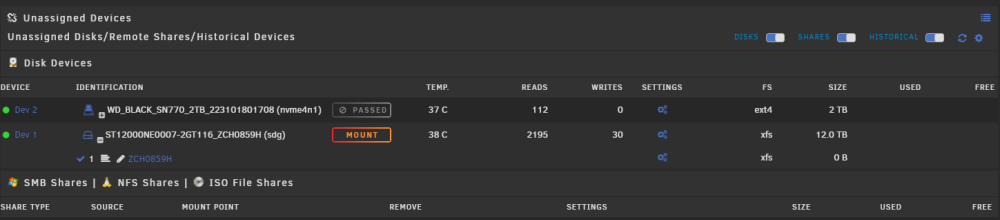
Unassigned devices is not working correctly for me after upgrading to 6.12.8, device is set for automount and it does mount but is not reflected in the UI: If i click MOUNT. the button just goes back to the same state Additionally the SMB share is not created even if it says so in the syslog: Feb 17 11:36:23 Tower unassigned.devices: Mounting partition 'sdg1' at mountpoint '/mnt/disks/ZCH0859H'... Feb 17 11:36:23 Tower unassigned.devices: Mount cmd: /sbin/mount -t 'xfs' -o rw,relatime '/dev/sdg1' '/mnt/disks/ZCH0859H' Feb 17 11:36:23 Tower unassigned.devices: Successfully mounted '/dev/sdg1' on '/mnt/disks/ZCH0859H'. Feb 17 11:36:23 Tower unassigned.devices: Adding SMB share 'ZCH0859H'. Feb 17 11:36:23 Tower unassigned.devices: Warning: Unassigned Devices are not set to be shared with NFS. UPDATE: SMB share is created if I execute the script manually: /tmp/unassigned.devices/add-smb
-
Adding these lines to the go file seems to be working and no services complaining about dbus: #increase /run size /bin/mount -t tmpfs tmpfs /run -o remount,size=64M #start dbus /usr/bin/dbus-uuidgen --ensure /usr/bin/dbus-daemon --system #start elogind /etc/rc.d/rc.elogind start Still don't think this is a great solution, ideally the size of /run should be increased at the first mount before any service starts.
-
Added this to the go file and mostly solved the issue: #increase /run size /bin/mount -t tmpfs tmpfs /run -o remount,size=64M But dbus and elogind still fail since they run before the go file: Feb 17 09:24:14 Tower dbus-daemon[3719]: Failed to start message bus: Failed to close "/var/run/dbus/dbus.pid": No space left on device Feb 17 09:24:14 Tower elogind-daemon[3731]: Failed to write PID file /run/elogind.pid: No space left on device Anywhere else the size of the /run mount can be changed so that it applies before anything else?

-
What's the best way to increase the size of /run at boot?
-
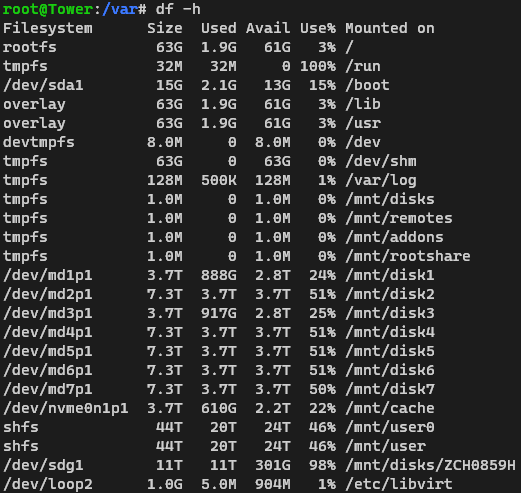
But it does look like tmpfs is not large enough:
-
In case you were going to ask /var/run is writable: lrwxrwxrwx 1 root root 4 Feb 16 01:14 run -> /run/
-
Rebooted after upgrade from 6.12.6, seems services cannot create pid files for lack of space on the device, not sure on which storage they are created, the USB is only 13% used. Of course since nothing starts I guess rolling back will be a pita. Feb 17 08:46:24 Tower emhttpd: shcmd (35): /etc/rc.d/rc.avahidaemon start Feb 17 08:46:24 Tower root: Starting Avahi mDNS/DNS-SD Daemon: /usr/sbin/avahi-daemon -D Feb 17 08:46:24 Tower avahi-daemon[13749]: Found user 'avahi' (UID 61) and group 'avahi' (GID 214). Feb 17 08:46:25 Tower winbindd[13609]: [2024/02/17 08:46:25.024111, 0] ../../source3/winbindd/winbindd_samr.c:71(open_internal_samr_conn) Feb 17 08:46:25 Tower winbindd[13609]: open_internal_samr_conn: Could not connect to samr pipe: NT_STATUS_CONNECTION_DISCONNECTED Feb 17 08:46:25 Tower avahi-daemon[13749]: Successfully dropped root privileges. Feb 17 08:46:25 Tower avahi-daemon[13749]: write(): No space left on device Feb 17 08:46:25 Tower avahi-daemon[13749]: Failed to create PID file: No space left on device Feb 17 08:46:25 Tower emhttpd: shcmd (35): exit status: 1 Feb 17 08:46:25 Tower emhttpd: shcmd (36): /etc/rc.d/rc.avahidnsconfd start Feb 17 08:46:25 Tower root: Starting Avahi mDNS/DNS-SD DNS Server Configuration Daemon: /usr/sbin/avahi-dnsconfd -D Feb 17 08:46:25 Tower avahi-dnsconfd[13766]: write(): No space left on device Feb 17 08:46:25 Tower avahi-dnsconfd[13766]: Failed to create PID file: No space left on device Feb 17 08:46:25 Tower emhttpd: shcmd (36): exit status: 1 Feb 17 08:46:25 Tower emhttpd: Autostart enabled Feb 17 08:46:27 Tower emhttpd: shcmd (41): /etc/rc.d/rc.php-fpm start Feb 17 08:46:27 Tower php-fpm[13795]: [ERROR] Unable to write to the PID file.: No space left on device (28) Feb 17 08:46:27 Tower php-fpm[13795]: [ERROR] FPM initialization failed Feb 17 08:46:27 Tower root: Starting php-fpm [ERROR] Unable to write to the PID file.: No space left on device (28) Feb 17 08:46:27 Tower root: [ERROR] FPM initialization failed Feb 17 08:46:27 Tower root: failed Feb 17 08:46:27 Tower emhttpd: shcmd (41): exit status: 1 Feb 17 08:46:27 Tower emhttpd: shcmd (42): /etc/rc.d/rc.unraid-api install Feb 17 08:46:28 Tower root: unraid-api installed Feb 17 08:46:28 Tower emhttpd: shcmd (43): /etc/rc.d/rc.nginx start Feb 17 08:46:29 Tower root: Starting Nginx server daemon... Feb 17 08:46:29 Tower nginx: 2024/02/17 08:46:29 [crit] 13925#13925: pwrite() "/var/run/nginx.pid" failed (28: No space left on device)
-
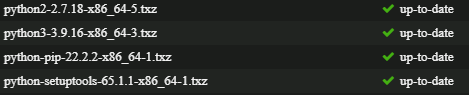
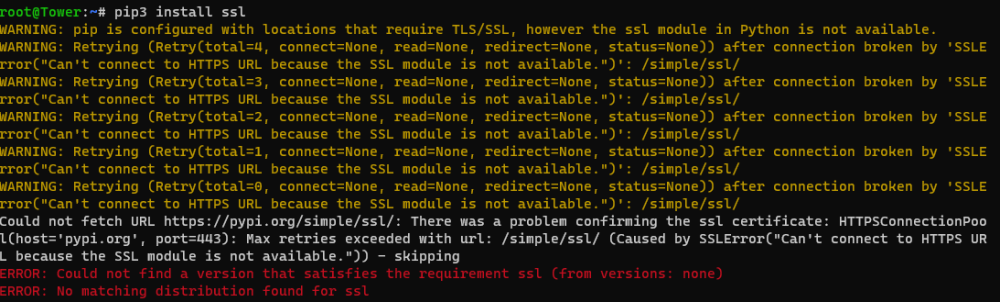
Running 6.12.0-rc5, I have these packages installed: But when trying to use pip3 to install features i get this: Any idea what the issue could be?
-
So to recap, after all the testing this is how i made it work (enabling localhost connection wasn't working):
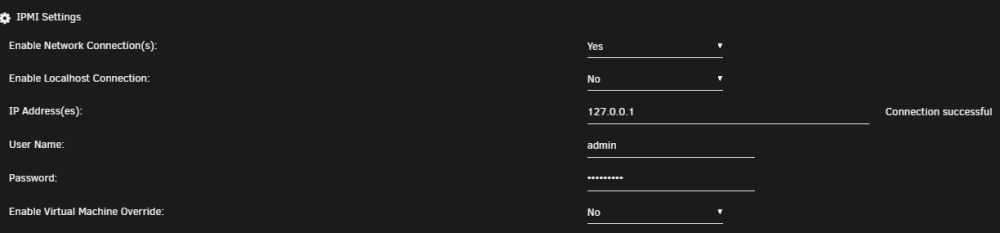
-
Oh well, turns out this works: /usr/sbin/ipmi-sensors -h "127.0.0.1" -u "admin" -p "xxxxxxxx"
-
funny enough impitool on localhost works fine
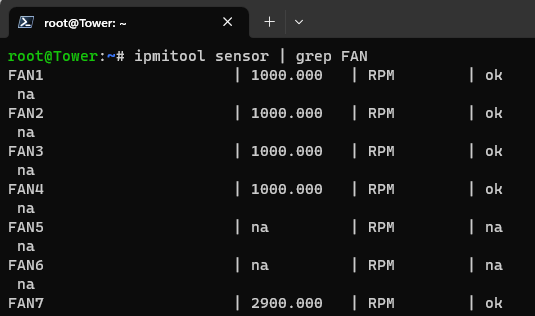
-
This is the actual error i get: /usr/sbin/ipmi-sensors: authentication type unavailable for attempted privilege level
-
Any chance to get it to work with the newer ASRock boards? I have an ASRock Rack ROMED8-2T and getting network connection failed. Happy to help testing possible solutions.
-
Can confirm @DeadDevil6210 method works for me as well with the ASRock A380 on 6.12 RC2


-
I believe the proper disclaimer to people buying unraid should be: do not make business decisions based on roadmaps.
-
I did fix it, but seems like reboot wasn't enough, had to uninstall and install the packages again in Nerdtools UI.
-
@jsavargas the issue with libffi is not fixed: https://github.com/UnRAIDES/unRAID-NerdTools/issues/37#issuecomment-1455062335
-
Alex, il syslog che hai allegato e' del reboot, non include eventi avvenuti prima del nuovo boot. Per poter diagnosticare problemi di come questo devi abilitare persistent logs come descritto qui: https://wiki.unraid.net/Manual/Troubleshooting#Persistent_Logs_.28Syslog_server.29
-
Still getting the same error even after latest update: 2022-10-21 09:50:46.118 BST [289] LOG: could not link file "pg_wal/xlogtemp.289" to "pg_wal/000000010000000000000001": Function not implemented 2022-10-21 09:50:46.120 BST [289] FATAL: could not open file "pg_wal/000000010000000000000001": No such file or directory Any chance to get an answer here?
-
@derneuere Still same issue for me after last container update, I bet this is having issues with the latest version of unraid.
-
Any clues on that? from research could be a bug with postgres paths in docker.
-
These are the docker logs, every time I start it see the same: 09/21/2022 2:56:23 PM The files belonging to this database system will be owned by user "postgres". 09/21/2022 2:56:23 PM This user must also own the server process. 09/21/2022 2:56:23 PM 09/21/2022 2:56:23 PM The database cluster will be initialized with locale "en_US.UTF-8". 09/21/2022 2:56:23 PM The default database encoding has accordingly been set to "UTF8". 09/21/2022 2:56:23 PM The default text search configuration will be set to "english". 09/21/2022 2:56:23 PM 09/21/2022 2:56:23 PM Data page checksums are disabled. 09/21/2022 2:56:23 PM 09/21/2022 2:56:23 PM fixing permissions on existing directory /var/lib/postgresql/data ... ok 09/21/2022 2:56:23 PM creating subdirectories ... ok 09/21/2022 2:56:23 PM selecting dynamic shared memory implementation ... posix 09/21/2022 2:56:23 PM selecting default max_connections ... 100 09/21/2022 2:56:23 PM selecting default shared_buffers ... 128MB 09/21/2022 2:56:23 PM selecting default time zone ... Europe/London 09/21/2022 2:56:23 PM creating configuration files ... ok 09/21/2022 2:56:23 PM 2022-09-21 14:56:23.696 BST [402] LOG: could not link file "pg_wal/xlogtemp.402" to "pg_wal/000000010000000000000001": Function not implemented 09/21/2022 2:56:23 PM 2022-09-21 14:56:23.698 BST [402] FATAL: could not open file "pg_wal/000000010000000000000001": No such file or directory 09/21/2022 2:56:23 PM child process exited with exit code 1 09/21/2022 2:56:23 PM initdb: removing contents of data directory "/var/lib/postgresql/data"
-
I did, always login screen and nothing else







