






bubbl3
Members
-
Joined
-
Last visited
Everything posted by bubbl3
-
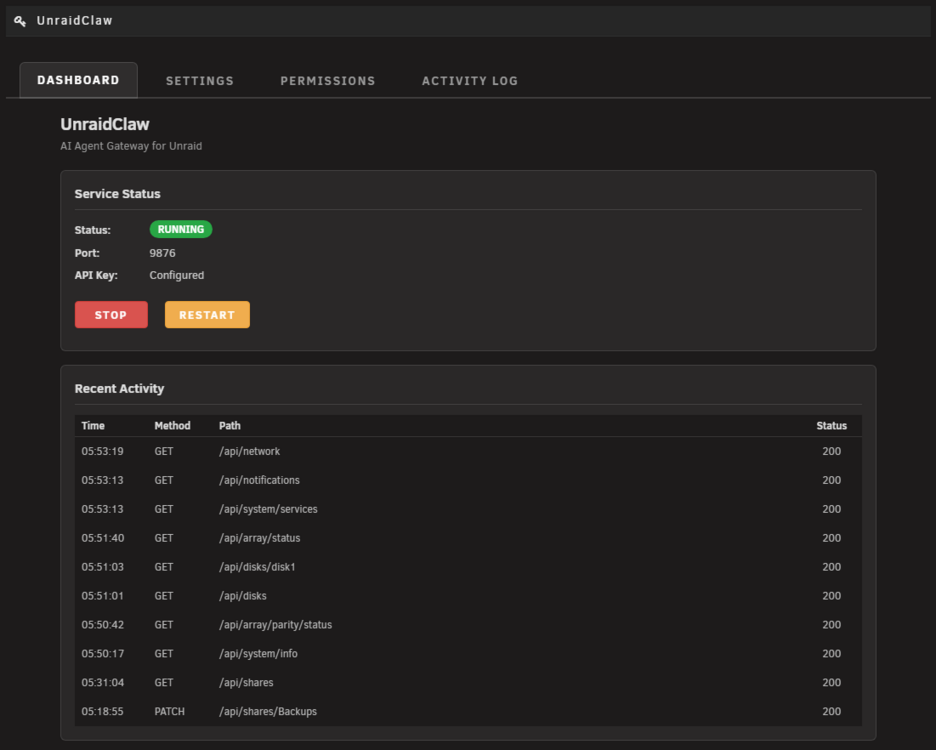
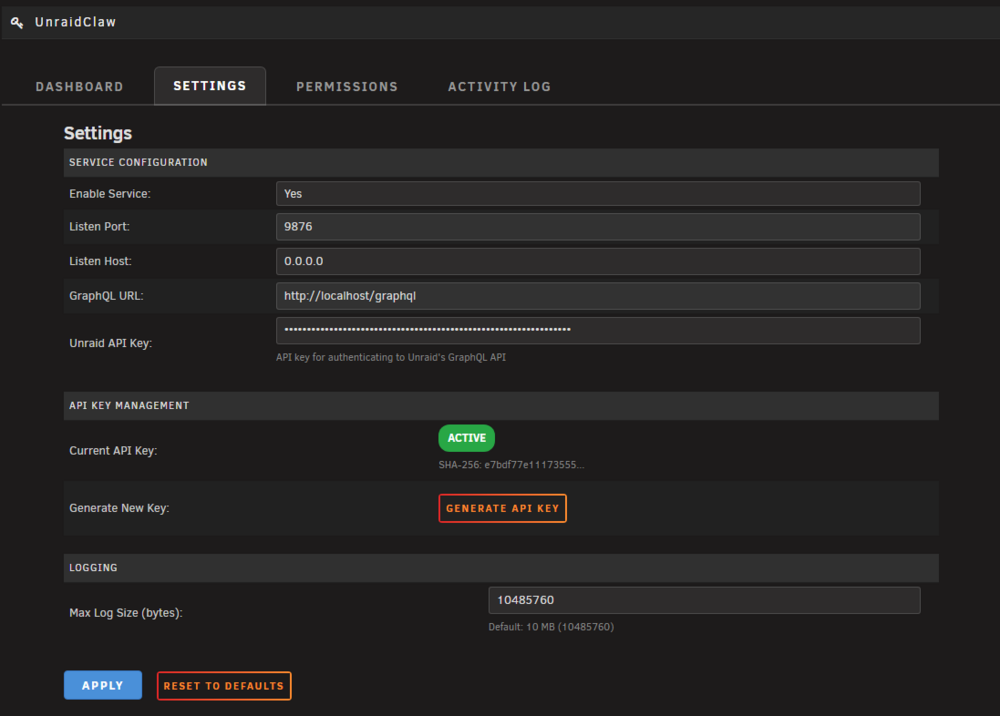
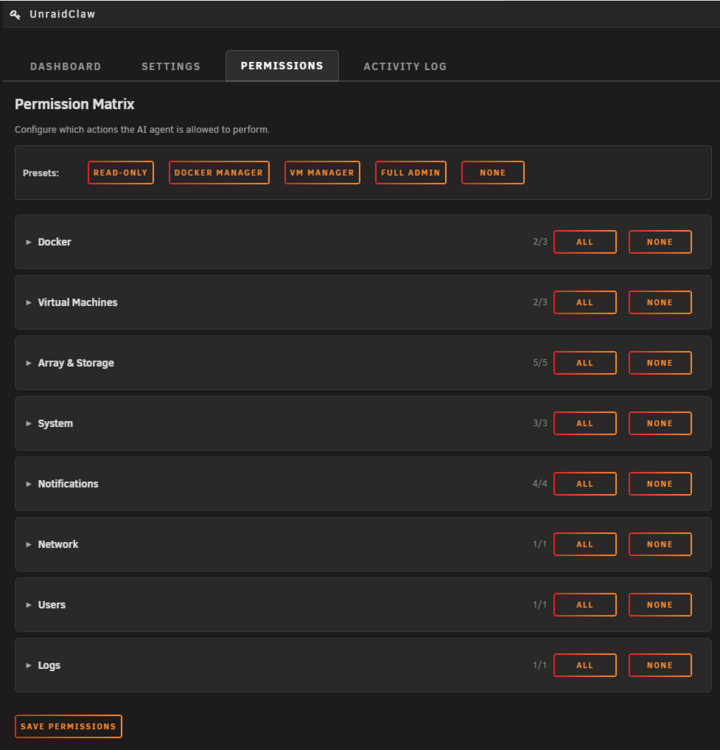
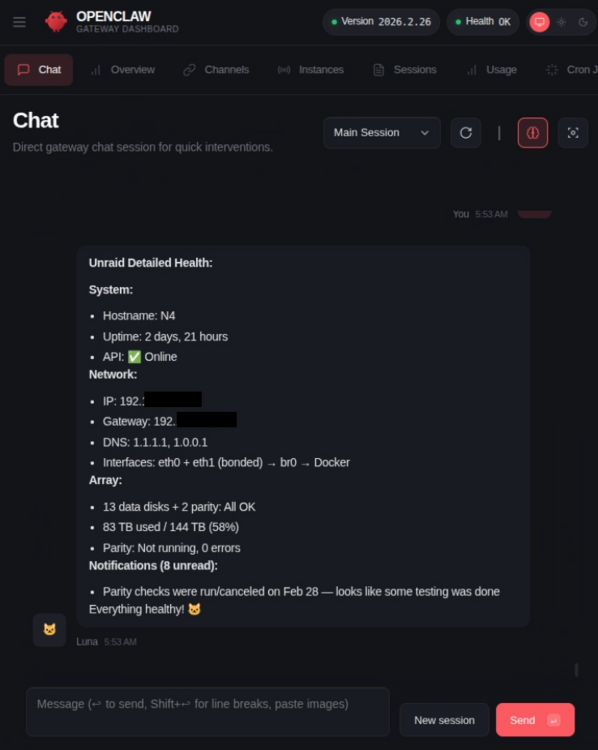
OverviewUnraidClaw is a permission-enforcing REST API gateway that lets AI agents manage your Unraid server. It sits between AI tools and your server, providing a unified API with fine-grained access control, authentication, and activity logging. Instead of giving AI agents direct access to Unraid internals, UnraidClaw acts as a controlled gateway. It combines Unraid's GraphQL API with direct system integration (CLI commands for parity checks, reboot/shutdown, and syslog; filesystem operations for share config editing and notification management; network introspection via ip) to expose capabilities that no single Unraid API covers. It works with any AI agent that speaks HTTP, and ships with an OpenClaw plugin for plug-and-play integration. What does it do?The plugin installs a Node.js server and a web interface that together give you: 43 tools across 11 categories: Docker – List, inspect, logs, start, stop, restart, pause, unpause, remove containers Virtual Machines – List, inspect, start, stop, force stop, pause, resume, reboot VMs Array – Status, start/stop array, parity check start/pause/resume/cancel Disks – List disks, view individual disk details and SMART data Shares – List shares, view details, edit settings (comment, allocator, split level, floor) System – System info, CPU/memory metrics, list services, reboot, shutdown Notifications – List, create, archive, delete notifications Network – View interfaces, routes, and DNS configuration Users – View current user info Logs – Read syslog entries Settings Page (Settings > UnraidClaw) with four tabs: Dashboard – Service status, server info, quick health check Settings – Service enable/disable, port configuration, API key generation Permissions – Full resource:action permission matrix with presets (Read Only, Docker Manager, VM Manager, Full Admin, None). 21 individual permission toggles across 8 categories Activity Log – Searchable log of all API requests with timestamps, endpoints, methods, and results Security: HTTPS with auto-generated self-signed TLS certificate (EC prime256v1, 10-year validity) API keys hashed with SHA-256 before storage; the plaintext key is never persisted Every request authenticated via API key ( x-api-key header ) and checked against the permission matrix All activity logged in JSONL format Runs locally on your Unraid box, no cloud dependencies OpenClaw Plugin (npm) – For AI agents that support the OpenClaw protocol: npm pack unraidclaw && openclaw plugins install unraidclaw-*.tgz && rm unraidclaw-*.tgzRegisters all 43 tools automatically. Configure with your server URL and API key in ~/.openclaw/openclaw.json. { "plugins": { "entries": { "unraidclaw": { "config": { "serverUrl": "https://YOUR_UNRAID_IP:9876", "apiKey": "YOUR_API_KEY", "tlsSkipVerify": true } } } } }RequirementsUnraid 7.0.0 or later (Node.js 22+ is built-in) InstallationCommunity Applications (coming soon, waiting for approval) Search for UnraidClaw in the CA plugin store. Manual Install Go to Plugins > Install Plugin and paste: https://raw.githubusercontent.com/emaspa/unraidclaw/main/packages/unraid-plugin/unraidclaw.plgQuick StartGo to Settings > Management Access in the Unraid WebGUI, scroll to the API section, and copy your Unraid API key Go to Settings > UnraidClaw, paste the Unraid API key into the Unraid API Key field Generate an UnraidClaw API key (save it, it won't be shown again) Configure permissions on the Permissions tab Set Service to Enabled and click Apply The server starts on port 9876 over HTTPS. TroubleshootingService won't start: Check that Node.js 22+ is available. Run node --version in the Unraid terminal. Connection refused: Verify the service is running: /etc/rc.d/rc.unraidclaw status TLS certificate errors: If your AI client doesn't accept self-signed certs, set tlsSkipVerify: true in the OpenClaw config. Permission denied on API call: Check the Activity Log tab to see which permission was denied, then enable it on the Permissions tab. API key not working: The key is shown only once during generation. If lost, generate a new one from the Settings tab. Support & FeedbackPlease report bugs and feature requests on the GitHub Issues page. For general discussion, questions, support and feedback, feel free to post in this thread. Source code: github.com/emaspa/unraidclaw
-
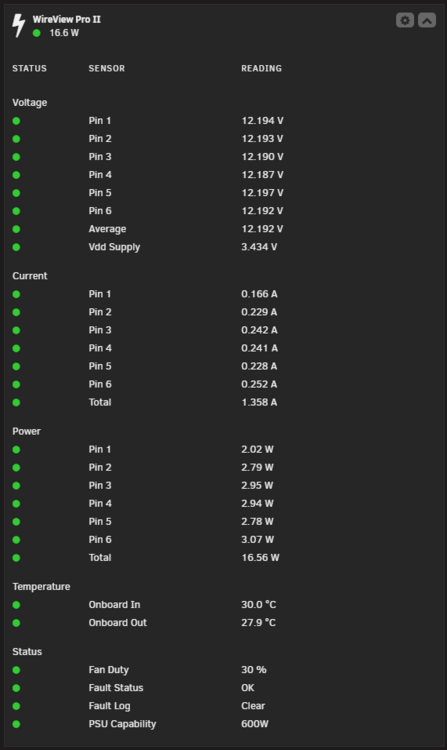
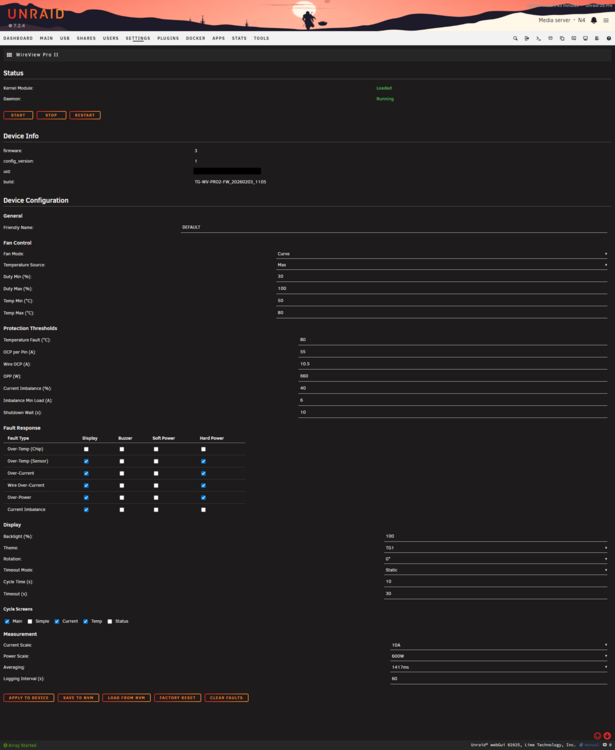
OverviewThis plugin brings full integration of the Thermal Grizzly WireView Pro II GPU power monitor into Unraid, exposing real-time voltage, current, power, and temperature readings through the Linux hwmon subsystem with a native web GUI on the Unraid dashboard. If you've got a WireView Pro II sitting between your PSU cables and GPU, this plugin lets you monitor and configure it directly from the Unraid web UI — no Windows app, no VM passthrough needed. It's built on top of the wireview-hwmon kernel module project. What does it do?The plugin installs a kernel module, a userspace daemon, and a web interface that together give you: Dashboard Tile — A live, movable tile on the Unraid dashboard showing: Per-pin and average voltage readings Per-pin and total current readings Per-pin and total power readings Onboard and external probe temperature readings Status info including fan duty, fault status/log, and PSU capability Auto-refreshes every 2 seconds with color-coded status indicators (green/orange/red) Settings Page (Settings > Utilities > WireView Pro II) — Full device configuration matching what you'd get in the official WireView II Pro GUI app: Daemon start/stop/restart Device info (firmware, UID, build string) Fan control (curve/fixed mode, temp source, duty/temp min/max) Protection thresholds (OCP, wire OCP, OPP, temperature fault, current imbalance) Fault response (per-type enable/disable for display, buzzer, soft power, hard power) Display settings (backlight, theme, rotation, timeout, screen cycling) Measurement config (current/power scale, averaging period, logging interval) NVM save/load/factory reset Clear faults Fault Alerts — A background monitor polls the device every 30 seconds and sends Unraid notifications on fault state transitions and high temperature warnings (above 80°C). CLI Tool (wireviewctl) — For those who prefer the command line: wireviewctl info # Device info wireviewctl read-config # Read config (hex) wireviewctl write-config <f> # Write config from file wireviewctl nvm store # Save to NVM wireviewctl clear-faults # Clear fault log wireviewctl screen main|temp|pause|resumeRequirementsUnraid 7.2.3 or later Thermal Grizzly WireView Pro II connected via USB directly to the Unraid host (must not be passed through to a VM) InstallationCommunity Applications (coming soon, waiting for approval)Search for WireView in the CA plugin store. Manual InstallGo to Plugins > Install Plugin and paste: https://raw.githubusercontent.com/emaspa/wireview-hwmon-unraid/main/wireview-hwmon.plgThe plugin automatically downloads the correct package for your kernel version. TroubleshootingPlugin installs but no sensor data appears: Make sure the WireView Pro II is connected via USB directly to the Unraid host, not passed through to a VM Run lsusb and look for vendor 0483 product 5740 Check daemon status: /etc/rc.d/rc.wireviewd status "Failed to download package for kernel X.Y.Z-Unraid": Your kernel version may not have a pre-built package yet — check the releases page You can also build from source (instructions on GitHub) Module fails to load: Run dmesg | tail -20 and check for errors Verify the module matches your kernel: uname -r Support & FeedbackPlease report bugs and feature requests on the GitHub Issues page. For general discussion, questions, support and feedback, feel free to post in this thread. If you find this plugin useful, consider buying me a coffee ☕
-
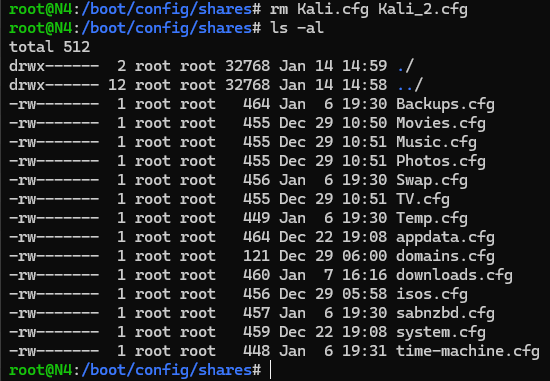
Decided to dig in, stopped the array and deleted the .cgf files manually Started the array and shares were in the UI, deleted them again, stopped the array. Verified cfg files were not there anymore, started the array again and now they're gone. I had them since RC1, so may be a fixed issue as new VMs don't create random shares anymore unless i define them.
-
I get that, but it doesn't really explain my issue, the VMs do not exist anymore, i deleted those 2 shares configuration wise and removed the folders. But they're gonna be recreated the next time i start the array. It's puzzling.
-
That's the thing, I did not setup shares for them.
-
I noticed them too since 7.0, even after deleting the VMs they're still there and if I delete the folders they are recreated at the next boot, don't think this is normal behavior.

-
Fixed in 6.12.9
-
That's not what I asked, can you try to boot a different USB drive with a different OS?
-
Ok, but what about now, does another bootable usb boot automatically?
-
Did you try another bootable USB? Like another drive and/or another OS, or both at the same time. Just to make sure it's a bios issue.
-
Recommended steps if you have the ability to get another drive: Take disk out of the server and keep in safe space Install new 6TB drive and follow rebuild process If rebuild successful proceed RMA faulty drive When drive comes back from RMA, keep it as spare
-
For sake of completion, disabling SMT seems to be a better workaround if that's an option in your setup: https://forums.unraid.net/bug-reports/stable-releases/6128-no-webgui-run-full-r2854/?do=findComment&comment=27345
-
Thanks, but this is not a solution, just a workaround. Would also suggest you to check your syslog after the change as you may also have DBUS failing (it starts before the GO file), which will cause all sort of underlaying issues: At least this confirms why the bug is affecting us, you're on a 64 cores Threadripper and I'm on a 64 cores EPYC, we have more devices creating UDEV files than others, I bet their /run/udev is probably abnormally big as well even if it doesn't affect them.
-
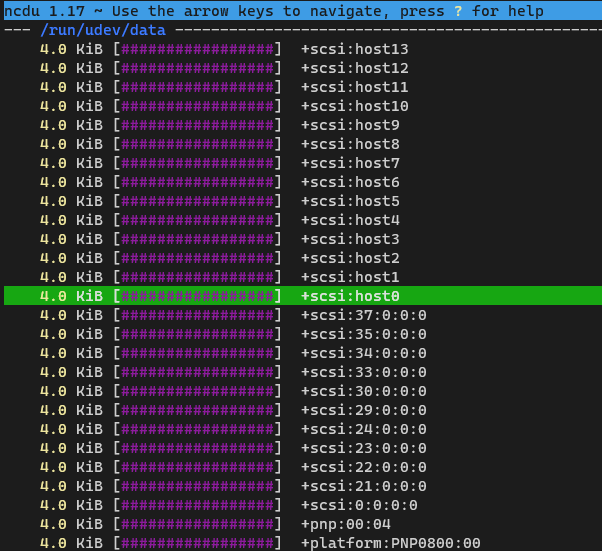
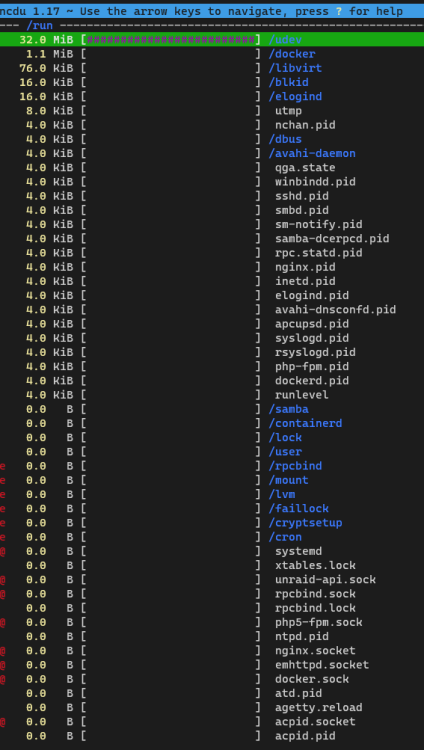
Also look here, all 0 bytes files in /run/udev/data are using 4KB:
-
That is correct, most of the files are 0 bytes and the total data that can be read from them is 512KB (confirmed by the output of tree --du -h -a /run > run.txt , attached here) , that said the block size is 4KB so every file will consume that amount of space on the partition. If you multiply the number of files for the minimum allocation you get a rough idea of why so much space is being taken: 9843 x 4 = 39372 If I learned anything in my years of working with file systems is that disk usage with small files gets often out of hand due to the default block size, NCDU is actually great for this, with tree or df you would be chasing ghosts as they just list the actual size. This also doesn't happen with 6.12.6, so it must be some change made between that and 6.12.8 run.txt
-
Bunch of 4KB files in there, weird:

-
Looks like udev is taking all the space:
 root@Tower:/# ls -la /run/ total 80 drwxr-xr-x 19 root root 1040 Feb 17 17:59 ./ drwxr-xr-x 21 root root 460 Feb 17 14:55 ../ -rw-r--r-- 1 root root 0 Feb 17 14:52 acpid.pid srw-rw-rw- 1 root root 0 Feb 17 14:52 acpid.socket= -rw------- 1 root root 0 Feb 17 14:53 agetty.reload -rw-r--r-- 1 root root 6 Feb 17 14:53 apcupsd.pid -rw-r--r-- 1 root root 0 Feb 17 14:52 atd.pid drwxr-xr-x 2 avahi avahi 80 Feb 17 14:54 avahi-daemon/ -rw-r--r-- 1 root root 6 Feb 17 14:54 avahi-dnsconfd.pid drwxr-xr-x 2 root root 80 Feb 17 14:55 blkid/ drw------- 3 root root 60 Feb 17 14:54 containerd/ drwxr-xr-x 2 root root 40 Feb 17 14:52 cron/ drwx------ 2 root root 40 Feb 17 14:53 cryptsetup/ drwxr-xr-x 2 root root 80 Feb 17 14:53 dbus/ drwx------ 8 root root 180 Feb 17 14:54 docker/ srw-rw---- 1 root docker 0 Feb 17 14:54 docker.sock= -rw-r--r-- 1 root root 5 Feb 17 14:54 dockerd.pid drwxr-xr-x 8 root root 160 Feb 17 14:54 elogind/ -rw-r--r-- 1 root root 6 Feb 17 14:53 elogind.pid srw-rw-rw- 1 root root 0 Feb 17 14:53 emhttpd.socket= drwxr-xr-x 2 root root 40 Feb 17 14:52 faillock/ -rw-r--r-- 1 root root 6 Feb 17 14:53 inetd.pid drwxr-xr-x 12 root root 440 Feb 17 14:54 libvirt/ drwxr-xr-x 4 root root 80 Feb 17 14:52 lock/ drwx------ 2 root root 40 Feb 17 14:52 lvm/ drwxr-xr-x 2 root root 40 Feb 17 14:51 mount/ -rw-r--r-- 1 root root 216 Feb 17 17:30 nchan.pid -rw-r--r-- 1 root root 6 Feb 17 14:53 nginx.pid srw-rw-rw- 1 root root 0 Feb 17 14:53 nginx.socket= -rw-r--r-- 1 root root 0 Feb 17 14:52 ntpd.pid -rw-r--r-- 1 root root 5 Feb 17 14:53 php-fpm.pid srw-rw---- 1 root users 0 Feb 17 14:53 php5-fpm.sock= -rw------- 1 root root 25 Feb 17 14:53 qga.state -rw-r--r-- 1 rpc rpc 6 Feb 17 14:53 rpc.statd.pid drwxr-x--- 2 rpc root 40 Feb 17 14:53 rpcbind/ -r--r--r-- 1 root root 0 Feb 17 14:53 rpcbind.lock srw-rw-rw- 1 root root 0 Feb 17 14:53 rpcbind.sock= -rw-r--r-- 1 root root 5 Feb 17 14:54 rsyslogd.pid -rw-r--r-- 1 root root 1 Feb 17 14:52 runlevel drwxr-xr-x 4 root root 80 Feb 17 14:52 samba/ -rw-r--r-- 1 root root 6 Feb 17 17:58 samba-dcerpcd.pid -rw------- 1 root root 6 Feb 17 14:53 sm-notify.pid -rw-r--r-- 1 root root 6 Feb 17 14:54 smbd.pid -rw-r--r-- 1 root root 6 Feb 17 14:53 sshd.pid -rw-r--r-- 1 root root 5 Feb 17 14:54 syslogd.pid lrwxrwxrwx 1 root root 7 Feb 17 14:52 systemd -> elogind/ drwxr-xr-x 8 root root 180 Feb 17 16:56 udev/ srwxr-xr-x 1 root root 0 Feb 17 14:53 unraid-api.sock= drwxr-xr-x 3 root root 60 Feb 17 14:55 user/ -rw-rw-r-- 1 root utmp 4224 Feb 17 14:55 utmp -rw-r--r-- 1 root root 6 Feb 17 14:54 winbindd.pid -rw------- 1 root root 0 Feb 17 14:52 xtables.lockI agree, but since the upgrade to 6.12.8 the 32MB of the /run mount are not enough and there's no other way to increase it, if I don't do that many services won't start, not to mention i have to manually start dbus as it runs before the go file and fails to create a .pid. Have a thread open but no help so far 🤷♂️That worked 👍root@Tower:/etc/samba/unassigned-shares# cat /etc/samba/unassigned-shares/ZCH0859H.conf [ZCH0859H] comment = ZCH0859H path = /mnt/disks/ZCH0859H browseable = yes valid users = emanuele write list = emanuele vfs objects = catia fruit streams_xattr fruit:encoding = native case sensitive = auto preserve case = yes short preserve case = yes [global] root@Tower:/etc/samba/unassigned-shares# cat /etc/samba/smb-unassigned.conf include = /etc/samba/unassigned-shares/ZCH0859H.confLooks like it's not there: root@Tower:~# ls /etc/samba/unassigned.devices/ /bin/ls: cannot access '/etc/samba/unassigned.devices/': No such file or directory The one there is called unassigned-shares root@Tower:/etc/samba# ls lmhosts smb-fruit.conf smb-names.conf smb-shares.conf smb-unassigned.conf smb.conf unassigned-shares/ root@Tower:/etc/samba# cd unassigned-shares/ root@Tower:/etc/samba/unassigned-shares# ls ZCH0859H.conf@dlandon can confirm the UI is fixed and reflects the disk being mounted, but the SMB share was not created at boot. See the diagnostics attached and the output of cat /proc/mounts , this time I didn't run the add-smb script manually. root@Tower:~# cat /proc/mounts rootfs / rootfs rw,size=65861692k,nr_inodes=16465423,inode64 0 0 proc /proc proc rw,relatime 0 0 sysfs /sys sysfs rw,relatime 0 0 tmpfs /run tmpfs rw,relatime,size=65536k,mode=755,inode64 0 0 /dev/sda1 /boot vfat rw,noatime,nodiratime,fmask=0177,dmask=0077,codepage=437,iocharset=iso8859-1,shortname=mixed,flush,errors=remount-ro 0 0 /dev/loop0 /lib squashfs ro,relatime,errors=continue 0 0 overlay /lib overlay rw,relatime,lowerdir=/lib,upperdir=/var/local/overlay/lib,workdir=/var/local/overlay-work/lib 0 0 /dev/loop1 /usr squashfs ro,relatime,errors=continue 0 0 overlay /usr overlay rw,relatime,lowerdir=/usr,upperdir=/var/local/overlay/usr,workdir=/var/local/overlay-work/usr 0 0 devtmpfs /dev devtmpfs rw,relatime,size=8192k,nr_inodes=16465424,mode=755,inode64 0 0 devpts /dev/pts devpts rw,relatime,gid=5,mode=620,ptmxmode=000 0 0 tmpfs /dev/shm tmpfs rw,relatime,inode64 0 0 fusectl /sys/fs/fuse/connections fusectl rw,relatime 0 0 hugetlbfs /hugetlbfs hugetlbfs rw,relatime,pagesize=2M 0 0 cgroup2 /sys/fs/cgroup cgroup2 rw,nosuid,nodev,noexec,relatime,nsdelegate,memory_recursiveprot 0 0 tmpfs /var/log tmpfs rw,relatime,size=131072k,mode=755,inode64 0 0 efivarfs /sys/firmware/efi/efivars efivarfs rw,nosuid,nodev,noexec,relatime 0 0 rootfs /mnt rootfs rw,size=65861692k,nr_inodes=16465423,inode64 0 0 tmpfs /mnt/disks tmpfs rw,relatime,size=1024k,inode64 0 0 tmpfs /mnt/remotes tmpfs rw,relatime,size=1024k,inode64 0 0 tmpfs /mnt/addons tmpfs rw,relatime,size=1024k,inode64 0 0 tmpfs /mnt/rootshare tmpfs rw,relatime,size=1024k,inode64 0 0 nfsd /proc/fs/nfs nfsd rw,relatime 0 0 nfsd /proc/fs/nfsd nfsd rw,relatime 0 0 /dev/md1p1 /mnt/disk1 xfs rw,noatime,nouuid,attr2,inode64,logbufs=8,logbsize=32k,noquota 0 0 /dev/md2p1 /mnt/disk2 xfs rw,noatime,nouuid,attr2,inode64,logbufs=8,logbsize=32k,noquota 0 0 /dev/md3p1 /mnt/disk3 xfs rw,noatime,nouuid,attr2,inode64,logbufs=8,logbsize=32k,noquota 0 0 /dev/md4p1 /mnt/disk4 xfs rw,noatime,nouuid,attr2,inode64,logbufs=8,logbsize=32k,noquota 0 0 /dev/md5p1 /mnt/disk5 xfs rw,noatime,nouuid,attr2,inode64,logbufs=8,logbsize=32k,noquota 0 0 /dev/md6p1 /mnt/disk6 xfs rw,noatime,nouuid,attr2,inode64,logbufs=8,logbsize=32k,noquota 0 0 /dev/md7p1 /mnt/disk7 xfs rw,noatime,nouuid,attr2,inode64,logbufs=8,logbsize=32k,noquota 0 0 /dev/nvme0n1p1 /mnt/cache btrfs rw,noatime,ssd,discard=async,space_cache=v2,subvolid=5,subvol=/ 0 0 shfs /mnt/user0 fuse.shfs rw,nosuid,nodev,noatime,user_id=0,group_id=0,default_permissions,allow_other 0 0 shfs /mnt/user fuse.shfs rw,nosuid,nodev,noatime,user_id=0,group_id=0,default_permissions,allow_other 0 0 /dev/sdg1 /mnt/disks/ZCH0859H xfs rw,relatime,attr2,inode64,logbufs=8,logbsize=32k,noquota 0 0 /dev/loop2 /var/lib/docker btrfs rw,noatime,ssd,space_cache=v2,subvolid=5,subvol=/ 0 0 /dev/loop2 /var/lib/docker/btrfs btrfs rw,noatime,ssd,space_cache=v2,subvolid=5,subvol=/ 0 0 /dev/loop3 /etc/libvirt btrfs rw,noatime,ssd,space_cache=v2,subvolid=5,subvol=/ 0 0 nsfs /run/docker/netns/133a2385364a nsfs rw 0 0 nsfs /run/docker/netns/5e2c60229e3f nsfs rw 0 0 nsfs /run/docker/netns/86b05786ef76 nsfs rw 0 0 nsfs /run/docker/netns/54188258c33f nsfs rw 0 0 nsfs /run/docker/netns/1429a1c211de nsfs rw 0 0 nsfs /run/docker/netns/b06ebc25f551 nsfs rw 0 0 nsfs /run/docker/netns/dcefdc5d840d nsfs rw 0 0 nsfs /run/docker/netns/50061aaae80d nsfs rw 0 0 nsfs /run/docker/netns/58f45d9663bf nsfs rw 0 0 nsfs /run/docker/netns/f1c5a05c5df4 nsfs rw 0 0 nsfs /run/docker/netns/8227e3776579 nsfs rw 0 0 nsfs /run/docker/netns/4583b25e57bb nsfs rw 0 0 nsfs /run/docker/netns/a27582ff11e7 nsfs rw 0 0 /dev/sdg1 /mnt/disks/ZCH0859H/incomplete xfs rw,relatime,attr2,inode64,logbufs=8,logbsize=32k,noquota 0 0 nsfs /run/docker/netns/4ef83a37736d nsfs rw 0 0 nsfs /run/docker/netns/eaf7b8eddd9e nsfs rw 0 0 tmpfs /run/user/0 tmpfs rw,nosuid,nodev,relatime,size=13175704k,nr_inodes=3293926,mode=700,inode64 0 0 tower-diagnostics-20240217-1455.ziproot@Tower:~# cat /proc/mounts rootfs / rootfs rw,size=65861692k,nr_inodes=16465423,inode64 0 0 proc /proc proc rw,relatime 0 0 sysfs /sys sysfs rw,relatime 0 0 tmpfs /run tmpfs rw,relatime,size=65536k,mode=755,inode64 0 0 /dev/sda1 /boot vfat rw,noatime,nodiratime,fmask=0177,dmask=0077,codepage=437,iocharset=iso8859-1,shortname=mixed,flush,errors=remount-ro 0 0 /dev/loop0 /lib squashfs ro,relatime,errors=continue 0 0 overlay /lib overlay rw,relatime,lowerdir=/lib,upperdir=/var/local/overlay/lib,workdir=/var/local/overlay-work/lib 0 0 /dev/loop1 /usr squashfs ro,relatime,errors=continue 0 0 overlay /usr overlay rw,relatime,lowerdir=/usr,upperdir=/var/local/overlay/usr,workdir=/var/local/overlay-work/usr 0 0 devtmpfs /dev devtmpfs rw,relatime,size=8192k,nr_inodes=16465424,mode=755,inode64 0 0 devpts /dev/pts devpts rw,relatime,gid=5,mode=620,ptmxmode=000 0 0 tmpfs /dev/shm tmpfs rw,relatime,inode64 0 0 fusectl /sys/fs/fuse/connections fusectl rw,relatime 0 0 hugetlbfs /hugetlbfs hugetlbfs rw,relatime,pagesize=2M 0 0 cgroup2 /sys/fs/cgroup cgroup2 rw,nosuid,nodev,noexec,relatime,nsdelegate,memory_recursiveprot 0 0 tmpfs /var/log tmpfs rw,relatime,size=131072k,mode=755,inode64 0 0 efivarfs /sys/firmware/efi/efivars efivarfs rw,nosuid,nodev,noexec,relatime 0 0 rootfs /mnt rootfs rw,size=65861692k,nr_inodes=16465423,inode64 0 0 tmpfs /mnt/disks tmpfs rw,relatime,size=1024k,inode64 0 0 tmpfs /mnt/remotes tmpfs rw,relatime,size=1024k,inode64 0 0 tmpfs /mnt/addons tmpfs rw,relatime,size=1024k,inode64 0 0 tmpfs /mnt/rootshare tmpfs rw,relatime,size=1024k,inode64 0 0 nfsd /proc/fs/nfs nfsd rw,relatime 0 0 nfsd /proc/fs/nfsd nfsd rw,relatime 0 0 /dev/sdg1 /mnt/disks/ZCH0859H xfs rw,relatime,attr2,inode64,logbufs=8,logbsize=32k,noquota 0 0 /dev/md1p1 /mnt/disk1 xfs rw,noatime,nouuid,attr2,inode64,logbufs=8,logbsize=32k,noquota 0 0 /dev/md2p1 /mnt/disk2 xfs rw,noatime,nouuid,attr2,inode64,logbufs=8,logbsize=32k,noquota 0 0 /dev/md3p1 /mnt/disk3 xfs rw,noatime,nouuid,attr2,inode64,logbufs=8,logbsize=32k,noquota 0 0 /dev/md4p1 /mnt/disk4 xfs rw,noatime,nouuid,attr2,inode64,logbufs=8,logbsize=32k,noquota 0 0 /dev/md5p1 /mnt/disk5 xfs rw,noatime,nouuid,attr2,inode64,logbufs=8,logbsize=32k,noquota 0 0 /dev/md6p1 /mnt/disk6 xfs rw,noatime,nouuid,attr2,inode64,logbufs=8,logbsize=32k,noquota 0 0 /dev/md7p1 /mnt/disk7 xfs rw,noatime,nouuid,attr2,inode64,logbufs=8,logbsize=32k,noquota 0 0 /dev/nvme0n1p1 /mnt/cache btrfs rw,noatime,ssd,discard=async,space_cache=v2,subvolid=5,subvol=/ 0 0 shfs /mnt/user0 fuse.shfs rw,nosuid,nodev,noatime,user_id=0,group_id=0,default_permissions,allow_other 0 0 shfs /mnt/user fuse.shfs rw,nosuid,nodev,noatime,user_id=0,group_id=0,default_permissions,allow_other 0 0 /dev/loop2 /var/lib/docker btrfs rw,noatime,ssd,space_cache=v2,subvolid=5,subvol=/ 0 0 /dev/loop2 /var/lib/docker/btrfs btrfs rw,noatime,ssd,space_cache=v2,subvolid=5,subvol=/ 0 0 /dev/loop3 /etc/libvirt btrfs rw,noatime,ssd,space_cache=v2,subvolid=5,subvol=/ 0 0 nsfs /run/docker/netns/d4f21cba8555 nsfs rw 0 0 nsfs /run/docker/netns/99301db2a02f nsfs rw 0 0 nsfs /run/docker/netns/e2f446f6a4a5 nsfs rw 0 0 nsfs /run/docker/netns/4671951dc6db nsfs rw 0 0 nsfs /run/docker/netns/ea6dae047f70 nsfs rw 0 0 nsfs /run/docker/netns/dcd0116882af nsfs rw 0 0 nsfs /run/docker/netns/3141f5f422ad nsfs rw 0 0 nsfs /run/docker/netns/9130782b52fb nsfs rw 0 0 nsfs /run/docker/netns/7dab268b47f0 nsfs rw 0 0 nsfs /run/docker/netns/6e12348ec98d nsfs rw 0 0 nsfs /run/docker/netns/1b7c59eaca16 nsfs rw 0 0 nsfs /run/docker/netns/86b1c75956dc nsfs rw 0 0 nsfs /run/docker/netns/0f8eedf38d1b nsfs rw 0 0 /dev/sdg1 /mnt/disks/ZCH0859H/incomplete xfs rw,relatime,attr2,inode64,logbufs=8,logbsize=32k,noquota 0 0 nsfs /run/docker/netns/225a436b9432 nsfs rw 0 0 nsfs /run/docker/netns/5210094db0a7 nsfs rw 0 0 tmpfs /run/user/0 tmpfs rw,nosuid,nodev,relatime,size=13175704k,nr_inodes=3293926,mode=700,inode64 0 0 Of course this is after i manually executed the smbshare script




