





GFRoSTY
Members
-
Joined
-
Last visited
Everything posted by GFRoSTY
-
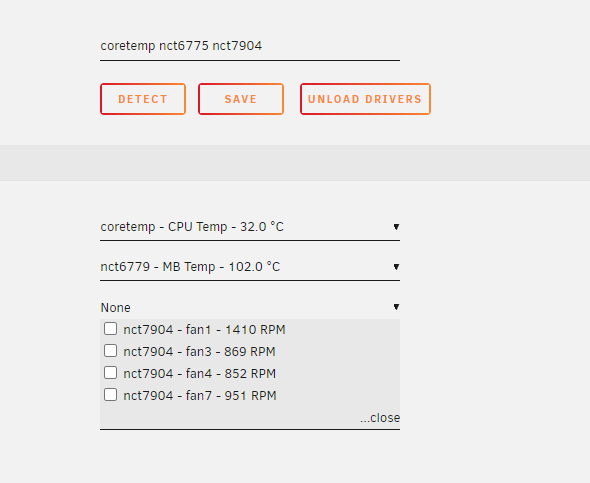
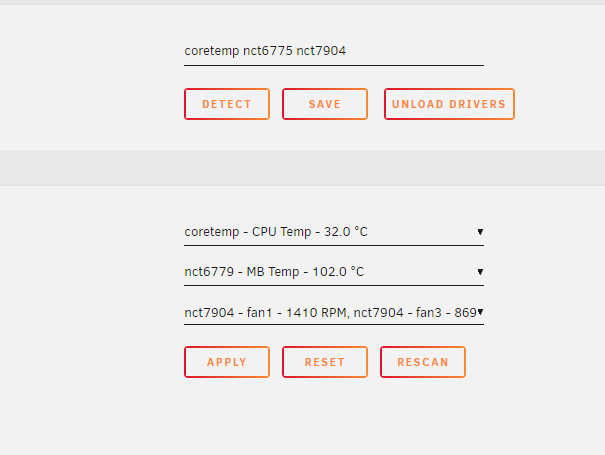
I may have found a reason why we are all having issues with the not being able to see the system temps anymore. SYSTEM INFO: unraid: v6.8.3 M/B: ASUSTeK COMPUTER INC. Z10PA-U8 Series Version Rev 1.xx BIOS: American Megatrends Inc. Version 3801. Dated: 05/23/2019 CPU: Intel® Xeon® CPU E5-2620 v4 @ 2.10GHz First I ran pwmconfig: Found the following devices: hwmon0/device is power_meter hwmon1 is nct7904 hwmon2 is coretemp hwmon3 is nct6779 Found the following PWM controls: hwmon1/pwm1 current value: 255 hwmon1/pwm2 current value: 76 hwmon1/pwm2 is currently setup for automatic speed control. In general, automatic mode is preferred over manual mode, as it is more efficient and it reacts faster. Are you sure that you want to setup this output for manual control? (n) n hwmon1/pwm3 current value: 76 hwmon1/pwm3 is currently setup for automatic speed control. In general, automatic mode is preferred over manual mode, as it is more efficient and it reacts faster. Are you sure that you want to setup this output for manual control? (n) n hwmon1/pwm4 current value: 5 hwmon3/pwm1 current value: 10 hwmon3/pwm2 current value: 0 Giving the fans some time to reach full speed... Found the following fan sensors: hwmon1/fan1_input current speed: 1412 RPM hwmon1/fan2_input current speed: 0 ... skipping! hwmon1/fan3_input current speed: 872 RPM hwmon1/fan4_input current speed: 852 RPM hwmon1/fan5_input current speed: 0 ... skipping! hwmon1/fan6_input current speed: 0 ... skipping! hwmon1/fan7_input current speed: 954 RPM hwmon1/fan8_input current speed: 0 ... skipping! hwmon3/fan1_input current speed: 0 ... skipping! hwmon3/fan2_input current speed: 0 ... skipping! So I can see that the system can see what sensors and fans I have. I then ran: 'dmesg | grep NCT6779' # dmesg | grep NCT6779 [ 49.798332] nct6775: Found NCT6779D or compatible chip at 0x2e:0x290 [85626.400888] nct6775: Found NCT6779D or compatible chip at 0x2e:0x290 [85646.600274] nct6775: Found NCT6779D or compatible chip at 0x2e:0x290 [86575.679176] nct6775: Found NCT6779D or compatible chip at 0x2e:0x290 [87679.600329] nct6775: Found NCT6779D or compatible chip at 0x2e:0x290 I next ran the command 'sensors' and it gave me a load of errors against the 'bus name' ~# sensors Error: File /etc/sensors.d/sensors.conf, line 14: Undeclared bus id referenced Error: File /etc/sensors.d/sensors.conf, line 16: Undeclared bus id referenced Error: File /etc/sensors.d/sensors.conf, line 18: Undeclared bus id referenced Error: File /etc/sensors.d/sensors.conf, line 20: Undeclared bus id referenced Error: File /etc/sensors.d/sensors.conf, line 26: Undeclared bus id referenced Error: File /etc/sensors.d/sensors.conf, line 28: Undeclared bus id referenced Error: File /etc/sensors.d/sensors.conf, line 30: Undeclared bus id referenced Error: File /etc/sensors.d/sensors.conf, line 32: Undeclared bus id referenced sensors_init: Can't parse bus name On opening up the 'sensors.conf' file and looking at the referenced error lines I can see a reference to '0-2d' # sensors chip "nct6779-isa-0290" ignore "temp7" chip "nct6779-isa-0290" ignore "temp8" chip "nct6779-isa-0290" ignore "temp9" chip "nct6779-isa-0290" ignore "temp10" chip "nct6779-isa-0290" ignore "fan1" chip "nct6779-isa-0290" ignore "fan2" chip "nct7904-i2c-0-2d" ignore "fan2" chip "nct7904-i2c-0-2d" ignore "fan5" chip "nct7904-i2c-0-2d" ignore "fan6" chip "nct7904-i2c-0-2d" ignore "fan8" chip "coretemp-isa-0000" label "temp1" "CPU Temp" chip "nct6779-isa-0290" label "temp1" "MB Temp" chip "nct7904-i2c-0-2d" label "fan1" "Array Fan" chip "nct7904-i2c-0-2d" label "fan3" "Array Fan" chip "nct7904-i2c-0-2d" label "fan4" "Array Fan" chip "nct7904-i2c-0-2d" label "fan7" "Array Fan" so I make changes from '0-2d' to '02d', thereby removing the minus char. I go back into settings>system temp and it now shows me all the settings!!!!! I choose all the fans, HOWEVER... when I click on APPLY. The page reloads and the temperature settings have reset and NOTHING shows and the sensors file is reset to show references to '0-2d' - argh! BUT.... If I do all the above and NOT click on APPY', the cpu and motherboard temps NOW show up in UNRAID. and one last update , if you REBOOT then it stops working again and I had to do the above again. SO, clearly further investigation around this whole situation is required from both Limetech and Bonienl
-
Hi, I used the Update OS option within the Unraid webpage, it downloaded the files extracted and then told me to reboot the system. I rebooted the system and when going through and past POST, the BIOS stated 'Boot Error' I rebooted again and seleced Force boot USB drive within the BIOS and it still gave me a 'Boot Error' indicating to me that it wasn't in a position to boot the inernal USB drive. The USB device shows up in the BIOS fine so knows it is there and go to excecute but fails. I have a flash copy backup of 6.7.2 my previous version, can I just put that on another USB and boot from that?? Will it cause any issues due to the upgrade proccess being completed? I don't want to go ahead with this step unless I can get some feedback. Thanks.
-
Hi, I am trying to change from the default naming in the PATH string and it only shows me (title) and wants to delete the existing filename which has "track name - artist". What do I need to add to enable a filename that gives me "trackname-artistname?"


-
deleted APPdata for Observium, started... It took about 10 mins, then I could log in. Not sure what happened on the first install which then you mentioned I needed to delete appdata and start up that seemed to fix it as I got to the Observium dashboard. Thanks.
-
installed , tried login with 'observium' name and Pswd, not being recognised. Waited 10 mins still not working. restarted app waited another 5 mins still won't accept login credentials.
-
32gb in mine (4 x8gb sticks DDR4) can upgrade MB to 512 but not for a looooooong time
