





sirkuz
Members
-
Joined
-
Last visited
-
Nevermind, had installed on a custom network and those ignore custom port settings I don't seem to be able to change the webui port from 3000. Whatever I set it to it just goes back to 3000. Tried a few times and pulling down fresh. Anyone else have this issue? I already have grafana on 3000.
-
and yep... cycling the docker service did the trick
-
dug a bit deeper on it and seems like its unraid networking related to the vlan bridge I have on an interface not routing properly. Disregard please (sorry I deleted the question before I saw a response).
-
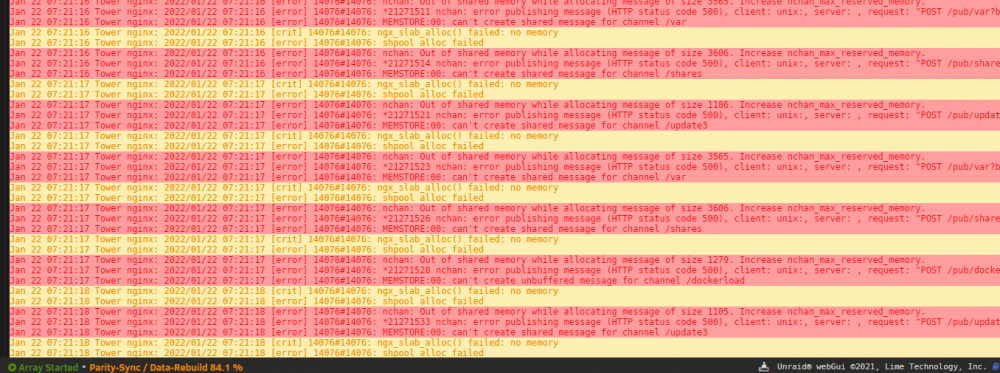
I am on 6.10.0-rc2 and while running parity rebuilds I am noticing that I still get these errors when leaving the UI open under the latest Edge browser. Waiting for 6.10 final to hopefully resolve this one
-
Thank you @HyperV!! After a couple days of frustration thinking it's always DNS I found your fix here with the good ol' search button and it worked like a champ. I cannot upgrade to 6.9.2 because of macvlan crashes in the docker implementation
-
si! dang ctrl+enter reflex
-
Ran into a strange issue and fixed today, not sure if anyone has reported this but couldn't find anything in a rudimentary search. If you uninstall WG after having setup a connection, your wg0 interfaces remain and they are unable to be deleted manually via network settings/unraid routing table gui. You instead have to reinstall WG and then remove the config to correct. I think these routes should be removed once the plugin is uninstalled.
-
Any chance this is issue is more related to the rsync application more than anything? The same issue described here happens for me with Plex/Emby using unbalance plugin as well....also rsync. Anyone take a stab at rewriting either plugin to use rclone? I get much better performance on my scripts using rclone for file moving processes.
-
Appreciate it bud!
-
Any chance someone could post these somewhere else again? Seems like the free download period has ended. Much appreciated!
-
This feature alone makes 6.4 so worth the wait. As soon as its released I am upgrading my second license just for the heck of it so I have two pro versions for my live and my test machines.
-
Thanks CHBMB. I might hang tight then until that gets ironed out. LDAP authentication is something new for me to play with in the home anyways and not a deal breaker. Nextcloud seems like a good fit for my household/homelab. PHP is not the path I have the capability to research. Here I was thinking it might have something to do with the lack of unix ldap attributes in server 2016 and specifically the uid attribute lol Glad I didn't spend any more time looking into that.
-
Just started playing with this container and it's nice. However I am running into issues authenticating it against a windows server 2016 ldap. Users never actually populate even tho all nextcloud's connection test/queries against the ldap are valid. Has anyone noticed this or know of a fix?
-
same here, port seems to be gone from the plex container for some reason right now.

