





mackid1993
Members
-
Joined
-
Last visited
Everything posted by mackid1993
-
Thanks, either way it seems like if it can't connect it tries on some sort of interval. Is that correct?
-
Just question. I'm mounting an SMB share from my Windows VM (the files are on Dropbox which are only accessible from within the VM). The file are for use in a docker container. Everything works really well so far. I have automount set up and if I reboot the VM it seems to mount on its own again just fine. I'm wondering if this will still work when I reboot the server. Obviously the VM will take a minute or two to start up. With automount selected will my SMB share properly mount once the VM is up and running on a fresh boot of Unraid? I'm just trying to look for any points of failure as so far this seems to be working really well for my use case.
-
Thanks! The goal is not to reboot until the old drives have been dod wiped and are ready to be pulled.
-
Thanks so much! I'm replacing all of my very old 3 and 4 TB drives with new higher density 12 TB drives so I have to break parity to do the transfer. My goal was to add the two precleared drives and start moving data and when the third one finishes it'll be my parity disk. I have redundant backups of everything so I'm not worried about data loss.
-
Are you running it with @jch's shell script. That made a difference for me.
-
I have a preclear going on 3 drives, they are nearly done but one is about 2 hours being the others. If I stop my array to add the two completed drives will that break the preclear that has yet to finish?
-
I'm replacing my drives, once I move the data to my new drives (I have plenty of bays for the old and new drives) I'm looking for an easy way either with a docker, vm or plugin to wipe my old drives. I was thinking I could run Parted Magic in a VM and pass the disks through by id using Unassigned Devices. Has anyone done this before? My old drives are really old so at some point I may want to recycle them rather than hang on to them.
-
Thanks I'm not going to go that far, I'll take your word for it. It is crazy fast now. Especially given the FUSE layer that Unraid has maybe it's best to leave cache disabled, especially given your point about the mover running.
-
I'm curious why were are disabling caching. It's supposed to improve performance is it not?
-
Maybe open an issue report on gitlab. I would test in Linux first to verify that it isn't a Windows driver issue. Then if it's isolated to Windows open a report with virtio-win.
-
Nvme from the server to the nvme vm boot drive I was getting 1+ GB/s. I'm not sure why your system behaves this way.
-
Did you make the shell script in nano on the server. If you try to make it in Windows and it isn't UNIX formatted it won't work. Also where are you placing rust virtiofsd? Did you not run chmod +x ./script.sh If you create the shell scripts on the server, copy and paste (and modify) what I provided into the go file and modify the xml properly it should work. You do have to reboot.
-
So I had a chance to test this with multiple shares and I have to say this is an incredible speed improvement with Rust virtiofs. @SimonF this should really be implemented in 6.13. Here is what I did. First I created a directory on my flash: /boot/virtiofsd In the directory I placed the rust version of virtiofsd and a shell script for each share I want to mount. In my case I have: appdata.sh archives.sh backup.sh communityapplicationsappdatabackup.sh downloads.sh movies.sh music.sh software.sh Note: Make these scripts using nano on the server. They must be formatted for UNIX. Making them in Notepad or Notepad++ on Windows will format them MSDOS and Virtiofs will die when booting the vm. Each shell script is exactly what @jch shared but modified for each individual share I want to mount in Windows. I modified the script to store virtiofsd in /usr/libexec: Here is an example for my Music share, all of the other shares are the same: #!/bin/bash # process -o option but ignore it because unraid generates the command for us VALID_ARGS=$(getopt -o o -l fd: -- "$@")i if [[ $? -ne 0 ]]; then exit 1; fi eval set -- "$VALID_ARGS" while [ : ]; do case "$1" in --fd ) FD="$2" shift 2 ;; -o ) shift 1 ;; -- ) shift; break ;; * ) shift; ;; esac done # https://gitlab.com/virtio-fs/virtiofsd /usr/libexec/virtiofsd \ --fd="$FD" \ --shared-dir="/mnt/user/Music" \ --xattr \ --cache="never" \ --sandbox="chroot" \ --inode-file-handles="mandatory" \ --announce-submounts Change --shared-dir= and rinse and repeat for each individual share with a new shell script. Next I modified my go file /boot/config/go #replace Virtiofsd with Rust version mv /usr/libexec/virtiofsd /usr/libexec/virtiofsd.old cp /boot/virtiofsd/virtiofsd /usr/libexec/virtiofsd chmod +x /usr/libexec/virtiofsd #copy mount scripts for each virtofs share #appdata cp /boot/virtiofsd/appdata.sh /usr/libexec/appdata.sh chmod +x /usr/libexec/appdata.sh #archives cp /boot/virtiofsd/archives.sh /usr/libexec/archives.sh chmod +x /usr/libexec/archives.sh #backup cp /boot/virtiofsd/backup.sh /usr/libexec/backup.sh chmod +x /usr/libexec/backup.sh #communityapplicationsappdatabackup cp /boot/virtiofsd/communityapplicationsappdatabackup.sh /usr/libexec/communityapplicationsappdatabackup.sh chmod +x /usr/libexec/communityapplicationsappdatabackup.sh #downloads cp /boot/virtiofsd/downloads.sh /usr/libexec/downloads.sh chmod +x /usr/libexec/downloads.sh #movies cp /boot/virtiofsd/movies.sh /usr/libexec/movies.sh chmod +x /usr/libexec/movies.sh #music cp /boot/virtiofsd/music.sh /usr/libexec/music.sh chmod +x /usr/libexec/music.sh #software cp /boot/virtiofsd/software.sh /usr/libexec/software.sh chmod +x /usr/libexec/software.sh #tv cp /boot/virtiofsd/tv.sh /usr/libexec/tv.sh chmod +x /usr/libexec/tv.sh I appended the following to the go file so this is persistent upon boot. This renames the original virtiofsd to virtiofsd.old, copies the rust version to /usr/libexec and then copies each of my mount scripts to /usr/libexec and makes them executable. Now for the xml, this part is easy. For each mount, replace <binary path='/usr/libexec/virtiofsd' xattr='on'> with <binary path='/usr/libexec/script.sh' xattr='on'> This is what my finished XML looks like for my environment: <filesystem type='mount' accessmode='passthrough'> <driver type='virtiofs' queue='1024'/> <binary path='/usr/libexec/appdata.sh' xattr='on'> <cache mode='always'/> <sandbox mode='chroot'/> </binary> <source dir='/mnt/user/appdata'/> <target dir='appdata'/> <alias name='fs0'/> <address type='pci' domain='0x0000' bus='0x02' slot='0x00' function='0x0'/> </filesystem> <filesystem type='mount' accessmode='passthrough'> <driver type='virtiofs' queue='1024'/> <binary path='/usr/libexec/archives.sh' xattr='on'> <cache mode='always'/> <sandbox mode='chroot'/> </binary> <source dir='/mnt/user/Archives'/> <target dir='Archives'/> <alias name='fs1'/> <address type='pci' domain='0x0000' bus='0x04' slot='0x00' function='0x0'/> </filesystem> <filesystem type='mount' accessmode='passthrough'> <driver type='virtiofs' queue='1024'/> <binary path='/usr/libexec/backup.sh' xattr='on'> <cache mode='always'/> <sandbox mode='chroot'/> </binary> <source dir='/mnt/user/Backup'/> <target dir='Backup'/> <alias name='fs2'/> <address type='pci' domain='0x0000' bus='0x05' slot='0x00' function='0x0'/> </filesystem> <filesystem type='mount' accessmode='passthrough'> <driver type='virtiofs' queue='1024'/> <binary path='/usr/libexec/communityapplicationsappdatabackup.sh' xattr='on'> <cache mode='always'/> <sandbox mode='chroot'/> </binary> <source dir='/mnt/user/CommunityApplicationsAppdataBackup'/> <target dir='CommunityApplicationsAppdataBackup'/> <alias name='fs3'/> <address type='pci' domain='0x0000' bus='0x06' slot='0x00' function='0x0'/> </filesystem> <filesystem type='mount' accessmode='passthrough'> <driver type='virtiofs' queue='1024'/> <binary path='/usr/libexec/downloads.sh' xattr='on'> <cache mode='always'/> <sandbox mode='chroot'/> </binary> <source dir='/mnt/user/Downloads'/> <target dir='Downloads'/> <alias name='fs4'/> <address type='pci' domain='0x0000' bus='0x07' slot='0x00' function='0x0'/> </filesystem> <filesystem type='mount' accessmode='passthrough'> <driver type='virtiofs' queue='1024'/> <binary path='/usr/libexec/movies.sh' xattr='on'> <cache mode='always'/> <sandbox mode='chroot'/> </binary> <source dir='/mnt/user/Movies'/> <target dir='Movies'/> <alias name='fs5'/> <address type='pci' domain='0x0000' bus='0x08' slot='0x00' function='0x0'/> </filesystem> <filesystem type='mount' accessmode='passthrough'> <driver type='virtiofs' queue='1024'/> <binary path='/usr/libexec/music.sh' xattr='on'> <cache mode='always'/> <sandbox mode='chroot'/> </binary> <source dir='/mnt/user/Music'/> <target dir='Music'/> <alias name='fs6'/> <address type='pci' domain='0x0000' bus='0x09' slot='0x00' function='0x0'/> </filesystem> <filesystem type='mount' accessmode='passthrough'> <driver type='virtiofs' queue='1024'/> <binary path='/usr/libexec/software.sh' xattr='on'> <cache mode='always'/> <sandbox mode='chroot'/> </binary> <source dir='/mnt/user/Software'/> <target dir='Software'/> <alias name='fs7'/> <address type='pci' domain='0x0000' bus='0x0a' slot='0x00' function='0x0'/> </filesystem> <filesystem type='mount' accessmode='passthrough'> <driver type='virtiofs' queue='1024'/> <binary path='/usr/libexec/tv.sh' xattr='on'> <cache mode='always'/> <sandbox mode='chroot'/> </binary> <source dir='/mnt/user/TV'/> <target dir='TV'/> <alias name='fs8'/> <address type='pci' domain='0x0000' bus='0x0b' slot='0x00' function='0x0'/> </filesystem> Once done, reboot the server so the go file moves all of the files and sets permissions. This is a huge improvement over the stock config. Thanks for this @jch. Hopefully we can get these settings implemented in 6.13.
-
Maybe check again with the next release of Unraid with the newer qemu and linux kernel.
-
Maybe try emulating your CPU instead of CPU passthrough and a test to see if speeds improve. Not saying you should leave it that way but it may be worth trying to see if it's an AMD issue.
-
It must be an amd issue. Maybe open a bug report with the virto win team?
-
You can also try the newer Rust version of Virtiofsd: https://gitlab.com/virtio-fs/virtiofsd/-/jobs/artifacts/main/download?job=publish To install it sftp to your server and create a folder in /boot called virtiofsd and copy the executable there. Then stop all VMs using Virtiofs. Then open a terminal and type: nano /boot/config/go Then add the following to your go file: #replace Virtiofsd with Rust version mv /usr/libexec/virtiofsd /usr/libexec/virtiofsd.old cp /boot/virtiofsd/virtiofsd /usr/libexec/virtiofsd chmod +x /usr/libexec/virtiofsd Then either run the 3 commands manually or reboot your server. This may or may not help, but the version of Virtiofsd that ships with Unraid is very old so it may actually end up helping.
-
Unraid prefers lower cores usually. I copied a file to my nvme from the VirtioFS drive and nothing froze, the graphs continued to move. I think there is something wrong with your Windows installation. This doesn't appear to be an issue with VirtioFS. I cannot repro any of your problems. My only other suggestion is it may be an AMD specific issue as my system is an Intel i7 12700k. At a minimum I would try a dism /Online /Cleanup-Image /RestoreHealth command or a repair install of Windows. Since your second VM didn't have these issues I'm inclined to believe you have a corrupted Windows installation.
-
The advantage of VirtoFS is not performance. It's that the volumes show up as local drives which helps with compatibility for certain programs that don't work with network drives.
-
It sounds like there's some issue with your VM, it may be time for a clean install of Windows.
-
Sorry I'm not having this issue, and I also have an nvme boot drive passed through. I was having some issues with RDP getting laggy but I think isolating my cores helped with that. Maybe use Driver Store Explorer to blow out all of the virtio drivers and install fresh. Or recreate your VM using the same disk, maybe a fresh XML will help?
-
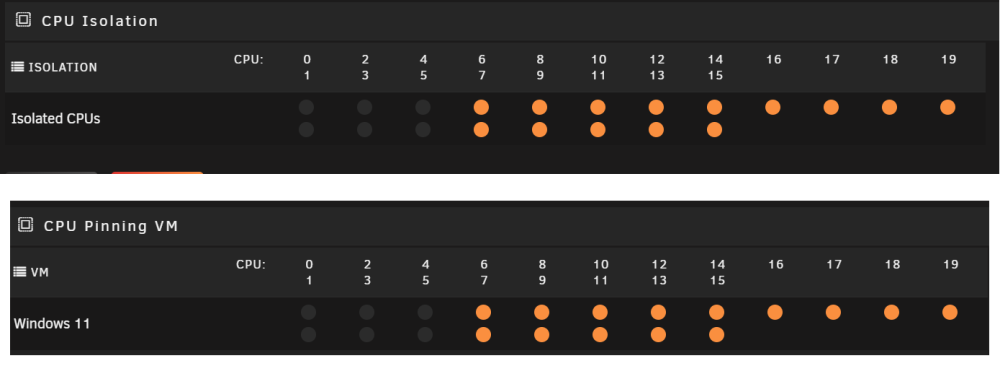
I have a 12700k. I ended up giving Unraid and dockers the first 6 threads and isolated the rest for my VM.
-
I found that isolating a bunch of CPU threads for my VM has drastically improved performance. Do you have any isolation or pinning configured?
-
I updated my setup post here: with information about the latest drivers. I added and cleaned up some screenshots as well. Hopefully now that this is reliable this post can help some more people get up and running with VirtioFS.
-
Thanks for this Simon. Everything is looking good on these drivers.

