





mackid1993
Members
-
Joined
-
Last visited
Everything posted by mackid1993
-
So I have about 4 hours of uptime now. Memory usage is pretty high and I noticed it's all in the non paged pool. The non paged pool is using 4.7 GB. I'm wondering if it's that high as I'm running a backup and it's copying thousands of files. I wonder now if it will continue to grow or eventually stop before the machine hangs.
-
I was able to run Virtiofsd with the --inode-file-handles=mandatory switch. I created a script: #!/bin/sh exec /usr/libexec/virtiofsd --inode-file-handles=mandatory -o sandbox=chroot "$@" And called it virtiofsd.sh and placed it in /usr/libexec. In my xml I just changed /usr/libexec/virtiofsd to virtiofsd.sh so it runs with the argument. I am testing this with the latest rust version. To make this persistent I created a folder in /boot called virtiofsd and placed the rust version in there along with my shell script. I added the following to /boot/config/go mv /usr/libexec/virtiofsd /usr/libexec/virtiofsd.old cp /boot/virtiofsd/virtiofsd /usr/libexec/virtiofsd chmod +x /usr/libexec/virtiofsd cp /boot/virtiofsd/virtiofsd.sh /usr/libexec/virtiofsd.sh chmod +x /usr/libexec/virtiofsd.sh Now to test with Backblaze Personal Backup on Win 11 and hopefully no crashing now. @SimonF does this sound like a good test case? EDIT: Prior to running with --inode-file-handles=mandatory I noticed that in task manager processes were reporting unusually low memory usage but the overall memory usage percentage was extremely high and it just didn't make any sense. Now I am seeing the opposite where processes report memory usage consistent with what I would expect. I'm hopeful that this may work now.
-
Just wondering if 6.12-RC4 has any changes that may impact this or if there is anything new that I can test? I'm eager to get this working!
-
I hate to say this, but I had a similar issue a while back when my Win 11 VM got insanely slow. I use the VM backup plugin to take monthly backups of my VM's vdisk. Restoring from a backup fixed it for me. Have you tried simply spinning up a new VM to see if it performs normally? Perhaps it is an issue with Windows and not with unRAID?
-
It seems to be an issue with QEMU which is external to unRAID. This is also a really new feature and it appears that it is more stable in Linux.
-
No actually, it's the <source type='memfd'/> <access mode='shared'/> that causes the instability for me. The way you have it is just fine. The issue must be something else.
-
Try taking <memoryBacking> <nosharepages/> <source type='memfd'/> <access mode='shared'/> </memoryBacking> out of your XML. This is used for VirtioFS and when I have this in the XML (it is in by default now), it causes my VM to slowly lock up. This issue with memorybacking has been widely reported. Perhaps it is causing your issue?
-
No problem. Let me know if there is anything else I can help test. I noticed with Virtiofsd 1.6.0 the lockup was more severe. RDP actually wouldn't connect. When I connected over VNC the lockscreen clock was frozen. Previously it would just get slower and slower and slower until it would gradually lock up. This time it completely froze.
-
Perhaps the issue is related to QEMU and not Virtiofsd.
-
Just to follow up. I tested with the latest version of Virtiofsd 1.6.0 and my Win 11 VM locked up after about 12 hours.
-
I got this working, it took me a little while to figure out what flock and posix_lock meant. I edited the xml and switched those from on to off for each mount. Now Windows is booted. I'm going to test and report back tomorrow if it locked up. I'm doing a trial of Backblaze personal backup now to really stress test it. Thanks Simon!
-
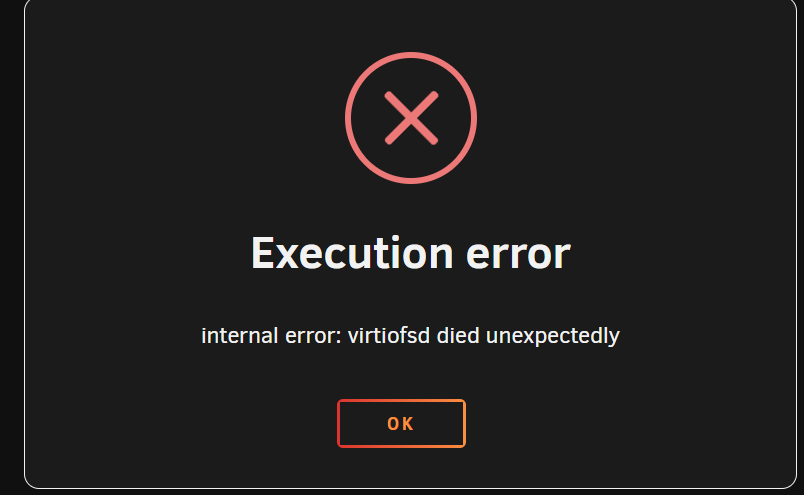
@SimonF so I did this and replaced the file. When I add a few mounts and try to start my VM I get this error.
-
Does anyone know how to get the rust version of Virtiofsd to work. I'm sure I'm just missing something stupid. I connected to my server over SFTP to replace the file. I'm wondering if I should be replacing it a different way?
-
I had trouble getting this to work. I swapped the file out but after that my VM's wouldn't start. Also the changed file didn't persist across reboots so I'm sure I did something wrong. I'm assuming I have to set some permissions on the file but I honestly am not proficient enough with Linux to know what exactly I have to do.
-
Does anyone know if Windows 10/11 still locks up on 6.12-rc3? I was still having lockups on rc2 and haven't had the time or patience to test again on rc3.
-
@SimonF will updating that file potentially resolve my issue that I was having back in late March. I am referring to the one that you created the report for here: https://gitlab.com/qemu-project/qemu/-/issues/1270. Thank you!
-
Is there a way to force the plugin to run an older version of rclone. My hosting provider is running an ancient version of ProFTPd and supposedly it will be upgraded next month. It's causing issues with the latest version of rclone and I was hoping to find a way to revert to v1.61.1. Is there any way I can downgrade the plugin? Thanks. Edit: just incase anyone is wondering I figured this out myself. It's only a temporary solution until my hosting provider updates ProFTPD. I went to /usr/local/emhttp/plugins/rclone and made a copy of updaterclone.sh. I then edited my copy and changed rcloneurl on lines 4 and 6 to the download for 1.61.1. I then ran the script and it downgraded and my FTPS connection works again. Once my provider updates their servers I'll reinstall the plugin to clean this up but for now I'm back online!
-
@SimonF I'm just going to keep memorybacking off until Qemu issues a patch. Thanks for your help!
-
Thanks, hopefully this will be fixed in a future patch then!
-
Hi Simon, This is my current XML. I removed <nosharepages/> to test. I found after a lot of patience that the VM just gets extremely slow. This morning I waited about 10 minutes for my RDP session to connect and the System process was going crazy, very high CPU usage and disk activity was pegged at 100%. So it's locking up in the sense that it is getting unbearably slow. Previously I just thought it was frozen but after waiting a while today I found that it is responsive, just insanely bogged down after 10-12 hours of uptime. <?xml version='1.0' encoding='UTF-8'?> <domain type='kvm' id='4'> <name>Windows 11_new</name> <uuid>c9aff419-2b45-d22b-9733-6412b5ac4478</uuid> <metadata> <vmtemplate xmlns="unraid" name="Windows 11" icon="windows11.png" os="windowstpm"/> </metadata> <memory unit='KiB'>8388608</memory> <currentMemory unit='KiB'>8388608</currentMemory> <memoryBacking> <source type='memfd'/> <access mode='shared'/> </memoryBacking> <vcpu placement='static'>8</vcpu> <cputune> <vcpupin vcpu='0' cpuset='0'/> <vcpupin vcpu='1' cpuset='4'/> <vcpupin vcpu='2' cpuset='1'/> <vcpupin vcpu='3' cpuset='5'/> <vcpupin vcpu='4' cpuset='2'/> <vcpupin vcpu='5' cpuset='6'/> <vcpupin vcpu='6' cpuset='3'/> <vcpupin vcpu='7' cpuset='7'/> </cputune> <resource> <partition>/machine</partition> </resource> <os> <type arch='x86_64' machine='pc-i440fx-7.1'>hvm</type> <loader readonly='yes' type='pflash'>/usr/share/qemu/ovmf-x64/OVMF_CODE-pure-efi-tpm.fd</loader> <nvram>/etc/libvirt/qemu/nvram/c9aff419-2b45-d22b-9733-6412b5ac4478_VARS-pure-efi-tpm.fd</nvram> </os> <features> <acpi/> <apic/> <hyperv mode='custom'> <relaxed state='on'/> <vapic state='on'/> <spinlocks state='on' retries='8191'/> <vendor_id state='on' value='none'/> </hyperv> </features> <cpu mode='host-passthrough' check='none' migratable='on'> <topology sockets='1' dies='1' cores='4' threads='2'/> <cache mode='passthrough'/> </cpu> <clock offset='localtime'> <timer name='hypervclock' present='yes'/> <timer name='hpet' present='no'/> </clock> <on_poweroff>destroy</on_poweroff> <on_reboot>restart</on_reboot> <on_crash>restart</on_crash> <devices> <emulator>/usr/local/sbin/qemu</emulator> <disk type='file' device='disk'> <driver name='qemu' type='raw' cache='writeback'/> <source file='/mnt/user/domains/Windows 11_new/vdisk1.img' index='1'/> <backingStore/> <target dev='hdc' bus='virtio'/> <serial>vdisk1</serial> <boot order='1'/> <alias name='virtio-disk2'/> <address type='pci' domain='0x0000' bus='0x00' slot='0x0e' function='0x0'/> </disk> <controller type='usb' index='0' model='ich9-ehci1'> <alias name='usb'/> <address type='pci' domain='0x0000' bus='0x00' slot='0x07' function='0x7'/> </controller> <controller type='usb' index='0' model='ich9-uhci1'> <alias name='usb'/> <master startport='0'/> <address type='pci' domain='0x0000' bus='0x00' slot='0x07' function='0x0' multifunction='on'/> </controller> <controller type='usb' index='0' model='ich9-uhci2'> <alias name='usb'/> <master startport='2'/> <address type='pci' domain='0x0000' bus='0x00' slot='0x07' function='0x1'/> </controller> <controller type='usb' index='0' model='ich9-uhci3'> <alias name='usb'/> <master startport='4'/> <address type='pci' domain='0x0000' bus='0x00' slot='0x07' function='0x2'/> </controller> <controller type='pci' index='0' model='pci-root'> <alias name='pci.0'/> </controller> <controller type='virtio-serial' index='0'> <alias name='virtio-serial0'/> <address type='pci' domain='0x0000' bus='0x00' slot='0x0d' function='0x0'/> </controller> <filesystem type='mount' accessmode='passthrough'> <driver type='virtiofs' queue='1024'/> <binary path='/usr/libexec/virtiofsd' xattr='on'> <cache mode='always'/> <sandbox mode='chroot'/> <lock posix='on' flock='on'/> </binary> <source dir='/mnt/user/Archives'/> <target dir='Archives'/> <alias name='fs0'/> <address type='pci' domain='0x0000' bus='0x00' slot='0x03' function='0x0'/> </filesystem> <filesystem type='mount' accessmode='passthrough'> <driver type='virtiofs' queue='1024'/> <binary path='/usr/libexec/virtiofsd' xattr='on'> <cache mode='always'/> <sandbox mode='chroot'/> <lock posix='on' flock='on'/> </binary> <source dir='/mnt/user/Backup'/> <target dir='Backup'/> <alias name='fs1'/> <address type='pci' domain='0x0000' bus='0x00' slot='0x04' function='0x0'/> </filesystem> <filesystem type='mount' accessmode='passthrough'> <driver type='virtiofs' queue='1024'/> <binary path='/usr/libexec/virtiofsd' xattr='on'> <cache mode='always'/> <sandbox mode='chroot'/> <lock posix='on' flock='on'/> </binary> <source dir='/mnt/user/CommunityApplicationsAppdataBackup'/> <target dir='CommunityApplicationsAppdataBackup'/> <alias name='fs2'/> <address type='pci' domain='0x0000' bus='0x00' slot='0x05' function='0x0'/> </filesystem> <filesystem type='mount' accessmode='passthrough'> <driver type='virtiofs' queue='1024'/> <binary path='/usr/libexec/virtiofsd' xattr='on'> <cache mode='always'/> <sandbox mode='chroot'/> <lock posix='on' flock='on'/> </binary> <source dir='/mnt/user/Downloads'/> <target dir='Downloads'/> <alias name='fs3'/> <address type='pci' domain='0x0000' bus='0x00' slot='0x06' function='0x0'/> </filesystem> <filesystem type='mount' accessmode='passthrough'> <driver type='virtiofs' queue='1024'/> <binary path='/usr/libexec/virtiofsd' xattr='on'> <cache mode='always'/> <sandbox mode='chroot'/> <lock posix='on' flock='on'/> </binary> <source dir='/mnt/user/Movies'/> <target dir='Movies'/> <alias name='fs4'/> <address type='pci' domain='0x0000' bus='0x00' slot='0x08' function='0x0'/> </filesystem> <filesystem type='mount' accessmode='passthrough'> <driver type='virtiofs' queue='1024'/> <binary path='/usr/libexec/virtiofsd' xattr='on'> <cache mode='always'/> <sandbox mode='chroot'/> <lock posix='on' flock='on'/> </binary> <source dir='/mnt/user/Music'/> <target dir='Music'/> <alias name='fs5'/> <address type='pci' domain='0x0000' bus='0x00' slot='0x09' function='0x0'/> </filesystem> <filesystem type='mount' accessmode='passthrough'> <driver type='virtiofs' queue='1024'/> <binary path='/usr/libexec/virtiofsd' xattr='on'> <cache mode='always'/> <sandbox mode='chroot'/> <lock posix='on' flock='on'/> </binary> <source dir='/mnt/user/Software'/> <target dir='Software'/> <alias name='fs6'/> <address type='pci' domain='0x0000' bus='0x00' slot='0x0a' function='0x0'/> </filesystem> <filesystem type='mount' accessmode='passthrough'> <driver type='virtiofs' queue='1024'/> <binary path='/usr/libexec/virtiofsd' xattr='on'> <cache mode='always'/> <sandbox mode='chroot'/> <lock posix='on' flock='on'/> </binary> <source dir='/mnt/user/TV'/> <target dir='TV'/> <alias name='fs7'/> <address type='pci' domain='0x0000' bus='0x00' slot='0x0b' function='0x0'/> </filesystem> <interface type='bridge'> <mac address='52:54:00:d1:06:c0'/> <source bridge='br0'/> <target dev='vnet3'/> <model type='virtio-net'/> <alias name='net0'/> <address type='pci' domain='0x0000' bus='0x00' slot='0x0c' function='0x0'/> </interface> <serial type='pty'> <source path='/dev/pts/1'/> <target type='isa-serial' port='0'> <model name='isa-serial'/> </target> <alias name='serial0'/> </serial> <console type='pty' tty='/dev/pts/1'> <source path='/dev/pts/1'/> <target type='serial' port='0'/> <alias name='serial0'/> </console> <channel type='unix'> <source mode='bind' path='/var/lib/libvirt/qemu/channel/target/domain-4-Windows 11_new/org.qemu.guest_agent.0'/> <target type='virtio' name='org.qemu.guest_agent.0' state='connected'/> <alias name='channel0'/> <address type='virtio-serial' controller='0' bus='0' port='1'/> </channel> <input type='tablet' bus='usb'> <alias name='input0'/> <address type='usb' bus='0' port='1'/> </input> <input type='mouse' bus='ps2'> <alias name='input1'/> </input> <input type='keyboard' bus='ps2'> <alias name='input2'/> </input> <tpm model='tpm-tis'> <backend type='emulator' version='2.0' persistent_state='yes'/> <alias name='tpm0'/> </tpm> <graphics type='vnc' port='5900' autoport='yes' websocket='5700' listen='0.0.0.0' keymap='en-us'> <listen type='address' address='0.0.0.0'/> </graphics> <audio id='1' type='none'/> <video> <model type='qxl' ram='65536' vram='65536' vgamem='16384' heads='1' primary='yes'/> <alias name='video0'/> <address type='pci' domain='0x0000' bus='0x00' slot='0x02' function='0x0'/> </video> <memballoon model='virtio'> <alias name='balloon0'/> <address type='pci' domain='0x0000' bus='0x00' slot='0x0f' function='0x0'/> </memballoon> </devices> <seclabel type='dynamic' model='dac' relabel='yes'> <label>+0:+100</label> <imagelabel>+0:+100</imagelabel> </seclabel> </domain> I do have the baloon driver installed and service enabled in this VM. I disabled it in the old VM. Should I uninstall the driver/service in this VM to test?
-
Thanks for this. I did have the new VM lock up last night again. However when I recreated it I forgot to take out <nosharepages/>. I took that out of the xml and rebooted and hopefully that may lead to stability after 10-12 hours of uptime.
-
I had some time tonight and built a fresh Win 11 VM with VirtioFS, everything is fresh and completely stock with the latest virtio drivers and winfsp. I assigned 8 GB of memory to the VM. To test I opened up a huge amount browser tabs. Vivaldi was using 3 GB of ram and the other processes on the machine weren't using a significant amount yet task manager was reporting 95+% memory usage. I'm convinced that the memory percentage in task manager is borked in these VMs baloon on or off. At this point I'm going to let it run overnight and see if it is stable and responsive in the morning. If after 24 hours it doesn't lock up I'm going to assume it is stable but perhaps the memory percentage is misrepresented.
-
I had to disable memory backing. Hopefully this becomes more stable with 6.12 stable but for now it's better but still not 100% stable. I've spent a few days trying to get this to work and it's just not worth the energy for me right now.
-
Yes I still have that removed. I let it run overnight and by the morning task manager was showing crazy high memory usage. As a side note for some reason I didn't have windows managing my swap file. I corrected that but I don't think that had much to do with it.
-
@SimonF, I have my initial and max memory set both to the same thing 16384 MB. I'm wondering if disabling the baloon service in Windows might help this issue. I disabled the service and also disabled the driver in device manager and after rebooting memory usage seems to add up now for each process. I also had a ton of processes that reported 0.0 MB used which now report memory usage. Could this have been the problem?



