





mackid1993
Members
-
Joined
-
Last visited
Everything posted by mackid1993
-
I'm not really seeing a difference. I also ran comparisons with Geekbench and the difference in performance seems like none. I got a lower score when using host passthrough rather than emulated which was probably just by chance. If I am correct maybe this can be something that can be added as an option in the GUI down the line. I have WSL working fine and my server is sitting at idle right now with the VM running in this configuration. I'm not home right now so it's got to be 80 degrees Farenheit in my apartment with the AC off and my CPU is sitting at 37 degrees celcius currently. From my testing I see no difference other than nested virtualization working. If there is anything I can do to help test performance let me know! Edit: Perhaps if this is a viable solution it may be helpful to make a more visible thread to help other users. I've seen a bunch of threads on this issue and it may be helpful to consolidate the discussion into one place.
-
My CPU usage is fairly low. I also ran Geekbench and performance was close to baseline bare metal 12700k. Edit: To test I rolled everything back and ran Geekbench again. I actually got a lower score with the default XML for some reason.
-
Sorry to dig up this old thread, I've been following it for a while and was able to find a solution for my i7 12700K with the help of this thread: https://superuser.com/questions/1431148/kvm-nested-virtualbox-windows-guest/1589286#1589286 Try modifying this section of your XML: <cpu mode='host-passthrough' check='none' migratable='on'> <topology sockets='1' dies='1' cores='8' threads='2'/> <cache mode='passthrough'/> </cpu> Change it to this, just be sure to keep your <topology> line the same to not change the core count: <cpu mode='custom' match='exact' check='partial'> <model fallback='allow'>Skylake-Client-noTSX-IBRS</model> <topology sockets='1' dies='1' cores='20' threads='1'/> <feature policy='disable' name='hypervisor'/> <feature policy='require' name='vmx'/> <feature policy='disable' name='mpx'/> </cpu> I also had to add <feature policy='disable' name='mpx'/> which wasn't in the superuser post. I was getting an error when booting my VM so there may be some modification needed based on CPU model. With this I was able to get WSL2 working! I'm not sure if this will greatly impact performance. I'm hoping someone more knowledgeable like @SimonF may be willing to comment as I've found him to be all knowing when it comes to Unraid and VMs!
-
Thanks for the update. Hopefully we don't have to wait super long.
-
It must be a 6.12 bug. Personally it's not causing an issue for me.
-
I'm seeing this as well but my VM starts and my GPU passes through just fine. I'm wondering if this is a bug. I'm seeing this with a Quadro P400 on Win 11.
-
Any news on QEMU 7.2+? Perhaps in 6.12.2?
-
You may want to consider going forward using unBALAENCE to move the data from your old disk to the new one rather than rebuilding the drive from parity. That is much safer than what you are doing.
-
That would be great. I think the community would be extremely grateful if a plugin could patch QEMU to fix this prior to 6.13 coming out likely later this year.
-
Is there any way to manually upgrade to QEMU 7.2 like how were were able to switch to the rust version of Virtiofsd?
-
I've opened a support ticket with Reddit about this guy. Hopefully they remove him. He's clearly in violation of their Code of Conduct.
-
Oh that would be awesome if Lime Tech can do that. Thanks for the update Simon!
-
Any news on this? Have the latest 6.12 RCs made any changes that could fix this memory leak?
-
Sorry! I missed this reply. Unfortunately when this happened I rolled back to Stable 6.11.5 and the issue went away. I'm going to stick to the stable builds for now as this is my primary server and I decided playing with pre-release software isn't in my best interest. Thank you for your help though.
-
These were actually missing when the array was stopped too. Funny thing is I just downgraded from 6.12-rc6 to 6.11.5 and everything is back to normal. Must be a bug!
-
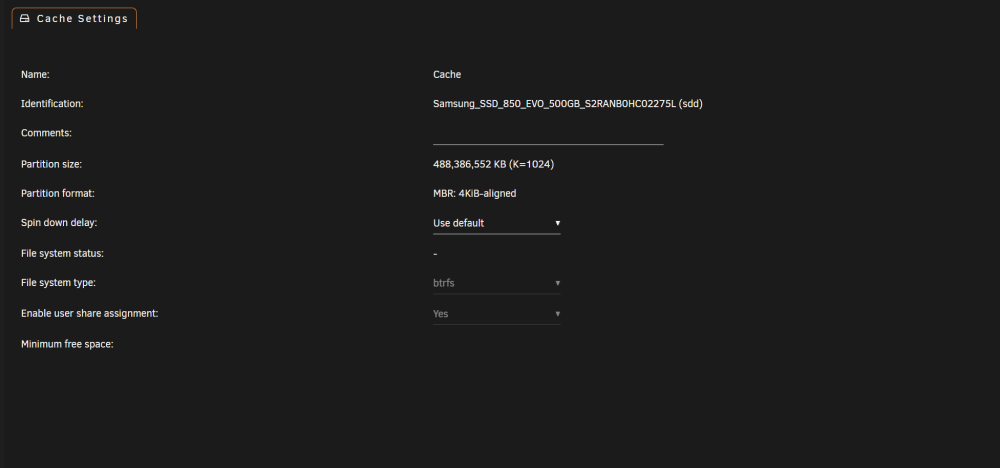
I've been having some VM performance issues and when I went to check my cache pool I noticed that the settings page is missing pretty much every option. I'm not sure what to do or what I'm doing wrong. I'm running two drives in a BTRFS RAID 0.
-
Just curious if this has been updated to account for the new Appdata Backup plugin?
-
Looking into this a little more I created a folder in /mnt/cache/appdata called rclonecache and set the parameter in my mount script --cache-dir=/mnt/cache/appdata/rclonecache I found that when using --vfs-cache-mode writes which is necessary in some cases particularly with cloud storage like Dropbox my server was running out of memory. This was happening with FTP as well. I think the problem was that because Unraid runs in memory and that this is a plugin, the default cache location is essentially on ramdisk. Directing rclone's cache to my cache drive rather than system memory fixed my lockups. During a large transfer I saw the cache folder I created in appdata grow to 15 GB in size and then later on reduce to about 50 MB. A 15 GB cache is enough to use up the free RAM in my server (32 GB total) and cause the WebUI to lockup.
-
Simon said in an earlier post that memfd/shared may not be needed eventually if I understood correctly. If/when that occurs hopefully this won't be an issue any longer. Until then I removed everything but </nosharepages> from my memory backing config and my VM is stable. Other than that the non-paged pool will slowly fill up until it crashes.
-
I was suddenly having my rclone FTP mount chew through memory and crash my server. I use rclone combined with Sonarr to copy content from my seedbox to my server. I noticed that all of the sudden my seedbox speeds have increased (before I would get 200-300 mbps but now I'm getting closer to 500-700 mbps) but at the same time the increased bandwidth may have broken something in my config or mount script because my server would suddenly run out of memory after a few minutes of Sonarr importing. What fixed it for me was to add --cache-chunk-no-memory to my mount script. I wanted to post this as I saw some others were having issues where rclone was using all of their memory and although the use cases may be different this option helped me and didn't impact transfer speeds in my scenario. Based on my limited understanding it seemed that rclone was buffering data into memory faster than it could release it.
-
@SimonF Thanks as always for your help!
-
I upgraded my server today and decided to enable wake on lan so I can easily power my server back on over my VPN if I'm away from home and there's a power outage or accidental shutdown. To do this I had to add: ethtool -s eth0 wol g to /boot/config/go. Once I did this WoL works perfectly, just running the command once doesn't work reliably as the change doesn't persist on reboot. I'm wondering if /boot/config/go is overwritten or modified when unRAID updates and I will have to readd this? I'm hoping that it doesn't! Thanks!!
-
I have a feeling this is the virtio drivers and not QEMU. Keep an eye on your non paged pool in task manager go to performance and then memory. I found that the non paged pool slowly grows. Usually that is caused by a buggy kernel mode driver. I've tracked it down to refs.sys which is used for Resilient File System (ReFS). I have a feeling VirtioFS is piggybacking off of that somehow and the driver for Windows is still buggy.
-
I also want to draw attention to this Reddit post. I observed the exact same issue described with the non paged pool leak. I used poolmon to track it down and it pointed to refs.sys. The non paged pool will just slowly grow and grow until the VM runs out of memory.
-
I just wanted to update. While It didn't lock up over night the non paged pool kept growing and growing and reached over 5 GB. I did tinker with a few other options with Virtiofsd but nothing seemed to help. I think this may be a driver issue in Windows.



