





cscoppa
Members
-
Joined
-
Last visited
Everything posted by cscoppa
-
I believe I took that screenshot right after starting playback, so it is probably still building the buffer.
-
APC units are probably the safest bet, but I would imagine others might be supported. More info here: http://apcupsd.org/manual/manual.html
-
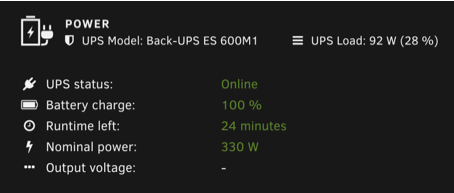
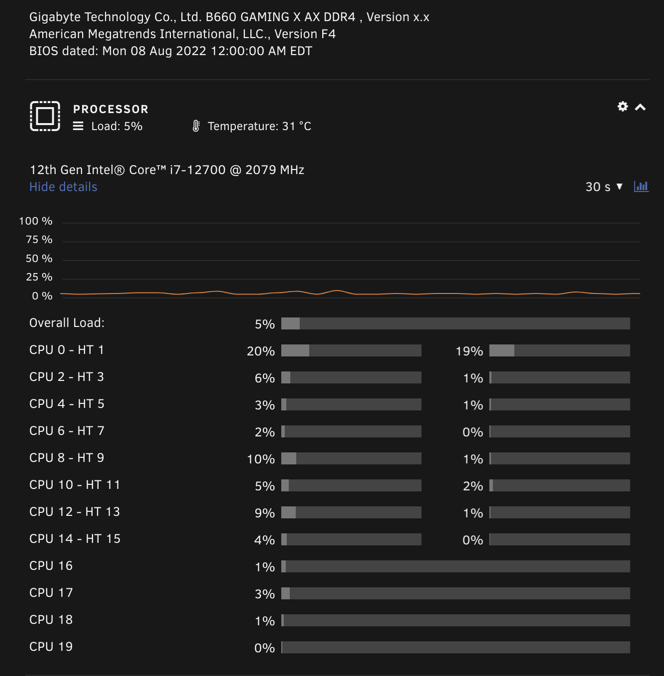
Pretty happy with the power usage on my 12700. (non-K on purpose) This is with a Windows 11 VM running with 8 cameras in Blue Iris going, about 20 Dockers, and all drives (4) spun up at the moment:
-
I can confirm the mac still changes on every boot with 6.11. (for shim-br0, which is what the router sees as the main)
-
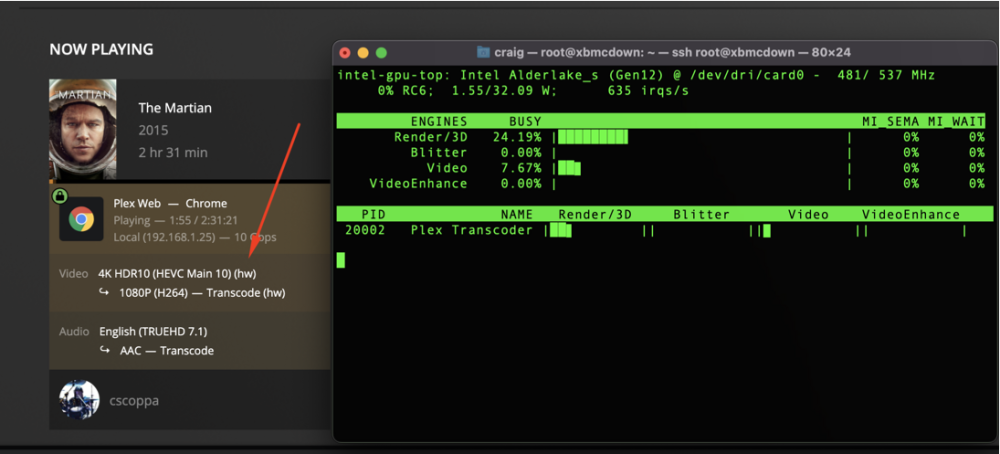
Working here too on the i7-12700. NOTE: You have to be on the Plexpass version. ( plexinc/pms-docker:plexpass )
-
What I did is install Watchdog on another client, then copied both its runtime and config files to the Docker. I use this to pickup new recordings that my HDHomeRun records. Once the files are in place you toggle it on via the web UI.
-
Same here ... usually I go into a FILE - LIST view, and can tell pretty quickly that way what was scraped in and what needs a little "help" (manual refresh, sometimes changing the title that's searched)
-
I ended up figuring it out. I copied the "service.watchdog" folder from another install into the Docker container, then went into the Web UI and flipped this button. Seems to be working nicely: http://prnt.sc/eco8mz
-
Is there a way to install Watchdog into kodi-headless? I'm new to Docker in general but I think I have it running ok, here's my kodi.log: http://pastebin.com/9UAPd9DV I wasn't sure if there's something cooked in to trigger library updates, or if not how that's usually initiated.


