





cscoppa
Members
-
Joined
-
Last visited
Everything posted by cscoppa
-
I will, thanks so much for the replies. :-)
-
So far it seems to be behaving, I guess time will tell. Still confused as to why it "lost" it's network configuration completely. It went from static with a bridge to automatic / no bridge, so I had to boot in GUI mode to fix it. I also think the read only bug must have caused some corruption in my docker.img, even though the btrfs scrub status window said "no errors".
-
So out of desperation, I deleted my docker.img and manually re-created the containers I use the most. So far this seems to have helped with me not being able to interact with the docker page. Fresh Diagnostics attached .... thanks!!! xbmcdown-diagnostics-20251110-0644.zip
-
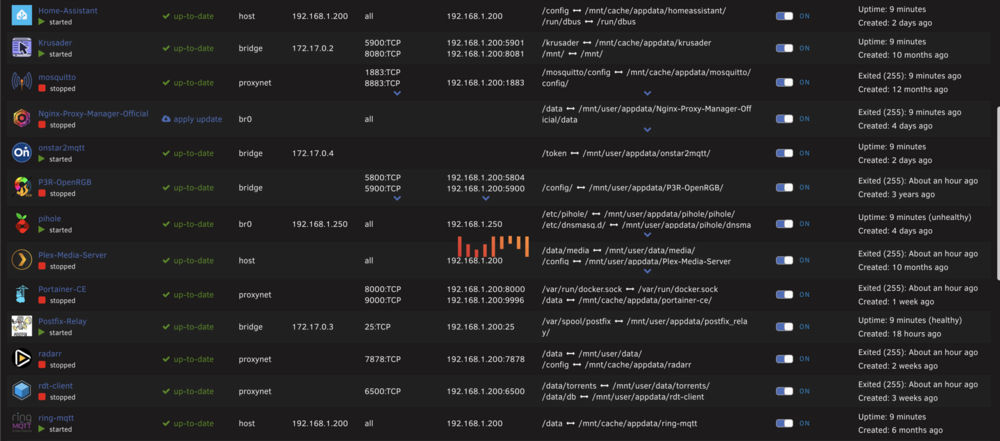
Hello, my Unraid box has been solid for years, but since the update to 7.2, I've been having a lot of problems. The first one I noticed is the file system would suddenly become read only. Later today I lost networking, turns out the server lost it's config, so I had to recreate it. Now it's showing "Please wait... starting up containers" on the Docker page. I updated to 7.2.1 RC1 as apparently not being able to list the contents of /mnt/user is a known issue, but still no luck. The web ui is frequently unresponsive, which makes troubleshooting even harder. Diagnostics are attached, if anyone has any ideas I'd be very grateful. xbmcdown-diagnostics-20251109-1854.zip
-
If it helps, I had to disable, apply, enable, apply "Enable USB Manager Hotplug on VM page" to get it to show up in the VM page. Just installing the plugin isn't enough.
-
Thanks, I might try this. Right now there's 2 cards, the Nvidia and the Intel, so I'd be adding a 3rd for the "virtual" ... guessing that would be VNC.
-
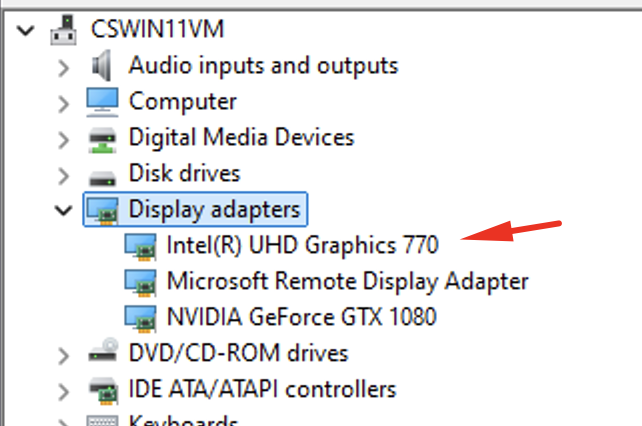
Awesome, thanks guys, I'll give this a shot. Sorry for being dense, I didn't realize it would still show up in the drop-down list in VM manager without being binded first. EDIT: That did the trick! Unbinded, still getting passed through to the VM. You learn something new every day.
-
So how do I get the iGPU to show up in the Win11 VM without binding it? I'm using the iGPU in Windows for hardware acceleration in Blue Iris. (working great, just the startup error above) Sorry if I'm slow, can I still pass through this iGPU sub-device to the VM without binding it?
-
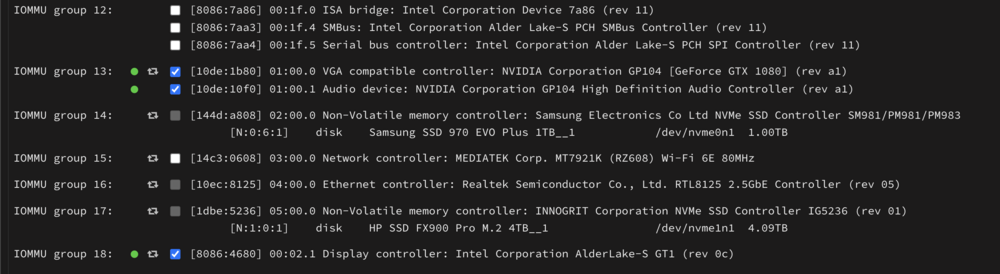
I'm not binding the main device, only the 2.1 sub-device so it can be passed through to the VM. Not sure I understand your reply...
-
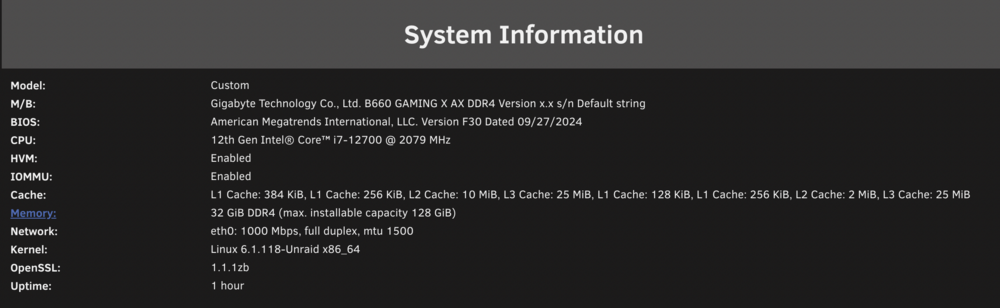
Hello, I successfully have SR-IOV working on my 12th gen Unraid box. I have the iGPU and a GTX1080 passed through to a Win11 VM and both have drivers loaded properly. Everything is great except when I reboot, I get this: Event: VM Autostart disabled Subject: vfio-pci-errors Description: VM Autostart disabled due to vfio-bind error Importance: alert Please review /var/log/vfio-pci-errors cat /var/log/vfio-pci-errors Error: Device 0000:00:02.1 does not exist, unable to bind device But it's there: lspci | grep 2.1 00:02.1 Display controller: Intel Corporation AlderLake-S GT1 (rev 0c) This looks correct: cat /boot/config/vfio-pci.cfg BIND=0000:01:00.0|10de:1b80 0000:01:00.1|10de:10f0 0000:00:02.1|8086:4680 I have tried unchecking, and rechecking a box and clicking bind, but doesn't seem to help. vfio-pci.cfg looks correct to me. Stumped as to what is causing this error. dmesg | grep i915 [ 70.705977] i915 0000:00:02.0: enabling device (0006 -> 0007) [ 70.706075] i915 0000:00:02.0: Running in SR-IOV PF mode [ 70.706747] i915 0000:00:02.0: [drm] VT-d active for gfx access [ 70.706778] i915 0000:00:02.0: [drm] Using Transparent Hugepages [ 70.707598] mei_hdcp 0000:00:16.0-b638ab7e-94e2-4ea2-a552-d1c54b627f04: bound 0000:00:02.0 (ops i915_hdcp_component_ops [i915]) [ 70.709737] i915 0000:00:02.0: [drm] Finished loading DMC firmware i915/adls_dmc_ver2_01.bin (v2.1) [ 70.729806] i915 0000:00:02.0: [drm] GT0: GuC firmware i915/tgl_guc_70.bin version 70.13.1 [ 70.729809] i915 0000:00:02.0: [drm] GT0: HuC firmware i915/tgl_huc.bin version 7.9.3 [ 70.732863] i915 0000:00:02.0: [drm] GT0: HuC: authenticated for all workloads! [ 70.733265] i915 0000:00:02.0: [drm] GT0: GUC: submission enabled [ 70.733265] i915 0000:00:02.0: [drm] GT0: GUC: SLPC enabled [ 70.733606] i915 0000:00:02.0: [drm] GuC RC: enabled [ 70.734088] mei_pxp 0000:00:16.0-fbf6fcf1-96cf-4e2e-a6a6-1bab8cbe36b1: bound 0000:00:02.0 (ops i915_pxp_tee_component_ops [i915]) [ 70.734152] i915 0000:00:02.0: [drm] Protected Xe Path (PXP) protected content support initialized [ 70.734696] [drm] Initialized i915 1.6.0 20201103 for 0000:00:02.0 on minor 0 [ 70.734878] i915 0000:00:02.0: 7 VFs could be associated with this PF [ 70.735333] i915 0000:00:02.0: [drm] Cannot find any crtc or sizes [ 70.735536] i915 0000:00:02.0: [drm] Cannot find any crtc or sizes [ 72.922645] i915 0000:00:02.1: enabling device (0000 -> 0002) [ 72.922655] i915 0000:00:02.1: Running in SR-IOV VF mode [ 72.923632] i915 0000:00:02.1: [drm] *ERROR* GT0: IOV: Unable to confirm version 1.4 (0000000000000000) [ 72.923707] i915 0000:00:02.1: [drm] *ERROR* GT0: IOV: Found interface version 0.1.4.1 [ 72.924184] i915 0000:00:02.1: [drm] VT-d active for gfx access [ 72.924193] i915 0000:00:02.1: [drm] Using Transparent Hugepages [ 72.924627] i915 0000:00:02.1: [drm] *ERROR* GT0: IOV: Unable to confirm version 1.4 (0000000000000000) [ 72.924637] i915 0000:00:02.1: [drm] *ERROR* GT0: IOV: Found interface version 0.1.4.1 [ 72.924868] i915 0000:00:02.1: GuC firmware PRELOADED version 0.0 submission:SR-IOV VF [ 72.924869] i915 0000:00:02.1: HuC firmware PRELOADED [ 72.926964] i915 0000:00:02.1: [drm] Protected Xe Path (PXP) protected content support initialized [ 72.926966] i915 0000:00:02.1: [drm] PMU not supported for this GPU. [ 72.926998] [drm] Initialized i915 1.6.0 20201103 for 0000:00:02.1 on minor 1 [ 72.927071] i915 0000:00:02.0: Enabled 1 VFs [ 74.010166] i915 0000:00:02.1: [drm] *ERROR* tlb invalidation response timed out for seqno 23 [ 121.310200] i915 0000:00:02.0: VF1 FLR [ 121.605273] i915 0000:00:02.0: VF1 FLR xbmcdown-diagnostics-20241222-1021.zip
-
I wasn't on that page at all, just the dashboard .... searched for Mover, took the first hit, and got the result I posted above. I should add I haven't used Preclear in a LONG time, since I first setup my server a few years ago.
-
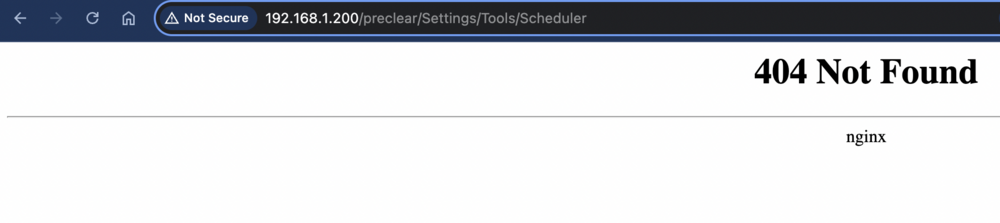
It's definitely broken ... If I start the search from the Dashboard, it's still adding in /preclear which breaks the destination URL: http://192.168.1.200/preclear/Settings/Tools/Scheduler EDIT: Removing the Unassigned Devices Preclear plugin fixes it. That plugin was just updated so I suspect something in that update broke things. unassigned.devices.preclear 2024.12.05 Fix: Change some php variables to constants that don't need to be variables. Fix: Page layout changes.
-
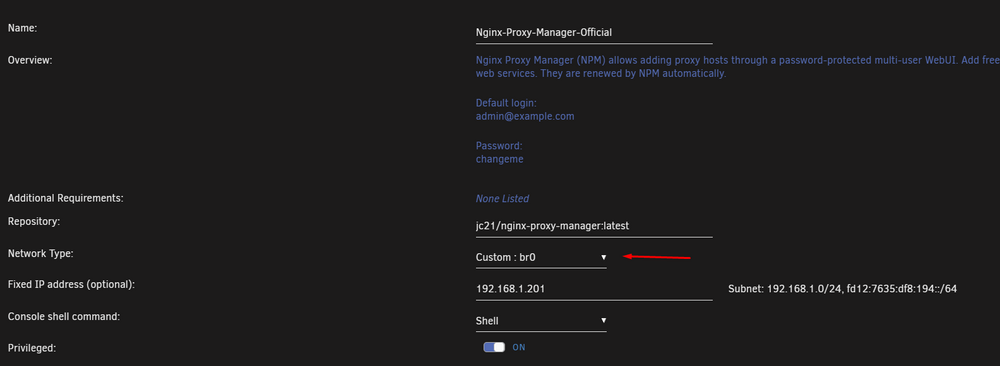
At least twice I've had my whole NPM blow up, where I had to clear out the persistent folder, and set everything up from scratch. No idea why it happens. (last time it was after a dirty shutdown so could have been data corruption)If it helps, I have mine setup like this and it works perfectly:
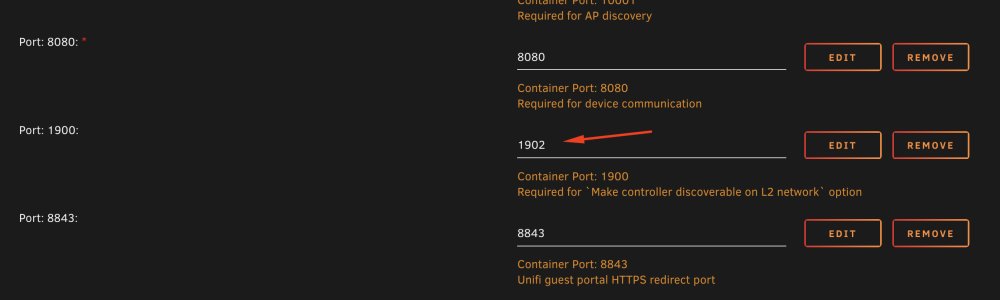
 I got bit by this too, took me a LONG time to stumble on the solution. (Unifi gear)Just do something like this, I don't even have that L2 Discovery option turned on, and I can manage my devices just fine. (and Adopt)
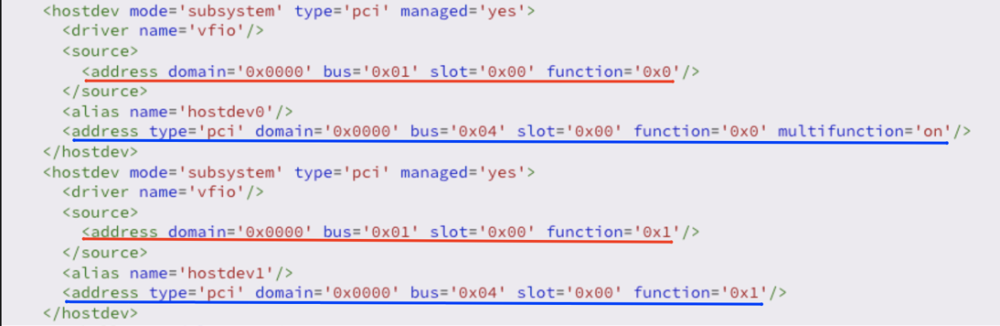
 I 100% agree with you. Years ago I was self-hosted because I started with the Access Points. When I got the Dream Machine I was disappointed in the speed compared to what I had before. I also like the MANY options I have for backups.Just wanted to say thanks for creating this! My UDM (base) died 2 days ago (the classic no lights, full fan death) and needed to get something up quick. This worked out great and is running really fast on my hardware, much better than the UDM. I have the UXG-Lite in transit and will be adding that shortly. For now I'm up on my old Asus RT-AC86U for the router function, and managing my 2x NanoHD's and 1 U6 Pro with this container.THANK YOU Squid and everyone else that contributed to fixing this. It had been driving me crazy for quite some time!!! Zigbee2MQTT was the first one that started showing not available awhile back, then 2 more popped up in my list.PS, I color coded my previous screenshot. The red lines are the "real" location of the GPU and HDMI audio devices respectively. The blue are the virtual ones that are presented to the VM. "vfio" is what gets created when you bind the devices in the Unraid UI.
 I'm not using a ROM file, I don't believe it's needed with my card. (too old to need one I believe) For 2 I let the UI create the XML. (in basic mode) ... then I switched to advanced and modified the XML based on some guides / videos I've seen. Not sure if this is required, as I believe it's mainly to get HDMI audio working. From what I remember, Window sees the GPU, but it sets it at a Code 43 or something, so I had to force the driver in to get it working. I downloaded the driver from Nvidia, ran the installer, and then when I knew it had extracted the files to a temp folder, I switched to Device Manager and installed the driver from there, then I just killed the Nvidia installer. HA=N means Nvidia in Blue Iris ... the "HA" is Hardware Acceleration. If it wasn't working it shows as a "-" instead.
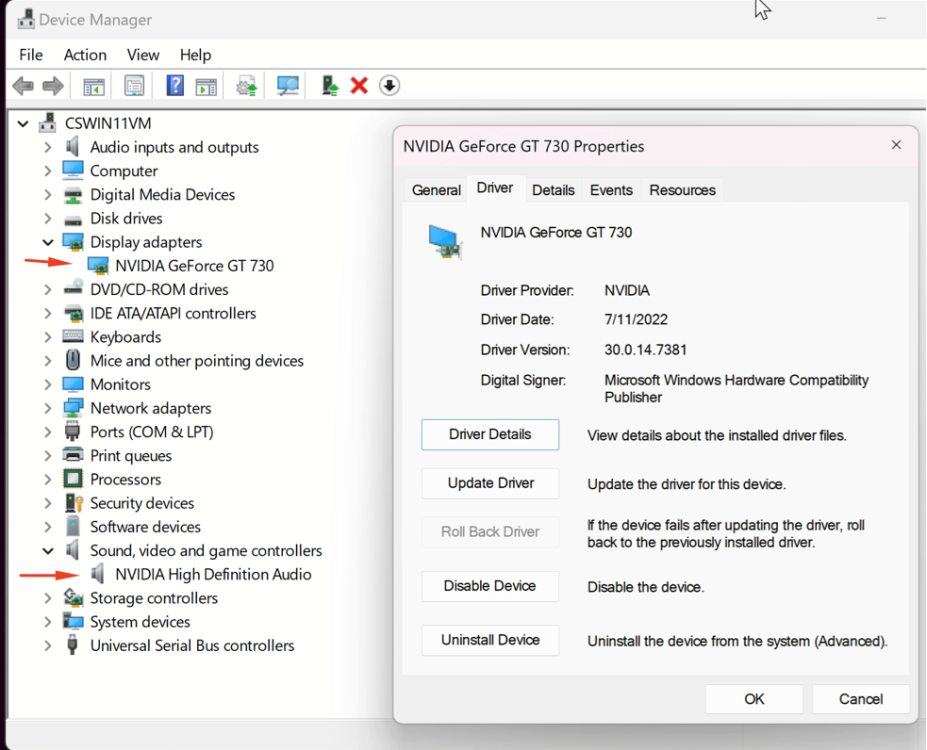 It wasn't too hard, I just had to "force" the driver in by starting the installer, switching to Device Manager, and pointing it at the temp driver install folder to get the driver to go in. TOOLS --> SYSTEM DEVICES:
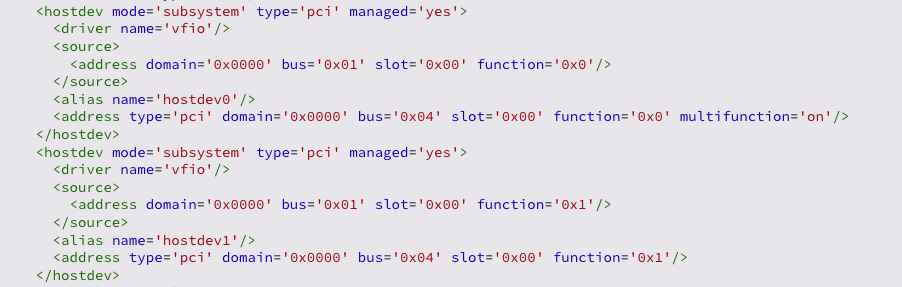
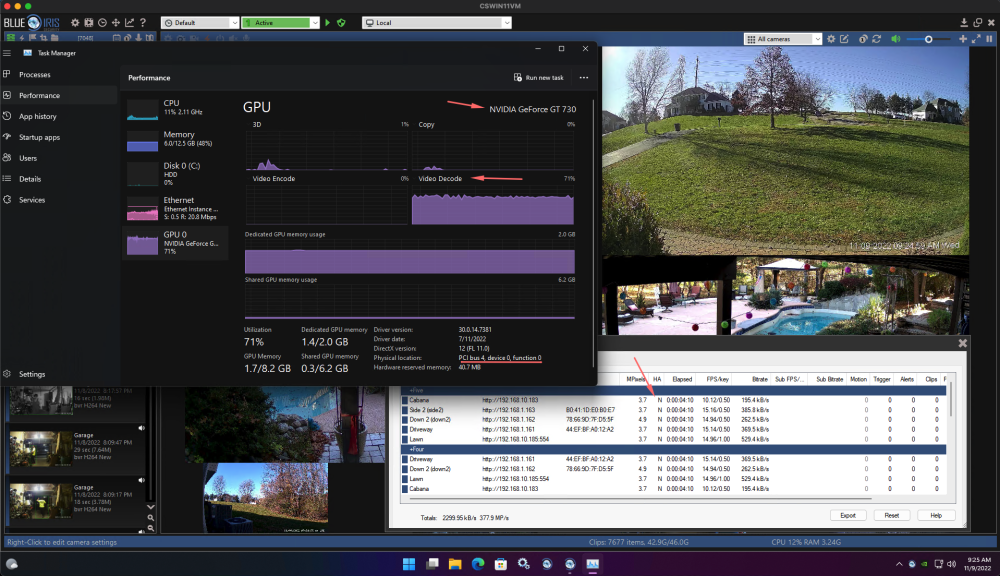 Same here, when I first built the box. I ended up flipping it around and using the iGPU for Plex and passing through my old GTX 730 to a Win11 VM for Blue Iris to use. I don't transcode in Plex very often (prefer direct play) so would be interested in getting iGPU passthrough to work.Thank you so much for posting this. I wanted to reconfigure things so that I could turn OFF "Host access to custom networks" as that generates a new MAC address on every boot, and it really is a hacky implementation. I could NOT get local LAN redirects working until I saw your post, and had the idea to move the Unraid UI ports so that NPM runs on the standard 80/443 like your screenshot. Now it's working great so thanks!!!!





