





dee31797
Members
-
Joined
-
Last visited
Everything posted by dee31797
-
Hi, can you post your template xml for intel-gpu-tools and/or handbrake?
-
Those options would be really tough to implement in the docker image, but one suggestion is to use the user scripts plugin that allows time scheduled jobs. #!/bin/bash docker start recordings-converter sleep 8h docker stop recordings-converter exit That script should start the container at the time you set in user scripts, for example 11 p.m., leave it running for 8 hours or until 7 a.m., then stop the container at that time. Sorry I couldn't be of more help.
-
There's a lot of debate on the internet about nvenc vs software encoding and video quality. The consensus I find is that software encoding is better quality, but I personally don't notice much of a difference. I don't know what "ref=5" does, but "bframes" is not supported by NVENC for HEVC except for RTX cards. You can reference which Nvidia cards support B-frames here: https://developer.nvidia.com/video-encode-decode-gpu-support-matrix
-
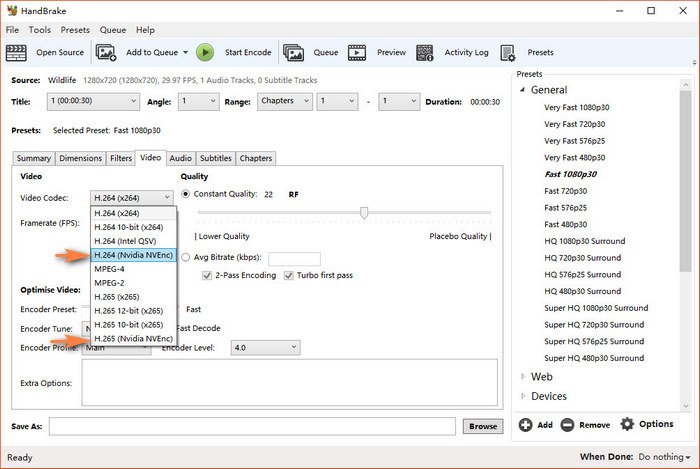
Thanks! Your XML looks good, and it works with other containers so that means you have the drivers installed. When you access the GUI, do you have the options in the pic below?
-
Hi, please attach your template file here. It's located at flash\config\plugins\dockerMan\templates-user my-HandBrake.xml
-
For nvidia, change the variable "ENCODER" to nvidia in the settings in the Docker add --runtime=nvidia to "extra parameters" (switch on advanced view) Click on Add another Path, Port, Variable, Label or Device and change config type to variable. then add in the KEY field NVIDIA_DRIVER_CAPABILITIES and in the VALUE field add "all" Click on Add another Path, Port, Variable, Label or Device and change config type to variable. then add in the KEY field NVIDIA_VISIBLE_DEVICES and in the VALUE field add your GPU UUID edit: this forum post has visual details on add those settings to a container
-
Yes it will convert recursively throughout the sub directories, except hidden folders. For example Plex records in a .grab folder temporarily. Also, the new files will be saved in the same folder path the .ts is located. Thats currently how I use the container. I just leave it running at /mnt/user/videos and anytime a tv show or movie is recorded in a sub directory it finds and converts it. If you run into any issues with that please let me know.
-
I believe the sync issue is with the audio codec being aac_latm, I found other people on the web describing the same issue. None of the channels I have from my provider come like that so I'd never run into this problem before. I'm going to test an updated ffmpeg version and get back to you. Thanks for sharing all the info. It will definitely help me make the setup better!
-
mihcox, I pushed an updated image to see if it fixes it. If you don't mind please try it out: Please delete the failed_conversions file in your appdata /recordings-converter/ folder, and then do a update to the container (Unraid docker tab, advanced view, force update). Send any new postprocess logs. Thanks for helping me improve the docker container!
-
For nvidia processed ones there could be a problem with the nvidia script, send me the postprocess log and I'll check it out.
-
Thank you for the logs, I'm looking into it. Quick question were you using encoder=intel at any point? or always software option?
-
Hi mihcox, Your container settings look correct, and I see the file is definitely a .ts. Sorry that didn't work for you. Check and see if there's a log file in your appdata /recordings-converter/log folder, the name of the log file should start with "postProcess". If they are there attach them here and I check what went wrong.
-
Awesome! Let me know if its an issue with the converted file or not.
-
There was an error in the startup script a few updates back that I think you're running into. I'm still working out the kinks, but I just tested the options you're using and I think I've fixed that issue. Please delete the failed_conversions file in your appdata /recordings-converter/ folder, and then do a update to the container (Unraid docker tab, advanced view, force update). One last thing, make sure the options below are set to either 0, or 1, 0 for no and 1 for yes. -e SUBTITLES=0 or 1 -e DELETE_TS=0 or 1
-
There's log files created in the /config/log folder, should tell us what's failing. On the host side the folder is your appdata /recordings-converter/log. The default user ID is 99 so my guess is a permission issue but attach the log file and I'll check it out
-
as soon as you start the container it watches the /watch folder for .ts files and coverts them. There's really no user interaction. The settings are applied through environment variables in the template such as subtitles, hardware or software encoding, delete .ts after conversion, etc. If you want to use a customize convert script save it in the /config folder as " custom.sh " and the container will execute it once it finds a .ts.
-
Hi @eds All the uGet browser add-ons I could find only work when uGet is installed on the same machine as your browser is installed on.
-
If you pass a directory that doesn't exist to the docker daemon (docker run -v /directory/not/there ... ... ) it will create it. That happens every time you install a container from CA apps and the /config folder is used. /mnt/appdata/new-app-config-folder gets created since the app is new, the folder wouldn't be there yet, as an example.
-
Sorry for the confusion, you were suppose to use your folder where your video files are located, what I put was just an example since I can't know your folder structure. I did mention to you to change it when you first asked about the command.
-
go to docker tab, advanced view
-
Your GPU can do two sessions at a time. Now that I think about it, I'm not sure if decode and encoding the same file counts as the two or not
-
Sorry Max, running ffmpeg from command line isn't as convenient as I initially thought. There's a lot of options you need to understand and make sure they're correct before it'll work.
-
This is a tough one, but I believe it's the folder, are you sure there's a video file here /unraid/user/Window Share/Handbrake/Watch?
-
That looks good, what GPU do you have?
-
Please paste here the exact command you ran
