






NewDisplayName
Members
-
Joined
-
Last visited
Everything posted by NewDisplayName
-
Where exactly i can change these options?
-
I mean it will be 2 years in /normal/folder/movie then moved to unionfs folder.. /unionfs/movie
-
There are no silly questions. Also, it was already found out why i got the directory not empty error, it was the change he did to the script to help ppl understand what directorys are for what. I found a workaround for my "directory problem". Ill just add another directory (the virtual) to the same plex library. Question is only if i add a movie to the library and it get later moved to the new folder, will plex understand this, or is this then a new movie for it? Im asking bc i dont want to show wrong movies as new and also i dont want to reassign the movies when they get moved after 2 years. Couldnt test anymore, ill try again when im on vacation, also ive upgraded my mainboard to double my ram from 16 to 32 gb, but i cant get it working, so that takes my free time up atm. Anyway, i will report!
-
I live my whole live in many rented houses. You just need to buy a <20usd cable and run it from router to server, you dont need any "internet hardware", wtf. And just btw you can take it with you when you leave. I also googled a bit, its even allowed to drill a hole between 2 rooms to for cables, atleast in germany. But anyway, dont see a reason to not add wifi support. (but if i were u i would do anything possible to not use wifi for computers)
-
I never created these directories ... ? root@Unraid-Server:~# vi /mnt/user/mount_unionfs/google_vfs/ movies/ tv_shows/ (im german, so i wont use english names for my folders) Where does they come from!?!?? They always get created when running the mount script. Edit: i found out line 25 "mkdir -p /mnt/user/mount_unionfs/google_vfs/{movies,tv_shows}" Wouldnt it be better to not do that? Bc not everyone uses "movies" and "tv shows"? Could you please explain me which directories needs to be empty when mounting. I should put new files in /mnt/user/rclone_upload (but can i also link radarr, sonarr to this directory?) Even when i delete the directorys i get errors mounting. I guess its the check of mountcheck which fails. Coulnt we meet in TS or discord or something to talk (or chat) about this, maybe its a very easy fix which i dont see, i did everything from scratch and still cant mount. Latest error i get is 14.11.2018 18:40:09 INFO: mounting rclone vfs. 14.11.2018 18:40:19 INFO: Check rclone vfs mount success. fusermount: failed to unmount /mnt/user/mount_unionfs/google_vfs: Invalid argument fuse: mountpoint is not empty fuse: if you are sure this is safe, use the 'nonempty' mount option 14.11.2018 18:40:19 CRITICAL: unionfs Remount failed. That mount failed before is probably due bc of to low sizes?! (was using 64mb for all values) Thats the error i get when i use your values. I already ordered new RAM so this will be np in future i hope.
-
I think the problem is/was that i was stopping the upload script, BUT that could happen all time. U say your script already moves the files, but if that were true, why should i check if there are files? (i guess you dont know what i mean?) I mean if mounting only works if there are no files, put a mv to a temp folder before mounting and then mv it back (or mv it to upload?)... so mount always works no matter what happens.
-
Ill try tomorrow from scratch, but the scripts should really count for it and if it needs to be empty maybe move it to tmp and then back... while mounting?!
-
SO. /mnt/user/mount_unionfs/google_vfs as directory for plex and radarr and so on? /mnt/user/rclone_upload there new files should be added? What you think about TS/discord/Teamviewer? Maybe we can make the tutorial easier to understand... (or find the problem) root@Unraid-Server:~# rm -r /mnt/user/mount_rclone/google_vfs root@Unraid-Server:~# rclone mount --rc-addr=192.168.86.2:5572 --allow-other --buffer-size 64M --dir-cache-time 72h --drive-chunk-size 64M --fast-list --log-level INFO --vfs-read-chunk-size 64M --vfs-read-chunk-size-limit off gdrive_media_vfs: /mnt/user/mount_rclone/google_vfs root@Unraid-Server:~# rm -r /mnt/user/mount_rclone/google_vfs root@Unraid-Server:~# rclone mount --rc-addr=192.168.86.2:5572 --allow-other --buffer-size 64M --dir-cache-time 72h --drive-chunk-size 64M --fast-list --log-level INFO --vfs-read-chunk-size 64M --vfs-read-chunk-size-limit off gdrive_media_vfs: /mnt/user/mount_rclone/google_vfs 2018/11/11 02:43:01 Fatal error: Can not open: /mnt/user/mount_rclone/google_vfs: open /mnt/user/mount_rclone/google_vfs: no such file or directory root@Unraid-Server:~# mkdir /mnt/user/mount_rclone/google_vfs mkdir: cannot create directory ‘/mnt/user/mount_rclone/google_vfs’: File exists
-
Sorry, now im completly confused. Didnt you said thats where i should put my files and point plex to? (/mnt/user/mount_unionfs/google_vfs)? root@Unraid-Server:~# touch /mnt/user/mount_rclone/google_vfs/mountcheck touch: failed to close '/mnt/user/mount_rclone/google_vfs/mountcheck': Operation not permitted (i tried to manually add the file hes looking for)
-
I dont know whats wrong. I removed all scripts and copied it from github, only chaning my ip and all MB and GB to 64MB (or M) Script location: /tmp/user.scripts/tmpScripts/rclone mount/script Note that closing this window will abort the execution of this script mkdir: cannot create directory '/mnt/user/mount_rclone/google_vfs': File exists 11.11.2018 01:45:04 INFO: mounting rclone vfs. 11.11.2018 01:45:04 CRITICAL: rclone_vfs mount failed - please check for problems. 2018/11/11 01:45:04 NOTICE: Serving remote control on http://192.168.86.2:5572/ 2018/11/11 01:45:06 Fatal error: Can not open: /mnt/user/mount_rclone/google_vfs: open /mnt/user/mount_rclone/google_vfs: transport endpoint is not connected But atleast im not getting any encoding errors now... ^^ After unmount, im getting now: Script location: /tmp/user.scripts/tmpScripts/rclone mount/script Note that closing this window will abort the execution of this script 11.11.2018 01:48:50 INFO: mounting rclone vfs. 11.11.2018 01:48:50 CRITICAL: rclone_vfs mount failed - please check for problems. 2018/11/11 01:48:50 NOTICE: Serving remote control on http://192.168.86.2:5572/ Even i removed all files from google drive and did: root@Unraid-Server:~# touch mountcheck root@Unraid-Server:~# rclone copy mountcheck gdrive_media_vfs: -vv --no-traverse 2018/11/11 01:47:55 NOTICE: --no-traverse is obsolete and no longer needed - please remove 2018/11/11 01:47:55 DEBUG : rclone: Version "v1.44-071-g9322f4ba-beta" starting with parameters ["rcloneorig" "--config" "/boot/config/plugins/rclone-beta/.rclone.conf" "copy" "mountcheck" "gdrive_media_vfs:" "-vv" "--no-traverse"] 2018/11/11 01:47:55 DEBUG : Using config file from "/boot/config/plugins/rclone-beta/.rclone.conf" 2018/11/11 01:47:55 DEBUG : pacer: Rate limited, sleeping for 1.286076833s (1 consecutive low level retries) 2018/11/11 01:47:55 DEBUG : pacer: low level retry 1/10 (error googleapi: Error 403: Rate Limit Exceeded, rateLimitExceeded) 2018/11/11 01:47:55 DEBUG : pacer: Rate limited, sleeping for 2.490673565s (2 consecutive low level retries) 2018/11/11 01:47:55 DEBUG : pacer: low level retry 2/10 (error googleapi: Error 403: Rate Limit Exceeded, rateLimitExceeded) 2018/11/11 01:47:57 DEBUG : pacer: Resetting sleep to minimum 10ms on success 2018/11/11 01:48:00 DEBUG : mountcheck: Couldn't find file - need to transfer 2018/11/11 01:48:03 INFO : mountcheck: Copied (new) 2018/11/11 01:48:03 INFO : Transferred: 32 / 32 Bytes, 100%, 4 Bytes/s, ETA 0s Errors: 0 Checks: 0 / 0, - Transferred: 1 / 1, 100% Elapsed time: 7.6s 2018/11/11 01:48:03 DEBUG : 4 go routines active 2018/11/11 01:48:03 DEBUG : rclone: Version "v1.44-071-g9322f4ba-beta" finishing with parameters ["rcloneorig" "--config" "/boot/config/plugins/rclone-beta/.rclone.conf" "copy" "mountcheck" "gdrive_media_vfs:" "-vv" "--no-traverse"] root@Unraid-Server:~# ls -l /mnt/user/mount_rclone/google_vfs/mountcheck /bin/ls: cannot access '/mnt/user/mount_rclone/google_vfs/mountcheck': No such file or directory I didnt changed any folders bc i want to try if and how it works before i change anything...
-
MOUNT: #!/bin/bash ####### Check if script already running ########## if [[ -f "/mnt/user/appdata/other/rclone/rclone_mount_running" ]]; then echo "$(date "+%d.%m.%Y %T") INFO: Exiting script already running." exit else touch /mnt/user/appdata/other/rclone/rclone_mount_running fi ####### End Check if script already running ########## ####### Start rclone_vfs mounted ########## # create directories for rclone mount and unionfs mount mkdir -p /mnt/user/mount_rclone/google_vfs mkdir -p /mnt/user/mount_unionfs/google_vfs # check if rclone mount already created if [[ -f "/mnt/user/mount_rclone/google_vfs/mountcheck" ]]; then echo "$(date "+%d.%m.%Y %T") INFO: Check rclone vfs mount success." else echo "$(date "+%d.%m.%Y %T") INFO: mounting rclone vfs." rclone mount --rc --rc-addr=192.168.86.2:5572 --allow-other --buffer-size 64M --dir-cache-time 72h --drive-chunk-size 64M --fast-list --log-level INFO --vfs-read-chunk-size 128M --vfs-read-chunk-size-limit off gdrive_media_vfs: /mnt/user/mount_rclone/google_vfs & # check if mount successful if [[ -f "/mnt/user/mount_rclone/google_vfs/mountcheck" ]]; then echo "$(date "+%d.%m.%Y %T") INFO: Check rclone vfs mount success." else echo "$(date "+%d.%m.%Y %T") CRITICAL: rclone_vfs mount failed - please check for problems." rm /mnt/user/appdata/other/rclone/rclone_mount_running exit fi fi ####### End rclone_vfs mount ########## ####### Start unionfs mount ########## if [[ -f "/mnt/user/mount_unionfs/google_vfs/mountcheck" ]]; then echo "$(date "+%d.%m.%Y %T") INFO: Check successful, unionfs mounted." else # Unmount before remounting to be safe fusermount -uz /mnt/user/mount_unionfs/google_vfs unionfs -o cow,allow_other,direct_io,auto_cache,sync_read /mnt/user/rclone_upload/google_vfs=RW:/mnt/user/mount_rclone/google_vfs=RO /mnt/user/mount_unionfs/google_vfs if [[ -f "/mnt/user/mount_unionfs/google_vfs/mountcheck" ]]; then echo "$(date "+%d.%m.%Y %T") INFO: Check successful, unionfs mounted." else echo "$(date "+%d.%m.%Y %T") CRITICAL: unionfs Remount failed." rm /mnt/user/appdata/other/rclone/rclone_mount_running exit fi fi ####### End Mount unionfs ########## ############### starting dockers that need unionfs mount ###################### # only start dockers once if [[ -f "/mnt/user/appdata/other/rclone/dockers_started" ]]; then echo "$(date "+%d.%m.%Y %T") INFO: dockers already started" else touch /mnt/user/appdata/other/rclone/dockers_started echo "$(date "+%d.%m.%Y %T") INFO: Starting dockers." echo keine Docker gestartet fi ############### end dockers that need unionfs mount ###################### # populate rclone dir-cache echo "$(date "+%d.%m.%Y %T") Info: populating dir cache - this could take a while." rclone rc --timeout=1h vfs/refresh recursive=true echo "$(date "+%d.%m.%Y %T") Info: populating dir cache complete." rm /mnt/user/appdata/other/rclone/rclone_mount_running exit UPLOAD #!/bin/bash ####### Check if script already running ########## if [[ -f "/mnt/user/appdata/other/rclone/rclone_upload" ]]; then echo "$(date "+%d.%m.%Y %T") INFO: Exiting as script already running." exit else touch /mnt/user/appdata/other/rclone/rclone_upload fi ####### End Check if script already running ########## ####### check if rclone installed ########## if [[ -f "/mnt/user/mount_rclone/google_vfs/mountcheck" ]]; then echo "$(date "+%d.%m.%Y %T") INFO: rclone installed successfully - proceeding with upload." else echo "$(date "+%d.%m.%Y %T") INFO: rclone not installed - will try again later." rm /mnt/user/appdata/other/rclone/rclone_upload exit fi ####### end check if rclone installed ########## # move files rclone move /mnt/user/rclone_upload/google_vfs/ gdrive_media_vfs: -vv --drive-chunk-size 64M --checkers 3 --fast-list --transfers 2 --exclude .unionfs/** --exclude *fuse_hidden* --exclude *_HIDDEN --exclude .recycle** --exclude *.backup~* --exclude *.partial~* --delete-empty-src-dirs --fast-list --bwlimit 9500k --tpslimit 3 --min-age 3m # remove dummy file rm /mnt/user/appdata/other/rclone/rclone_upload exit I cant mount anymore even if i manually touich and upload.... Could you maybe upload your scripts somewhere? It seems like if u copy out of forum its fugged up, github or something? Script location: /tmp/user.scripts/tmpScripts/rclone mount/script Note that closing this window will abort the execution of this script 11.11.2018 00:37:30 INFO: mounting rclone vfs. 11.11.2018 00:37:30 CRITICAL: rclone_vfs mount failed - please check for problems. 2018/11/11 00:37:30 NOTICE: Serving remote control on http://192.168.86.2:5572/
-
I guess its limitation bc its a free account till now. I only try it atm with one file actually. I unmount bc i cant restart upload bc its not "normal" ended bc i abort it. Bc if it doenst friendly exit, it doesnt delete that check file... ^^
-
Im confused, i wanna test upload and playback and such things. I click mount script. I click upload script. I see it erroring and then transfering. I stop upload. I click unmount. I click mount and it wont work...??? Script location: /tmp/user.scripts/tmpScripts/rclone mount/script Note that closing this window will abort the execution of this script 10.11.2018 22:53:44 INFO: mounting rclone vfs. 10.11.2018 22:53:44 CRITICAL: rclone_vfs mount failed - please check for problems. 2018/11/10 22:53:44 NOTICE: Serving remote control on http://192.168.86.2:5572/ If i manually touch the file you mentioned on first post, then mount works again....? What im doin wrong? Really dont get it bc the file is there... root@Unraid-Server:~# rclone copy mountcheck gdrive_media_vfs: -vv --no-traverse 2018/11/10 22:49:51 NOTICE: --no-traverse is obsolete and no longer needed - please remove 2018/11/10 22:49:51 DEBUG : rclone: Version "v1.44-071-g9322f4ba-beta" starting with parameters ["rcloneorig" "--config" "/boot/config/plugins/rclone-beta/.rclone.conf" "copy" "mountcheck" "gdrive_media_vfs:" "-vv" "--no-traverse"] 2018/11/10 22:49:51 DEBUG : Using config file from "/boot/config/plugins/rclone-beta/.rclone.conf" 2018/11/10 22:49:51 DEBUG : pacer: Rate limited, sleeping for 1.181963476s (1 consecutive low level retries) 2018/11/10 22:49:51 DEBUG : pacer: low level retry 1/10 (error googleapi: Error 403: Rate Limit Exceeded, rateLimitExceeded) 2018/11/10 22:49:51 DEBUG : pacer: Rate limited, sleeping for 2.594804229s (2 consecutive low level retries) 2018/11/10 22:49:51 DEBUG : pacer: low level retry 2/10 (error googleapi: Error 403: Rate Limit Exceeded, rateLimitExceeded) 2018/11/10 22:49:52 DEBUG : pacer: Rate limited, sleeping for 4.995846331s (3 consecutive low level retries) 2018/11/10 22:49:52 DEBUG : pacer: low level retry 3/10 (error googleapi: Error 403: Rate Limit Exceeded, rateLimitExceeded) 2018/11/10 22:49:55 DEBUG : pacer: Rate limited, sleeping for 8.990207945s (4 consecutive low level retries) 2018/11/10 22:49:55 DEBUG : pacer: low level retry 4/10 (error googleapi: Error 403: Rate Limit Exceeded, rateLimitExceeded) 2018/11/10 22:50:00 DEBUG : pacer: Resetting sleep to minimum 10ms on success 2018/11/10 22:50:10 DEBUG : mountcheck: Modification times differ by -10h59m11.287699484s: 2018-11-10 22:49:46.555699484 +0100 CET, 2018-11-10 10:50:35.268 +0000 UTC 2018/11/10 22:50:11 INFO : mountcheck: Copied (replaced existing) 2018/11/10 22:50:11 INFO : Transferred: 32 / 32 Bytes, 100%, 1 Bytes/s, ETA 0s Errors: 0 Checks: 0 / 0, - Transferred: 1 / 1, 100% Elapsed time: 20.2s BTW it seems like the APi Sleep time need to be 10ms, how to adjust this so i dont get these errors?
-
So secure way is adding it to /mnt/user/mount_unionfs/folder/ ? Bc then rclone handles everything!? If i upload to rclone_upload its immediatly getting uploaded? Is there any way i can keep my current file structure? Is there anything other then chaning /mnt/user/mount_unionfs/ in your files to my currently share? I need to do? [and changing remote] Did you thought about if you could help me with my little feature? If i woud pay for it? Check if 2 local ips are reachable, if so, dont upload, if not upload.
-
[gdrive] type = drive scope = drive token = {"access_token":"..."} [gdrive_media_vfs] type = crypt remote = gdrive:crypt filename_encryption = standard directory_name_encryption = true password = ... password2 = ... How would you transfer the files into the remote thing? I have currenlty one share added to unraid called "Archiv" which has all the "movies" directorys and so on...? (I would still like to keep that structure?!) Is that possible? Btw im currenlty only on the free 15gb account, does that change anything!?
-
Sorry, its now working, i forgot to change the modified thing. Its uploading now, but still get 403 google errors is this normal!?
-
Okay, now it seems to do things, buit i gate google error? Script location: /tmp/user.scripts/tmpScripts/rclone upload/script Note that closing this window will abort the execution of this script 10.11.2018 15:37:27 INFO: rclone installed successfully - proceeding with upload. 2018/11/10 15:37:27 DEBUG : --min-age 30m0s to 2018-11-10 15:07:27.300550781 +0100 CET m=-1799.992295632 2018/11/10 15:37:27 DEBUG : rclone: Version "v1.44-071-g9322f4ba-beta" starting with parameters ["rcloneorig" "--config" "/boot/config/plugins/rclone-beta/.rclone.conf" "move" "/mnt/user/rclone_upload/google_vfs/" "gdrive_media_vfs:" "-vv" "--drive-chunk-size" "512M" "--checkers" "3" "--fast-list" "--transfers" "2" "--exclude" ".unionfs/**" "--exclude" "*fuse_hidden*" "--exclude" "*_HIDDEN" "--exclude" ".recycle**" "--exclude" "*.backup~*" "--exclude" "*.partial~*" "--delete-empty-src-dirs" "--fast-list" "--bwlimit" "9500k" "--tpslimit" "3" "--min-age" "30m"] 2018/11/10 15:37:27 DEBUG : Using config file from "/boot/config/plugins/rclone-beta/.rclone.conf" 2018/11/10 15:37:27 INFO : Starting bandwidth limiter at 9.277MBytes/s 2018/11/10 15:37:27 INFO : Starting HTTP transaction limiter: max 3 transactions/s with burst 1 2018/11/10 15:37:29 DEBUG : Filme/Minions (2015).mkv: Excluded 2018/11/10 15:37:29 INFO : Encrypted drive 'gdrive_media_vfs:': Waiting for checks to finish 2018/11/10 15:37:29 INFO : Encrypted drive 'gdrive_media_vfs:': Waiting for transfers to finish 2018/11/10 15:37:29 DEBUG : Filme: Making directory 2018/11/10 15:37:29 DEBUG : Filme/Filme: Making directory 2018/11/10 15:37:30 DEBUG : pacer: Rate limited, sleeping for 1.982966287s (1 consecutive low level retries) 2018/11/10 15:37:30 DEBUG : pacer: low level retry 1/10 (error googleapi: Error 403: Rate Limit Exceeded, rateLimitExceeded) 2018/11/10 15:37:30 DEBUG : pacer: Rate limited, sleeping for 2.300215383s (2 consecutive low level retries) 2018/11/10 15:37:30 DEBUG : pacer: low level retry 2/10 (error googleapi: Error 403: Rate Limit Exceeded, rateLimitExceeded) 2018/11/10 15:37:32 DEBUG : pacer: Rate limited, sleeping for 4.269526966s (3 consecutive low level retries) 2018/11/10 15:37:32 DEBUG : pacer: low level retry 3/10 (error googleapi: Error 403: Rate Limit Exceeded, rateLimitExceeded) 2018/11/10 15:37:34 DEBUG : pacer: Rate limited, sleeping for 8.799628569s (4 consecutive low level retries) 2018/11/10 15:37:34 DEBUG : pacer: low level retry 4/10 (error googleapi: Error 403: Rate Limit Exceeded, rateLimitExceeded) 2018/11/10 15:37:39 DEBUG : pacer: Resetting sleep to minimum 10ms on success 2018/11/10 15:37:48 DEBUG : Encrypted drive 'gdrive_media_vfs:': copied 2 directories 2018/11/10 15:37:48 DEBUG : Filme/Filme: Removing directory 2018/11/10 15:37:48 DEBUG : Filme: Removing directory 2018/11/10 15:37:48 DEBUG : Filme: Failed to Rmdir: remove /mnt/user/rclone_upload/google_vfs/Filme: directory not empty 2018/11/10 15:37:48 DEBUG : Local file system at /mnt/user/rclone_upload/google_vfs: failed to delete 1 directories 2018/11/10 15:37:48 DEBUG : Local file system at /mnt/user/rclone_upload/google_vfs: deleted 1 directories 2018/11/10 15:37:48 INFO : Transferred: 0 / 0 Bytes, -, 0 Bytes/s, ETA - Errors: 0 Checks: 0 / 0, - Transferred: 0 / 0, - Elapsed time: 21.2s 2018/11/10 15:37:48 DEBUG : 6 go routines active 2018/11/10 15:37:48 DEBUG : rclone: Version "v1.44-071-g9322f4ba-beta" finishing with parameters ["rcloneorig" "--config" "/boot/config/plugins/rclone-beta/.rclone.conf" "move" "/mnt/user/rclone_upload/google_vfs/" "gdrive_media_vfs:" "-vv" "--drive-chunk-size" "512M" "--checkers" "3" "--fast-list" "--transfers" "2" "--exclude" ".unionfs/**" "--exclude" "*fuse_hidden*" "--exclude" "*_HIDDEN" "--exclude" ".recycle**" "--exclude" "*.backup~*" "--exclude" "*.partial~*" "--delete-empty-src-dirs" "--fast-list" "--bwlimit" "9500k" "--tpslimit" "3" "--min-age" "30m"]
-
Ok, then i understand your instructions wrong, sorry, i thought i need to do it that way.
-
Yeah it must be some hours now. root@Unraid-Server:~# ls -l /mnt/user/mount_unionfs/Filme/moviename\ \(2015\).mkv -rwxr-xr-x 1 root root 3135406858 Nov 10 12:44 /mnt/user/mount_unionfs/Filme/moviename\ (2015).mkv*
-
Ive added a movie under /mnt/user/mount_unionfs/Filme/ but it didnt upload, even after i pressed run script (rclone upload) Seems like wrong directory, but i did like u wrote in post, so im confused what to do. The test file tho seems to be transfered i found a file inside crypt directory on gdrive. I would also suggest you add the rc-addr INSIDE YOUR LAN IP HERE into the script, so its more easy to find out that you need to change that.
-
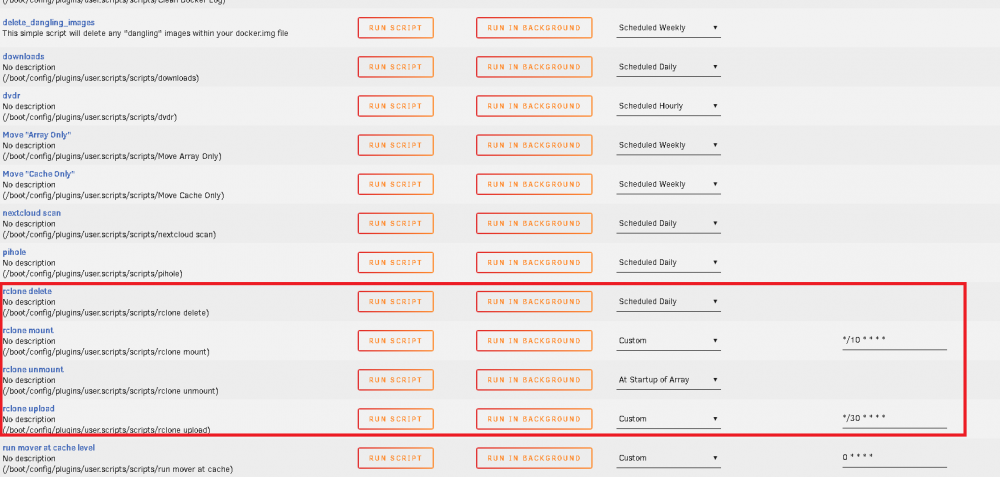
Okay, i startet playin with it, but i cant even login. It says i should connect to 127.0.0.1 which is ofc not working. If i enter the unraid ip, it redirects me back to 127.0.0.1 which is ofc not working... how to login to gdrive? Tried to install lynx but i get lynx: error while loading shared libraries: libidn.so.11: cannot open shared object file: No such file or directory edit: ok im dumb, didnt saw that N option... Okay im adding the mount thing: I guess the problem is the rc ip addr, u say we should change it, but in your script its not there... ? i added it after mount "rclone mount --rc --rc-addr 192.168.86.2:5572" But what ip is that? can it be local ip? does it need to be remote ip? Why not use local host (default?) Solution: you need to manually add directorys, i didnt read that in your post (or is it msising?) For ip Adress im using my LAN IP adress of unraid. root@Unraid-Server:~# mkdir /mnt/user/appdata/other root@Unraid-Server:~# mkdir /mnt/user/appdata/other/rclone/ root@Unraid-Server:~# mkdir /mnt/user/rclone_upload/ root@Unraid-Server:~# mkdir /mnt/user/rclone_upload/google_vfs Can you please check my picture if i understand it correct?
-
For me update plugin and restarting only worked half way. But since i upgraded to 6.6.5 its working perfeclty and disks spinning down again... but didnt saw any changes in log which indicates anything... mysterios. If i enable loggin, where i can see activity?
-
Yes, that wuld be the last way, but the thing is, even if i upload 24/7 it would take months/years to upload, and when i set a fixed hours per day, it would probably never finish before my unraid dies... XD So a "if ping XXX = not reachable" -> do ur thing really a big difference in time. If i pay u, could you code it? just a simple check if any of 2 local ips are reachable, if so, dont transfer, if not reachable, do transfer. maybe check every 5 min. and abort/resume accordingly (but i guess rsync handle that on itself)
-
I dont know how long i use unraid, i never needed to restart after changing a plugin. So is your mysterios uestion a yes?!
-
Ur too fast... i was editing this at the moment u answered: Also i would change your script so it only uplaods files older then e.g. 1 year, so i dont waste time uploading "bad movies". I wonder if it would be possible to uploadonly files to gdrive when 2 ips (local) are not reachable. So it doesnt interfer with other network activitys.

