






NewDisplayName
Members
-
Joined
-
Last visited
Everything posted by NewDisplayName
-
it sends a nice "please shutdown" to the dockers, atleast if they end in 30 sec... i think u c an even make that limit higher.
-
show advanced settings. i never not stopped the mariadb container, never had problems for last 2-3 years. i backup every day. Only thing i dont stop is handbrake bc it would break encoding which maybe are in work for hours.
-
M/B: ASRock - B85M DASH/OL R2.0 CPU: Intel® Core™ i3-4370 CPU @ 3.80GHz
-
i dont know wtf is goin on. I found a .mkv which i need to encode. Which worked in level 3 and 4, then i set it back to auto and even that works... How it can work some time and some time not? Does it depend on the filetype? [00:09:36] + container: MPEG-4 (libavformat) [00:09:36] + align initial A/V stream timestamps [00:09:36] * video track [00:09:36] + decoder: h264 [00:09:36] + filters [00:09:36] + Comb Detect (mode=3:spatial-metric=2:motion-thresh=1:spatial-thresh=1:filter-mode=2:block-thresh=40:block-width=16:block-height=16) [00:09:36] + Decomb (mode=39) [00:09:36] + Framerate Shaper (mode=0) [00:09:36] + frame rate: same as source (around 50.000 fps) [00:09:36] + Crop and Scale (width=1920:height=800:crop-top=142:crop-bottom=138:crop-left=0:crop-right=0) [00:09:36] + source: 1920 * 1080, crop (142/138/0/0): 1920 * 800, scale: 1920 * 800 [00:09:36] + Output geometry [00:09:36] + storage dimensions: 1920 x 800 [00:09:36] + pixel aspect ratio: 1 : 1 [00:09:36] + display dimensions: 1920 x 800 [00:09:36] + encoder: H.264 (Intel Media SDK) [00:09:36] + preset: quality [00:09:36] + profile: auto [00:09:36] + level: auto [00:09:36] + quality: 25.00 (QP) [00:09:36] + color profile: 1-1-1 [00:09:36] * audio track 1 [00:09:36] + decoder: Deutsch (AC3) (2.0 ch) (track 1, id 0x1) [00:09:36] + bitrate: 384 kbps, samplerate: 48000 Hz [00:09:36] + mixdown: Stereo [00:09:36] + dither: triangular [00:09:36] + encoder: AAC (libfdk_aac) [00:09:36] + bitrate: 160 kbps, samplerate: 48000 Hz [00:09:36] * audio track 2 [00:09:36] + decoder: Deutsch (AC3) (2.0 ch) (track 1, id 0x1) [00:09:36] + bitrate: 384 kbps, samplerate: 48000 Hz [00:09:36] + AC3 Passthru [00:09:36] sync: expecting 382835 video frames libva info: VA-API version 1.3.0 libva info: va_getDriverName() returns 0 libva info: User requested driver 'i965' libva info: Trying to open /opt/intel/mediasdk/lib64/i965_drv_video.so libva info: Found init function __vaDriverInit_1_3 libva info: va_openDriver() returns 0 [00:09:36] encqsvInit: using encode-only path [00:09:36] encqsvInit: H.264/AVC High profile @ level 4.2 [00:09:36] encqsvInit: TargetUsage 2 AsyncDepth 4 [00:09:36] encqsvInit: GopRefDist 4 GopPicSize 32 NumRefFrame 3 [00:09:36] encqsvInit: BFramesMax 3 BRefType pyramid [00:09:36] encqsvInit: RateControlMethod CQP with QPI 25 QPP 27 QPB 29 [00:09:36] sync: first pts video is 0 [00:09:36] sync: Chapter 1 at frame 1 time 0 [00:09:36] sync: first pts audio 0x1 is 1620 [00:09:36] sync: first pts audio 0x1 is 1620 [00:09:37] qsv_enc_init: using 'hardware (1) via VAAPI' implementation, API: 1.28 Its at 45fps which is pretty good for that shitty cpu, i guess. Does this look correct for Intel Quick Sync? I will now use auto, i guess?!
-
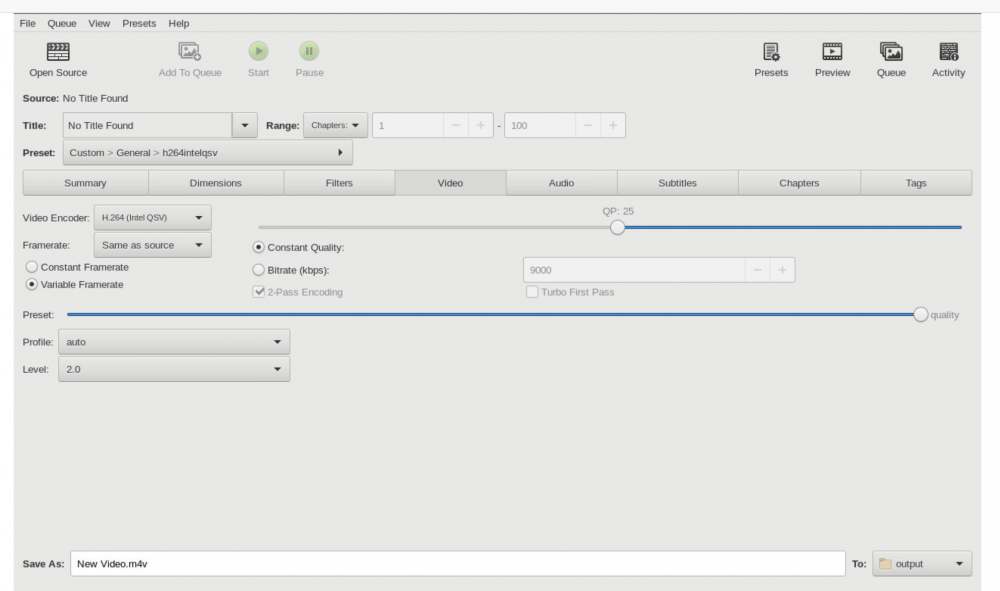
Then its bugged. I can change to whatever preset i want, the value dont change in the error message. It just startet to work when i changed the Level thing. Atm i have preset at the highest and Level at 2, which is working. It defaults to "auto" but then i wonder why it doesnt automaticly understand that my cpu can only do level 2. (bc thats what the error message tells) When i find the next DVDR ill try to raise the level value to 3 so we would see if the error message change.
-
The error says 2 is the highest?! ibva info: VAEncMiscParameterBufferQualityLevel.quality_level (4) out of range (max 2). ERROR: encqsv: MFXVideoENCODE_EncodeFrameAsync failed (-17) Or do i understand that wrong!?
-
I came up with this #!/bin/bash killall -15 fancontrol echo "fancontrol gekillt" rm -f /etc/fancontrol echo "/etc/fancontrol gelöscht" echo "# Configuration file generated by pwmconfig, changes will be lost INTERVAL=10 DEVPATH=hwmon0=devices/platform/coretemp.0 hwmon1=devices/platform/nct6775.656 DEVNAME=hwmon0=coretemp hwmon1=nct6776 FCTEMPS=hwmon1/pwm2=hwmon0/temp1_input FCFANS= hwmon1/pwm2=hwmon1/fan2_input MINTEMP=60 hwmon1/pwm2=60 MAXTEMP=75 hwmon1/pwm2=75 MINSTART=150 hwmon1/pwm2=20 MINSTOP=0 hwmon1/pwm2=15 MINPWM=0 hwmon1/pwm2=15 MAXPWM=255 hwmon1/pwm2=255" > /etc/fancontrol echo "/etc/fancontrol/ neu geschrieben" fancontrol any ideas? Ive set it to "on startup of array". edit: slightly better version which i run every hour now, so if it crashs it restarts. #!/bin/bash ### Check if script already run if [[ -f "/var/run/fancontrol.pid" ]]; then echo "fancontrol läuft bereits." exit else echo "starte fancontrol" fi killall -15 fancontrol echo "fancontrol gekillt" rm -f /etc/fancontrol echo "/etc/fancontrol gelöscht" echo "# Configuration file generated by pwmconfig, changes will be lost INTERVAL=10 DEVPATH=hwmon0=devices/platform/coretemp.0 hwmon1=devices/platform/nct6775.656 DEVNAME=hwmon0=coretemp hwmon1=nct6776 FCTEMPS=hwmon1/pwm2=hwmon0/temp1_input FCFANS= hwmon1/pwm2=hwmon1/fan2_input MINTEMP=60 hwmon1/pwm2=60 MAXTEMP=75 hwmon1/pwm2=75 MINSTART=150 hwmon1/pwm2=20 MINSTOP=0 hwmon1/pwm2=15 MINPWM=0 hwmon1/pwm2=15 MAXPWM=255 hwmon1/pwm2=255" > /etc/fancontrol echo "/etc/fancontrol neu geschrieben" fancontrol
-
Sorry, i dont know what that means. I cant read these charts.
-
You were right! It seems like my Mainboard doesnt report PWM speed back, still i can control the speed of the fans. I just manually changed the setting from PWM2 (/sys/devices/platform/nct6775.656/hwmon/hwmon1/fan2_input) to PWM1 and /sys/devices/platform/nct6775.656/hwmon/hwmon1/fan1_input And it works! Still i have the problem that my CPU fan goes crazy, always like full speed. Thats my settings: Settings for hwmon1/pwm2: Depends on hwmon0/temp1_input Controls hwmon1/fan2_input MINTEMP=60 MAXTEMP=75 MINSTART=150 MINSTOP=0 MINPWM=0 MAXPWM=255 But it only works when i manually run fancontrol.. is there a automated way like could i simply make a user script run at array start: "fancontrol" ? Would be cool if you could control multiple fans with your script ?! Like a GUI for the functions of fancontrol. Or atleast a way to select which sensor it should use. So we could use ur plugin (install multiple times) for CPU, also.
-
I wonder what i have to do to get my pwm fan CHA running, # sensors-detect revision 6284 (2015-05-31 14:00:33 +0200) # Board: ASRock B85M DASH/OL R2.0 # Kernel: 4.18.20-unRAID x86_64 # Processor: Intel(R) Core(TM) i3-4370 CPU @ 3.80GHz (6/60/3) This program will help you determine which kernel modules you need to load to use lm_sensors most effectively. It is generally safe and recommended to accept the default answers to all questions, unless you know what you're doing. Some south bridges, CPUs or memory controllers contain embedded sensors. Do you want to scan for them? This is totally safe. (YES/no): y Silicon Integrated Systems SIS5595... No VIA VT82C686 Integrated Sensors... No VIA VT8231 Integrated Sensors... No AMD K8 thermal sensors... No AMD Family 10h thermal sensors... No AMD Family 11h thermal sensors... No AMD Family 12h and 14h thermal sensors... No AMD Family 15h thermal sensors... No AMD Family 16h thermal sensors... No AMD Family 15h power sensors... No AMD Family 16h power sensors... No Intel digital thermal sensor... Success! (driver `coretemp') Intel AMB FB-DIMM thermal sensor... No Intel 5500/5520/X58 thermal sensor... No VIA C7 thermal sensor... No VIA Nano thermal sensor... No Some Super I/O chips contain embedded sensors. We have to write to standard I/O ports to probe them. This is usually safe. Do you want to scan for Super I/O sensors? (YES/no): y Probing for Super-I/O at 0x2e/0x2f Trying family `National Semiconductor/ITE'... No Trying family `SMSC'... No Trying family `VIA/Winbond/Nuvoton/Fintek'... Yes Found `Nuvoton NCT5573D/NCT5577D/NCT6776F Super IO Sensors' Success! (address 0x290, driver `nct6775') Probing for Super-I/O at 0x4e/0x4f Trying family `National Semiconductor/ITE'... No Trying family `SMSC'... No Trying family `VIA/Winbond/Nuvoton/Fintek'... No Trying family `ITE'... No Some systems (mainly servers) implement IPMI, a set of common interfaces through which system health data may be retrieved, amongst other things. We first try to get the information from SMBIOS. If we don't find it there, we have to read from arbitrary I/O ports to probe for such interfaces. This is normally safe. Do you want to scan for IPMI interfaces? (YES/no): y Probing for `IPMI BMC KCS' at 0xca0... No Probing for `IPMI BMC SMIC' at 0xca8... No Some hardware monitoring chips are accessible through the ISA I/O ports. We have to write to arbitrary I/O ports to probe them. This is usually safe though. Yes, you do have ISA I/O ports even if you do not have any ISA slots! Do you want to scan the ISA I/O ports? (yes/NO): y Probing for `National Semiconductor LM78' at 0x290... No Probing for `National Semiconductor LM79' at 0x290... No Probing for `Winbond W83781D' at 0x290... No Probing for `Winbond W83782D' at 0x290... No Lastly, we can probe the I2C/SMBus adapters for connected hardware monitoring devices. This is the most risky part, and while it works reasonably well on most systems, it has been reported to cause trouble on some systems. Do you want to probe the I2C/SMBus adapters now? (YES/no): y Using driver `i2c-i801' for device 0000:00:1f.3: Intel Lynx Point (PCH) Module i2c-dev loaded successfully. Next adapter: SMBus I801 adapter at f040 (i2c-0) Do you want to scan it? (yes/NO/selectively): y Client found at address 0x50 Probing for `Analog Devices ADM1033'... No Probing for `Analog Devices ADM1034'... No Probing for `SPD EEPROM'... Yes (confidence 8, not a hardware monitoring chip) Probing for `EDID EEPROM'... No Client found at address 0x51 Probing for `Analog Devices ADM1033'... No Probing for `Analog Devices ADM1034'... No Probing for `SPD EEPROM'... Yes (confidence 8, not a hardware monitoring chip) Client found at address 0x52 Probing for `Analog Devices ADM1033'... No Probing for `Analog Devices ADM1034'... No Probing for `SPD EEPROM'... Yes (confidence 8, not a hardware monitoring chip) Client found at address 0x53 Probing for `Analog Devices ADM1033'... No Probing for `Analog Devices ADM1034'... No Probing for `SPD EEPROM'... Yes (confidence 8, not a hardware monitoring chip) Next adapter: i915 gmbus ssc (i2c-1) Do you want to scan it? (yes/NO/selectively): y Next adapter: i915 gmbus vga (i2c-2) Do you want to scan it? (yes/NO/selectively): y Next adapter: i915 gmbus panel (i2c-3) Do you want to scan it? (yes/NO/selectively): y Next adapter: i915 gmbus dpc (i2c-4) Do you want to scan it? (yes/NO/selectively): y Next adapter: i915 gmbus dpb (i2c-5) Do you want to scan it? (yes/NO/selectively): y Next adapter: i915 gmbus dpd (i2c-6) Do you want to scan it? (yes/NO/selectively): y Now follows a summary of the probes I have just done. Just press ENTER to continue: Driver `coretemp': * Chip `Intel digital thermal sensor' (confidence: 9) Driver `nct6775': * ISA bus, address 0x290 Chip `Nuvoton NCT5573D/NCT5577D/NCT6776F Super IO Sensors' (confidence: 9) Do you want to generate /etc/sysconfig/lm_sensors? (yes/NO): y Copy prog/init/lm_sensors.init to /etc/init.d/lm_sensors for initialization at boot time. You should now start the lm_sensors service to load the required kernel modules. Unloading i2c-dev... OK Could it have someting to do with Using driver `i2c-i801' for device 0000:00:1f.3: Intel Lynx Point (PCH) Module i2c-dev loaded successfully.
-
No, if u load the drivers via system temp, you dont need to also load it in any other program, its system wide enabled then.
-
https://github.com/ncw/rclone/issues/2869
-
the create and remove directorys is also a known problem...
-
https://github.com/ncw/rclone/issues/2880 (we should add --drive-pacer-min-sleep=100ms )
-
No, it was video -> level, this is standard to auto, if i set it to 2 it works... any recomm for settings?
-
EDIT: I Found the problem... video -> level -> was set to auto -> i changed it to 2 and it works ... now 60-70fps... - up to 100 Anyway, could someone look over my settings or show how what they set it to? ----- obsolete... OKay, it seems like it didnt really took my settings even i saved them and it showed them correctly in GUI. Ive created now a new preset but i get the following error: [01:34:01] qsv_enc_init: using 'hardware (1) via VAAPI' implementation, API: 1.28 libva info: VAEncMiscParameterBufferQualityLevel.quality_level (4) out of range (max 2). ERROR: encqsv: MFXVideoENCODE_EncodeFrameAsync failed (-17) BufferQuality is set to 4 and it can max do 2. Where the f i find these settings? { "AlignAVStart": true, "AudioCopyMask": [ "copy:mp3", "copy:aac", "copy:ac3", "copy:dts" ], "AudioEncoderFallback": "fdk_aac", "AudioLanguageList": [ "deu", "eng" ], "AudioList": [ { "AudioBitrate": 160, "AudioCompressionLevel": -1.0, "AudioDitherMethod": "auto", "AudioEncoder": "fdk_aac", "AudioMixdown": "dpl2", "AudioNormalizeMixLevel": false, "AudioSamplerate": "auto", "AudioTrackDRCSlider": 0.0, "AudioTrackGainSlider": 0.0, "AudioTrackQuality": 1.0, "AudioTrackQualityEnable": false }, { "AudioBitrate": 640, "AudioCompressionLevel": -1.0, "AudioDitherMethod": "auto", "AudioEncoder": "copy:ac3", "AudioMixdown": "none", "AudioNormalizeMixLevel": false, "AudioSamplerate": "auto", "AudioTrackDRCSlider": 0.0, "AudioTrackGainSlider": 0.0, "AudioTrackQuality": -1.0, "AudioTrackQualityEnable": false } ], "AudioSecondaryEncoderMode": true, "AudioTrackSelectionBehavior": "all", "ChapterMarkers": true, "ChildrenArray": [], "Default": false, "FileFormat": "av_mp4", "Folder": false, "FolderOpen": false, "InlineParameterSets": false, "Mp4HttpOptimize": false, "Mp4iPodCompatible": false, "PictureAutoCrop": true, "PictureBottomCrop": 0, "PictureCombDetectCustom": "", "PictureCombDetectPreset": "default", "PictureDARWidth": 0, "PictureDeblock": 0, "PictureDeblockCustom": "qp=0:mode=2", "PictureDeinterlaceCustom": "", "PictureDeinterlaceFilter": "decomb", "PictureDeinterlacePreset": "default", "PictureDenoiseCustom": "", "PictureDenoiseFilter": "off", "PictureDenoisePreset": "", "PictureDenoiseTune": "none", "PictureDetelecine": "off", "PictureDetelecineCustom": "", "PictureForceHeight": 0, "PictureForceWidth": 0, "PictureHeight": 0, "PictureItuPAR": false, "PictureKeepRatio": true, "PictureLeftCrop": 0, "PictureLooseCrop": false, "PictureModulus": 2, "PicturePAR": "auto", "PicturePARHeight": 720, "PicturePARWidth": 853, "PictureRightCrop": 0, "PictureRotate": "disable=1", "PictureSharpenCustom": "", "PictureSharpenFilter": "off", "PictureSharpenPreset": "", "PictureSharpenTune": "", "PictureTopCrop": 0, "PictureWidth": 0, "PresetDescription": "High quality H.264 video (up to 1080p30), AAC stereo audio, and Dolby Digital (AC-3) surround audio, in an MP4 container.", "PresetName": "h264intelqsv", "SubtitleAddCC": false, "SubtitleAddForeignAudioSearch": true, "SubtitleAddForeignAudioSubtitle": true, "SubtitleBurnBDSub": true, "SubtitleBurnBehavior": "foreign", "SubtitleBurnDVDSub": true, "SubtitleLanguageList": [ "deu", "eng" ], "SubtitleTrackSelectionBehavior": "all", "Type": 1, "UsesPictureFilters": true, "UsesPictureSettings": 2, "VideoAvgBitrate": 9000, "VideoColorMatrixCode": 0, "VideoEncoder": "qsv_h264", "VideoFramerate": "auto", "VideoFramerateMode": "vfr", "VideoGrayScale": false, "VideoLevel": "auto", "VideoOptionExtra": "", "VideoPreset": "balanced", "VideoProfile": "main", "VideoQSVAsyncDepth": 4, "VideoQSVDecode": false, "VideoQualitySlider": 18.0, "VideoQualityType": 2, "VideoScaler": "swscale", "VideoTune": "", "VideoTurboTwoPass": false, "VideoTwoPass": true, "x264Option": "", "x264UseAdvancedOptions": false } I tried to set the only 4 to 2, which didnt helped (videoqsvasyndepth)
-
To imrove performance i enabled quick sync, and logfile shows its working: [00:40:34] CPU: Intel(R) Core(TM) i3-4370 CPU @ 3.80GHz [00:40:34] - Intel microarchitecture Haswell [00:40:34] - logical processor count: 4 [00:40:34] Intel Quick Sync Video support: yes Still, its about the same FPS and same CPU %... i selected h264 intel qsv. Anything else i need to do? Oo Or is it just that slow...? avg of about 10 fps. I played a little with QP and the speed preset.. didnt change too much Oo (i cant even really say if it change something) Can anyeone suggest good settings for h264 intel qsv, good speed, good quality..? But i guess speed is more important for me then quality.
-
anyone got intels quick sync working? added --device=/dev/dri:/dev/dri to extra parameters and run root@Unraid-Server:~# modprobe i915 root@Unraid-Server:~# chmod -R 777 /dev/dri root@Unraid-Server:~# vi /dev/dri/ by-path/ card0 renderD128
-
Its easier to just add what you need to index, but never use include and exclude together. But thats what they said from the beginning...
-
We could make a script which runs all the time and just checks for the mountcheck file, this would instant stop plex if neccessary. while [ ! -f /tmp/list.txt ]; do sleep 1; done; Would be like 1 or 2 sec delay, so fast he cant delete sometzhing, and even if, its unlikly its something gets deleted which was manually added.
-
Yes ive only use ur scripts, just changed here and there, like upload script, still the question is, if it fails to mount for whatever reason, and this whatever reason doenst get automaticly resolved, what happens e.g. to the plex library. Ive set the "dont auto remove" like u suggested, but i already found a flaw in it... if e.g. a series gets updated from xxxP to 1080p, plex shows it as missing (the old file) which is kinda annoying... so i wanna enable it again. I guess you could add it to your script like if not mounted, mount, if that still not helps, close dockers, sleep 10min. Since your script also starts the dockers, this would jsut make sense.
-
What you guys think about a small script which checkes if mountcheck file is there, and if not closes all related dockers (atleast plex)?
-
yeah, i edited my post after thinking about it...^^ I want that handbrake can take all it wants if nothing else needs something. Plex should always be highest prio, but i guess, sicne i never had problems - till handbrake - i dont need to change all the other dockers. Is there such a command for unraid processes?
-
Its just crazy what you can do today... exactly what im looking for, tho didnt found via googling Oo i just found that cpu pinning. (which i know already) So if i understand it correct it does CPU / 1024 ? 1. If i set c=2 its the lowest number and thus the it would take 2 out of 1024 "CPU power". 2. When i wanna give plex a higher prio, i set it to 1024, which means 100% ?!?! (i dont need to do that tho, bc 1024 is standard, right?) 3. I do put it under extra arguments, right? 4. i guess theres no way to give unraid more power? Much thanks!
-
just add a link from /tmp (host) to /encode (or what ever u wanna call it and make it your output directory, but then, other dockers also needs to be able to get there. (but i dont think this gives any imrovement, except lower wearage of hdds (thats why i use ssds)


