





DarkHorse
Members
-
Joined
-
Last visited
-
Hmm... downloaded a new OpenVPN config definition from my VPN provider and all is now good. Not sure why that would affect me connecting to the docker instance locally.
-
Anyone else seeing TLS handshake failures? I see the following in my log every minute or so, and can no longer connect to the WebGUI. I recently updated my docker containers, and I believe it was working fine before the last update. Could it be related to the ciphers warnings? 2021-01-21 09:22:33,410 DEBG 'start-script' stdout output: 2021-01-21 09:22:33 TLS Error: TLS key negotiation failed to occur within 60 seconds (check your network connectivity) 2021-01-21 09:22:33 TLS Error: TLS handshake failed 2021-01-21 09:22:33,410 DEBG 'start-script' stdout output: 2021-01-21 09:22:33 SIGHUP[soft,tls-error] received, process restarting 2021-01-21 09:22:33,411 DEBG 'start-script' stdout output: 2021-01-21 09:22:33 DEPRECATED OPTION: --cipher set to 'AES-256-CBC' but missing in --data-ciphers (AES-256-GCM:AES-128-GCM). Future OpenVPN version will ignore --cipher for cipher negotiations. Add 'AES-256-CBC' to --data-ciphers or change --cipher 'AES-256-CBC' to --data-ciphers-fallback 'AES-256-CBC' to silence this warning. 2021-01-21 09:22:33,411 DEBG 'start-script' stdout output: 2021-01-21 09:22:33 WARNING: file 'credentials.conf' is group or others accessible 2021-01-21 09:22:33 OpenVPN 2.5.0 [git:makepkg/a73072d8f780e888+] x86_64-pc-linux-gnu [SSL (OpenSSL)] [LZO] [LZ4] [EPOLL] [PKCS11] [MH/PKTINFO] [AEAD] built on Nov 6 2020 2021-01-21 09:22:33 library versions: OpenSSL 1.1.1h 22 Sep 2020, LZO 2.10 2021-01-21 09:22:33 Restart pause, 5 second(s) 2021-01-21 09:22:38,411 DEBG 'start-script' stdout output: 2021-01-21 09:22:38 WARNING: --ping should normally be used with --ping-restart or --ping-exit 2021-01-21 09:22:38 NOTE: the current --script-security setting may allow this configuration to call user-defined scripts 2021-01-21 09:22:38,412 DEBG 'start-script' stdout output: 2021-01-21 09:22:38 Outgoing Control Channel Authentication: Using 512 bit message hash 'SHA512' for HMAC authentication 2021-01-21 09:22:38 Incoming Control Channel Authentication: Using 512 bit message hash 'SHA512' for HMAC authentication 2021-01-21 09:22:38 TCP/UDP: Preserving recently used remote address: [AF_INET]134.19.189.171:1194 2021-01-21 09:22:38 Socket Buffers: R=[212992->212992] S=[212992->212992] 2021-01-21 09:22:38 UDP link local: (not bound) 2021-01-21 09:22:38 UDP link remote: [AF_INET]134.19.189.171:1194 2021-01-21 09:23:38,818 DEBG 'start-script' stdout output: 2021-01-21 09:23:38 TLS Error: TLS key negotiation failed to occur within 60 seconds (check your network connectivity) 2021-01-21 09:23:38 TLS Error: TLS handshake failed 2021-01-21 09:23:38,819 DEBG 'start-script' stdout output: 2021-01-21 09:23:38 SIGHUP[soft,tls-error] received, process restarting 2021-01-21 09:23:38,820 DEBG 'start-script' stdout output: 2021-01-21 09:23:38 DEPRECATED OPTION: --cipher set to 'AES-256-CBC' but missing in --data-ciphers (AES-256-GCM:AES-128-GCM). Future OpenVPN version will ignore --cipher for cipher negotiations. Add 'AES-256-CBC' to --data-ciphers or change --cipher 'AES-256-CBC' to --data-ciphers-fallback 'AES-256-CBC' to silence this warning.
-
I looked up my installation notes... not sure if this is helpful, but these are the steps I used to get netbox up and running: First install Postgres11 docker container, enter POSTGRES_PASSWORD, keep other default values Console in to postgres container su postgres psql CREATE DATABASE netbox; \l to verify it was created GRANT ALL PRIVILEGES ON DATABASE netbox TO postgres; \l to verify permissions \q and exit console. Next install Redis container, keep default values. Next install netbox container, username for admin account, admin. specify admin password. allowed host *. database name netbox. Database user postgres. Database password. Database host <<unraid IP>>. database port 5432. redis host <<unraid IP>>. leave all other values as defaults. Netbox container will start, but with errors. Bring up log of netbox console from docker tab in unraid interface... I saw errors related to deprecated usage of DEFAULT_TIMEOUT for redis server Console in to the netbox container cd into /app/netbox/netbox/netbox and edit the configuration.py file Change all values (should be two of them) of DEFAULT_TIMEOUT to RQ_DEFAULT_TIMEOUT Save file, exit console, and then restart container from the docker tab in unraid Console in again to netbox container, run the following commands cd /app/netbox/netbox python3 ./manage.py createsuperuser Open the the webGUI for netbox from the docker tab in unraid Log in as admin
-
For me, I found that my netbox configuration.py file was not being properly updated with the variables passed. To take a look, console in to your netbox container, and view /app/netbox/netbox/netbox/configuration.py. I simply edited that file directly, saved, and then restarted the docker container.
-
sorry, no... haven't looked into it any further.
-
Well, after reading this thread... I knew I had a Marvell controller on my board, but couldn't recall if any of my drives were using it. So I did ls -al /sys/block/sd* lrwxrwxrwx 1 root root 0 May 21 12:17 /sys/block/sda -> ../devices/pci0000:00/0000:00:1d.0/usb2/2-1/2-1.4/2-1.4:1.0/host0/target0:0:0/0:0:0:0/block/sda/ lrwxrwxrwx 1 root root 0 May 21 12:17 /sys/block/sdb -> ../devices/pci0000:00/0000:00:1f.2/ata1/host1/target1:0:0/1:0:0:0/block/sdb/ lrwxrwxrwx 1 root root 0 May 21 12:17 /sys/block/sdc -> ../devices/pci0000:00/0000:00:1f.2/ata2/host2/target2:0:0/2:0:0:0/block/sdc/ lrwxrwxrwx 1 root root 0 May 21 12:17 /sys/block/sdd -> ../devices/pci0000:00/0000:00:1f.2/ata3/host3/target3:0:0/3:0:0:0/block/sdd/ lrwxrwxrwx 1 root root 0 May 21 12:17 /sys/block/sde -> ../devices/pci0000:00/0000:00:1f.2/ata4/host4/target4:0:0/4:0:0:0/block/sde/ lrwxrwxrwx 1 root root 0 May 21 12:17 /sys/block/sdf -> ../devices/pci0000:00/0000:00:1f.2/ata5/host5/target5:0:0/5:0:0:0/block/sdf/ lrwxrwxrwx 1 root root 0 May 21 12:17 /sys/block/sdg -> ../devices/pci0000:00/0000:00:1f.2/ata6/host6/target6:0:0/6:0:0:0/block/sdg/ and then I checked which controller they were on: lspci | grep 1f.2 00:1f.2 SATA controller: Intel Corporation C600/X79 series chipset 6-Port SATA AHCI Controller (rev 06) looks like I must have known about Marvell issues before, as all my drives are on the Intel controller. I then proceeded with the upgrade from 6.6.7 to 6.7.0 and everything went smoothly. Very nice interface enhancements. Thank you LimeTech.
-
I got it working... I had a previous instance that I had deleted, and I forgot to delete the /mnt/usr/appdata/nextcloud directory from the previous install. It's now working fine. thanks!
-
Hmm... I do a clean install of the nextcloud docker app and I can't get the initial login / configuration screen to appear. When I launch the WebUI, I get: Internal Server Error The server encountered an internal error and was unable to complete your request. Please contact the server administrator if this error reappears multiple times, please include the technical details below in your report. More details can be found in the server log. no errors that I see in the logs. Anyone else seeing this? Was following SpaceInvader's setup video on youtube, and in the comments I see some others running into the same problem.
-
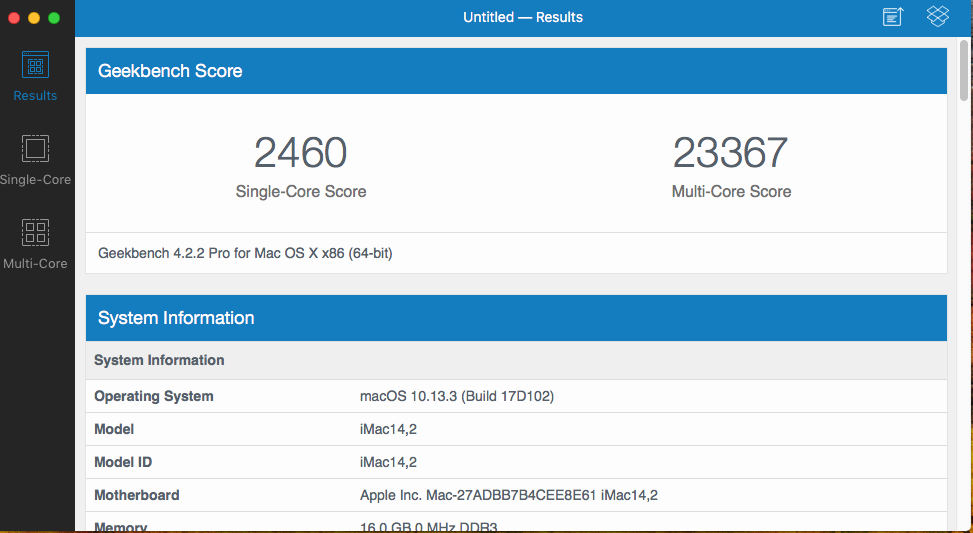
For fun, I assigned all 16 cores / 32 threads / 16GB RAM to the High Sierra VM... multicore performance is about 2X of my 2011 3.4Ghz core i7 iMac.
-
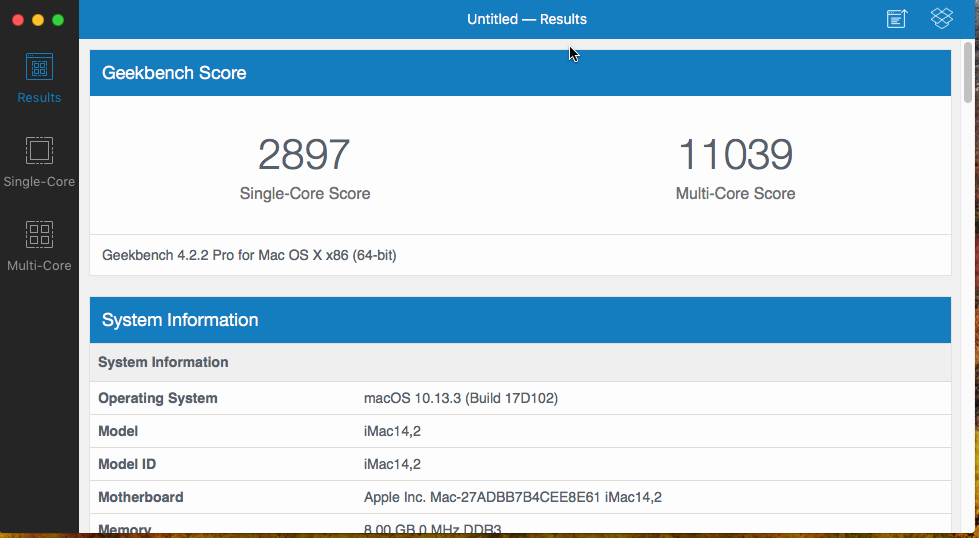
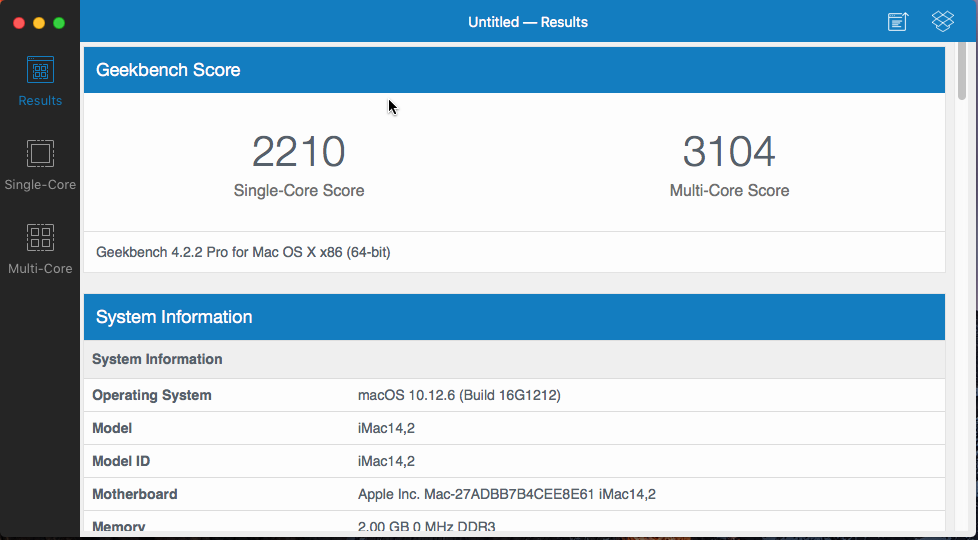
Hmm... got an even better score... I must not have waited long enough after rebooting for the VM to settle down.
-
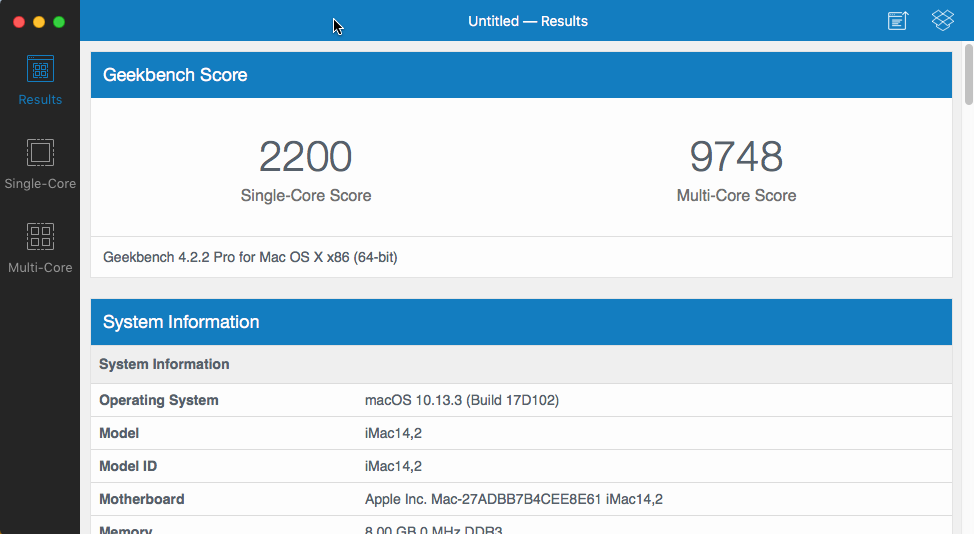
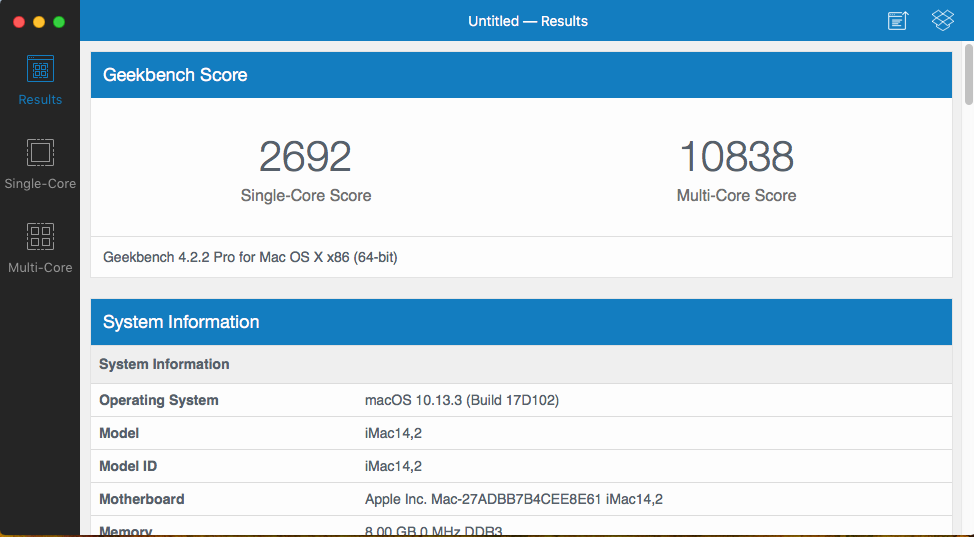
So, on my OSX VM running macOS High Sierra 12.13.3, with 4 cores and 8 threads, and 8GB RAM. Nice bump. Note the single core performance, without any optimizations, is better in High Sierra than it was in Sierra. Thanks @gridrunner for the video!
-
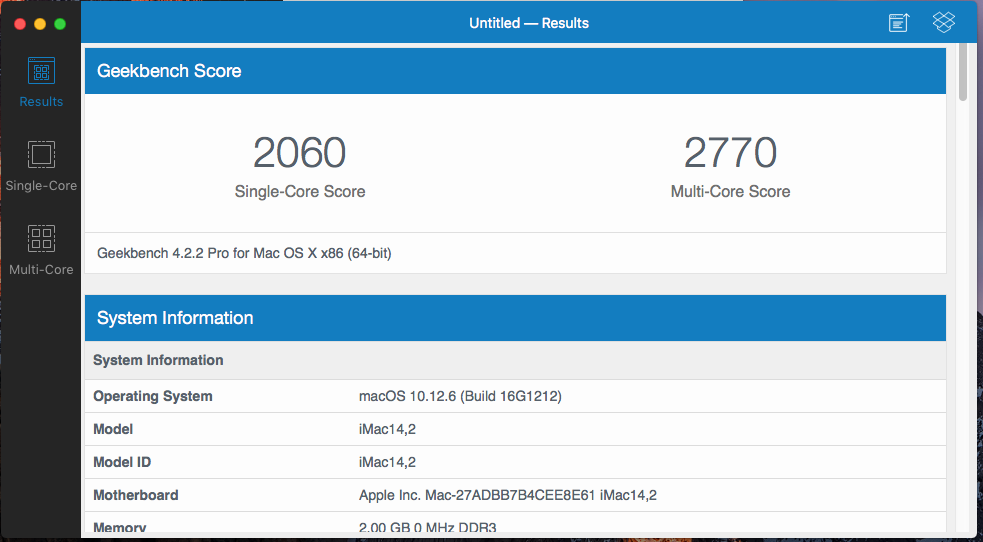
Nice. A little bit of a bump. My minimal OSX VM is running just 1 CPU, both cores, and only 2GB RAM. (my CPUs are Intel E5-2670's). Note, this is running macOS Sierra, 10.12.6.
-
Argh! Thanks Apple... apparently Content Caching is not available if running in a VM: https://discussions.apple.com/thread/8224088 dang it!! I wonder if there is a way to trick macOS into thinking it is not virtualized? sudo /usr/bin/AssetCacheManagerUtil canActivate 2018-03-12 15:25:56.535 AssetCacheManagerUtil[656:9496] Built-in caching server can not be activated: (no error) sudo /usr/bin/AssetCacheManagerUtil activate 2018-03-12 15:26:07.583 AssetCacheManagerUtil[658:9539] Failed to activate built-in caching server: Error Domain=ACSMErrorDomain Code=5 "virtual machine" UserInfo={NSLocalizedDescription=virtual machine}
-
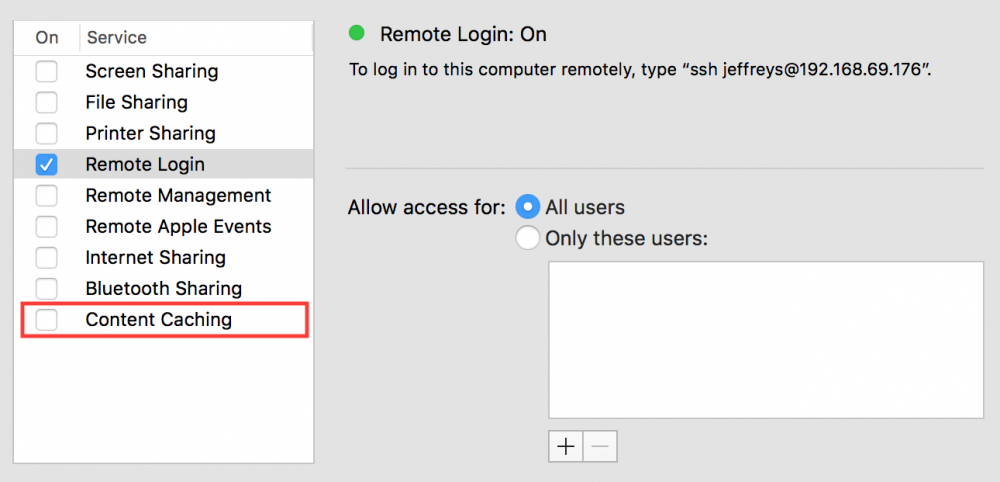
Hmmm.... one of the goals for this was to run a macOS VM so I can have access to iMessages when on a Linux system. This appears to be working, I'll just keep a VNC window open to the macOS VM. The other goal was to have the macOS VM do content caching of System Updates and even iOS/iPad app downloads... a new feature of High Sierra. However, when I go into the Sharing preferences pane, I do not see the Content Caching service listed (area marked by red rectangle is present on my real Mac, but missing from the macOS VM). Any ideas why this is not showing up?
-
Ah! I found a couple things I did wrong... and have now fixed. In the VMware Fusion instance of High Sierra, I mounted the EFI partition using the EFI Mounter v3 script, and then: a) I moved q35_acpi_dsdt.aml into the CLOVER/ACPI/origin folder b) I installed the FakeSMC.kext into the kexts/10.13 folder c) I installed the HDMIAudio.kext into the kexts/10.13 folder I then shut down the Fusion VM, moved the updated vmdk file over to my UnRAID server and converted using qemu-img. Launched the VM from UnRAID and it booted right up! So, I think my main issue was not having the FakeSMC.kext installed.



