






ATEglauer
Members
-
Joined
-
Last visited
-
I was terrified when the "Setting up Unraid" screen displayed... I just skipped it after reading the above posts, and a sigh of relief. Do I always have to look at the "no internal boot setup detected, click here to set up" under my usb flash device? Is it preferred to boot from an internal disk instead of the usb now?
-
As a follow-up/solution, I created a completely new profile and no longer log in to Firefox, and the notifications in Unraid behave as expected again. Something got messed up in my Firefox profile somewhere along the way, I guess. Now, I've got a new profile and will delete my old one.
-
It's something to do with Firefox, as when I use Chrome or Opera (I just installed them to try), both work fine with the Unraid notifications. Clearing the cache and browsing data from Firefox didn't help, nor did a refresh of the browser. And in case anyone else runs into this, I was using Firefox for Linux Mint, "mint-001 - 1.0", I think also known as 150.0.1 (64-bit). The previous 149.x.x version also didn't work properly with the notifications.
-
When Unraid notifies me of issues, I need to click on the 'All Types' tab, then to the 'Alert' to see if the notification was an 'Alert'. If it is Info, I have to click the 'All Types' then the 'Alert' tab to see the alert. Similarly for Info and Warnings. This is a nuisance and I"m not sure if it's related to my GPU (Geforce GTX 1660 Ti) or something in Unraid. - I'm using the 580.159.03 driver for the Quadro P2200 GPU in the server and this behaviour occurred with 7.2.4 and 7.2.5 (I can't recall if I've struggled with it since 7.2.3 though). - In the Notification Settings, I notice that the notifications are not stored to flash - I don't really want them or think they should be saved to the flash drive (i.e., container and plugin updates or even OS version updates). - I've changed from the black theme to the white theme, but that made no difference. - After recording the video, I deleted all of the notifications sop I can't recall if this behaviour is only on the Unread tab or also on the Archived tab. I'll try to make note of that tomorrow or the next time I get a notification. I doubt diagnostics will help with this, but I've attached them anyway. 2026-05-04 09-42-00.mp4 tower-diagnostics-20260504-1053.zip
-
Sorry, I'm not following. Are you saying I should delete a couple of FSCK files off the flash drive? (I've had to reboot again, this time due to nVidia driver, so I stopped the array first, then hit reboot on the main page, but I've not done anything on the flash drive yet.) Upon reboot this time, it appears it was a clean shutdown and parity check didn't start. I also see the two FSCK files on the flash drive, so I assume if I delete those it might help? I note they are dated from 1979!
-
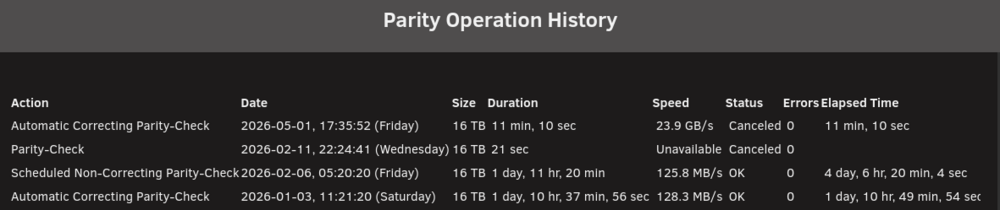
It seems every time I boot my server, I get notified of an unclean shutdown and parity runs. I just ignored the issue before, but it's bothering me as why my server doesn't seem to think the update from 7.2.4 to 7.2.5 is an unclean shutdown. Also, I don't know why my server would think that the 'Reboot' option from the Main page isn't a clean shutdown. I've attached the diagnostics from right after the reboot, although I believe they won't have much information in them. Therefore, I'm also attaching diagnostics from a few days ago when I was trying to diagnose another small issue (can' see notifications unless I press Alert, Info, All Types, Warnings, then back to Info). I noticed that issue in 7.2.4 (not sure if it started when I updated to 7.2.4), but I switched from black to white color scheme and it made no difference. Should I re-run a complete parity check again or is there something else that might be triggering an unclean shutdown notification? tower-diagnostics-20260501-1740.ziptower-diagnostics-20260427-1311.zip
-
I upgraded my 8 GB of RAM to 48 GB about 3 weeks ago and everything seems fine. However, I got an error from FCP indicating MCE. When I look at the the mcelog, I'm not sure I completely understand whether things were all fixed or if there are issues. Can someone review and help me out? I've included my diagnostics as well. (I am accessing the server remotely over tailscale, but I don't think that would come into play.) Thanks, Armand mcelog.txttower-diagnostics-20260202-0030.zip
-
I had the same issue come up today, except it was /mnt/Media: I used mc (Midnight Commander) from the Unraid terminal and navigated to the /mnt/Media folder. I found it to be empty, so I deleted the folder. That gave me a few seconds of a heart attack, as I couldn't immediately see my actual /Media share!! I did find it intact in /mnt/user/Media, but it made my heart stop for a second. :) So, it might be that the/mnt/cache folder is empty (are you using /cache_doc, /cache_ssd, /cache_vm, and /cache_protected now instead of /mnt/cache?). Perhaps if that folder is empty, it's left over from a previous configuration you used and now you could delete it?? If it is just an empty folder and not being written to, then it might also be okay to leave it as is and ignore the error. I'm not really sure, just sort of guessing. For me (at least for now!), deleting the empty folder removed the error from FCP for me.

-
I didn't really want to hijack the thread, so I hope chrisb42 doesn't mind that I include my diagnostics here as well. I have no VMs and I believe everything goes to my cache drive until mover runs (daily at 8:30 am, if memory serves) tower-diagnostics-20250214-2226.zip
-
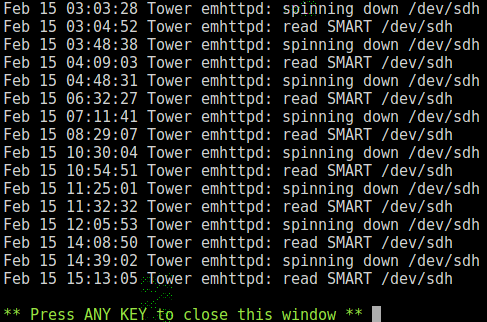
I have no idea, chrisb42, but I have the same situation. I also thought I had a lot of reads on the array, but I couldn't find anything that causing the issue. If I looked at the disk log for each disk, there seemed to be files opened (by what, I have no idea!) but those files shouldn't have been opened in my opinion. There was no one watching those files on my Plex so no idea why they would open. I also have just posted that I thought I was getting a lot of reads on the disks, but maybe I'm mistaken. As an example, When I check the file activity under Tools | System Information | File Activity, I see the last activity was from this morning about 9:30, when I watched an episode of House: The disk log information for my disk1 (the icon immediately left of the identification column on the main screen) looks like this: I have no idea what might be causing the drive to spin up and read SMART information. However, disk1 (sdh) above suggests it might actually spin down for durations ranging from about 2 minutes to 2 hours. This is better than it was in the past, as I think the spin down was only 1 to 2 minutes each time before SMART was read again. Despite my efforts, I couldn't find anything accessing the disk, but I ended up uninstalling the disk cache plugin as I thought this might be keeping my disks spinning. After removing the plugin, I'm not sure if things are better, since every time I look at the Main window in Unraid, my disks all appear to be spinning. Contrarily, I have long pauses/delays when accessing files on the server, which suggests the drives might have to spin up before I access them, but I'm not sure since I never see them spun down. Maybe the indication on the Main page isn't accurate??? Anyway, I hope you get some resolution, as I'll be watching this thread in hopes to improve my setup. ATE

-
Thanks, JorgeB. When I toggle that, the disks don't seem to have much consistent activity (actually, very little activity). So are you saying the disks aren't being read by something or if they are, that is normal? I'm curious if you/others toggle theirs as a comparison to mine.
-
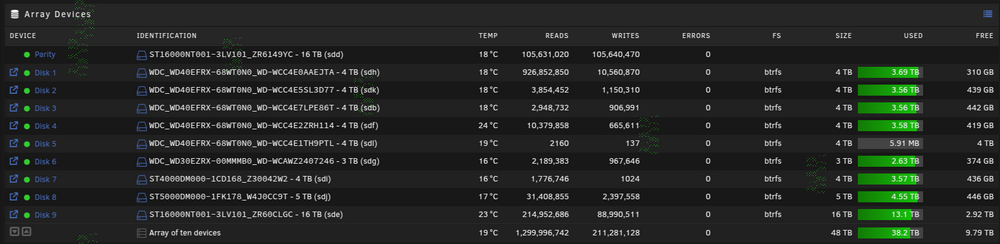
My unraid server mainly runs Plex (along with sonarr, radarr, filebot, nginx proxy, duckdns, etc. dockers). I'm not sure, but I believe I'm seeing an unusually large number of reads on the array over a 2 week period - in the order of 1.3 Billion reads. I have 10 disks, so I'm not sure, but hoping that someone can advise if something is not configured properly or if this amount of reads would be considered typical. The reads are somewhat reduced after I removed the disk cache plugin, as I was getting about 15 Billion reads in a week with that plugin installed/running. The seemingly high number of reads seems to persist after updating to 7.0.0 as well. Can anyone advise and/or suggest ways to see what might be causing this and possible fixes? http://i.imgur.com/IEkvbJNm.png My diagnostics are attached. Thanks, ATE tower-diagnostics-20250214-2226.zip

-
Are WD disks known to have more read issues or should I change the settings for the ST drives as well?
-
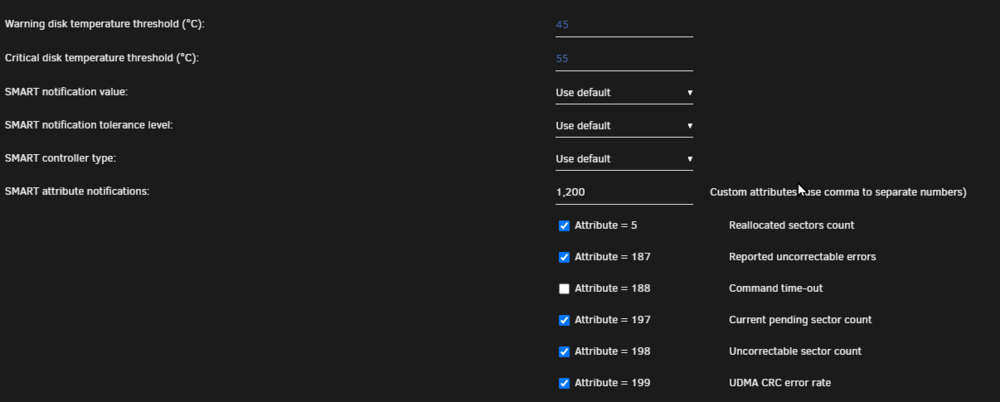
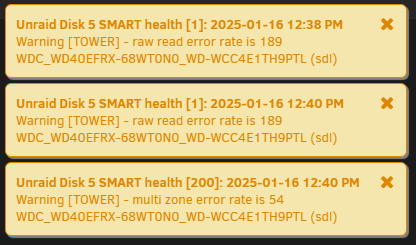
Hi trurl, I didn't have notifications set up except in the browser, but I have now set up notifications in Discord as well. As for the SMART settings, can you confirm this is what you meant? Right after doing that, I've received a few other warnings. They might be useful if I had a clue what they meant... guess I need to learn a lot more about SMART errors. OK, that makes sense of not moving them off the disk. I was thinking if I moved the data, then parity would be updated, but I suppose it would be with 'copy' as well.
-
Thanks very much for your time on this, JorgeB! I will keep monitoring it, but will look at a replacement drive in the near future. Thanks again, Armand





