






swingline
Members
-
Joined
-
Last visited
-
I use the Nginx Proxy Manger container to deal with this.
-
Didnt know if this is something related to unraid or this docker. I swapped from binhex jellyfin container to this one to beable to transcode, I used the same appdata folder.
-
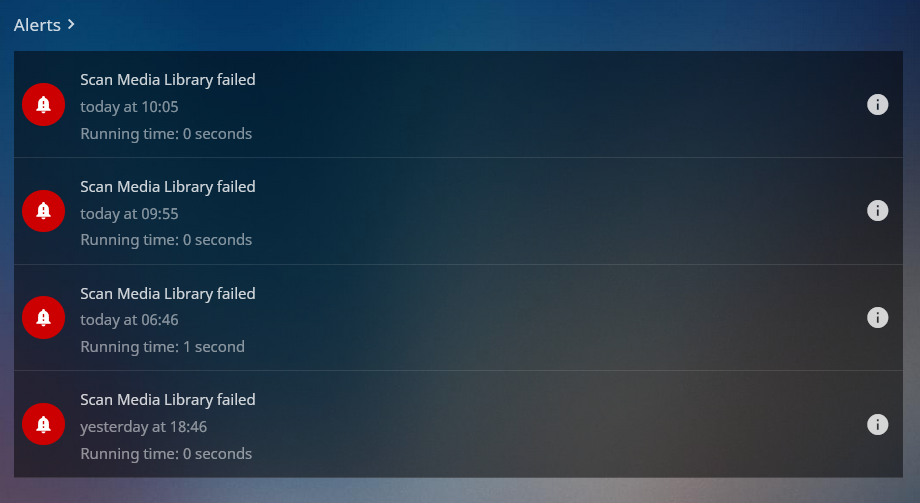
I am having issues with "Scan Media Library failed" The error is as follows Could not find a part of the path '/config/root/default/Movies'. at System.IO.Enumeration.FileSystemEnumerator`1.CreateDirectoryHandle(String path, Boolean ignoreNotFound) at System.IO.Enumeration.FileSystemEnumerator`1.Init() at System.IO.Enumeration.FileSystemEnumerable`1..ctor(String directory, FindTransform transform, EnumerationOptions options, Boolean isNormalized) at System.IO.Enumeration.FileSystemEnumerableFactory.DirectoryInfos(String directory, String expression, EnumerationOptions options, Boolean isNormalized) at System.IO.DirectoryInfo.InternalEnumerateInfos(String path, String searchPattern, SearchTarget searchTarget, EnumerationOptions options) at System.IO.DirectoryInfo.EnumerateDirectories(String searchPattern, SearchOption searchOption) at Emby.Server.Implementations.IO.ManagedFileSystem.GetFileSystemEntries(String path, Boolean recursive) at MediaBrowser.Controller.Providers.DirectoryService.GetFileSystemEntries(String path) at MediaBrowser.Controller.IO.FileData.GetFilteredFileSystemEntries(IDirectoryService directoryService, String path, IFileSystem fileSystem, IServerApplicationHost appHost, ILogger logger, ItemResolveArgs args, Int32 flattenFolderDepth, Boolean resolveShortcuts) at MediaBrowser.Controller.Entities.CollectionFolder.CreateResolveArgs(IDirectoryService directoryService, Boolean setPhysicalLocations) at MediaBrowser.Controller.Entities.CollectionFolder.RequiresRefresh() at MediaBrowser.Providers.Manager.MetadataService`2.RefreshMetadata(BaseItem item, MetadataRefreshOptions refreshOptions, CancellationToken cancellationToken) at MediaBrowser.Controller.Entities.BaseItem.RefreshMetadata(MetadataRefreshOptions options, CancellationToken cancellationToken) at MediaBrowser.Controller.Entities.Folder.RefreshChildMetadata(BaseItem child, MetadataRefreshOptions refreshOptions, Boolean recursive, IProgress`1 progress, CancellationToken cancellationToken) at MediaBrowser.Controller.Entities.Folder.RefreshMetadataRecursive(List`1 children, MetadataRefreshOptions refreshOptions, Boolean recursive, IProgress`1 progress, CancellationToken cancellationToken) at MediaBrowser.Controller.Entities.Folder.ValidateChildrenInternal2(IProgress`1 progress, CancellationToken cancellationToken, Boolean recursive, Boolean refreshChildMetadata, MetadataRefreshOptions refreshOptions, IDirectoryService directoryService) at MediaBrowser.Controller.Entities.Folder.ValidateChildrenInternal(IProgress`1 progress, CancellationToken cancellationToken, Boolean recursive, Boolean refreshChildMetadata, MetadataRefreshOptions refreshOptions, IDirectoryService directoryService) at MediaBrowser.Controller.Entities.UserRootFolder.ValidateChildrenInternal(IProgress`1 progress, CancellationToken cancellationToken, Boolean recursive, Boolean refreshChildMetadata, MetadataRefreshOptions refreshOptions, IDirectoryService directoryService) at Emby.Server.Implementations.Library.LibraryManager.ValidateTopLibraryFolders(CancellationToken cancellationToken) at Emby.Server.Implementations.Library.LibraryManager.PerformLibraryValidation(IProgress`1 progress, CancellationToken cancellationToken) at Emby.Server.Implementations.Library.LibraryManager.ValidateMediaLibraryInternal(IProgress`1 progress, CancellationToken cancellationToken) at Emby.Server.Implementations.ScheduledTasks.ScheduledTaskWorker.ExecuteInternal(TaskOptions options)
-
swingline changed their profile photo
-
a couple of months ago after updating this container "Secure connections" stopped working with all android clients. Webrowser work just fine. So I just set it to disable and told user to select allow insecure connections and would deal with it at a later date. Well I have soem free time and I would like to fix this problem. I have a static IP from my ISP, I use opnsense as a firwall and have port 32400 forwdring to unraid server. **Update** I dont remember changing my NAT reflection setting on my firewall rules...but I did. Nothing wrong with the container.
-
I recently have had users using android clients complying that streaming isn't working. They are able to select content it just spins forever. I have been using plex and this container for couple years and made no changes since the last update. I have a static IP from my ISP and most clients seem to be working just android.
-
I recently started having issues with Bookstack container and NginxProxyManager giving "502 Bad Gateway" when accessing from the domain pointed at it. The Bookstack container is accessible for it IP on local network, restarting the NginxProxyManager fixes the issue for a few minutes then back to 502. I originally posted on the NginxProxyManager thread but maybe the issue is with bookstack? I have NAT refection turned on my firewall and all other domains I have are working. The bookstack container is accessible from its IP address. Bookstack log [s6-init] making user provided files available at /var/run/s6/etc...exited 0. [s6-init] ensuring user provided files have correct perms...exited 0. [fix-attrs.d] applying ownership & permissions fixes... [fix-attrs.d] done. [cont-init.d] executing container initialization scripts... [cont-init.d] 10-adduser: executing... ------------------------------------- _ () | | ___ _ __ | | / __| | | / \ | | \__ \ | | | () | |_| |___/ |_| \__/ Brought to you by linuxserver.io We gratefully accept donations at: https://www.linuxserver.io/donate/ ------------------------------------- GID/UID ------------------------------------- User uid: 99 User gid: 100 ------------------------------------- [cont-init.d] 10-adduser: exited 0. [cont-init.d] 20-config: executing... [cont-init.d] 20-config: exited 0. [cont-init.d] 30-keygen: executing... using keys found in /config/keys [cont-init.d] 30-keygen: exited 0. [cont-init.d] 50-config: executing... App Key found - setting variable for seds Running config - db_user set /var/run/s6/etc/cont-init.d/50-config: line 63: warning: command substitution: ignored null byte in input /var/run/s6/etc/cont-init.d/50-config: line 63: warning: command substitution: ignored null byte in input Nothing to migrate. [cont-init.d] 50-config: exited 0. [cont-init.d] 99-custom-files: executing... [custom-init] no custom files found exiting... [cont-init.d] 99-custom-files: exited 0. [cont-init.d] done. [services.d] starting services [services.d] done. Below is a log excerpt from when it stops working. It never recovers unless I restart the NginxProxyManger container then fails after i close my session with the bookstack. [02/Nov/2019:21:11:22 +0400] - 502 502 - GET https wiki.domain.pw "/" [Client 10.0.0.1] [Length 166] [Gzip -] [Sent-to 10.0.0.64] "Mozilla/5.0 (X11; Fedora; Linux x86_64; rv:70.0) Gecko/20100101 Firefox/70.0" "http://10.0.0.77:8181/nginx/proxy" [06/Nov/2019:23:10:18 +0400] - 502 502 - GET https wiki.domain.pw "/" [Client 10.0.0.1] [Length 166] [Gzip -] [Sent-to 10.0.0.64] "Mozilla/5.0 (X11; Fedora; Linux x86_64; rv:70.0) Gecko/20100101 Firefox/70.0" "-"
-
I have issues from all networks when accessing from domain. I have NAT refection turned on my firewall and all other domains I have are working. The container is accessible from its IP address. Below is a log excerpt from when it stops working. It never recovers unless I restart the NginxProxyManger container then fails after i close my session with the bookstack. [02/Nov/2019:21:11:22 +0400] - 502 502 - GET https wiki.domain.pw "/" [Client 10.0.0.1] [Length 166] [Gzip -] [Sent-to 10.0.0.64] "Mozilla/5.0 (X11; Fedora; Linux x86_64; rv:70.0) Gecko/20100101 Firefox/70.0" "http://10.0.0.77:8181/nginx/proxy" [06/Nov/2019:23:10:18 +0400] - 502 502 - GET https wiki.domain.pw "/" [Client 10.0.0.1] [Length 166] [Gzip -] [Sent-to 10.0.0.64] "Mozilla/5.0 (X11; Fedora; Linux x86_64; rv:70.0) Gecko/20100101 Firefox/70.0" "-"
-
Thanks for the reply. Here is everything in the bookstack logs. [s6-init] making user provided files available at /var/run/s6/etc...exited 0. [s6-init] ensuring user provided files have correct perms...exited 0. [fix-attrs.d] applying ownership & permissions fixes... [fix-attrs.d] done. [cont-init.d] executing container initialization scripts... [cont-init.d] 10-adduser: executing... ------------------------------------- _ () | | ___ _ __ | | / __| | | / \ | | \__ \ | | | () | |_| |___/ |_| \__/ Brought to you by linuxserver.io We gratefully accept donations at: https://www.linuxserver.io/donate/ ------------------------------------- GID/UID ------------------------------------- User uid: 99 User gid: 100 ------------------------------------- [cont-init.d] 10-adduser: exited 0. [cont-init.d] 20-config: executing... [cont-init.d] 20-config: exited 0. [cont-init.d] 30-keygen: executing... using keys found in /config/keys [cont-init.d] 30-keygen: exited 0. [cont-init.d] 50-config: executing... App Key found - setting variable for seds Running config - db_user set /var/run/s6/etc/cont-init.d/50-config: line 63: warning: command substitution: ignored null byte in input /var/run/s6/etc/cont-init.d/50-config: line 63: warning: command substitution: ignored null byte in input Nothing to migrate. [cont-init.d] 50-config: exited 0. [cont-init.d] 99-custom-files: executing... [custom-init] no custom files found exiting... [cont-init.d] 99-custom-files: exited 0. [cont-init.d] done. [services.d] starting services [services.d] done.
-
I recently started having issues with Bookstack container and NginxProxyManager giving "502 Bad Gateway" when accessing from the domain pointed at it. The Bookstack container is accessible for it IP on local network, restarting the NginxProxyManager fixes the issue for a few minutes then back to 502
-
Is there a way to have SickGear scan existing shows in /tv folder? Found "import" under the manage menu. I was expecting to find it under the config section.
-
Well, I wasn't able to manually reset the password but I was able to solve this. Open console for bookstack container Enter cd /var/www/html Then enter and follow the prompts to create a new admin account. php artisan bookstack:create-admin
-
I was transitioning to Bitwarden password manager and seems that I overlooked 4 passwords. Which were randomly generated and managed with LastPass which I had already deleted. No big deal I just manually reset them, that is until bookstack. The container is really new and I haven't added much content yet so it's not all that critical.
-
Long story short I need to manually reset my password. Used a BCrypt hash generator with "password" replaced the hash in my database when I try and log in with password I'm getting These credentials do not match our records error. I am I missing a step?
-
I just assumed it did as it listed the FS type on the list of devices. Thats what I get for assuming In my case I didn't remove them from my FreeNAS pool so I had to force the imports with adding -f
-
So I wasn't able to use the Unassigned devices plugin to mount the pool I was able to SSH in and run zpool import -f Poolname Once I did that it was mounted no problem....now I'm just waiting for my new drives to preclear and then transfer everything over.

