





FireFtw
Members
-
Joined
-
Last visited
-
aaand whatever you did completely nuked all of it's data, including all it's backups. Awesome. Going to say don't touch this project and find something else.
-
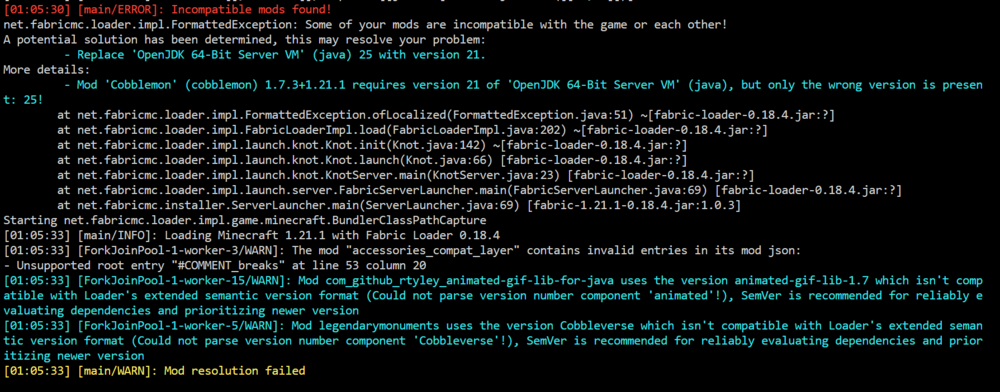
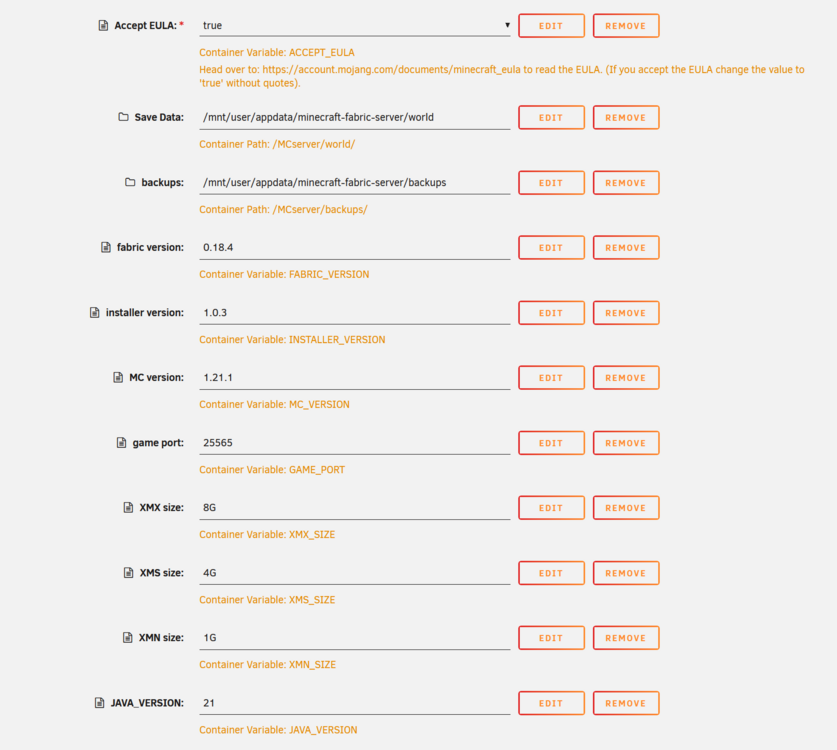
I appreciate it, but it doesn't seem to be working. I can manually download java 21 and change it to the default but that's less than ideal.
-
FireFtw changed their profile photo
-
Could you please release a tag for a version still using java 21? Not all of my mods are compatible.
-
Bless, for anyone dealing with the "Unauthorized" issue this is the fix. Took way longer than it had any right to.
-
Well after way too much time I realized I'm an idiot and this setup is pretty easy for the letsencrypt container. Here's your conf file: server { listen 443 ssl; listen [::]:443 ssl; server_name bookstack.*; include /config/nginx/ssl.conf; client_max_body_size 128M; location / { include /config/nginx/proxy.conf; resolver 127.0.0.11 valid=30s; set $upstream_bookstack bookstack; proxy_pass http://$upstream_bookstack:80; proxy_set_header Upgrade $http_upgrade; proxy_set_header Connection "Upgrade"; } } Do NOT enter anything in the docker for "Reverse proxy URL". DO edit the .env file in /appdata/bookstack/www/.env and UNCOMMENT the "#APP_URL=" as well as put in your domain name including your subdomain prefix. That's it. However if you're an idiot like me and don't do one of those things it can send you on a long trail of trying to fix something that isn't broken.
-
I'm having issues getting a few dockers set up. Booksonic is a strange one, here is my config server { listen 443 ssl; listen [::]:443 ssl; server_name booksonic.*; include /config/nginx/ssl.conf; client_max_body_size 0; location / { include /config/nginx/proxy.conf; resolver 127.0.0.11 valid=30s; set $upstream_booksonic booksonic; proxy_pass http://$upstream_booksonic:4040; } } Which gives me this when I actually try and navigate to it Clicking on the link actually brings me to where I want to be the webUI for the docker has it set to http://10.0.0.10:4040/booksonic which gets redirected like it should, but how to set up the equivalent with nginx or a DNS config I don't know. Then we have gotify, which doesn't work at all. I just get a bad gateway. server { listen 443 ssl; listen [::]:443 ssl; server_name gotify.*; include /config/nginx/ssl.conf; client_max_body_size 0; location / { include /config/nginx/proxy.conf; resolver 127.0.0.11 valid=30s; set $upstream_gotify gotify; proxy_pass http://$upstream_gotify:1400; } } This is regular docker container, not one that was setup for unraid. Not sure if that means there's something to set up that I don't know about.
-
The only left over annoying part of this is going to 'jellyfin.website.com' doesn't redirect so it doesn't work. you have to manually enter in 'https://jellyfin.website.com'. I think I'm probably just missing a setting in NGINX but I haven't been able to find anything, anybody know how to fix this?
-
Here's an interesting one. I would like to run MineOS through this too so I can close the ports I need open for it. I don't care about the web interface, just so ports 25565-25575 get passed on to the docker, no URL stuff. I don't know nearly enough about nginx to come up with the solution on my own and I can't find much for references to base it off of. Any ideas?
-
Yep, forgot I didn't have the bridge swapped over. The internal and external ports are both 8083 on the newest docker.
-
Still looking for a working calibre subdomain config file. I have: server { listen 443 ssl; listen [::]:443 ssl; server_name calibre.*; include /config/nginx/ssl.conf; client_max_body_size 0; location / { include /config/nginx/proxy.conf; resolver 127.0.0.11 valid=30s; set $upstream_calibre calibre; proxy_max_temp_file_size 2048m; proxy_pass http://$upstream_calibre:8083; } } with my calibre docker named 'calibre', however accessing the site gives me a bad gateway error. Any ideas?
-
Thanks for the reply, my bad I thought the button would have disappeared.
-
For the Bitwarden container setting the SIGNUPS_ALLOWED to false doesn't seem to be disabling the signups. Any idea why?
-
how about testdisk for idiots like me who delete things they shouldn't?
-
Trying to get rtorrent to execute a script sitting after it's done downloading, is there any reason method.set_key=event.download.finished,filebot,"execute={/home/rtorrent-postprocess.sh,$d.base_path=,$d.name=,$d.custom1=}" doesn't seem to work? I gave the script all permissions and the first thing it does is echo into a file so I'm pretty sure it's not being called. On a separate note I found an interesting (although unfortunately really old) thread on some forums about having deluge handle downloading and then having it pass the download off to rtorrent after it's done. In order to do something like that I would have to be able to, through the docker, point it at a torrent file to import and tell it where to find it. Is something like this currently possible?
-
I am having a hard time finding a few things you referenced before with kizer, mainly how to run it from command line (/usr/bin/filebot.sh does not exist) and being able to have a folder run a script automatically after some time. Anywhere you can point me for those?


