





bobokun
Members
-
Joined
-
Last visited
-
I'm seeing this spammed in my syslog on every page I go to (even if I'm not on the AICLIAGENTS page). Do you know how to fix this error? Oct 5 10:31:03 webgui: Invalid .page format: plugins/unraid-aicliagents/AICliRelayMcp.page
-
@mgutt , thanks for putting this together. I use discord for alerting and a lot of the times it would fail to send the notification to discord because it would parse the JSON incorrectly with this error {"message": "The request body contains invalid JSON.", "code": 50109}. I've patched this section of the script to ensure Newlines, quotes, and backslashes in syslog entries are escaped safely. I'm posting it here in case you want to add it into your script as well. # create notification for new errors if [[ $errors ]]; then # remember line number of last error line_number_start=$(grep --text --fixed-strings --line-regexp --line-number "$last_line" "$syslog_file" | cut -f 1 -d ":") echo "$line_number_start" >"$line_number_file" # escape subject keywords subject="syslog $(echo "$errors" | grep -ioP "($words)" \ | tr '[:upper:]' '[:lower:]' | sort -u | xargs)" # escape description safely desc=$(echo "${errors:1}" | jq -Rs . | sed 's/^"//;s/"$//') # send notification /usr/local/emhttp/webGui/scripts/notify \ -i "alert" \ -s "$subject" \ -d "$desc" exit else # store last line number if no error has been found line_number_start=$(grep -c ^ "$syslog_file") echo "$line_number_start" > "$line_number_file" fi
-
unnas-diagnostics-20250903-2129.zip
-
If I add it to the array and let it clear the disk but don't format after, instead just stop the array and remove the disk, would that be considered "precleared" and would parity be valid still after removing the disk?
-
Hi I got redirected here after posting in the support forum. I recently purchased a HDD and wanted to test for early failure, but no matter how many times I try to preclear the drive it keeps coming back with FAIL! Invalid Unraids MBR signature on 3ZGYASGZ (sdk). I'm using the latest version of the Unassigned Devices Preclear plugin (2028.08.20). The first time I tried preclearing I was using a USB dock and thought there might be an issue with the dock, so I tried putting the HDD in my server and rebooting it instead but I'm still running into this issue. This is being connected via Dell PERC H310 to a supermicro 16 bay SAS2 backplane. This seems to happen right after it finishes zeroing the drives. See attached preclear logs. preclear.txt
-
I don’t plan on using this drive right away. It’s meant as a backup ready to be replaced in case a drive fails. Is there anyway Unraid can preclear it and have it ready without adding it to the array?
-
I recently purchased a HDD and wanted to test for early failure, but no matter how many times I try to preclear the drive it keeps coming back with FAIL! Invalid Unraids MBR signature on 3ZGYASGZ (sdk). I'm using the latest version of the Unassigned Devices Preclear plugin (2028.08.20). The first time I tried preclearing I was using a USB dock and thought there might be an issue with the dock, so I tried putting the HDD in my server and rebooting it instead but I'm still running into this issue. This is being connected via Dell PERC H310 to a supermicro 16 bay SAS2 backplane. This seems to happen right after it finishes zeroing the drives. unnas-diagnostics-20250903-2129.zippreclear.txt
-
The extended SMART test passed but some of the SMART attributes came back with additional errors and I'm seeing an alert in fix common problems about the disk8 read errors. I've attached the latest diagnostics, hopefully it has information about the extended smart test that can help. unnas-diagnostics-20250731-1326.zip
-
The past few days I've been receiving alerts that my disk8 has read errors. This usually happens when mover is running. Do I need to replace this drive and how urgent is this? The drive itself is not that old compared to some of the other drives I have in my system and it's passed preclear multiple times before I added it into the array. I've attached diagnostics as well. unnas-diagnostics-20250730-0816.zip
-
No there hasn’t been any new device or hardware changes
-
I'm seeing a lot of segfault errors on my server starting today. Is there any way I can debug what the issue is and how to fix these? Are they safe to ignore? unnas-backup-diagnostics-20250428-1120.zip
-
I'm running into the same issue as well.
-
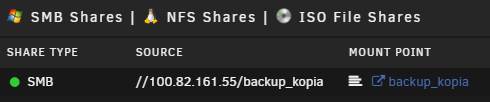
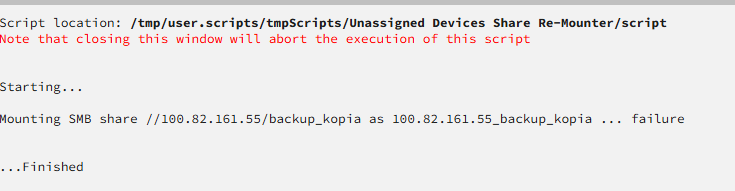
So I did test it and it does remount correctly but afterwards when you try to run it again it shows failure even though it's already mounted.
-
Instead of hardcoding the mount name as "${server_name}_${share_name}", this doesn't work for those who change the mount names from the default. Can it use the mountpoint found in samba_mount.cfg instead?
-
Is there any way I can request a feature to be able to opt out of certain drives from SMART updates? Ideally I would want to keep the smart updates scheduled but not receive these emails daily. If I could opt out of those two nvme's from being updated that would help until the new version of smartmontools gets upgraded with the new Unraid version.

