





Eyeheartpie
Members
-
Joined
-
Last visited
Everything posted by Eyeheartpie
-
Do I reboot in between deactivating autostart and then re-installing the plugin? I already started the upgrade process to 6.12.10. Am I able to override this with an upgrade to 7 if I just run it again? Or am I stuck on the upgrade path to 6.12.10? EDIT: Did the above process with a reboot after uninstalling the plugin and deactivating the autostart. Seems to be working as expected now. I'll keep an eye on it when I move up to the 7.0.0 to see if I have similar issues.
-
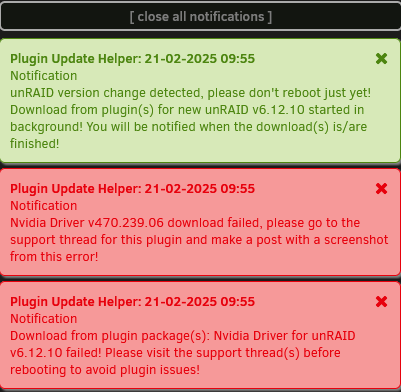
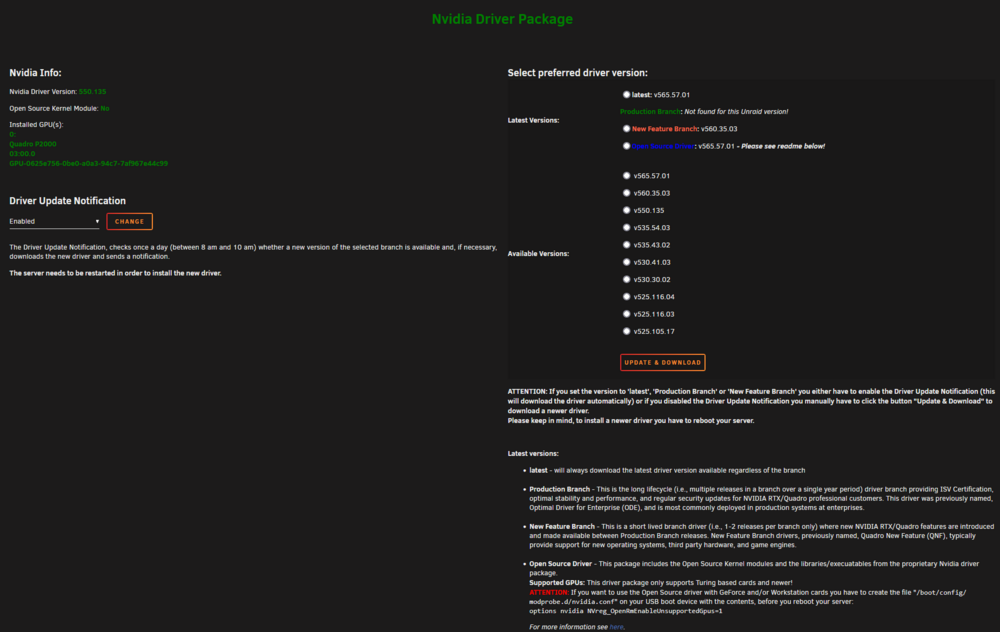
I'm on unRaid 6.11.5, updating to 6.12.10, and I got the following toast notifications: I have not received the toast notification that it's safe to reboot yet. I'm already on a higher driver version than 470.239.06, and I don't seem to have a corrupt plugin like some others in this thread have had. Here's a screenshot from my plugin settings page: Any help would be appreciated.
-
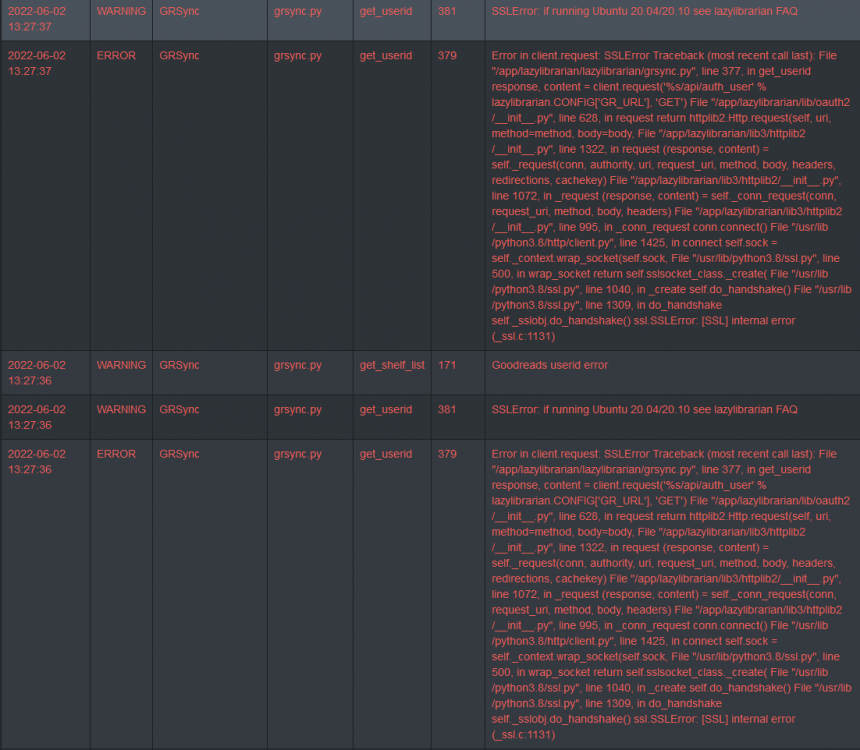
As of the latest update, goodreads sync no longer works. The error message in logs is shown here: The error message directs me to the FAQ (https://lazylibrarian.gitlab.io/faq/) which mentions issues with SSL in Ubuntu 20.04+. Is there any intention to change the relevant SSL packages in the container image so that this works again?
-
For posterity, this is what I did to migrate from the old deprecated container to the new one: Backed up library folders and appdata/calibre folder just in case I jacked something up. Exported all calibre libraries through calibre interface to an open share where I was storing all my books anyways. Stopped old calibre container. Deleted appdata/calibre because I wanted to use the same name/location for the new one, and I was getting a failed error when importing the libraries when I used a different appdata location for the new container. Explanation: I initially set up the new container to use calibre-test as the container name and the appdata folder name. When I tried to import the libraries, I got an error that said "appdata/calibre is not an empty folder, import failed". I assume something in what I was importing was trying to use the old file path, not the new one, so I figured it would be easier to just use the same name if I wanted to import my libraries. Deleted all the library folders I had and recreated them as empty folders, to make sure no db files or hidden files were left. Installed new calibre container using same ports and pointing /books to the same directory I used to use in the old container. Not sure what the purpose of /import is. Is it automatically monitored, or is it set up to be a folder that can then be set up in calibre to autoimport? I already had a folder set up in my libraries folder as where lazylibrarian moves books to, which are then ingested by calibre, so I just pointed this at an empty folder in my calibre library folder. Launched calibre web UI once, and set up the first library inside the config directory, as default. Imported the previously exported config from step 2, which imported all my settings and plugins as well. Changed the auto-import directory from libraries/lazylibrarian to books/lazylibrarian, since the previous container used libraries instead of books for the default directory. Confirmed that my settings were still working, and that I can still connect via calibre-companion on Android. So far everything seems to work as usual. I'll have to wait and see to check if my lazylibrarian workflow still works as it used to. Once that one is confirmed, I'll delete the old container and the backups I made.
-
Would doing a calibre internal export and import work to move the libraries like this? Or should I just copy-paste them to the new location and then tell new calibre to use existing folder for library?
-
So, I'm dumb and just realized the container I was using for calibre has been deprecated for like a year now. Is there a way to reuse the config from the previous one, or will I have to manually recreate the configurations, like auto-import and convert on import and such? I was using the aptalca/docker-rdp-calibre container, support thread here:
-
Has anyone set this up with LazyLibrarian? Any help if you have?
-
I'm using Firefox as well. I just tried in Chrome and it works there, but for some reason it's not working in Firefox. I tried disabling all addons and still no go, even with a forced refresh.
-
I'm having an issue with the pducharme/unifi-video-controller container. I can still watch the live stream video from my cameras, but I can't view the recordings in the browser window, either from the recordings tab or the timeline tab. I can see there are recordings, but when I click one, it just pops up as a black screen. I can download them and watch them fine, but I can't watch them in the browser window anymore. Any help?
-
I did this same thing and I'm up and running as well on 3.10.10. Thanks for the help, everyone.
-
In 3.10.5 (also works), it points to a mongodv3.0+.conf file, which points to my UniFi-Video/appdate/db folder. How would I restore a config after doing a clean install? I can't seem to find the option in the UI.
-
Oof. That sounds insane. I went back version by version and I was able to get 3.10.2 and 3.10.4 logged in, but I can't get logged in to 3.10.6. The issue is that in 3.10.4, it says it can't connect to my camera because "firmware not supported".
-
I think I could manage that with some fiddling, but I was checking out inside the container and I do have daily backups of my config going back a week, so it's possible I can just restore one of those backups to a clean install of latest. Just out of curiosity, what version changed from mongodb to wiredTiger?
-
I'm not sure, but I do keep my containers up to date. There weren't any pending updates a few days ago, and then I updated last night, and now I can't log in.
-
I'm having that same problem, and I was on latest. Last update was last night, and looking at my recordings, I had stuff stop recording around the time I updated the docker. Not sure which version I should try to roll back to, but I've tried 3.10.6 and 3.10.8.4.0 (since that's the last unique number on the github repo). Any thoughts or ideas? EDIT: Tried beta and testing as well, no job in getting logged back in.
-
I'm having trouble getting reverse proxy (using the linuxserver/nginx container) working with this container. I saw the discussion back on page 14 but I must be missing something because I can't get mine to work. I get either the endless loading, or I get into the UI but nothing populates. Anyone willing to help point me in the right direction as to what changes I need to make in which nginx config files to get this working?
-
Happy birthday! No complaints at all with unRaid, and that's pretty much the highest praise for any product.
-
I see my custom image in that location, but after every reboot, I get a broken image link in the dashboard. I have to reselect the image for it to show up again.
-
So in short, stop both, delete /mnt/user/appdata/mariadb, and /mnt/user/appdata/nextcloud, start mariadb, configure it per the setup, then start up nextcloud, and configure it as well, then inside nextcloud, have it scan for existing data, and it should pick up all the existing data? EDIT: Ok, I think I got it working. What I had apparently done was decide to start messing around with wordpress, so I deleted mariaDB appdata and messed around with it, forgetting it was nextcloud. So I created the nextcloud db on the mariaDB container, and then deleted my nextcloud appdata and set everything up again. It picked up the existing data without having to do anything on my part, and my webpages and mobile apps are working again. Thanks for all the help!
-
I think I may have at some point deleted my MariaDB container completely because I had been using it to play with learning databases, and then thought I didn't need it so I just got rid of it. How do I destroy all config and data for MariaDB? Just remove the container and reinstall it? And how do I delete all the config for NextCloud without deleting the data? Thanks for your help.
-
I think I've managed to screw up my installation good and proper. I think I jacked with my MariaDB docker, forgetting I needed it for NextCloud, and now I can't access NextCloud at all (I get HTTP 500 errors). How can I back up the data in my NextCloud and start from scratch?
-
I'm having an issue with plugins. Whenever I enable one, check mark shows up, I hit apply, then close the preferences window. But when I open up the preferences window again, the check mark disappears. This happens for all plugins that I've tried so far. Any help?



