





pjneder
Members
-
Joined
-
Last visited
-
Ok. I got it working. I was really confused by the bind path I was seeing in the unraid docker ui. Previous reading on this topic indicated that the internal nextcloud name would be "/mnt/ncdata/local" so seeing Docker say /mnt/user/Paperless<->/mnt/user/Paperless really threw me off. Getting the local setting in nextcloud was also not quite what I expected. In my readings I thought the mount point was the starting directory. So if I did a mount for /mnt/user/Paperless then all I would put in the configuration was "consume" but this is not how it worked for me. Create a new variable in the nextcloud-aio-mastercontainer docker. name: NEXTCLOUD_MOUNT value: /mnt/user/Paperless stop the containers via the AIO UI. restart the mastercontainer start all of the containers via the AIO UI (or if this doesn't work you might have to tear down and rebuild the whole AIO bundle) In NC config, enable external storage from the admin->applications->disabled apps section In External storage add a new entry Folder name = paperless-consume (or whatever you want) External storage = Local Auth = none Configuration = /mnt/user/Paperless/consume (if you are using default paperless values) Apply it via the check box and watch for the green check on the left And it works!
-
I found this thread while trying to solve the problem of local mount to nextcloud, primarily for paperless consume function. I have followed all of these instructions and AI, etc.. The problem I have is that the NEXTCLOUD_MOUNT variable is resulting in what looks to be incorrect binding on the child container. The mastercontainer contains: "Env": [ "NEXTCLOUD_DATADIR=/mnt/user/nextcloud/", "NEXTCLOUD_MOUNT=/mnt/user/Paperless/", "SKIP_DOMAIN_VALIDATION=false", But the nextcloud-aio-nextcloud child container contains this in the binds config, which clearly won't work as it not what we want there: "HostConfig": { "Binds": [ "nextcloud_aio_nextcloud:/var/www/html:rw", "/mnt/user/nextcloud/:/mnt/ncdata:rw", "/mnt/user/Paperless/:/mnt/user/Paperless/:rw" ], I cannot figure out how this is happening or how to fix it. Any help from users or @SpaceInvaderOne is greatly appreciated. Cheers!
-
+1 vote on this. Keeping the topic alive. I am a Plus license and would happily pay more for this feature!
-
I got this fixed. It was due to repeating UUIDs, as I had not wiped the signature from the disks and they were in unassigned but conflicted with pool disks. All sorted now. Thanks!
-
I should have noted, I tried multiple settings. My first path was to just have it zero the drive without the pre/post tests. Agreed it is already known to be good, reliable and nominal SMART stats. Regardless, the preclear should work, so my question about the warning and behavior still stands. Your support is much appreciated! Added: Actually, I see a different but related issue in the array. I decided to start writing some media files and I notice that Disk 2&3 are greenballed yet the parity disk is not showing as spun up. That should not be possible. Something seems to be fishy in the enumeration at this time.
-
Got what is hopefully an easy question. Probably answered but not found while searching the forums. In the process of upgrading my parity drive to larger and adding a disk, now I have the former 3T parity drive sitting in Unassigned devices. All good and as expected. Array is started and nominal. Therefore I wanted to do a preclear on the 3T parity, currently sitting on sde1. If I start preclear with default options the UI says "starting" but no stats appear and it does not appear to be working the disk. Checking the disk log I see: May 4 17:10:58 Floater emhttpd: WDC_WD30EFRX-68AX9N0_WD-WMC1T2998971 (sde) 512 5860533168 May 5 05:41:22 Floater emhttpd: WDC_WD30EFRX-68AX9N0_WD-WMC1T2998971 (sde) 512 5860533168 May 5 05:41:51 Floater root: WARNING: adding device /dev/sdi1 gen 225 but found an existing device /dev/sde1 gen 234 May 5 05:41:56 Floater emhttpd: shcmd (10913): /sbin/btrfs device delete /dev/sdi1 gen 224 but found an existing device /dev/sde1 gen 234 /mnt/cache & Not sure what I should do here. Any hints? Thanks!
-
[sOLVED]! OK, I figured out what the problem was. I had selected "Other (32b)" as the type of Linux. Hence ESXi would never allow me to assign a VMXNET3. Once I switched that to "Ubuntu (32b)" I got that choice in the drop down and unRAID (with http://lime-technology.com/forum/index.php?topic=11449.0 installed) found the interface just fine. Now I'm working all sweet like. P.S. FWIW pfSense is another story. Figured out how to do the necessary custom install of VMWare tools, but traffic shaping is acting all fussy so I've dropped back to E1000 until I can sort that out.
-
Thanks for the response. I follow everything you are saying and I'm pretty familiar with how that works. Attached are a few snips from the VM summary tabs. I understand how *nix generally enumerates interfaces. In the case of pfSense and unRaid both it will automatically find the interfaces, even if it does renumber them. For me, I must still be missing something simple because the VMXNET3 don't show up at all on unRAID or pfSense. I have an Ubuntu appliance VM from Bitnami running Wordpress and in that VM it does show up as VMXNET3. On that VM the tools show as "Installed (current)" and not as 3rd party. Same in my Win7 VM running apcupsd. Therefore the real question is: How have folks gotten VMXNET3 adapters to work on unRAID? thanks!
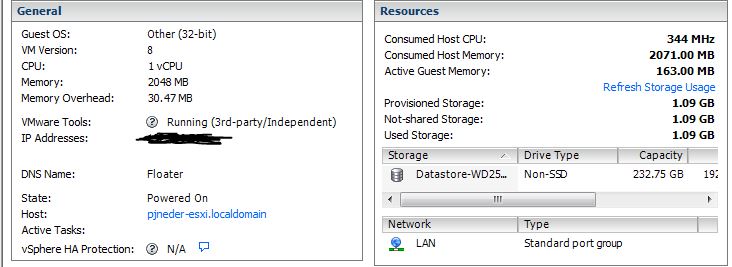
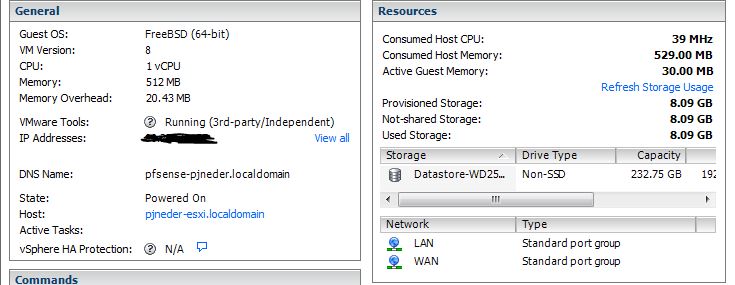
-
I wonder if I got the *right* non-standard driver. Both of the interfaces work fine, as E1000's, but I haven't gotten VMXNET3 to work on any VM so far...
-
Check. Check. Still no joy.
-
I am not getting the option to assign a VMXNET3 NIC to my unRAID VM. Furthermore, although not unRAID related directly, if I assign VMXNET3 NICS to my pfSense VM they do not show up. For reference the NICs on this mobo are both Intel. 82574L and 82579LM When I look in the vSwitch properties under Network Adapters tab I see that the driver is listed a e1000e. Curious if anyone has thoughts on what I need to fix. Thanks!
-
Joe, Handy advise that... In my structure, under "Media" is only directories. You have to go another level deeper to see files and thumbs. I'm wondering what could be getting accessed? Thanks!
-
I'm new to cache_dirs. Don't know why I didn't use it before except that I was lame... Anyway, running it under the plug-in interface on 5.0-rc12a. This is all on a VM. When I open my "Media" share in Windows, disk #2 always spins up. Media is spread across several disks. I'm using pure default config on the plug-in interface. root@Floater:~# free -l total used free shared buffers cached Mem: 2074512 739824 1334688 0 334304 211760 Low: 890824 511788 379036 High: 1183688 228036 955652 -/+ buffers/cache: 193760 1880752 Swap: 0 0 0 Doesn't look like I'm running into memory limits. ESXi also shows way below the 2GB commit limit for the VM. Where can I look for more debug data? Thanks, Paul
-
Here is a handy site that tells you that stuff. http://ark.intel.com/search/advanced/?s=t&FamilyText=Intel%C2%AE%20Core%E2%84%A22%20Quad%20Desktop%20Processor&VTD=true That's what I used when hunting for a Core i3/5/7 that would do what I needed.
-
Thanks jangjong! I will consider this strongly and possibly go for the M1015. I was restricted to x4, but now I will use a different mobo, so x8 cards are an option again. Thanks!
