






Josh.5
Members
-
Joined
-
Last visited
Everything posted by Josh.5
-
@tasmith88 The part I find strange there is that you have the container pinned to 4-7,16-19, yet cores 0-3,12-15 are also spiking
-
@tasmith88 What does your CPU resource use look like when Unmanic is not running?
-
This is a separate issue. It is to be expected that a task like an FFMpeg encode would attempt to use all resources it has available to carry out the job. Audio encoding and remuxing is only being done on the CPU and your NVENC encoder will bot be used. For most people who use Unmanic, this is something that they want to have running in the background. Furthermore, it is the sort of thing that they are running in the background sharing resources with other processes. For these people (again, most people) it is HIGHLY recommended to limit resource use by your Unmanic Docker container. This is a screenshot of my config. Because I am using NVENC for hardware acceleration, I do not need the CPU to do much. I have pinned Unmanic to just a couple of cores and have then limited the use across those cores to 30% (--cpus='.3'). Even if you were not using hardware acceleration, you should be limiting the resources Unmanic can use in a similar way to this as otherwise it will affect your other processes on your server. There is currently no way to limit the workers resource use in Unmanic, and I am unsure if there will be any time soon. Therefore, Docker is the best way to run Unmanic and using the "--cpuset" ("CPU Pinning" in the Unraid templated) and "--cpus" to then limit it's resources.

-
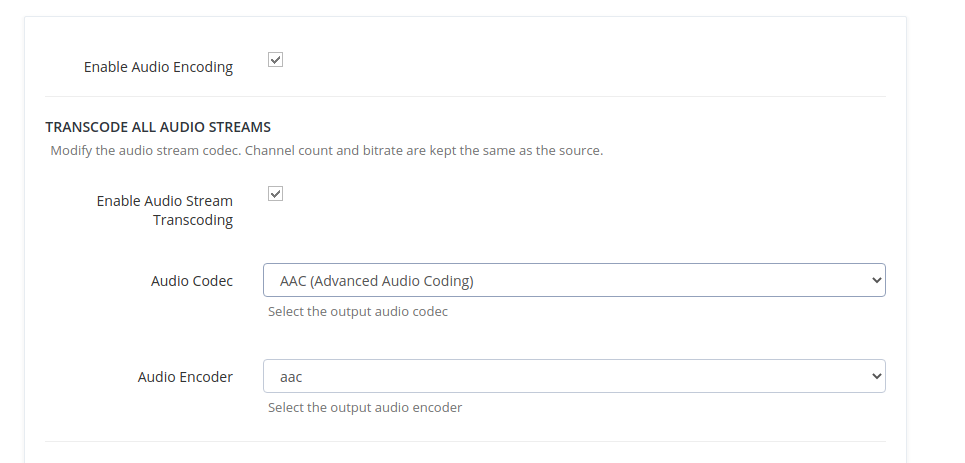
If you do not have "Enable Audio Stream Transcoding" checked, then whatever audio streams exist in the original file will be copied to the destination file with no changes made to it's codec. I personally do not have this checked as my playback devices can handle any codec fine (with the exception of the Chromecast). However, if you find that you have files in your library that are not playing well due to the audio, you may wish to enable this setting. Below it you will see a setting "Enable Audio Stream Cloning". This setting clones any surround sound audio streams (greater than 2 channels) and encodes that clone with only 2 channels according to the selected audio codec and bitrate. As an example that affects me personally, I had some videos that contained audio streams encoded with some kind of DD 7.1. My Chromecast could not play these and Plex would not transcode the audio when it tried (it would happily transcode the video, but not he audio). I didn't want to remove the surround sound streams from my files. My Chromecast (in the kitchen) only plays stereo anyway. So my solution was to add this setting to Unmanic that clones the audio stream (at the cost of an extra few MB per result file). On the Plex app I can then select the stereo channel when casting these videos to the kitchen Chromecast and the video files that were unable to play before now work perfectly fine. These settings are really dependant on your setup. You may have no issues with audio playback on any of your players. And in that circumstance I would recommend NOT selecting the "Enable Audio Encoding" checkbox at the top of that page at all. When that is not selected, then your audio streams are left completely untouched and are just "copied" into the new destination file.
-
@jonfive In your case here the FFProbe has detected that your old file is in a "matroska,webm" container. Whereas the application settings mandate that video files need to be in a "matroska" container. So nothing is being transcoded here, just remuxed. The job would only take a couple of seconds and does not use any hardware acceleration as it is not encoding any video streams.
-
Please note that with the last lot of changes, if you have "Enable Audio Stream Transcoding" enabled, Unmanic will transcode your files if the audio codec does not match what you have specified in the dropdown.
-
Is anyone able to send debug logs? I am unable to reproduce this issue.
-
There may be an issue with the last few changes. I'll take a look tonight and get it fixed for you all
-
I have a suspicion that it is an old 'settings.json' file from a much earlier version of Unmanic. Could you please delete that file in your Docker config volume. May be something like '/mnt/user/appdata/unmanic/.unmanic/config/settings.json'. Let me know how you get on.
-
I made some changes this week to allow for Unmanic to be run as a Kodi add-on. I'm betting that I messed something up. Sorry. I'll take a look tonight.
-
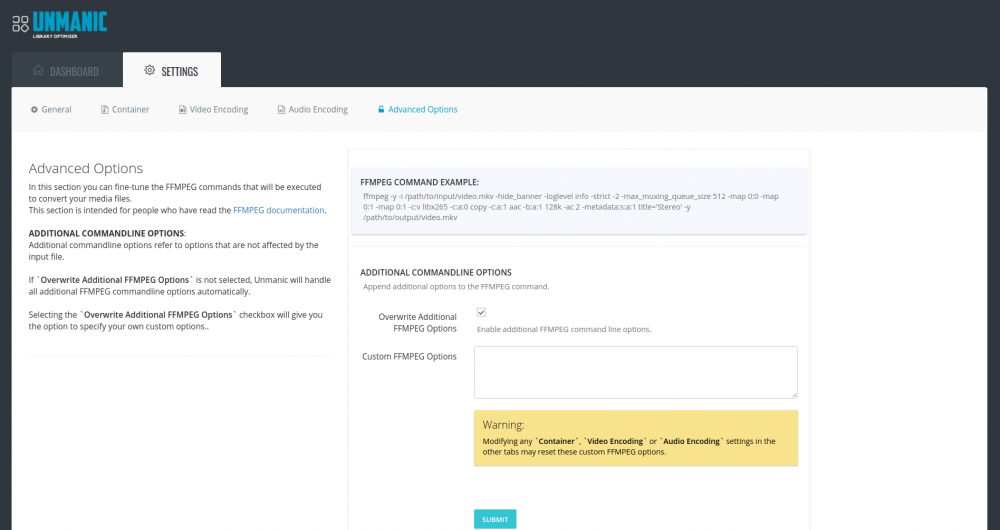
This overwrites the command options for all files. You can enter as many as you like separated either by a new line or space. And adding an option to this field that already exists will replace the unmanic default for all files. Just note that the example is just an example. The command does differ in some ways for each of your files based on its streams and container.
-
Indeed. It's hacktober. I took a few days off work so I could spend some time kick-starting development again. The issue list on GitHub was starting to backup a bit.
-
O right. Well there we go then. Spritzup needs to modify the Docker template.
-
Do you by any chance have it as a map on your Unmanic docker container config? I'm not sure what "Media" directory you are talking about. Unmanic does not do anything with a "Media" directory in it's defaults.
-
May be a bug in the python dist package. Without the full path I cannot know for sure. I did a full update of the Docker Ubuntu base image the other day, perhaps that is why this is now broken
-
Are there any fancy characters in the name or path of your files?
-
Are you able to get me the unmanic.log file?
-
I'm really sorry. I cannot help with this at all. I don't have an Intel CPU on my Unraid machine. I can only test Unmanic quick sync on the laptop that I have.
-
Try adding `-max_muxing_queue_size 1024` to the Custom FFMPEG Options. I've already set this quite high at 512. But perhaps your file needs to go higher. (https://trac.ffmpeg.org/ticket/6375)
-
Yes. Inotify has an upper limit on the number of files that it can monitor. This is a Linux kernel feature, not a Python module or Unmanic feature. I just checked my Unraid and it is set to 16384 files for "max_user_watches". If you want to be able to extend inotify to do this, you will need to increase this setting in Unraid. For more info on how to do that, I'd recommend googling something like "increasing inotify max_user_watches events"
-
I've pushed an update to fix these sorts of errors.
-
What errors are you seeing in the ffmpeg logs (not unmanics logs)? Since you have dubugging turned on, the ffmpeg logs will be saved. They will appear under details of task if you go to the history page. It just so happens that I've accidentally forgotten to turn off debugging on the ffmpeg logs (woops), so you should see a decent amount of information there.
-
New Zealand. So, I've pushed x3 new features today... Quicksync HW Encoding (VAAPI) support. Quicksync was not fully enabled after the NVIDIA encoding feature was added a few months back. It was missing some testing and additional configurations. I finally managed to get my hands on an Intel laptop a couple of months back, so I was able to finally finish that part off. There are no configuration options at the moment for HW decoding, but I think I would like to get around to that some time also. However, there is now a way you can configure Intel decoding and encoding if you know what you are doing (keep reading below) Task lists are now read from the database. This is a big update. If anyone's install breaks because of this change... sorry. Basically, all the "lists" are now inserted and selected from the SQLite DB. This change required a decent overhaul of the way the application passes tasks around to the workers and post-processor etc. Now that this change has been implemented, it will be possible to add features to move items around in the task list or set priority on items. This is what I want to move onto next. This was the last big change that I had to implement before moving from "beta". It is the last change that I have on my milestones that would break anyone's configuration and cause them to need to delete the database and start fresh. So now that this is done, I should be moving this out of beta and expanding it to other forums. Advanced FFMPEG Options. This is something that users that want to get their hands dirty may particularly enjoy. I often see posts wishing Unmanic could give them more control over how it was transcoding their library. Even recently I have seen a post here wondering what the FFMPEG arguments were that Unmanic were executing. In settings you will now find a fifth tab - "Advanced Options". This tab will give you a print out example of what FFMPEG will be run on your video files as well as a text input box for adding your own custom FFMPEG Options. For those of you who can be bothered reading the FFMPEG docs, you may find some ways to further improve the command. For now, this "Custom FFMPEG Options" field will also be a requirement to get the Intel VAAPI encoders working. It requires these two params to be added: -vaapi_device /dev/dri/renderD128 -vf format=nv12|vaapi,hwupload If this is to difficult for people, I will eventually come up with a way for these to be automatically populated when one of the vaapi encoders is selected. But that is a low priority. It's time to get onto some front-end improvements. I will add instructions on the first post for setting this up. Sorry for the seemingly lack of development people. I have far from given up on this application. I quite enjoy it. I have been slowly working on it this year. Unfortunately, earlier this year when we finished our lock-down here in NZ, my workload increased as we went into catch-up mode at my day job. Its been the busiest year form me. My next goal is to give us some ability to sort the pending tasks list and blacklist any files that are constantly failing. Hopefully some people get some good use out of this last update with quicksync. Cheers
-
Enabling the debugging will add the full ffmpeg log to the historical record
-
I love it when ppl ask these questions... Anything to post a lmgtfy link. https://lmgtfy.com/?q=what%27s+the+difference+between+%3A%C2%A0+hevc_nvenc+and+nvenc_hevc The drop-down list is populated by what's available for that compiled ffmpeg, minus what unmanic is not able to do. Unmanic can do both and the ffmpeg in the container can do both. So both are shown. And no, unmanic cannot use the decoder at this point. I'd be open to any PR for adding this feature.




