Josh.5
Members
-
Joined
-
Last visited
Everything posted by Josh.5
-
Cannot diagnose this without logs
-
could you also post your config
-
There is a manual scan button coming. It will be at the top of the pending tasks list. No intent to have a start paused exactly, but I was going to add a scheduler of sorts at some point. For now you are able to schedule Unmanic with docker and cron. I believe there are a few people in this thread that have done that by creating multiple Unmanic containers and a user script that starts and stops the containers at certain times during the day. You are correct with the advanced FFMPEG options. This is the place to fine tune your requirements. You can add filters, etc here. And you will need to set the other options in the audio and video tabs. If you want more control over the FFMPEG process, you will need to look at the new plugins feature currently available on the staging branch. Plugins are really easy to write if you know a little python.
-
No worries
-
So you see how this log says: Stream mapping: Stream #0:0 -> #0:0 (copy) Stream #0:1 -> #0:1 (ac3 (native) -> aac (native)) That basically shows that the video stream was already the correct format as configured in Unmanic's settings. Therefore it is just going to copy it from source to destination. Your GPU will not be touched in this task.
-
That is correct. If you like, enable debugging. Then when a file is converted, take a look at the history and view the details of that conversion. Post the first part of the FFMPEG log here
-
Are you getting errors, or is it converting files? Just because you have hardware acceleration enabled, does not mean the CPU will not be used. The CPU is still used for decoding, audio encoding and remixing. If the task is only those, then it will use 100% CPU. Sent from my Mi MIX 2 using Tapatalk
-
Thanks for the report and the logs. A fix will be available in the 'staging' tag again for download in about 10 mins.
-
Hey team, I'm getting ready to push another lot of changes to the staging branch. I have been busy developing a new plugin system for Unmanic over the past 2 weeks. I chose not to merge the current staging changes into the master branch as there was identified some additional issues with conversion tasks and cache files not being delete. I am hoping that the changes that I push to the staging branch tonight fix those. But as always, if you update tomorrow and are still having issues, let me know and I will dive deeper. I have begun writing some documentation on using Unamnic. You can find this here: https://docs.unmanic.app/ I want to give a shout out to @Cpt. Chaz as he has been putting some decent effort into making great video guides on setting up Unraid and he has made some great ones on Unmanic to date. He has provided me with some sweet updated graphics for Unmanic logos and he is taking it upon himself to create some more in-depth guides on using the application. Check out is first Unmanic video tutorial here: With more to follow. Cheers guys.
-
I'm not sure what "TB" is sorry. I will look through your stuff today. Hopefully we find a smoking gun. I really suspect it is the audio transcoding changes in February. They are pretty big changes to how the app ran last year. Adding support for people who only want to modify the audio in their container even when the video codec is already correct.
-
My server has been doing this lately also.
-
A fast-forward to latest or staging branch from 0.0.1 should work fine without needing to reset. Could you please switch to latest without wiping appdata (just back it up) and then let me know if you start having those issues again? If you are still having issues, I can create a branch just for you to test that we can remove commits until we discover what one is causing problems.
-
Is anyone currently on staging that could provide feedback? I would love to find someone who can help test the staging branch for a week before I merge it into master.
-
You also need to change the unmanic settings to us the nvenc encoder. You don't need to be on staging for he transcoding to work
-
I use 265 also, you just caught me while running some tests with 264. But both work. Yes it does overwrite. So save a copy of your originals if you wish to compare. In my tests between the defaults using intel and nvidia hardware acceleration, I've noticed that the intel hevc_vaapi encoder's defaults tends to compress a lot more resulting in poorer picture quality. I personally would recommend adding a few additional settings to the advanced options if using intel vaapi. Unless all you are going for is smaller files and are not so worried about the result video quality.
-
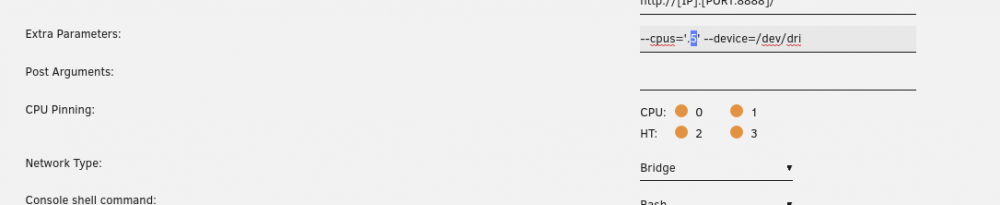
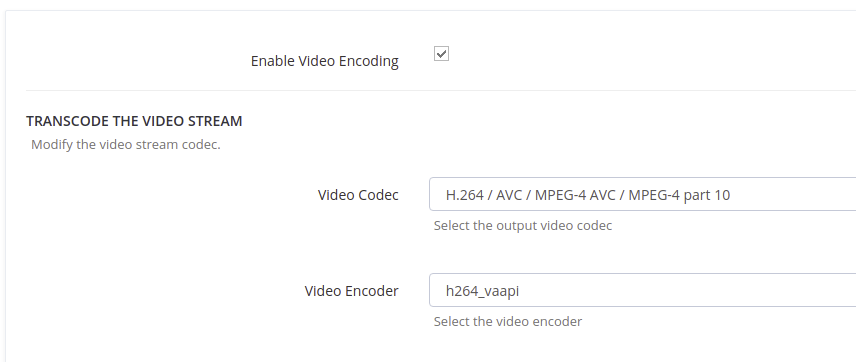
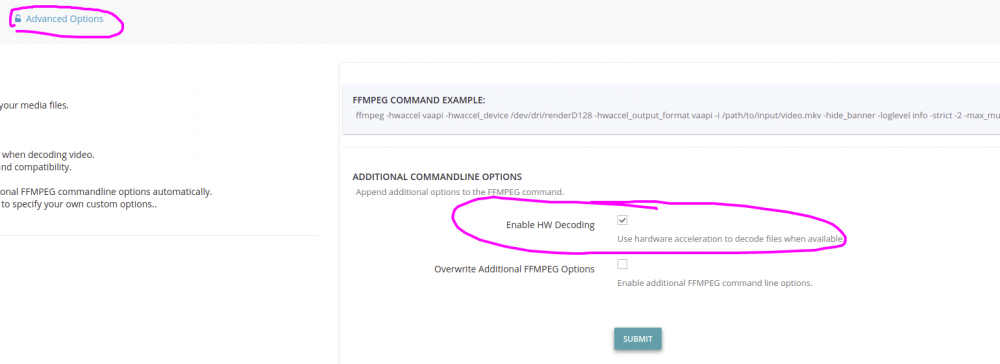
I'm using my Intel CPU to transcode a file at the moment (i3-6100). Make sure you have `--device=/dev/dri` set in the "Extra Parameters" section. Pull from the staging branch for hardware decoding (not yet in latest): Set the encoder to one that ends in "vaapi" like I have here for h264: (select "Submit") Then under the "Advanced Options" tab select "enable HW Decoding" (select "Submit")

-
You could revert to version 0.0.1 (josh5/unmanic:0.0.1) from last year.
-
Hey team. Today i did a little work on Unmanic. These changes are in the "staging" branch so will only be available to those who are running the "staging" tag on docker (Repository: josh5/unmanic:staging). I've pulled in the latest docker-ffmpeg bin base image in case there were any changes. I believe there may have been an update. But it seems like the FFMPEG version is still a little behind. I've added support for hardware accelerated decoding (both NVDEC/CUDA and VAAPI). To enable it, select the "Enable HW Decoding" checkbox in the advanced tab. I would not recommend mixing and matching CUDA and VAAPI decoding and encoding. At the moment if you have both available, it will default to CUDA. If this is an issue for anyone, open an issue on GitHub and I will make a selector on the advanced tab. I see quite a few messages here where people are saying that they have issues with spiking CPU use. I find this odd as I have tried for hours to reproduce this and have not been able to. My only suggestion to those people at this time is: Switch to the staging branch. Clear out the unmanic settings completely. Ensure that all files in the /config/ volume (/mnt/user/appdata/unmanic/) is owned by 'nobody:users'. Enable debugging in unmanic. Avoid using NTFS partitions for media libraries at this time. Disable Audio Encoding completely (a recent change last month causes unmatch audio to warrant a fresh transcode) Hopefully whatever is causing the issue is left behind with this. A little note on point 5 above. A friend of mine was using unmanic with a pair of NTFS drives on Ubuntu. I believe there was a bug in the shutil python module that was preventing completed transcodes from being moved back to their original directory in the library. The shutil.move function was not returning an error of any kind, just failing, so unmanic was assuming that the move completed successfully. This was causing files to just keep being re-added to the pending task list every time the library scan was run. I have not yet looked into this issue further. However, we believe we did isolate it down to is NTFS partitions. The permissions for those partitions were fine and unmanic worked as expected on his other XFS drives. If anyone else has experienced this, or has any insight, I would be interested to know...
-
I'll take a look and get back to you tomorrow. I'm not at a computer at the moment...
-
The unmanic.log file would help. Enable debugging beforehand.
-
So is unmanic converting the same file more than twice?
-
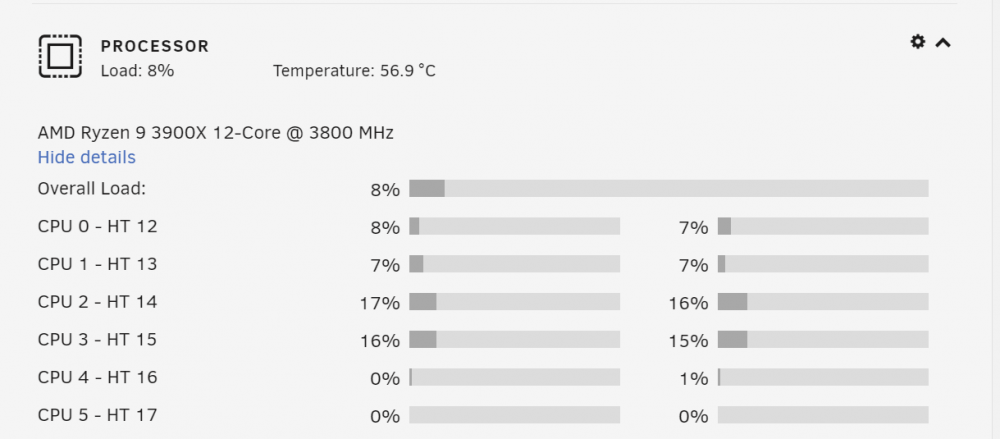
Just let them go. It should do exactly that. As I was mentioning earlier, make sure you add --cpus='.5' in your unmanic docker configuration. This will prevent it from slamming the CPU.
-
The settings look fine to me. I don't normally have driver capabilities at all. Just delete it. I also have my nvidia gpu I'd just set to "all" as I only have the one gpu anyway. Perhaps the uuid is wrong in your settings? Try setting it to all. Also, once you have configured the hardware acceleration, you will need to restart Unmanic for it to be applied to the current pending list.
-
Could you try re-creating the docker container. Just modify the template and click apply. If that does not work, could you try moving the appdata/unmanic directory to appdata/unmanic_backup and restart the container. You will need to reconfigure the Unmanic settings. I personally use `/dev/shm/unmanic` for my cache as I have enough spare ram for this.

-
@tasmith88 I have modified my settings slightly to test it. Pointing it at my entire TV Show library