





andrew207
Members
-
Joined
-
Last visited
Everything posted by andrew207
-
@Phoenix Down Yes this installs the 60 day free enterprise trial license. In the Github repo readme there are instructions on how to reset the license when it runs out.
-
@tkohhh I'm testing a fix to this now. It'll be available temporarily under the :tzfix dockerhub tag, I'll push it to master (and update this post) later this arvo once I've fully tested it. Issue seems to be related to my recent update to Alpine Linux -- they changed the way timezones are applied and I didn't notice. EIDT: Now working fine. Update your container and set your timezone in user preferences in the UI, should be all good
-
TL;DR: seems to be a UI bug, unsure what's causing it. Am looking into it. Generally there are 3 things to consider: 1. The timezone of your log source. If the source data has a correct TZ specified in it then you shouldn't need to change anything. Splunk will use this timestamp and create a metadata timestamp in GMT for storage and retrieval. 2. The timestamp of your Splunk server. Generally servers are set in UTC, but unRAID docker will apply an environment variable that is set to your TZ. This container always runs the server in GMT (per Splunk best pracitces). All data in Splunk is stored with a GMT timestamp. 3. The timestamp of your end user, as set in the UI or by default through your web browser settings. All data presented to the end user has the GMT timestamp converted to their local time. THIS SETTING DOES NOT SEEM TO BE HONOURED BY SPLUNK. If you have logs that are being created and sent in realtime (i.e. most syslogs) then you can check the difference between your server time and user time by running this search: index=myindex | eval indextime=strftime(_indextime,"%Y-%m-%d %H:%M:%S") | table _time indextime _time should be the local time of the event, and should be the GMT time of the event. It looks like both my GMT and localtime appear the same despite me setting a timezone in the UI, so there must be a bug somewhere. For now you can just present you're in GMT, or you can hard-code a conversion into any searches you're running -- e.g. there's a 28800 second difference between UTC and PST so you can run | eval _time=_time-28800. I'll look in to this TZ issue. Here's some extra reading: https://docs.splunk.com/Documentation/Splunk/latest/Search/Abouttimezones
-
When you set any user's timezone in the UI, it is saved in a file /opt/splunk/etc/users/user-prefs.conf. You'll need to put this file in a volume if you want timezone changes to persist after a restart. I suggest making /opt/splunk/etc/users/ a volume, as setting the whole /opt/splunk/etc parent directory will cause other issues. Perhaps in the next version I'll add this to the UnRAID template
-
One of the coolest things about Docker is how easy it is to test them both out to make the best decision happy to help
-
@tkohhh The key reason I made my own was actually because the official repo requires root to install itself. My container does not, and therefore it is compatible with locked down environments like OpenShift where security is important. Additionally the official repo is bloated for what it provides. The official repo seems to install itself by first installing Ansible inside a Debian/RedHat/CentOS container, then install Splunk using Ansible. This seemed odd to me as I'm able to fully download and install Splunk in about 5 lines of bash. The official container also has no optimisations for small-footprint use. My container has several tweaks that make a massive difference to footprint. For example, the official repo will store Splunk's 20-ish internal log files in /opt/splunk/var/log/splunk/*, it will allow them each to grow to 25Mb before rolling them. It will then store 5 additional rolled files (e.g. splunkd.log.1, splunkd.log.2, splunkd.log.n) consuming a not-insignificant amount of disk space. My container will only store one of each file, in addition to logging dramatically less noise to them thanks to an optimised internal log config that I wrote. Additionally, I have also written config that disabled some features that are enabled by default but only used in enterprise environments, such as several internal automated Distributed Service Monitoring dashboards+reports in the Health Monitoring Console. Splunk's official repo doesn't even support distributed deployments so it's odd that they don't disable this stuff too. This container has no issues running in distributed mode (and it is in several instances) if that is required, but for the majority of my Docker users I suspect they're running in standalone and don't need this resource wastage. So the TL;DR is that mine has a much smaller storage footprint, requires significantly less resources to run, and is capable of never using the root user/running as an arbitrary user.
-
Hey @tkohhh yeah in super simple terms Splunk is like a syslog server with built in search/report/alert functionality. You only need this container, no dependencies. Check the readme for volume definitions, make sure you set these up so you persist your data and config. It gives you an interface for searching. It's particularly useful when you want to correlate things, for example if you wanted to monitor a connection through your pfsense into your reverse proxy into your web server that's bread-and-butter for Splunk. For long term logging Splunk is great. It holds the full raw log events, under the hood it just gzips them and runs a heap of accelaration over the data to make it run miles faster than grep. Yeah, you can store literally any machine data in Splunk. I have my Splunk configured to predict my solar panel's output and therefore my solar battery capacity based on weather forecasts, and it can alert me (infinite alert vectors, I use Telegram) if it thinks my batteries look like they might run out if I keep using electricity per normal. It's also got a cake of enterprise features like reporting/alerting/dashboarding/blah blah, but for UnRAID use cases the above is a decent overview. It's got a bit of a learning curve, but the search documentation is pretty good. Happy to PM if you have any specific questions.
-
Yes, the container is still actively maintained. Recently (days ago) updated to the latest Splunk and Alpine Linux. Thanks for your interest, hope you get your internet fixed up so you can use it!
-
Ah good point, I don't see this as my Docker volume is set to 300GB due to hitting the limit in the past. I also have it stored on a non-array SSD for performance, alongside most of my appdata folders. Splunk image at absolute full blast should only ever consume 5-7 GB as an absolute max, more likely to only be about 1.5GB; so 20GB could be very limiting based on what else you run. The increase in size is due to Splunk's "dispatch" directory which resides in /opt/splunk/var/run/splunk/dispatch, which will fill up with "search artifacts" based on how frequently / what you search. This directory can be (fairly) safely deleted in a pinch, but the best solution is probably to increase your Docker volume size. I wouldn't consider this directory a candidate for a Docker volume due to its volatility. Based on my link above, if your dispatch directory is getting large due to search volume, you can set your `ttl` or `remote_ttl` in `limits.conf`, perhaps set it to something crazy low like 10 minutes so things don't get hoarded there like they do by default.
-
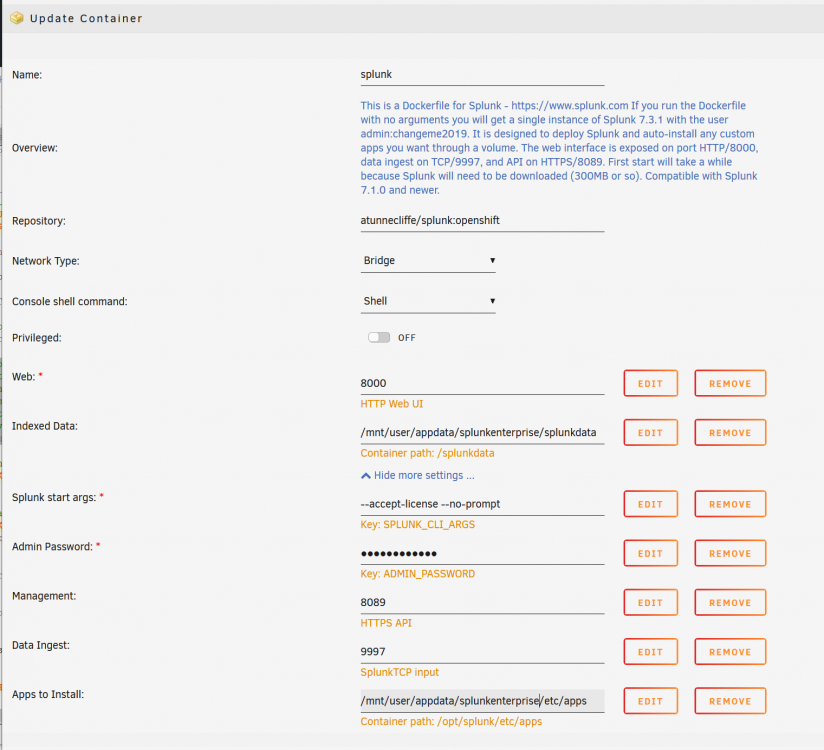
@wedge22 @mgiggs Fixed, I'll be pushing it to master shortly and it'll be available through unRAID's interface whenever they update their repos; probably a day or two. it's now published and available. If you want it now set your config up thusly - note adding :openshift tag to the repo, and make sure the volumes are exact: For anyone interested, I'm still not certain why the kvstore was failing previously (probably volume permissions?); the issue was mitigated by moving the SPLUNK_DB to a proper standalone volume (and separating the KVstore from SPLUNK_DB). This means your KVstore isn't persistent, but chances are for a small standalone install that won't matter.
-
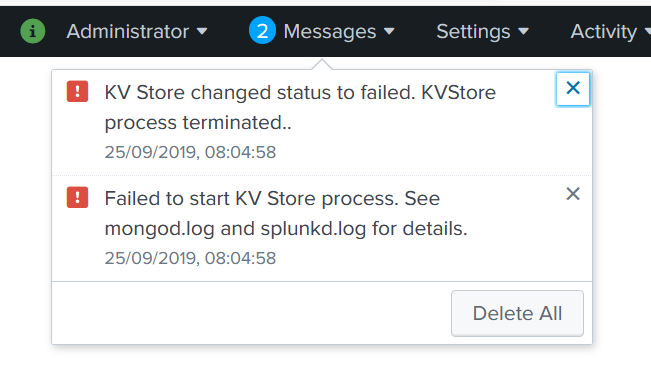
Yeah @wedge22 persistent data has been challenging, when I convert the /opt/splunk/var/lib/ directory (i.e. where Splunk stores indexed data) to a volume the KV store crashes. You can make it a volume yourself -- search / report / alert etc will still work if you make it a volume, but you get a permanent "message" about KV store being dead. I'm working on it though, we'll get there hopefully in the next week or so alongside a rebase to Alpine. https://github.com/andrew207/splunk/tree/openshift
-
To make your inputs.conf persistent set this path: As for your port 514, you'll have to expose that port yourself as it's not done by default; I only expose 8000 (web) 8089 (https api) and 9997 (splunk data). Just make it available through unRAID's docker edit screen same as those three are configured and it should work fine. FYI I have a new version of this container coming out soon that does a few fixes including defaulting to persistent storage of config as well as data, as well as rebasing to Alpine Linux: https://github.com/andrew207/splunk/tree/openshift

-
The container runs as GMT, and so does the Splunk app. To change the displayed timezone, in Splunk under your user's preferences set a timezone and Splunk will add the offset to any events at search time. From Splunk Answers:
-
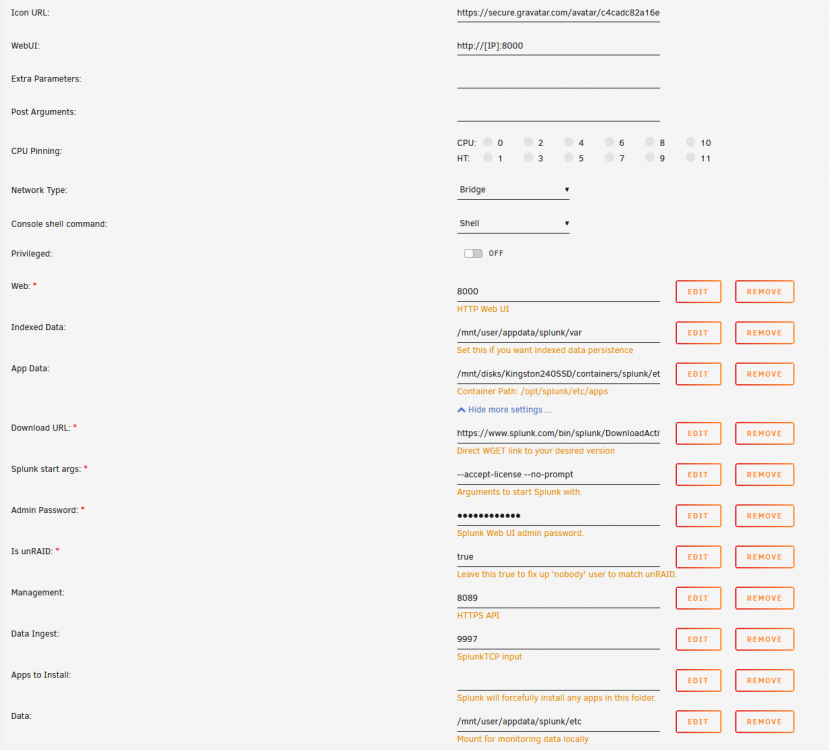
Hey @wedge22 that one may be due to a bad download -- doesn't happen on my end on UnRAID or on Win 10 hypervisors. In an attempt to make this answer a bit more useful, here's a screenshot showing my container config, change being the added "App Data" volume:
-
If you want a fully persistent install, for some reason Splunk throws some pretty odd errors. They don't seem to hinder functionality) so if you're cool ignoring them then you can do the following @wedge22 @GHunter Just add a volume for /opt/splunk/etc. /opt/splunk/etc directory stores all of your customisation. By default we already have a volume for /opt/splunk/var, the directory that stores all indexed data; so with these two your install should feel fully persistent.
-
Queueiz, if you want full persistence of your entire install you'll need to add a volume for the entire /opt/splunk directory. I haven't tested this, I may need to patch the installer script so it checks for an existing installation in /opt/splunk/ rather than just an existing installer file. You can stop/start the container all you want but if you rebuild it you will lose config by default (by design, in a perhaps misguided attempt to follow Splunk best practice), the container will only persist your indexed data if you have created a volume for /opt/splunk/var. --- edit: @queueiz I just tried to properly configure a volume for /opt/splunk for a full persistent install but Splunk started throwing some very obscure errors. I'll look further into this, perhaps I'll try to configure a persistent mount for the config in /opt/splunk/etc alongside indexed data in /opt/splunk/var, but I'll probably have to leave the rest of the application to be installed on every container rebuild. Feel free to try swapping to the dockerhub tag "fullpersist" (i.e. in unraid set Repository to "atunnecliffe/splunk:fullpersist"), removing any /opt/splunk/var volume and adding an /opt/splunk volume.
-
Overview: Docker image for Splunk based on Alpine Linux. Application: Splunk https://www.splunk.com/ Docker Hub: https://hub.docker.com/r/atunnecliffe/splunk GitHub: https://github.com/andrew207/splunk Documentation: https://github.com/andrew207/splunk/blob/master/README.md // https://docs.splunk.com/Documentation/Splunk Splunk can get pretty big so the default Docker image size is tight. You should increase this if you plan on using this image. Any issues let me know here. If you want to reset your Splunk Enterprise trial license, there are instructions in the GitHub readme. You can specify branches to download starting from 8.0.0, or just use "latest": 8.0.0 8.0.1 x.x.x ### If you upgrade to 9.0.0 and the web interface fails to start after ~10mins, just restart the container. This is because Splunk changed the way it handles SSL certs and in some cases it might need a restart to regenerate them properly.
-
OK I got it working, honestly not sure how it was working before; the only port forwarded is 443. I changed Validation to duckdns, added DUCKDNSTOKEN variable, and added wildcard to subdomains. All good now, thanks very much!
-
<-------------------------------------------------> <-------------------------------------------------> cronjob running on Mon Feb 11 20:09:20 AEDT 2019 Running certbot renew Saving debug log to /var/log/letsencrypt/letsencrypt.log - - - - - - - - - - - - - - - - - - - - - - - - - - - - - - - - - - - - - - - - Processing /etc/letsencrypt/renewal/[...] - - - - - - - - - - - - - - - - - - - - - - - - - - - - - - - - - - - - - - - - Cert is due for renewal, auto-renewing... Plugins selected: Authenticator standalone, Installer None Running pre-hook command: if ps aux | grep [n]ginx: > /dev/null; then s6-svc -d /var/run/s6/services/nginx; fi Renewing an existing certificate Performing the following challenges: http-01 challenge for [...] http-01 challenge for www.[...] Waiting for verification... Cleaning up challenges Attempting to renew cert ([...]) from /etc/letsencrypt/renewal/[...].conf produced an unexpected error: Failed authorization procedure. [...] (http-01): urn:ietf:params:acme:error:connection :: The server could not connect to the client to verify the domain :: Fetching http://[...]/.well-known/acme-challenge/[...]: Timeout during connect (likely firewall problem), www.[...] (http-01): urn:ietf:params:acme:error:connection :: The server could not connect to the client to verify the domain :: Fetching http://[...]/.well-known/acme-challenge/T9kiSatf7ElU1UhFQHSwUAG4udfx58cCUOkRiXQ8Rac: Timeout during connect (likely firewall problem). Skipping. All renewal attempts failed. The following certs could not be renewed: /etc/letsencrypt/live/[...]/fullchain.pem (failure) - - - - - - - - - - - - - - - - - - - - - - - - - - - - - - - - - - - - - - - - All renewal attempts failed. The following certs could not be renewed: /etc/letsencrypt/live/[...]/fullchain.pem (failure) hi guys, my cert expired so I checked out my logs and saw failures. Sensetives replaced with [...]. I manually executed the update script a couple times and got the above, same as the cron-executed ones. I have been able to use this config for well over a year with no worries (and no changes on my part!), not sure what to do. I can still access my configured domain remotely on 443 like always, just now I get a cert error. Any ideas? Anyone else unable to renew for the same reason? Should I just nuke the container and reinstall it? Cheers.
-
Hi lurkers, if you want to start Firefox in full screen mode use this: https://addons.mozilla.org/en-US/firefox/addon/autofullscreen For whatever reason there isn't a command line arg that does this.
-
Timestamp was incorrect for me, so I executed a band-aid fix -- installing NTP inside the container. Note if anyone else does this (bad) fix, you will need to re-install NTP after every update. docker exec -it MotionEye bash apt-get install ntp Restart container. Done. Note I have snapshots + Motion recording (h264) working on a pair of Amcrest ip2m-841b. Thanks for the template



