





_Shorty
Members
-
Joined
-
Last visited
Everything posted by _Shorty
-
No parity drives? Don't need to do anything if you have parity drives until you put the new drive in. Then you just do a rebuild.
-
Yes, as I mentioned earlier, I would bet this was just something that was only supposed to be there temporarily until the rest of the script was worked out. And they just forgot, probably in the middle of doing 90 different things, hehe. Commenting that first part out fixes it, as the rest of the script does what it should when it actually gets to run.
-
It won't hurt to run it twice, but it isn't doing anything useful by doing so. The whole cron section can just be commented out without worry.
-
That whole cron section is just useless, actually, considering all that remains is zfs_trim(false), and zfs_trim(true) runs at the end anyway. No need to run it twice.
-
That's good. You're welcome.
-
Definitely a bug, as it isn't doing what it should be doing. I would guess that this was an oversight that was forgotten after writing and testing the rest of the script. It was probably meant to be commented out or removed once they got the rest of the script working how they wanted, and that removal part just never happened.
-
if (is_hdd($source)) continue; fwrite($myfile,"$source Is HDD\n\r"); ### Result of HDD Check The "continue" command actually means "bail out here and don't execute any of the remaining commands in this side branch, and instead, continue back on the branch that called it." So your fwrite is being executed only when a hard drive is NOT found. Since you do not see your added line of text output when it looks at /dev/sde1 this tells you that it is indeed bailing out at that continue command. What I find interesting about your list of processes that are running is the fstrim command is not the same as what's in the section of script code we're looking at. The command listed there in the processes list is "fstrim -va", which means trim all drives. I wonder where it is getting that command from, since the one we've been looking at doesn't have -va, but only -v. Ah yes, right at the very start of the script. // cron operation if ($argc==2 && $argv[1]=='cron') { // trim btrfs, xfs echo shell_exec("fstrim -va 2>/dev/null"); // trim zfs zfs_trim(false); exit(0); } This checks if it is running as a cron job, and if it is then it runs "fstrim -va 2>/dev/null" which trims ALL drives, and "zfs_trim(false);" to trim zfs pools, and then exits without running the rest of the script. So the remainder of the code where it checks for which drive types there are, and only trims SSDs, never gets executed. The two slashes "//" at the start of those lines are an indication that whatever else follows on that line is just commentary and is ignored as far as execution goes. So if you just add two slashes to the start of the echo line and the exit line it should start behaving. // cron operation if ($argc==2 && $argv[1]=='cron') { // trim btrfs, xfs // echo shell_exec("fstrim -va 2>/dev/null"); // trim zfs zfs_trim(false); // exit(0); } That will stop it from running fstrim on all drives here, and will also stop it from exiting here so that the remainder of the code will run. I think that'll do the trick.
-
Looking at it again, it seems you don't even need to modify any mount info. Rather, you can just use a dummy file with a line that looks the same as what you'd find in /etc/fstab and use that to tell fstrim to skip /dev/sde1 for you. Maybe go to /boot/config and create a dummy file called "fstrim-dummy-file" that just has this line in it: /dev/sde1 /mnt/sde1 ext4 defaults,X-fstrim.notrim 0 0 And in /usr/local/emhttp/plugins/dynamix/scripts/ssd_trim change this: write(_("TRIM operation started")."\n","\n","\n"); // trim btrfs, xfs exec("findmnt -lnt btrfs,xfs -o target,source|awk '\$2!~\"\\\\[\"{print \$1,\$2}'",$mounts); foreach ($mounts as $mount) { [$target,$source] = explode(' ',$mount); if (is_hdd($source)) continue; write("$target: ... <i class='fa fa-spin fa-circle-o-notch'></i>\r"); $trim = exec("fstrim -v $target 2>/dev/null"); if ($trim) write("$trim on $source\r","\n"); else write("\r"); } to this: write(_("TRIM operation started")."\n","\n","\n"); // trim btrfs, xfs exec("findmnt -lnt btrfs,xfs -o target,source|awk '\$2!~\"\\\\[\"{print \$1,\$2}'",$mounts); foreach ($mounts as $mount) { [$target,$source] = explode(' ',$mount); if (is_hdd($source)) continue; write("$target: ... <i class='fa fa-spin fa-circle-o-notch'></i>\r"); $trim = exec("fstrim -v --listed-in /boot/config/fstrim-dummy-file $target 2>/dev/null"); if ($trim) write("$trim on $source\r","\n"); else write("\r"); } and I believe that should stop it from trimming that drive. The only change is the one line to add the dummy file that lists the drive to skip. $trim = exec("fstrim -v --listed-in /boot/config/fstrim-dummy-file $target 2>/dev/null");
-
I'd just use the mount option workaround and be done with it.
-
I think what he's saying is if you change the schedule to a different time and save it then it will update things to ensure it is using the latest script, rather than the old command. And if it uses the latest script it should stop trimming that hard drive, especially since the manual run you did from the schedule page skipped it. I'd give that a try.
-
This is that cron job: 45 0 * * * /sbin/fstrim -a -v | logger &> /dev/null It's just running fstrim. It would seem he may be able to work around this issue by adding a mount option for that drive, at least according to the man page for fstrim. And adjusting the cron job's command line accordingly. https://man7.org/linux/man-pages/man8/fstrim.8.html
-
It would appear that the one that runs as a cron job is a binary, and not the script in question. /sbin/fstrim It would seem that the binary's check for SSD vs rotational is not as robust. Perhaps it is actually checking for the presence of the trim command, and in the case of that HDD, it finds it, and so runs it.
-
Right. Well, you could make them echo statements instead and run it manually again. function is_hdd($disk) { $disk = explode('/', $disk); $disk = preg_replace('/^(sd[a-z]+|nvme[0-9]+n1)p?1$/', '$1', end($disk)); $is_hdd = file_get_contents("/sys/block/$disk/queue/rotational") == 1; echo "Checking $disk: " . ($is_hdd ? "HDD\n" : "SSD\n"); // Debugging output return $is_hdd; } and exec("findmnt -lnt btrfs,xfs -o target,source|awk '\$2!~\"\\\\[\"{print \$1,\$2}'", $mounts); foreach ($mounts as $mount) { [$target, $source] = explode(' ', $mount); echo "Checking source: $source\n"; // Debugging output if (is_hdd($source)) continue; write("$target: ... <i class='fa fa-spin fa-circle-o-notch'></i>\r"); $trim = exec("fstrim -v $target 2>/dev/null"); if ($trim) write("$trim on $source\r","\n"); else write("\r"); } and you should see output on screen like this: Checking source: /dev/sde Checking sde: HDD Checking source: /dev/sdb Checking sdb: SSD ...
-
Add a couple of debugging statements to make sure things are being properly identified. function is_hdd($disk) { $disk = explode('/', $disk); $disk = preg_replace('/^(sd[a-z]+|nvme[0-9]+n1)p?1$/','$1',end($disk)); $is_hdd = file_get_contents("/sys/block/$disk/queue/rotational") == 1; write("Checking $disk: " . ($is_hdd ? "HDD\n" : "SSD\n")); // Debugging output return $is_hdd; } and foreach ($mounts as $mount) { [$target, $source] = explode(' ', $mount); write("Checking source: $source\n"); // Debugging output if (is_hdd($source)) continue; write("$target: ... <i class='fa fa-spin fa-circle-o-notch'></i>\r"); $trim = exec("fstrim -v $target 2>/dev/null"); if ($trim) write("$trim on $source\r","\n"); else write("\r"); } While it seems like it should be skipping that drive, it obviously isn't. This may help figure out where it is tripping up.
-
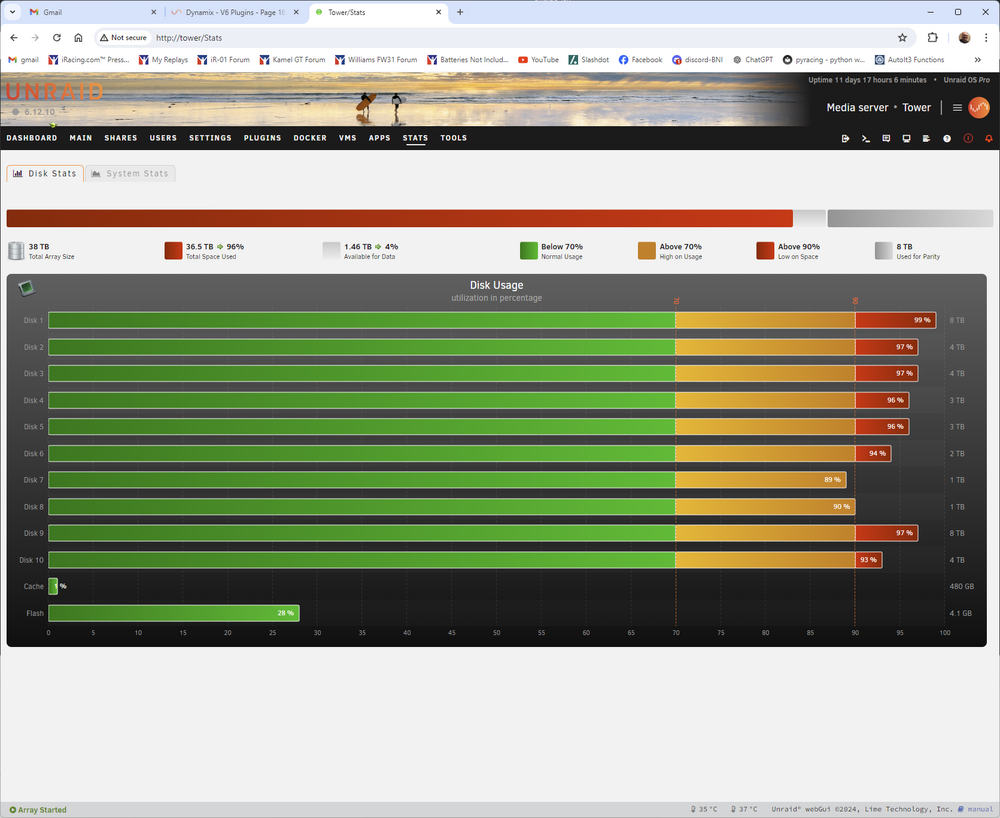
Mine looks like this:
-
More testing revealed this was probably just pure luck. I'm still getting crashes even testing with /IPG:100, which appears to limit it to about 10 files per second when they're small, as one would expect. But whatever is making it crash is still making it crash, so it would seem /IPG doesn't make a dent with this one after all. I think this is likely because it only has any effect when a file transfer actually occurs. It doesn't seem to throttle any other kinds of activity, so when it is going through and checking file metadata to see if anything needs to be updated this is probably what's slapping around whatever is getting slapped around. Maybe I should try a different util to do the mirroring, and maybe that will sidestep these crashes.
-
I've since learned that robocopy has a switch, /IPG, that tells it to insert an "inter-packet gap" of a specified number of milliseconds, "to free bandwidth on slow lines." I just arbitrarily tried 10 ms (/IPG:10) for this switch to see what happened, and have only had one crash since then. So whatever is going on, it seems to be fairly borderline, and these 10 ms gaps that I've now introduced seem to have nearly eliminated the problem. I don't know if it's having any appreciable effect on the amount of bandwidth file transfers are using. I'll have to run some more thorough tests. But so far, it has helped out the routine back scripts I use quite a bit. I'll have to run some tests with large files to see if transfer speeds are noticeably different or not. Some penalty there, if there even is any, would be fairly acceptable if it means I'm avoiding the crashes. Perhaps I'll play with different amounts of gaps and see if there's some number that seems to avoid crashes altogether without causing slow than acceptable transfer speeds. I haven't looked at the transfer speeds yet to see if it even is having any effect with just 10 ms added. Something worth testing anyway.
-
Wow, ok, maybe I just lucked out prior to 6.12's release. I thought the issue only started with 6.12's release, but that seems to not actually be the case. I just tested with 6.11.5 and a run that produced 11 crashes with 6.12.4 only yielded 2 crashes with 6.11.5, so maybe my backup data simply contains more small files now than it did before 6.12's release. Perhaps that's why I never noticed it before, if it was possible prior to 6.12, which it appears to be. Perhaps not so coincidentally, the data I'm testing with is something I also only started working with recently. Maybe that was also close to the time 6.12 was released. Anyway, with 6.11.5 the issue seems to be present but much less severe, and with 6.12.4 it seems to be happening much more frequently. Perhaps I was just getting close to the line with 6.11.5 and never saw any crashes happen, if any did. But since then I may have more small files, and it seems as though 6.12 might be more sensitive to it than previous versions, and I'm past that line now and it crashes quite frequently during a run.
-
Well, it only surfaced after 6.12 was released. If you like, I think going back to the last stable version before 6.12 should be easy enough, and I can test it there now. I really doubt anything is going on with my hardware, but that should reveal whether or not that's the case, I would imagine. Since it began immediately after installing 6.12 I don't imagine anything else is going to be at fault but 6.12 itself.
-
Alright, I finally found some time to play with this some more last night and this morning. I enabled disk shares and tried the same routine with the same test directory, only this time using the disk share for the cache drive in addition to the usual user share on the array. I have been using more than one copy of the directory in question in order to make the crashes more repeatable, and that worked rather well, with many crashes occurring during a single run. Now I also tried paring it back to just a single copy of the directory and ran it a few times until I had a run with no crashes utilizing the user share. Using the disk share only required single runs, as it never seems to trigger the crashes. Even the 32-copy run went off without a hitch when using the disk share. And it sure is faster with the disk share. disk share single copy: 34.200 seconds no crashes user share single copy: 3:17.384 no crashes disk share eight copies: 4:48.440 no crashes user share eight copies: 1:09:10.257 with 11 crashes disk share 32 copies: 18:42.339 no crashes user share 32 copies: 2:32:28.529 with 13 crashes So it would seem to be something in the code that takes care of things with user shares. Deleting the test batch on the Windows box and rerunning the mirror operation in order to delete all the files on the unRAID box lead to some interesting problems with the crashes. Robocopy would try to delete all the files and directories on the unRAID box but would fail after the first crash happened. And after the unRAID box sorted itself out and was accessible again I would try the robocopy mirror command again to get it to try to complete the deletion job, but it would have trouble deleting some of the files/directories for some reason, or would just continually crash anyway. I'd have to go into the unRAID box myself to delete the remaining files/directories before I could try another test run. Quite strange.
-
I still don't know if you are saying that the cache counts or does not count as having already tried a disk share. I'll try disabling the cache and then just create a disk share with it to see what happens. To add further information, I had to reinstall the OS on one of my Windows machines, and after doing so I tried to restore its backup files from my array. The same error occurred when it was reading all the files from the array as happened with the earlier tests, only this is reading from it rather than writing to it. I'll report back as to whether or not anything improves when using a disk by itself.
-
Alright, I'm confused. Are you saying that copying to a cache drive would be the same as what you're asking me to try? I have an array with parity drives. And I have a single SSD for cache. Cache is turned on for all shares. So in every case where I did not specifically turn off the cache drive it was writing all those new files only to the cache drive itself, and the issue occurred. Disabling the cache so it was writing directly to the array also saw the issue occur at pretty much the same frequency.
-
I tried expanding the test batch to see if it would repeat the error case more often by making 16 copies of the directory and doing mirror runs with the directories in place and moved elsewhere so it would do copy runs and delete runs. It didn't seem to make any difference to have the cache drive enabled or disabled. Each run it would trigger the error once or twice. Copying, no cache 2023/09/24 13:04:07 ERROR 53 (0x00000035) Copying File C:\Users\Clay\Documents\Joel Real Timing\trackmaps\virginia patriot\img\logo_pct.txt The network path was not found. 2023/09/24 13:48:35 ERROR 53 (0x00000035) Copying File C:\Users\Clay\Documents\LabRadar data - Copy to test unRAID crash 8\SR0179\TRK\Shot0099 Track.csv The network path was not found. Deleting, no cache 2023/09/24 14:09:04 ERROR 53 (0x00000035) Deleting Extra File \\Tower\Backups\Docs-Clay\LabRadar data - Copy to test unRAID crash 1\SR0165\TRK\Shot0037 Track.csv The network path was not found. Copying, with cache 2023/09/24 15:12:23 ERROR 53 (0x00000035) Copying File C:\Users\Clay\Documents\LabRadar data - Copy to test unRAID crash 10\SR0102\SR0102 BC 0.281 (min 15 dB SNR).png The network path was not found. 2023/09/24 15:18:54 ERROR 53 (0x00000035) Copying File C:\Users\Clay\Documents\Motec\i2\Workspaces\Inerters (Copy 4)\Track Maps\belleisle.mt2 The network path was not found. Deleting, with cache 2023/09/24 16:40:37 ERROR 53 (0x00000035) Deleting Extra File \\Tower\Backups\Docs-Clay\LabRadar data - Copy to test unRAID crash 1\SR0158\SR0158.lbr The network path was not found. 2023/09/24 16:44:45 ERROR 53 (0x00000035) Scanning Destination Directory \\Tower\Backups\Docs-Clay\Joel Real Timing\import - export\dashboard pages\Neil_Dashboards - default\ The network path was not found. I've attached another diagnostics zip from this time period. If you still think it would be worthwhile to try it with an isolated drive I suppose I could disable the cache again and make that drive a new share to test it with. Let me know and I can do that if you'd like. Hmm, would that involve lengthy parity shuffling? tower-diagnostics-20230924-1653.with.and.without.cache.16.dirs.zip
-
Rather than letting it copy to the cache as usual? I suppose the easiest way to test that would just be to turn the cache off and try, eh?
-
AMD Phenom II X4 965 Asus M3N72-D motherboard 8 GB RAM 2 parity SATA drives 10 data SATA drives 1 cache SATA SSD Dockers: binhex-krusader, qbittorrent, and recently added Czkawka to find dupe files but problem occurred before that docker was added. Currently have 6.12.4 running, but it happened with every 6.12.x stable revision so far, I think. I didn't know how to cause it before, but now I can recreate it on demand just by copying a whole bunch of 3-4 KB files at once (serially) from Windows using robocopy to mirror a directory. The whole server does not crash, as my current uptime is still showing nearly two weeks since I last restarted that box, but it stops responding to SMB traffic from the Windows machine(s), and the web UI stops responding. Whatever is going on seems to take about 3 minutes to resolve itself and then the web UI and SMB traffic will be responsive again and things seem normal again. Normal near-idle file traffic, say with a HTPC streaming a movie, never seems to have any issues. But when I start a backup of a bunch of files via robocopy and it contains a fair number of small files something freaks out and the machine goes MIA for ~3 minutes. My current test crop is a directory containing just over 7,000 files mostly 3-4 KB in size, which are just a bunch of CSV files from a chronograph. I'll just make another copy of that directory and start the robocopy again to get it to mirror the parent directory as part of a routine backup, thus copying the new test directory during the process. Once it starts firing off all the small files it is only a matter of time before whatever is going on will trigger and the machine will then be basically unreachable for ~3 minutes, after which it seems to be back to normal. At least, unless that condition is met again and it goes MIA again, whatever that condition is. I'm thinking this only started with the initial 6.12 stable release. I don't think I was using any of the release candidates prior to that, and don't think I ever saw any similar behaviour prior to 6.12, either. At any rate, I can make it happen now with 100% certainty. Any ideas? Diagnostics file attached. edit: If it helps, there should be an occurrence around 11:33:44 am. 2023/09/23 11:33:44 ERROR 53 (0x00000035) Copying File C:\Users\Clay\Documents\LabRadar data - Copy to test unRAID crash\SR0157\TRK\Shot0015 Track.csv The network path was not found. Waiting 30 seconds... tower-diagnostics-20230923-1142.zip

