





Spyderturbo007
Members
-
Joined
-
Last visited
Everything posted by Spyderturbo007
-
I think we are getting close. I manually created the folder inside of Movies as opposed to moving it from the SAB download. It looks like the NFO file is now nobody users as opposed to daemon daemon -rw-r--r-- 1 nobody users 913852772 Jul 26 19:09 72\ Hours.mp4 -rw-r--r-- 1 nobody users 14643 Jul 26 19:10 72\ Hours.nfo -rw-r--r-- 1 nobody users 6229409 Jul 26 19:10 clearlogo.png -rw-r--r-- 1 nobody users 1144196 Jul 26 19:10 fanart.jpg -rw-r--r-- 1 nobody users 227283 Jul 26 19:10 fanart1.jpg -rw-r--r-- 1 nobody users 1012212 Jul 26 19:10 poster.jpg Do the files have the correct permissions? I can delete them from Windows Explorer and can now open the EmbyServer folder inside of AppData. But after running docker safe new params, it sets everything to -rw-rw-rw- 1 nobody users.
-
Thank you so much for your help @strike I don't think I ever installed any extra plugins. Here is my list: Backup & Restore Bluray Folder Support Cinema Intros DLNA Dvd Folder Support Emby Guide Data Fanart.tv IMVDb Kodi companion M3U TV Tuner MusicBrainz Nfo Metadata OMDb Open Subititles Port Mapper Studio Images TheAudioDb TheMovieDb TheTVDB Webhooks XmlTV It appears to be the official container: Repository: emby/embyserver
-
Emby is the only one creating the NFO files. I didn't add that to the SMB settings. I was hoping to get it resolved outside of global changes to the entire array because everything seems to be between these two apps (Emby and SAB). Everything else works just fine.
-
I started digging into permissions, but I'm afraid to make things worse. I tried a test file and here is what I got: SABNzbd New Download (Folder): drwxr-xr-x 2 nobody users 104 Jul 26 15:16 Another.Simple.Favor.2025.2160p.Hybrid.MULTI.WEB-DL.DV.HDR.H265-AOC/ SABNzbd New Download (File) -rw-r--r-- 1 nobody users 27637948002 Jul 26 15:14 rq0KY7NJAwRLV3oV5D0OnnJx4aMHlW1s.mkv A normal movie folder, where Emby can write metadata after a "Docker Save New Parms" looks like this: drwxrwxrwx 1 nobody users 181 Jan 21 2024 Zola/ -rw-rw-rw- 1 nobody users 25887830210 Sep 27 2021 Zola.bluray.mkv I ran a test where I downloaded something with SABNzbd, then manually created a new folder inside the /cache/Movies folder and dropped in the file. Here is what that looks like: drwxrwxrwx 2 nobody users 384 Jul 26 15:33 Another\ Simple\ Favor -rw-r--r-- 1 nobody users 27637948002 Jul 26 15:14 Another\ Simple\ Favor.4K.HDR.DV.mkv -rw-r--r-- 1 daemon daemon 23796 Jul 26 15:33 Another\ Simple\ Favor.4K.HDR.DV.nfo I am very new to this entire thing, but do I have two different issues here, one with the initial SAB folder creation and file write and then another when Emby tries to create it's files? Manually creating the folder and only copying over the .mkv file allowed Emby to create the additional files, but they have different permissions than all the other files after a "Docker Safe New Parms" run.
-
I've tried resolving this before, but never quite got it. Here is my issue. I'm running Emby Server as a docker container and managing my folders and media using a Windows 11 PC. If I remember correctly, this happened after an upgrade to unRAID years ago. Emby does work and I can do everything I need to when it comes to viewing my media. Workflow: Download a movie with SAB. Rename the folder / movie manually and cut / paste it to the \\tower\cache\Movies folder. At some point the task for scanning for new media happens and the mover moves it to the array. Problem: When Emby scans the folder and attempts to write the metadata, I get this error in the log file. This file was on the cache drive at the time of the media scan. 2026-07-26 14:09:46.393 Error ProviderManager: UnauthorizedAccessException: Emby Server is being denied write access to /mnt/user/Movies/Disclosure Day/poster.jpg. Please check your file permissions. Running Docker Safe New Parms fixes the issue, until there is a new folder, at which time I get the same error in the new folder. Emby can't even write it's own backup to the EmbyServer folder. Emby Docker Settings: Host Port 1: 8096 Host Path 2: /mnt Key 1 (Container Variable APP_UID): 99 Key 2: (Container Variable: APP_GID): 100 Host Key 2 (Container Variable: NVIDIA_DRIVER_CAPABILITIES): all AppDataConfig Path: /mnt/cache/system/docker/AppData/EmbyServer One other weird one is that if I try and navigate to the \\tower\cache\system\docker\AppData\EmbyServer folder, I can't. No error message, no password prompt, nothing in the Event Log. It's like I didn't even click on it. I'd love to get this resolved and would appreciate any help!
-
Right now, I'm running an older SuperMicro server that never spins down the fans. There are 7 fans in there running at 3,500rpm all day long, even when all the drives are spun down. Apparently it's an known issue with the H8DGU board. Now that my electric bill keeps going up and up, I was looking for lower power options. Does anyone run a higher drive count server that's low power? I'm not even sure what's reasonable when it comes to power draw. The current server is 4U, has 32 drive bays and is currently running: 2 x AMD Opeteron 6380 64GB Memory 20 x 3.5" drives set to spin up individually and spin down when not in use. 3 x SSDs NVIDIA Quadro P620 2 x 1400w redundant power supplies It's primary use is Emby and unless I'm doing a parity check, it rarely spins up more than a couple drives if we are all watching separate movies. I haven't put a meter on it yet, so I can't even say where I'm at right now, but with all those fans spinning 24/7, it can't be low. I forgot that my UPS shows usage. I have one power supply plugged into the UPS right now, because oddly the other failed yesterday, and it's showing 385 watts. I have a replacement on order.
-
I think I'm all set. I replaced the parity disk and the parity check shows as completed with 0 errors. Thank you so much @trurl and @JorgeB ! I'm going to try and tackle the upgrade to 7.3.0 now and see how that goes. Fingers crossed!

-
@trurl Here is what I got. Last SMART test result: Completed: read failure WDC_WD60EFRX-68L0BN1_WD-WX11D37444PZ-20260522-0937.txt # 1 Extended offline Completed: read failure 30% 35746 3477753040 # 2 Extended offline Completed: read failure 90% 35738 3547641224
-
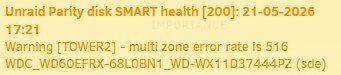
I replaced the disk and it did the rebuild, but it looks like there might be some issues with the Parity drive. It's showing 230,000+ errors. I have an 8TB drive that I can swap in it's place, which is something I wanted to do anyway. How do I resolve the issue with the parity drive? There were a ton of these errors, but I ran the short SMART test (attached) on the drive and it said it was fine. 20-05-2026 19:53 Unraid Parity disk SMART health [197] Warning [TOWER2] - current pending sector is 122 WDC_WD60EFRX-68L0BN1_WD-WX11D37444PZ (sde) warning 20-05-2026 19:53 Unraid Parity disk SMART health [1] Warning [TOWER2] - raw read error rate (failing now) is 6572 WDC_WD60EFRX-68L0BN1_WD-WX11D37444PZ (sde) warning Thank you! WDC_WD60EFRX-68L0BN1_WD-WX11D37444PZ-20260521-0811.txt tower2-diagnostics-20260521-0819.zip

-
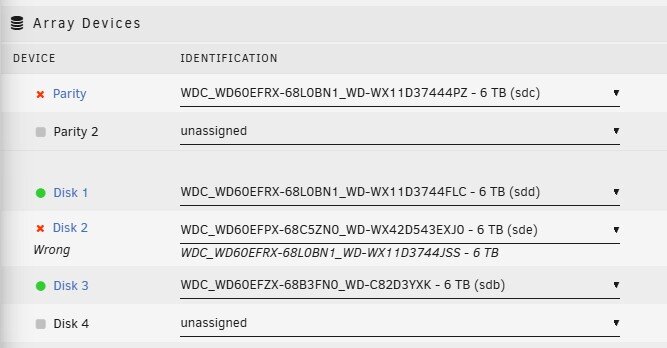
Can I just swap in a new drive in the disk 2 slot and will it rebuild the data now that it seems to be emulating correctly?
-
The main folder is named 2018 and contains 195GB of data, which appears to be good. There is a lost+found folder with 1170 files. He said if that's all he lost, he'd be just fine with it. But obviously if we can get it back, that would be great. If not, I'd just like to learn how to rebuild the disk and get it working again. Thank you!
-
I started the array after rebooting and got this:

-
I'm not sure if I got this right or not. I ran it one time with no options and got this: There was a lot more to it, but this was the end. etadata corruption detected at 0x453030, xfs_bmbt block 0x23d50b7d8/0x1000 libxfs_bwrite: write verifier failed on xfs_bmbt bno 0x23d50b7d8/0x8 Metadata corruption detected at 0x453030, xfs_bmbt block 0x23d9c42d8/0x1000 libxfs_bwrite: write verifier failed on xfs_bmbt bno 0x23d9c42d8/0x8 Metadata corruption detected at 0x453030, xfs_bmbt block 0x71a09320/0x1000 libxfs_bwrite: write verifier failed on xfs_bmbt bno 0x71a09320/0x8 Metadata corruption detected at 0x453030, xfs_bmbt block 0x3e26eb38/0x1000 libxfs_bwrite: write verifier failed on xfs_bmbt bno 0x3e26eb38/0x8 Maximum metadata LSN (2079689086:1598493115) is ahead of log (0:0). Format log to cycle 2079689089. xfs_repair: Releasing dirty buffer to free list! xfs_repair: Releasing dirty buffer to free list! xfs_repair: Releasing dirty buffer to free list! xfs_repair: Releasing dirty buffer to free list! cache_purge: shake on cache 0x50c560 left 18 nodes!? xfs_repair: Refusing to write a corrupt buffer to the data device! xfs_repair: Lost a write to the data device! fatal error -- File system metadata writeout failed, err=117. Re-run xfs_repair.It said Ru-run xfs_repair, so I did and got this: Phase 1 - find and verify superblock... Phase 2 - using internal log - zero log... - scan filesystem freespace and inode maps... - found root inode chunk Phase 3 - for each AG... - scan and clear agi unlinked lists... - process known inodes and perform inode discovery... - agno = 0 - agno = 1 - agno = 2 - agno = 3 - agno = 4 - agno = 5 - process newly discovered inodes... Phase 4 - check for duplicate blocks... - setting up duplicate extent list... - check for inodes claiming duplicate blocks... - agno = 0 - agno = 1 - agno = 2 - agno = 3 - agno = 4 - agno = 5 Phase 5 - rebuild AG headers and trees... - reset superblock... Phase 6 - check inode connectivity... - resetting contents of realtime bitmap and summary inodes - traversing filesystem ... - traversal finished ... - moving disconnected inodes to lost+found ... Phase 7 - verify and correct link counts... doneDiagnostics before a reboot and after the 2nd run with no options are attached. Thank you for sticking with me on this! tower2-diagnostics-20260519-0753.zip
-
There is no repair option. This isn't a real disk, it's an emulated disk. I have a spare 6TB drive I can use if needed.
-
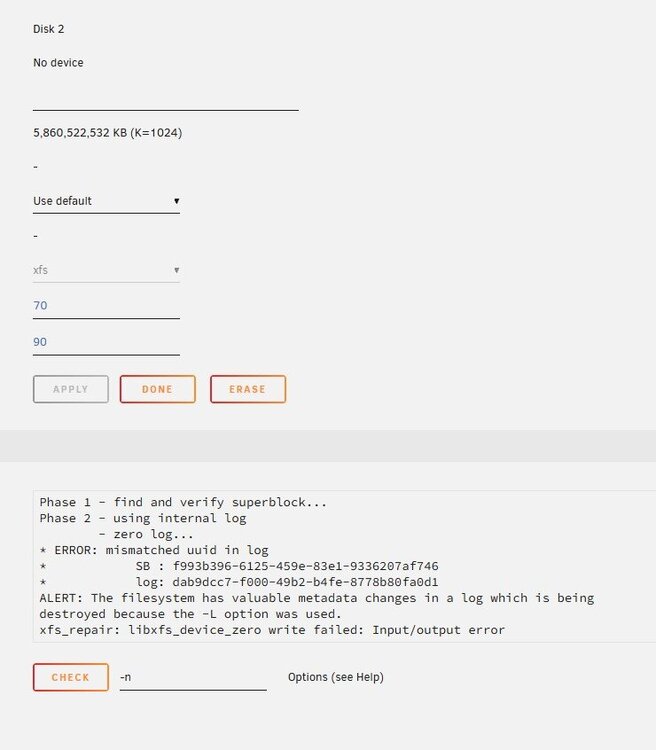
Thank you! Here is what I got: Phase 1 - find and verify superblock... Phase 2 - using internal log - zero log... ERROR: mismatched uuid in log SB : f993b396-6125-459e-83e1-9336207af746 * log: dab9dcc7-f000-49b2-b4fe-8778b80fa0d1 ALERT: The filesystem has valuable metadata changes in a log which is being destroyed because the -L option was used. xfs_repair: libxfs_device_zero write failed: Input/output error
-
It's on v6.12.13 right now. I guess this happened sometime in 2024 and he never did anything with it. Phase 1 - find and verify superblock... Phase 2 - using internal log - zero log... ERROR: mismatched uuid in log SB : f993b396-6125-459e-83e1-9336207af746 * log: dab9dcc7-f000-49b2-b4fe-8778b80fa0d1 ERROR: The filesystem has valuable metadata changes in a log which needs to be replayed. Mount the filesystem to replay the log, and unmount it before re-running xfs_repair. If you are unable to mount the filesystem, then use the -L option to destroy the log and attempt a repair. Note that destroying the log may cause corruption -- please attempt a mount of the filesystem before doing this.
-
Unfortunately, I don't see a fix button. At the bottom of the log is a button that says "Check" and then a -n in the options line. At the top I have "Done" which takes me back to the Main page and then Erase, which I haven't clicked. I stopped the array and looked for it in regular mode, but I don't see it there either.
-
Hi @trurl Sorry for the delay, the server is in my office and I was at home over the weekend. I'm attaching the output as a .txt file because it's huge. Once again, thank you for your help! Check Filesystem Status.txt
-
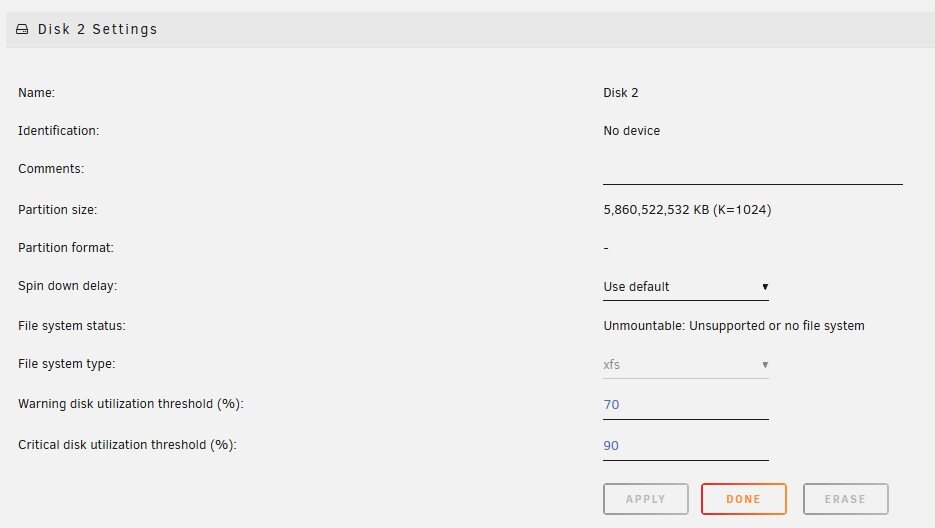
I changed it to XFS and then started the array, but it still shows "Unmountable" for disk 2 that's being emulated. Thank you SO MUCH for your help! tower2-diagnostics-20260515-1723.zip

-
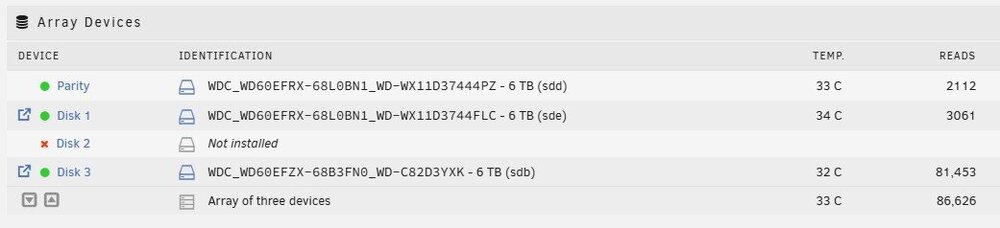
Thank you so much @trurl , I think that worked! What do I do now? I have a replacement 6TB drive and a new 8TB drive that I can use for anything needed. New logs attached. tower2-diagnostics-20260515-1709.zip
-
Thank you for your response. I just want to make sure I understand. You want me install a replacement disk in the Disk 2 spot because it isn't seeing the 744JSS drive regardless of what SATA port I use, so I'm guessing it's dead. So: -Install replacement disk -Tools -> New Config -> Retain All -> Apply -Assign replacement disk to Disk 2 slot -Check Maintenance Mode and Parity Valid and start the array -Stop the array, set disk 2 to unassigned and then start the array without checking the Parity Valid or Maintenance Mode box I go to that part and stopped because I'm seeing a big warning next to the parity drive that says "All existing data on this device will be OVERWRITTEN when the array is started".
-
I found the 744JSS disk and installed it, but I think it's dead. I swapped it into the SATA port of a working disk and it's still saying that it is Missing. Logs attached with 744JSS installed, but not appearing as a device. Thank you! tower2-diagnostics-20260515-1618.zip
-
A friend of mine gave me his unRAID server (v6.12.13) because he was having problems with it. I guess he was screwing around trying to get it to work, and ended up messing it up. He said the parity drive was offline or "something" so he started trying to move disks around. To be honest, he isn't much help on what happened. If I replace the missing disk with a new 6TB drive, will the array rebuild itself? It's showing that the Parity drive is disabled and that a wrong disk is installed. It shows that the other two disks are correct and that the 3rd disk will be "Emulated". I'm wondering if I just assign the wrong disk to disk 2, it will rebuild itself, but I don't want to do that until someone smarter than myself gives me the go ahead. Thank you! tower2-diagnostics-20260514-0927.zip
-
Wow, it took literally 10 minutes to get that working. It's about 1000x easier than Swag. Looks like I can go ahead and blow away Swag. Thank you so much for your help!
-
I'm having some issues getting Swag to work correctly and I don't even know where to start. Let's Encrypt was obviously depreciated, but it worked until a few days ago when it failed to renew. I tried the Let's Encrypt -> Swag migration and had all sorts of issues. So I started all over again and installed Swag from scratch. My problem is that even though my certificates renewed, I just get the "Welcome to your SWAG instance" page and never make it to either of my apps (Emby or Bitwarden) when I'm on the same network or not using the custom .conf files from the Let's Encrypt install, but when I'm outside my LAN, I get the ERR_CONNECTION_REFUSED message when using the .conf files. So I'm thinking this is an issue with the .conf files, but I'm not sure how to fix them. I see this error in the log, but I'm not sure what it means. 2025/08/13 07:56:44 [emerg] 941#941: "resolver" directive is duplicate in /config/nginx/proxy-confs/bitwarden.subdomain.conf:7 2025/08/13 07:56:45 [emerg] 950#950: "resolver" directive is duplicate in /config/nginx/proxy-confs/bitwarden.subdomain.conf:7 ========================================================= I copied over all the settings from my Let's Encrypt instance. Network Type: Custom : proxynet Console Shell Command: Shell Privileged: On WebUI: 1443 Port 80: 180 Port 443: 1443 Validation: http DNSPLUGIN: cloudflare ONLY_SUMDOMAINS: true Staging: false ========================================================== I also copied my .config files from my old Let's Encrypt folder and put them in the proxy-confs folder. resolver 127.0.0.11 valid=30s; upstream bitwarden { server bitwardenrs:80; } server { listen 443 ssl; server_name bitwarden.*; include /config/nginx/ssl.conf; client_max_body_size 128M; location / { proxy_pass http://bitwarden; proxy_set_header Host $host; proxy_set_header X-Real-IP $remote_addr; proxy_set_header X-Forwarded-For $proxy_add_x_forwarded_for; proxy_set_header X-Forwarded-Proto $scheme; } location /notifications/hub { proxy_pass http://bitwarden; proxy_set_header Upgrade $http_upgrade; proxy_set_header Connection "upgrade"; } location /notifications/hub/negotiate { proxy_pass http://bitwarden; } } ========================================================== I could really use some help because at this point, everything is completely broken. Thank you!



