





Spyderturbo007
Members
-
Joined
-
Last visited
Everything posted by Spyderturbo007
-
I'm hoping for a little clarification surrounding the migration from reiserfs to xfs. I have a total of 16 disks and 2 parity drives. 6 of my drives are still reiserfs that I need to convert to xfs. All 6 disks are 3TB each (18TB total). I have enough space on the array to accommodate all the data if I were to move it to another drive(s). Can I just copy the data from those 6 drives onto a new drives and then just format them or remove them completely? They are drives from when I originally built the server probably 10 years ago. So it might be time to replace them anyway. Thank you!
-
Disk 16 has been slowly growing in it's error count. I have 2 precleared unassigned drives that I could use as a replacement, but I'm not sure of the correct way to replace the drive. Do I just stop the array and assign one of the unassigned drives to the slot current used by Disk 16? Or just yank out Disk 16 and then use an unassigned drive when I reboot the array? Disk 16 is still being used and has not been disabled. Diagnostics are attached. Thank you for the help! tower-diagnostics-20241116-1853.zip
-
I've had Let's Encrypt working correctly for years and am trying to migrate to Swag and I'm having horrible issues. I've followed the @SpaceInvaderOne tutorial, but when I start Swag it gives me a firewall error, that I don't get when I start Let's Encrypt. I know it's working because Let's Encrypt last renewed on 3/24/24. When I start Swag after the migration, all of the sub domains break (Emby, Bitwarden, etc.) and a browser gives me an error: Error code: PR_END_OF_FILE_ERROR Log from Swag: ==================================================================================================== Using Let's Encrypt as the cert provider SUBDOMAINS entered, processing Sub-domains processed are: emby.MyDomain.net,bitwarden.MyDomain.net,nextcloud.MyDomain.net E-mail address entered: [email protected] http validation is selected Generating new certificate Requesting a certificate for emby.MyDomain.net and 2 more domains Certbot failed to authenticate some domains (authenticator: standalone). The Certificate Authority reported these problems: Domain: bitwarden.MyDomain.net Type: connection Detail: During secondary validation: XX.XXX.XX.XX: Fetching http://bitwarden.MyDomain.net/.well-known/acme-challenge/xxxxxxxxxxxxxxxxxxxxxxx: Timeout during connect (likely firewall problem) Domain: nextcloud.MyDomain.net Type: connection Detail: During secondary validation: XX.XXX.XX.XX: Fetching http://nextcloud.MyDomain.net/.well-known/acme-challenge/xxxxxxxxxxxxxxxxxxxxxxxxxxxxx: Timeout during connect (likely firewall problem) Hint: The Certificate Authority failed to download the challenge files from the temporary standalone webserver started by Certbot on port 80. Ensure that the listed domains point to this machine and that it can accept inbound connections from the internet. ERROR: Cert does not exist! Please see the validation error above. The issue may be due to incorrect dns or port forwarding settings. Please fix your settings and recreate the container ==================================================================================================== Thank you for any help. I'm completely lost.
-
I just realized that Emby is running into file permissions issues. I'm guessing this started a few upgrades when the file permissions were changed and I lost the ability for a few other containers to access their data. I didn't notice the Emby issue because it was downloading everything from the Internet. The Emby log is filled with things like: System.UnauthorizedAccessException: System.UnauthorizedAccessException: Access to the path '/mnt/user/Movies/Five Nights at Freddys/Five Nights at Freddys.4K.HDR.Atmos.nfo' is denied. 2024-01-21 10:32:26.461 Error ProviderManager: UnauthorizedAccessException: Emby Server is being write access to /mnt/user/Movies/The Marvels/clearlogo.png. Please check your file permissions. Does anyone know how to get this resolved? I know almost nothing about Linux and am completely lost when reading through posts. Thank you!
-
I've noticed some of these errors in my log file and I'm not sure if I should be concerned? I have 64GB of RAM (16 x 4GB). Apr 12 20:09:08 Tower kernel: mce: [Hardware Error]: Machine check events logged Apr 12 20:09:08 Tower kernel: [Hardware Error]: Corrected error, no action required. Apr 12 20:09:08 Tower kernel: [Hardware Error]: CPU:0 (15:2:0) MC4_STATUS[-|CE|MiscV|AddrV|-|CECC|-]: 0x9c33c00008080a13 Apr 12 20:09:08 Tower kernel: [Hardware Error]: Error Addr: 0x000000028cf67210 Apr 12 20:09:08 Tower kernel: [Hardware Error]: MC4 Error (node 0): DRAM ECC error detected on the NB. Thank you! tower-diagnostics-20230416-2236.zip
-
For anyone reading this thread, DO NOT follow the instructions in the linked post. Most of my docker containers are now broken and completely inaccessible. I'm being told that I'm going to have to delete them all and start over again. Essentially rebuild all my containers and their associated databases. Hopefully this helps someone so they don't have to rebuild their server.
-
Is there a way to restore the permissions to how they were before and then fix them individually? It appears to be Emby and Sonarr that were broken. I have backups of the AppData folder.
-
I was having the issue where some containers were unable to write to the array. Someone told me to run the first set of commands and everything is all messed up now. I am unable to open some of my docker container folders inside of windows. For example, I get a permissions issues when trying to navigate to the AppData\EmbyServer folder. Emby is also throwing errors trying to write its own configuration file backup, saying that the EmbyServer folder doesn't exist. Is there a way to fix my issues? This entire 6.9 -> 6.11 thing royally screwed up my server. I wish the developers would have warned people about these issues or at least helped the people that are having these issues. I've created threads in docker container forums, the individual program forums (Emby, Sonarr, etc) and multiple threads here with no resolution. I don't know what to do other than nuking all the docker containers having issues and starting over again. At this point I'm literally begging for help.
-
No luck. I'm still getting the access denied error message. Couldn't import episode /tv/BBQ.Pitmasters.S05E12.1080p.WEB.h264-SKYFiRE/9c91bc0e4af94d48b5cc4ae5bc5777a3.mkv: Access to the path '/tv/BBQ.Pitmasters.S05E12.1080p.WEB.h264-SKYFiRE/9c91bc0e4af94d48b5cc4ae5bc5777a3.mkv' is denied.
-
Unfortunately not. I'm still struggling with it and not getting anywhere.
-
Do I run that in the terminal window? Any chance of something blowing up running all those commands? Should I back anything up before running them? Thank you!
-
@trurl Thank you for the reply. I pasted in the wrong error message. That error message was because I deleted the folder that Sonarr was trying to copy from before I deleted the pending task in Sonarr. That's why it couldn't find the folder. This is the error message I normally get and has been plaguing me since the unRAID upgrade. I've found countless other people that have the same issue, none of which have been able to find a resolution. Couldn't import episode /tv/Bar.Rescue.S08E24.JJs.Sports.Bust.720p.HULU.WEBRip.AAC2.0.H264-WhiteHat/c792f9dda2404c18ae20be60fc539e15.mkv: Access to the path '/tv/Bar.Rescue.S08E24.JJs.Sports.Bust.720p.HULU.WEBRip.AAC2.0.H264-WhiteHat/c792f9dda2404c18ae20be60fc539e15.mkv' is denied.
-
@Mr.meowgi Have you gotten anywhere with fixing the issue? I've been manually renaming and copying files that Sonarr can't move because of the permissions issue. I'm pulling out my hair.
-
@JoeUnraidUser I've been fighting issues with Sonarr not being able to rename and copy files into their respective folders. It can create a new folder in the root folder, for example the TV Shows folder, but when it tries to write the file into the existing folder associated with the show, I get this; Import failed, path does not exist or is not accessible by Sonarr: /tv/South.Park.S26E02.720p.HDTV.x264-SYNCOPY/. Ensure the path exists and the user running Sonarr has the correct permissions to access this file/folder I wanted to try your fix, but where do I run those commands? Do I run them from the terminal window in the web interface? Should I backup the folders before changing the permissions? Thanks so much. This has been driving me crazy for months.
-
I've been having some really weird issues with my array. They all involve Disk 15 which is the highest numbered disk in the array. This is a supermicro server so it has the backplane setup. Issues: 1. Disk 15 dropped off the array during a parity check in November. I was told that it disconnected and reconnected. I rebuilt it on the same disk. 2. Disk 15 dropped off the array again in January. I replaced the disk with a new disk. 3. Disk 15 dropped off the array in February so I swapped it to a new slot. I'm waiting until March to see what happens, but now, it won't spin down. I've run both the Open Files and Dynamix Active Streams plugins and both show no usage except for /config/ or other docker containers on the cache drive. I've manually tried spinning it down and it spins right back up. Is it possible I've hit some weird bug where disk 15 is as high as I can go? tower-diagnostics-20230226-1029.zip
-
@JorgeB Unfortunately I rebooted before I got new logs so whatever was there is now gone. I added a brand new pre-cleared drive (that's in a different slot) back to the array. What I'm noticing now is that Disk 15 is always spun up. I noticed it before, but I guess it never sunk in that it was weird. I installed Dynamix Active Streams, but that shows nothing. Open files shows everything as either /data/ or /config which should be the cache drive. I manually spun it down, but it spins back up again. Spin down delay is set to "use default". All the other drives (except Parity 1 and Parity 2) are spun down. I might try another parity check, but I'm afraid of have the drive drop off again. Thoughts?
-
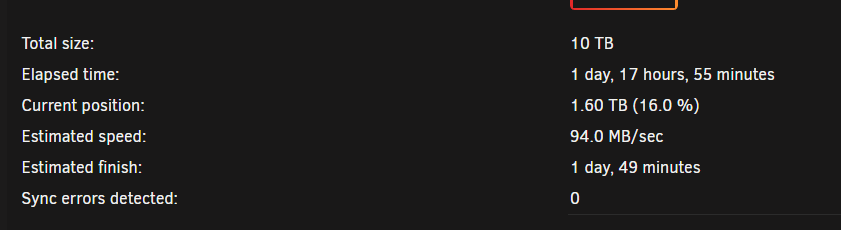
How do I go about rebuilding the data to a different drive? That's where I'm concerned I'll make a mistake? The drive has been replaced multiple times. I think it's the slot. Thank you! EDIT -> This is a little weird. It's been stuck in it's parity check for over a day with no movement. I can't cancel it or pause it. It's also weird that it shows 0 sync errors. All the drives are still showing as spun up but the parity check is stuck.
-
I have a SuperMicro server with 36 drive bays. I've been having issues with Disk 15 for months. It throws errors during every parity check. I've precleared it with multiple cycles and found no errors and I've replaced it with 2 different disks from a different brand / model. It's a backplane, but I checked the connections and everything is fine. I'm thinking it might be the slot and the next best test would be to move the data to a drive in a different slot. The weird thing is that it's fine when I'm streaming a movie from that slot, but on parity check day, I have a 50/50 shot of it throwing errors. I also noticed that the last 2 failures have started with almost exactly the same sector of the disk showing read errors. That sounds highly unlikely to me being two different disks. I currently have 3 precleared 8TB drives waiting to be used. Can someone look at my most recent log and make sure it isn't the disk? Also, what is the best way to remove Disk 15 and rebuild it to another drive in a different slot? I know how to replace the existing drive, but not sure about moving it. I always get scared about playing with disk assignments, so I thought it would be easier to ask. tower-diagnostics-20230201-0706.zip
-
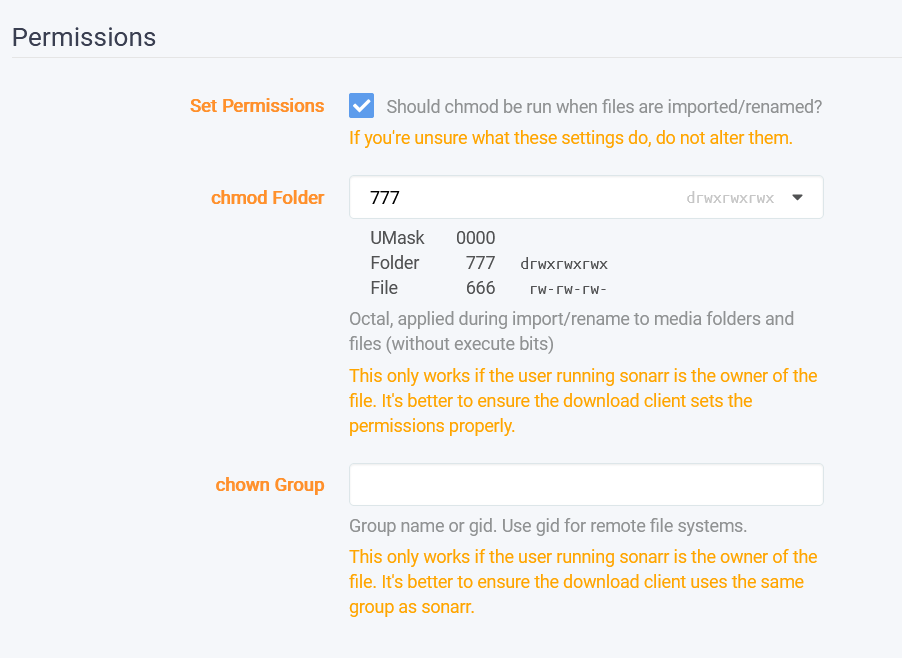
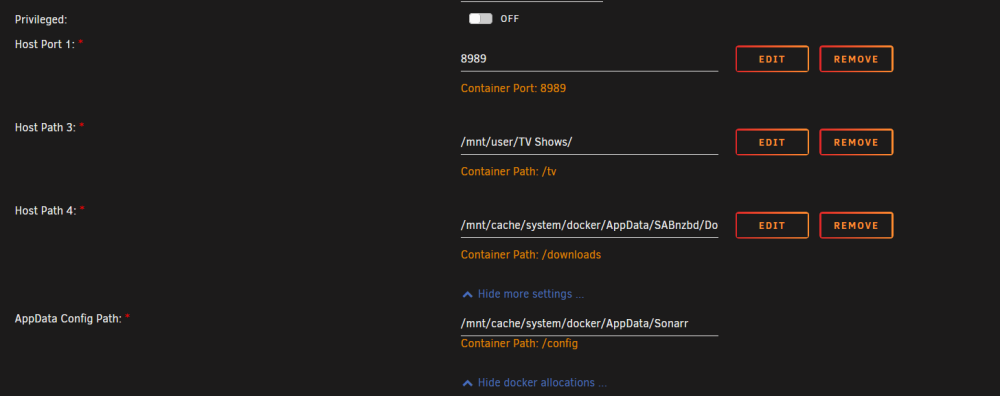
I'm hoping someone can help because I'm at the end of my rope. Ever since I went from 6.9.2 to 6.11.x, I've been having permission issues. SAB seems to write the file without issue, but when Sonarr tryies to move it from the unpack folder to the folder with the other shows, I get this error: Import failed, path does not exist or is not accessible by Sonarr: /tv/Servant.S04E01.HDR.2160p.WEB.h265-TRUFFLE/. Ensure the path exists and the user running Sonarr has the correct permissions to access this file/folder I then have to do it manually through file explorer. I guess there is a permissions issue, but I'm not sure where to look or what to change.
-
Me again. I'm still stuck and would love if someone could help me fix this issue? Thank you!
-
Thank you @dlandon That worked perfectly.
-
If I stop the array, will that interfere with a current preclear operation? I have a disk that I need to reassign, but I have a preclear running on 3 other disks.
-
Thank you @JorgeB for looking at my logs. If I stop the array will that interfere with my preclear on the new disks? I was going to unassign and reassign the drive to rebuild over itself, but I'm preclearing 3 drives right now and didn't want to interrupt the process.
-
My parity check started last night and this morning I woke up to an error email about disk 15 being in an error state. I'm guessing the drive is bad, but was hoping someone could look at my log files to be sure? Oddly enough I think it partially crashed the server when it happened. None of the parity check information was changing and the timer stopped. The main page showed 0% usage for every CPU core. I rebooted it and got the GUI back. I just need to know what to do with the drive. I actually have 3 x 8TB drive sitting here that I was going to use to replace some of the smaller drives, but they haven't been precleared yet. I have a precleared 6TB installed, but that was one that went into an error state previously, but someone told me the disk looked fine and that if it precleared without issue I could add it back to the array. Thank you! tower-diagnostics-20230101-0846.zip
-
Mine is still broken as well and I'm not getting much help in the forums.
