





harihoudini
Members
-
Joined
-
Last visited
-
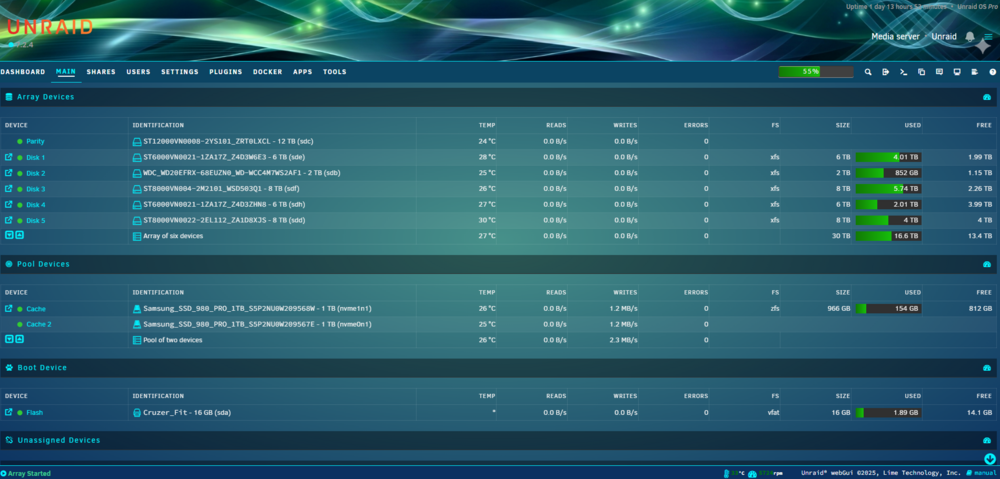
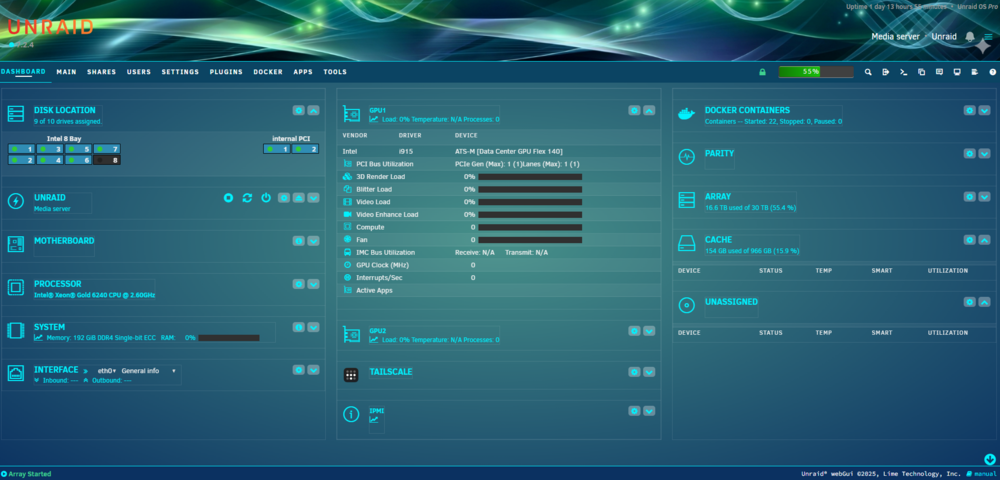
Here is the Aquamarine Theme from Theme-park. Argued with Gemini AI for a few hours before i got it to where i liked it. Aquamarine theme Unraid.css
-
that did the trick. Thank you
-
Yes i guess i can split them up since they dont have a limitation. Thanks!
-
@ich777 So just an update since you were helping me fix my Intel GPU issue. I changed the card to this one and now everything is working in Unraid and Plex/Jellyfin. The previous card was pre-prod and had some experimental battlemage firmware. It may also have been conflicting with my Aspeed Igpu as it has video output. The replaced card has no video output and intended for a server chassis. https://www.intel.com/content/www/us/en/products/sku/230020/intel-data-center-gpu-flex-140/specifications.html Now only one question remains - This card shows up in Unraid as 2 GPUs (this is apparently intentional from Intel folks). So is there a way i can tell Plex or Jellyfin to use Either card/whichever is available rather than specify /dev/dri/renderD128 or /dev/dri/renderD129? In Plex 2 cards show up and i can only check 1 or leave it in auto. In Jellyfin i need to specify in the box. I know this is not your issue (Plex/Jellyfin) but maybe you came across a way to use both?
-
OK i have made the change to 1 or 2 dockers to test and it repulled some stuff. Started and then went orange (with no updates available) and then i did a recheck and cleared it. I guess i wait till tonight when it does its automatic checks.
-
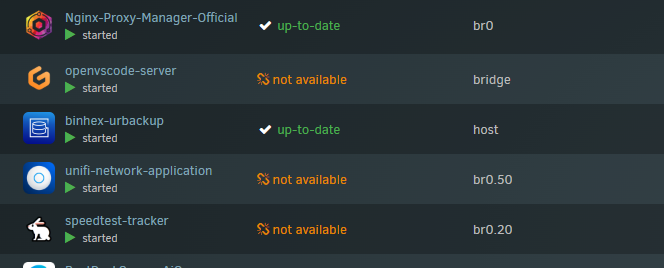
to follow up to my message it seems to be only containers with repository from lscr.io
-
Used to be an issue a long time ago which i thought was resolved but it seems to have come back as a nightly occurrence Docker containers show unavailable when it does it daily checks (around 12-1 AM). Forcing a check for update fixes it. But it's a daily pain. Seems to always be the same containers. Is this a repository problem?
-
The earlier blacklist solution did not work. I guess i will have to disable onboard and test. I will have to clear CMOS if it doesnt work because everything will go dark. There is no option for Resizeable BAR in intel server bios of my server.
-
ok i will try the blacklist. The Igpu is the native server GPU vga adapter and it's working fine (outputs to my console). I am not sure where you make the change to resizeable bar. This is an intel server Bios/MB. Had an old Nivida card that was working fine before this. In the bios i have enabled add-on GPU as well.
-
I have an Intel Pro A60 card. https://www.intel.com/content/www/us/en/products/sku/235979/intel-arc-pro-a60-graphics/specifications.html Unraid sees the card in system devices (Unraid 7) Have installed the plugin, rebooted and on the configuration page for the plugin it allows me to select the card, but the Dashboard stats shows nothing. Perhaps the card is not supported? Neither Plex nor Jellyfin can see the card either, possibly due to the plugin. Can anyone help? unraid-diagnostics-20250222-1457.zip
-
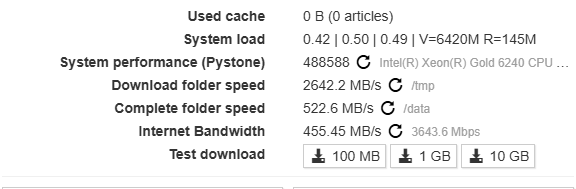
I am having the same issue with NVME cache on Unraid. My Sabnzbd reports write speed of 500MB. It should be well in excess of 2K-3K/sec Ignore the temp download as that is a ram disk. My system is pretty beefy with 192GB ram and my internet is 6Gbps symetric but i'm being limited by my NVME speeds atm. The cache drive is dedicated share.
-
I have exactly the same issue going on. There aren't any updates but right at 12 AM or at some predetermined time it goes Orange. Did you find a solution? I have tried uninstalling and reinstalling it, but no luck. Seems to be some issue since Unraid 7



