spxlabs
Members
-
Joined
-
Last visited
Everything posted by spxlabs
-
@Nanobug Well if I remember I can just let you know here. Also, I started working late last night. I have no idea how long it will take me to complete. But if you don't hear from me in like a month, I either died, gave up, or forgot. Sooooooooooo oops.
-
@Nanobug The server does not do any encoding/transcoding/decoding work. It simply takes a single RTMP stream and distributes that stream to multiple platforms of your choosing. Fear not. I am actively working on an OBS-Server container to take a stream from your gaming computer and encode/transcode/decode the stream, then send it off to twitch. But it is proving rather difficult due to my lack of understanding Docker and poor documentation. Stay tuned.
-
Yeah that's what I mean, super bizarre. lol -Probably -To be clear, this docker does not do any transcoding, your gaming rig will do all the transcoding work. This setup simply allows you to stream to multiple places at once. -When you port forward, your brother used your public IP:port to reach your server? -He could VPN into your network as an alternative to exposing your system to the internet.
-
@itimpi is right, the # is to comment that line out and it shoudn't have been read by the container. If you copy and pasted there could have been a hidden character that was breaking things. But if you added that line in and it worked then that makes things super bizarre. Anyway. Glad you got it working.
-
You could duplicate the container but you would most likely have to change the ports. I have a feeling if you stream to the same container things are not going to work. Client 1 and Container 1: port 1935 Client 2 and Container 2: port 1936 That should work in my mind but this is not something I have tested. Something I am planning to do or work on is figure out how to get two computers to stream to the server and then to twitch. Both computers would basically be like in split screen. However, it seems the best way to do this is use OBS with NDI on the server. Then within the canvas just make sure both computers have equal space. I'd like do this with a container instead of a VM but it is proving rather difficult.
-
Yup audio worked for me. Only thing I can think of is, to double check your audio capture settings, which I'm sure you have done.
-
Did I win?
-
Go figure. Just a pipe dream at the moment anyway. I have many other things to work on!
-
Yeah buddy. Just need to figure out how to get it to work with Handbrake. Pretty awesome stuff!
-
Nice! I’ll keep it in mind. Now that the linuxserver team has released the Nvidia GPU plugin for all dockers. I may try using gpu transcoding in the future. If that’s even possible.
-
Negative. WD Reds comprise the array. There is a 1TB NVME drive as the cache drive. The watch folders are set to use cache, this way when pushing data to the server we can achieve up to 1GB/s.
-
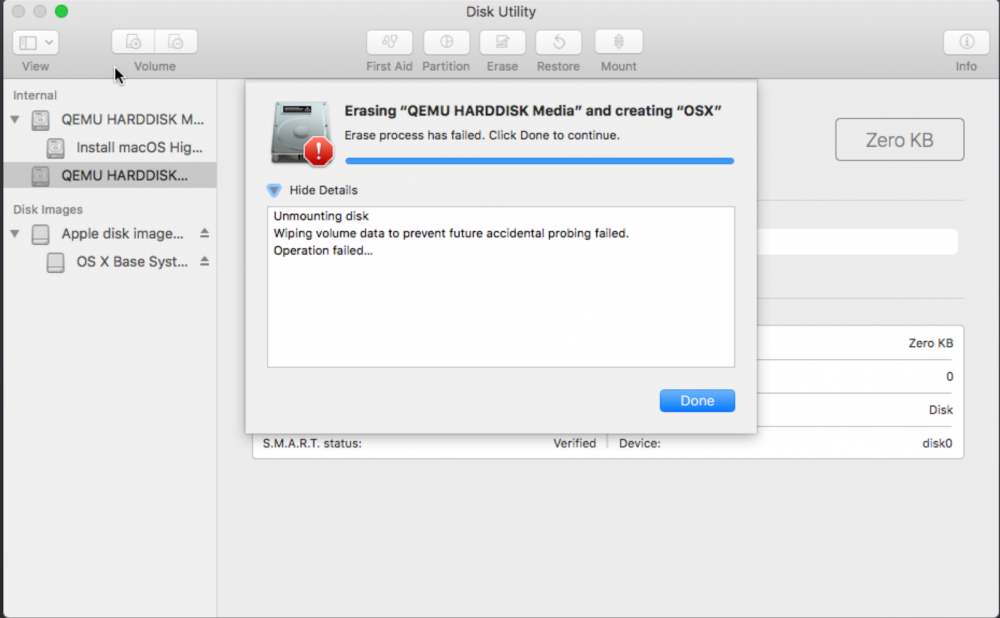
Got everything working up until the part where I need to format my vdisk with Disk Utility, I get an error everytime I try to format the disk. the vdisk I created is set to SATA like you explicitly say. Not sure how to proceed. I have tried formatting the disk with several of the available options, all fail, with the same error.