bastl
Members
-
Joined
-
Last visited
Everything posted by bastl
-
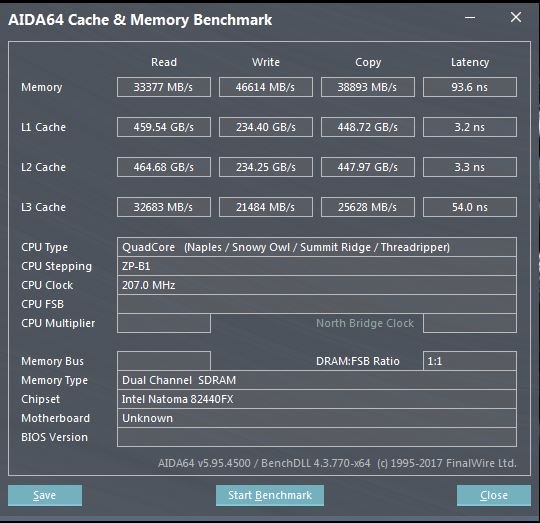
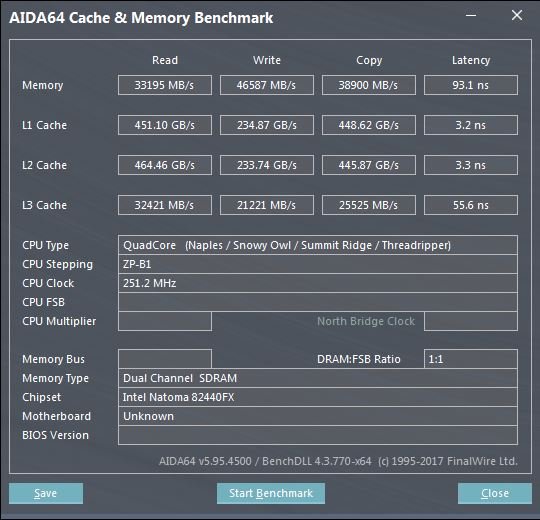
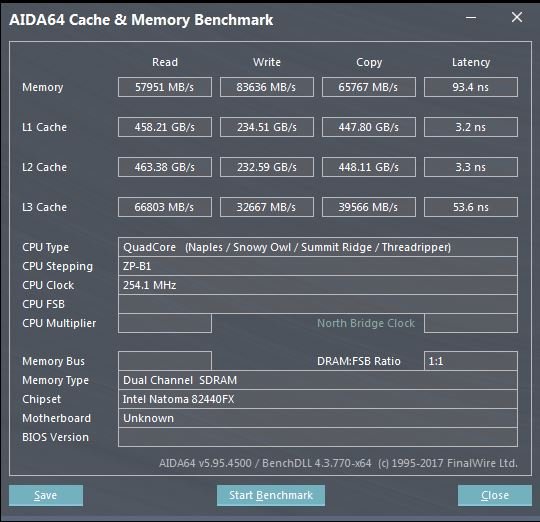
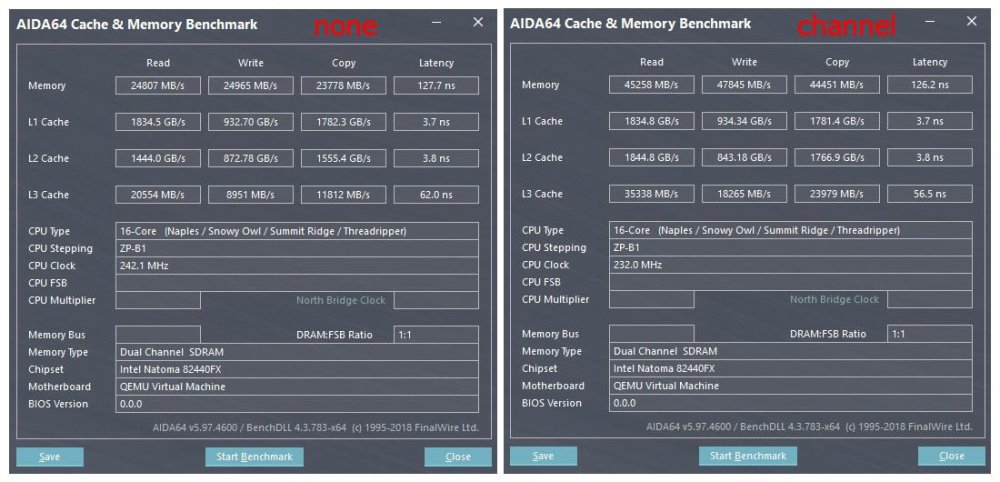
Ok, now it gets interesting. I already watched almost all videos from Wendell, but thanks for mentioning it here for people stumbling across this thread. @tjb_altf4 I might overlooked something by doin all my tests and the presented core pairings are alright. I assumed that the better memory performance depends on the cores and from which die they are. By switching between the options auto, die, channel, socket and none in the BIOS under AMD CBS settings, I should have already noticed that as soon as I limit a VM to only 1 die I get the memory bandwith from this specific memory controller. I basically cut the bandwith in half from quad channel (both dies) to dual channel. Makes perfectly sense. How could i miss that? If you need the memory bandwith for your applications, the UMA mode is the way to go. For me i have to set it to Auto, Socket or Die for the memory to get interleaved over all 4 channels and the CPU gets reported as only 1 node. By choosing the option Channel (Numa mode) I basically limit the memory access to the 2 channels from the specific die. The latency in this case should be reduced because you removed the hop to the other die. Option None will limit it to single channel memory and cuts the bandwith even further as shown in the pictures above. I'am actually not sure whats the difference between Auto, Die and Socket are. They all show similar results in the tests. And it should be also mentioned that it looks like Cinebench is more memory bandwith related as most people are reporting. Wendell mentioned in that video by using the lstopo to check which PCIE slots are directly connected to which die. Is there a way to check this without lstopo, which isn't available on Unraid? Right now my 1080ti is placed on the third PCIE slot x16 (1st slot 1050ti x16, second slot empty x8) and I'am not sure if it's directly attached to the correct die in my gaming VM. Maybe there is something already implemented in Unraid for listing the topology in a way lstopo did. Any ideas? Edit: Another thing i should have checked earlier are the behaviour of the clock speeds. Damn i feel so stupid right now. watch grep \"cpu MHz\" /proc/cpuinfo Checking this command during the tests would have shown that as soon as i choose cores from both dies for a VM the clocks on all cores ramp up. If i assign the core paires Unraid gives me, only one die ramps up to full speed and the other stays on idle clocks. 🙄
-
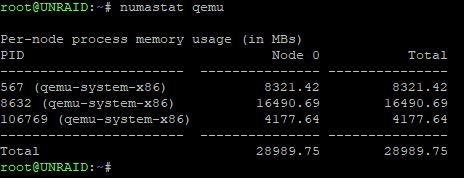
As reported earlier for the 1950x on a ASRock Fatal1ty x399 Gaming Pro something is reported differently. Looks like the same happened for Jcloud on his Asus Board. Currently I'am on the 6.6 RC2. I couldn't realy find a BIOS setting to change the behaviour how the dies are reported to the OS. It always been reported as 1 node. Edit: @testdasi It looks like your RAM usage for your VMs isn't optimized either. If I understand the shown scheme right, for example your VM with PID 33117 uses half the RAM from 2 different nodes which have a memory controller build in. In case u have more than 1 die assigned to the VM thats ok, but if you use lets say 4 cores from 1 die, it should use the 4GB RAM from the same node and not from another node.

-
Force shutdown is exactly what he is complaining about. It will be forced after some time if the clean shutdown isn't working. Except from a sheduled shutdown inside the VM i have no idea. I quickly tested it and it doesn't work for me either. Sorry
-
Agesa 1.0.0.4 you needed some sort of extra patch. The Agesa 1.0.0.6 never released for me at least from ASRock as stable. Only a beta version was available, i never testet. I think it mainly adressed memory incompatibility for the AM4 Ryzen chips and came with some microcode updates to fix security issues. The Agesa version 1.1.0.0 should be the first one including the fix.
-
BIOS is up to date now with version 3.30. Same results. Core pairings are showing wrong in 6.6.0-rc1. I played around a bit and tested a couple things. First boot it came up with tons of PCI reset errors, but it looks fine now after the second reboot. ACS override i can disable now and get most devices split up in there own groups now. Only the network interfaces are grouped together.
-
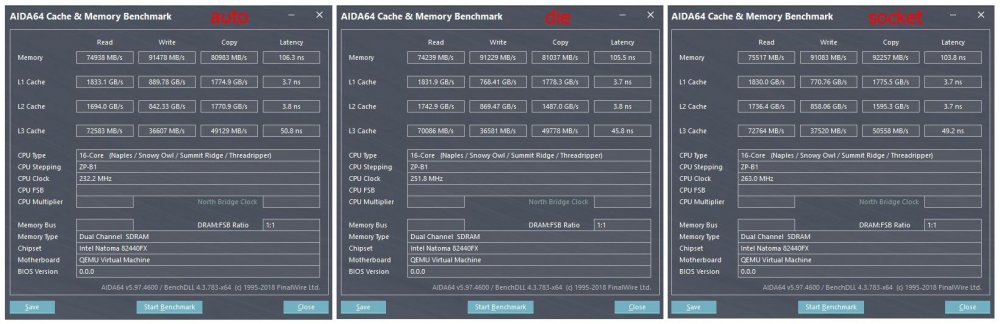
I did a couple more tests with all available memory interleaving settings. In the ASRock BIOS settings under AMD CBS / DF Common Options i found 5 available options (auto, die, channel, socket, none). Auto settings is what i used before in all of my tests. This time i only tested with the Win10 VM using cores 16-31. The die and socket option produced pretty much the same results as auto and as expected choosing channel or none interleaving showed the worst performance. If i had accidentally choosen cores from both dies i guess the results by selecting the die option for memory interleaving would be different. I searched around and tested a bit in the BIOS for an option to maybe force the BIOS to report the cores in a different way to unraid, but without luck. I couldn't find any option specific to select UMA or NUMA either. I know you can set it in Ryzen Master, but the software doesn't work inside a vm. Maybe i will test it tomorrow with a bare metal install and check what else is changed in the BIOS after choosing the NUMA/UMA setting in Ryzen Master. Enough for today. Good night to everyone 😑
-
@testdasi I don't really get the point why you ask if memory interleaving is on or off. If you ask because of the L3 Cache 10-15ns performance bump i got. I can tell you this has nothing really to do with the main memory configuration. I think the reason is the newer microcode update which comes with the new BIOS. The point of all these tests are to figure out which core pair shown by unraid is on the same die. My 1950x has 2 dies each with its own memory controller adressing 2 channels. As soon as you have a communication between the dies the memory bandwith is reduced. I used this behaviour to find out, in which configuration unraid is only using one die and in which case it uses cores on two different dies. The way i configured the RAM is the same as before. Load the XMP profil, done. The XMP profil is stored on the memory sticks itself and the settings are absolute the same as before. No more extra tweaking from me and the settings are exactly matching the old BIOS settings. For your 2990WX it gets even more interresting. The second gen Threadripper still uses quad channel memory. The difference to an EPYC is, that only on 2 dies out of 4 the memory controllers are active. Lets say you configure a VM to use a complete die (8 cores, 16 threads), you will see a difference depending on which die you give to the VM. As soon as you give your Windows VM a full die without an active memory controller you will see the exact same bandwith decreases as i showed before. The reason for this is the die has to comunicate across the infinity fabric with the neigbour die with an existing mem controller. You might check your current config and do a couple tests on your own to find the best performance Maybe the shown core pairs 0-1 etc aren't actual the correct ones for you. Just sayin.
-
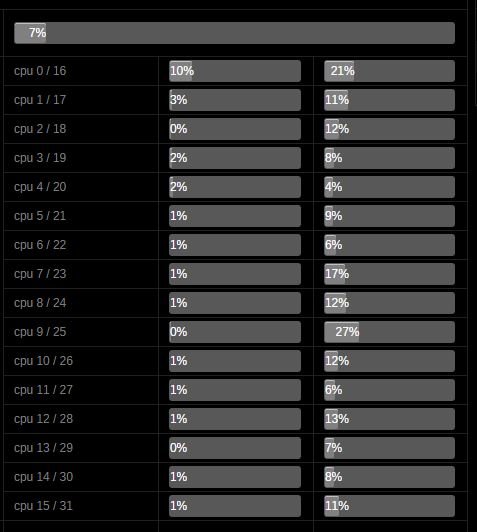
Time for an BIOS update you said? Ok, here we go. Until today i ran Unraid on the BIOS Version 2.00 from Nov. last year. The latest stable version until they released 3.20 and 3.30 with support for second generation Threadripper a couple days ago. I upgraded the BIOS to the latest version 3.30 without any issues. I reconfigured all the BIOS settings as i had them before (enable Virtualisation, IOMMU Support, OC and Fan Settings etc) and i did the same tests again. The results are basically the same as in my earlier tests. The only noticable difference is a slightly improved L3 Cache latency performance. All tests showed an improvement of 10-15ns. Everything else performed as before. Also the core pairings presented by Unraid are the same. So an updated BIOS for me didn't make any difference. Would be nice to know how @thenonsense core pairings is shown in the Unraid gui. Maybe Gigabyte delivers the core pairs different than other manufacturers to the OS. As @Jcloud and my tests showed, ASUS and ASRock kinda doin the same thing here. Maybe the 2990WX is the reason your core pairs are different. Who knows?! Is there a chance you have a 1950x laying around to test your board with? @testdasi Sry, stupid question, but i want an solution which works for everyone 😁 If there are any tests we can do to find a solution @eschultz let us know. Btw did you had any time yet to check the behaviour on your Threadripper system?
-
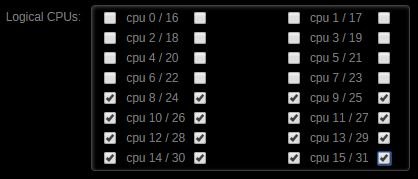
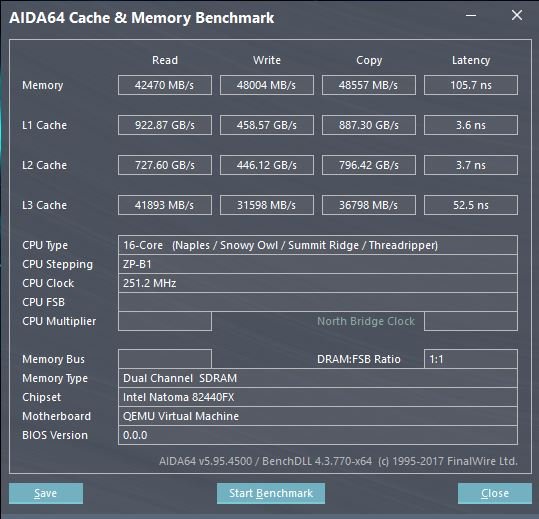
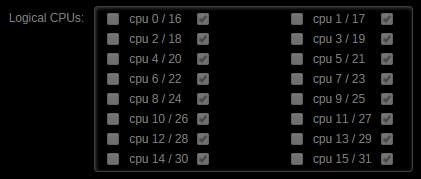
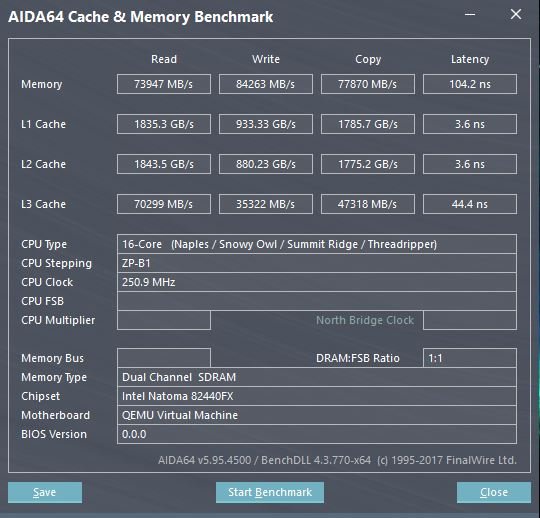
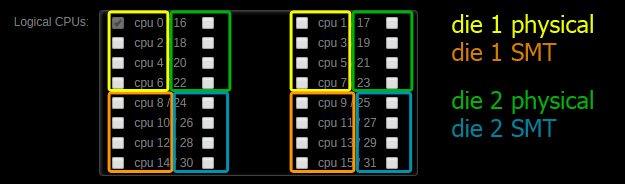
Hi everyone, first of all, let me say hello to everyone. My first posting after nearly 1 year of using Unraid. So far i had no big issues and if there where some smaller ones it was easy to find a fix for it in the forums. I fiddled around with the topic of core assignments when i started with the TR4 platform end of last year. I thought i figured it out after doing some tests back than, which die corresponds to which core shown in the Unraid Gui. First of all my specs: CPU: 1950x locked at 3,9GHz @1.15V Mobo: ASRock Fatal1ty X399 Professional Gaming RAM: 4x16GB TridentZ 3200MHz GPU: EVGA 1050ti Asus Strix 1080ti Storage: Samsung 960 EVO 500GB NVME (Cache Drive) Samsung 850 EVO 1TB SSD (Steam Library) Samsung 960 Pro 512GB NVME (passthrough Win10 Gaming VM) 3x WD Red 3TB (Storage) After reading your post @thenonsense i was kinda confused. So i decided to do some more testing. Here are my results which basically confirmes your findings. I did some benchmarks with Cinebench (3 times in a row) inside a Win10 vm i use since end of last year for gaming and video editing. Also i did some cache and memory benchmarks with Aida64. Specs Win10 VM: 8cores+8threads 16GB RAM Asus Strix 1080ti 960 Pro 512GB NVME Passthrough TEST 1 initial cores assigned: Cinebench Scores: run1: 1564 run2: 1567 run3: 1567 Next i did the exact same tests with the following core assignments you suggested @thenonsense TEST 2 Cinebench Scores: run1: 2226 run2: 2224 run3: 2216 Both the CPU and the memory score was improved. The memory performance almost doubled!! Clearly a sign that on the second test, only one die was used and the performance wasn`t limited by the communication between the dies over the Infinity Fabric as on my old setting. After that i decided to do some more testing. This time with a Windows 7 VM with only 4 cores and 4GB of RAM to check which are the physical cores and which ones are the corresponding SMT threads. first test: assigned cores 4 5 6 7 (physical cores only) Cinebench Scores: run1: 558 run2: 558 run3: 557 second test: assigned cores 12 13 14 15 (SMT cores only) Cinebench Scores: run1: 540 run2: 542 run3: 541 third test: assigned cores 4 5 12 13 (physical + corresponding SMT cores) Cinebench Scores: run1: 561 run2: 563 run3: 560 And again a clear sign your statement is correct @thenonsense. The cores 0-7 are the physical cores and the cores 8-15 are the SMT cores. Test 2 only uses the SMT cores and clearly showes that the performance is worse than using physical cores like in test 1. I'm really sure based on my first tests last year i configured my WIN10 vm to only use the cores from one die and all other vm`s to use the correct corresponding core pairs. Clearly not. Did UNRAID changed something in how the cores are presented in the webgui in one of the last versions? i never checked if something is changed. All my VM`S run smooth without any hickups or freezes but as the tests showed the performance wasn't optimal. @limetech It would be nice if you guys could find a way to recognize the CPU if its a Ryzen/Threadripper based system and present the user the correct core pairing in the webui. Over all, i had no bigger issues over the time i use your product. Let me say thank you for providing us UNRAID Greetings from Germany and sry for my bad english ?