






Keexrean
Members
-
Joined
-
Last visited
Everything posted by Keexrean
-
Yup no clue if it's that in your case or just a totally new and original way to crap Unraid out, but having seen your post a while back and this happening today, I figured it could be worth going back here to offer the info up just in case.
-
I have been able to accidently reproduce the same behavior. Testing different HBAs for my cache, I would run dd if=/dev/zero of=/mnt/cache/tempfile bs=1M count=8192 conv=fdatasync but when running accidently to of=/tmp/tempfile, I basically encountered the exact same issue shown on video, and similar log whining, SMB howling and also a bit of unassigneddisks plugin winces.. Could it be that something in your setup was hammering tempfiles like there was no tomorrow?
-
Update: NFS drops happen way less often, half-resolved by the gro disabling that shut the kernel error on unraid guest. The other reason of drop on NFS seem to be the mover and other types of file changes, causing NFS to error for a fileid change and not remount properly Nov 10 15:32:29 PVESERVERNAME kernel: NFS: server UNRAIDNFSSHAREIP error: fileid changed fsid 0:91: expected fileid 0x280000001eab92, got 0xfe000000cbd76753 Nov 10 15:32:29 PVESERVERNAME systemd[1]: mnt-pve-NFSSHARENAME\x2dNFS.mount: Deactivated successfully. Still don't know what the cause was for SMB though (it's actually the same share over 2 sharing protocols, I have been running the NFS one for the past week, can't tell if the SMB still has an issue since it is deactivated atm) Currently, to force a remount, I use this script on host side, on each of the PVE nodes: #!/bin/bash while true do list=$(ls /mnt/pve) for i in $list do status=$(ls /mnt/pve/$i 2>&1) if [[ $status =~ .*Stale.* ]] then umount /mnt/pve/$i fi done sleep 10 done Running it as a service, it won't spam the system logs in GUI, stays fairly lightweight (while, for, 1 ls command +1 per share), and basically make the drops not incidental on neither backups (even though they sometimes throw an error, they do work) nor regular use from the GUI (like downloading LXC templates, moving a vdisk from local storage to the share to convert it between nodes running local-lvm or a zfs rpool to be able to migrate the vm/container between them, etc)
-
Update: it did fix the kernel errors, but my proxmox cluster still sometimes loose connection to SMB/NFS shares, or the backups do report an error linked to being unable to reach storage.... but still do the backup just fine and the files are there and proper. I'd guess it might have something to do with disks spinning down though and taking a bit of time to spin back up? Eh.
-
Gotcha! So far disabling generic recieve offload on VirtIO interface within the Unraid guest seems to have fixed the issue on my side on 6.12.13.
-
@tjb_altf4 Haven't tested vmxnet3... is it also a 1gbps virtual nic or is it 'adaptative'? (I would very much prefer my unraid VM to be able to still benefit from the fact its host is equipped with 2x 10gbps links) So far, post-'ethtool -K eth0 rx-gro-hw off', I haven't had any kernel whining tho!
-
Possible solution I'm currently testing, one on eth0, one on eth1 and both on eth2: ethtool -K eth0 rx-gro-hw off ethtool -K eth0 rx-lro-hw off Any other idea?
-
Unraid seems to have a real issue with paravirtualized NICs. Using E1000E drivers, I was able to stop that from happening on one NIC (the only gigabit one), but it did seem to cause issues with docker containers' webuis*. (*and going back to VirtIO, it's still borked. Somehow now no docker container has the webui option, and the ones using bridge/host now can't be accessed anymore in bridge/host mode, even typing the port manually. Only way I could fix that behavior was, for some containers, to remove-reinstall them, or to change the port back and forth until it worked. Changing between host, bridge, br0 and such did nothing.) Virtio drivers do "work" somewhat on the 10G paravirtualized NIC, but not only they do cause kernel: eth1 - bad gso: type: 1, and this kind of unsightly states: it happens also that SMB/NFS shares on these networks are thoroughly unstable. It's actually somewhat surprising that an hypervisor that uses VirtIO drivers for its VMs seems to dislike so much being served with what it dishes. And yes, do note that Unraid VM does use host cpu passthrough.

-
I've been checking the smart data of all of my drives on all of my 24/7 boxes every couple of weeks for the last 7 years. I can swear on both my rack and my life that both of these started their journey at Percentage Lifetime Remaining 99, and it has been doing nothing but just creeping down slowly... admittedly faster for one of the two drives. (fun note: after reaching 00, it now rolled over back to 99, but is still reporting "FAILING NOW" on this value) Both CT1000MX500SSD1, both on firmware M3CR023. Both 1,000,204,886,016 bytes. Though there is a difference between the two. The rapidly failing one is 512 bytes logical, 4096 bytes physical sector sizes; While the enduring one boasts 512 bytes logical/physical. Gotta love manufacturers shafting us by swapping components.
-
Here to report an other Crucial MX500 weirdness. I've got two of them. One purchased January 2019, the other December 2019. Their sole and only purpose has been to be cache drives. As soon as the second was there, they were put in a BTRFS raid1, and have been since. Ergo: they spent their life together writing exactly the same thing, minus the older of the two having just some more runtime and wear&tear prior. The youngest of the pair is at 1% lifetime remaining, the oldest of the pair is at 81%. Meanwhile: Oldest of the two (the okay one) @ 81% life remaining : 296446640314 LBAs written Youngest of the two (failing one) @ 01% life remaining : 291934762544 LBAs written Huh?
-
I didn't. I just slapped in a shitty 20bucks 4x1gbps NIC in PCIe, because the Intel Mezzanine card for Dell servers is dogshit, and the broadcom one (which is the brand of most of my PCIe NICs which work flawlessly) for the R720 isn't cheap and an expense I don't want to do.
-
Hi everyone! Some of you, like I do, don't actually have a room or a closet dedicated to their servers. Some of you, like I do, don't have a basement or a garage so they can tuck them away from the living space. Some of you, especially myself, even sleep in the same room as their open rack. Yup. And even if you don't, you may have environmental conditions, or noise requirements, that are way different than what the handful of cooling profile available in iDrac are initially made and tuned for. That's exactly for that reason I basically made myself an assortment of scripts to have my servers' cooling managed automatically, but from parameters I can fine tune. You will find in this github repository the script as I published it make to be standalone* and can be ran on unraid as-is as a cron job, eventually through the user-scripts plugin. *unlike the ones I actually use, that are very setup-specific (detailed in the README.md). The fancontrol.sh script basically gives you everything you need, I tried to detail it step by step in the commented notes, and should provide you every indication needed to use it. I would though advise you to read carefully the README.md, since it contains also warnings concerning the fact of running the script on the same machine it is controlling the cooling of. Mind the requirements also and annotations. If you're on iDrac Express for example, an upgrade might be doable on the cheap. If you want to go a bit more in depth with what you can do with iDrac on these generations of servers and IPMI tools, you can find here a little explicative summary of stuff and commands I know about iDrac, since these decade old resources are slowly disappearing and scattered across the web, or even only findable through web.archive.org 's wayback machine. I'm in no way an expert, and completely open to being schooled constructively. That's what forks and pullrequests are for on github. EDIT: The script have been improved a lot with the revisions 3 and 4. A guide for unraid beginners have been added.
-
Hi people, here's the thing, I have a router that doesn't support VLAN (long story short, ISP router, proprietary GPON, can't be arsed to have an edge router). As such, my VLANs are different networks all together and really only exist on my L2 switch to segment the ports that should be on this or that network. Consider eth0 and eth1. None is configured in UNRAID to be VLAN aware. Again, VLANs are only setup as untagged anyways on the switch. eth0 is on VLAN1, ISP router network XX.XX.7.XX/24 . From this network, from any other computer that is on it, I can access every service running, and the Web GUI, working as intended and expected. eth1 used to be a direct connection, through a DAC cable, between my server and my workstation. Server is set to a static IP on XX.XX.42.XX/24, and so too is my workstation. With a simple DAC cable linking the two together back to back, yeay, 10GBPs transfer works just fine, can access dockers and stuff, all fine. If I plug the both of them on the switch, on ports that are assigned to VLAN42 (in which they are "alone", there is no router router on that network nor VLAN), they can ping each other, the workstation can SSH into the server, and I can even $smbclient into the shares of the workstation from the server! But no webgui, no talking to the dockers that are on host nor bridge, NOTHING. What gives?
-
Hello hi, about 2 weeks into using unraid 6.9, trying 2 of my 3 known working SolarFlare SFN5122N cards, and I already had to reboot TWICE because Unraid just casually and randomly forgets a network card is supposed to actually fulfill a function. Basically, not other info than "ethx link is down, please check cables". Oh I've got cables. direct attach copper or fiber, which color, length or thickness do you fancy?, and even using the ones that never dropped a packet in back to back connection on my proxmox and workstation boxes, Unraid still aint no clue a cable is plugged in at all, because while windows and proxmox have visibly no issue seeing and using these NICs, apparently Unraid hasn't got its goggles on and a bad case of wrist stumps. Point is. I can't use the onboard NIC and have a NetXtreme II BCM57810 dual 10gbps for ethernet cabling, because unraid's being a dumbass with the onboard NIC, it only works when I passthrough the thing to a VM, great, I don't need that! I apparently now can't use my SFP+ Solarflare card either and will have to get an other sku/brand because Unraid can't deal with that either? And in 10months basically no one cares. That's awesome.
-
Still happeeeeens... including in the middle of a backuuuuuup.....
-
@grphx @CrimsonBrew @Widget Nope. Unless trying some weird technics I have seen flung around, UEFI seem to be a no-go (at least on a R720) because on the onboard video chip, which you can disable for an add-in video card but then you loose Idrac's remote screen and access to bios at boot time. Though the importance of booting in legacy and UEFI isn't that big of a deal for virtualization purposes, since the boot method of the host has minimal impact on the vm's boot method, and legacy boot allows sometimes some peculiar hardware to work in passthrough when it derps in UEFI. Honestly, I don't think we're missing much. UEFI boot on unraid I think gets only usefull in some cases I heard about people having their server not being able to boot properly in legacy after some update, but that switching to UEFI solved the trick (on way more recent hardware than our beaters here, though).
-
Okay, update. Since that fiasco, I basically dropped $$$ into a second add-in NIC, a double 10gbps RJ45 card (to be eth0), on top of the original 4 1gbps nic and the already added double 10gbps SFP+ card. And so far it was working great! Except today. After 72days of uptime, it crashed... but not the OG nic! The SFP nic is now the buggy one! unplugging and plugging back in didn't do a thing. Reboot fixed it... but I still find it surprisingly unpredictable and unsolvable behavior, that wouldn't be much of an issue for a desktop distro, but quite worrying on a server-oriented distro, AND on server hardware, mind you. (I wouldn't make much of this kind of issues on a desktop, it's really because it's a server that I take it seriously.) procyon-diagnostics-20201222-1913.zip
-
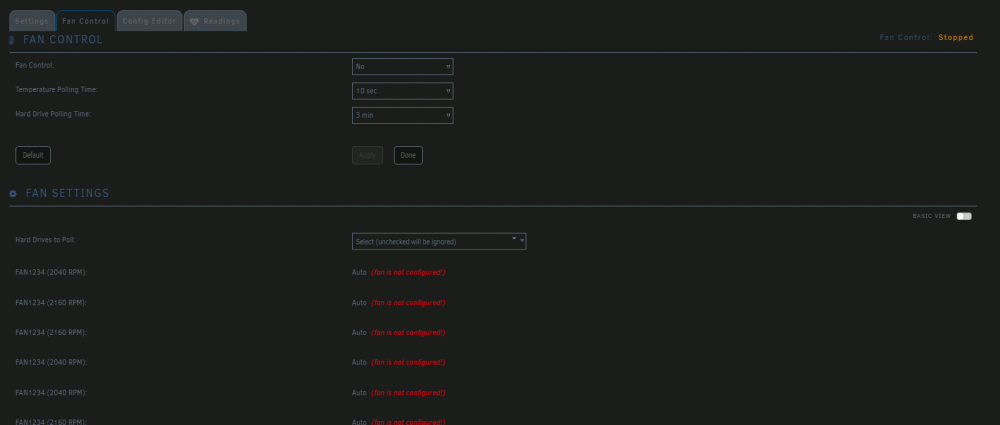
Lucky you! I don't even have the Configure button! (Dell Poweredge R720)
-
I get that pcie_acs_override=downstream and type1.allow_unsafe_interrupts=1 are kind of old-school methods now, and are just settings that were ported over from when I was running the same unraid install in an other box, an HP Z600 workstation, that definitively needed them to be able to passthrough something. (I also used to shuffle my PCIe devices a lot, so using that instead of targetted-stubbing was just some kind of comfort method, also I never used 'vfio-pci.ids=', always did 'pci-stub.ids=') I'll admit with no shame what so ever that I just took my drives, HBA and NICs out of the Z600, slapped them in the R720 I booted it with little to no care in early 2020. I might be part of this year's curse theme. I called that gracefull as in 'it went smoothly'. Power down the server, slap GPU in, boot, little xml edition of the VM to set multifunction and bring the sound device on the same virtual slot, vbios rom, VM boots right away, drivers install, CUDA acceleration work and passmark is in the range. And since it has been running stable for over a week, and through about 30 VM restarts, as long as it doesn't catch fire, I call that good enough. As for the NICs! Saying they were unconfigured, I used them at some point for Unraid's main networking, as it can be seen in This 'onboard' stock NIC did showed some unreliable behavior before, that I attributed to heat most likely, heavy usage + quite low airflow setting for my ears sanity (running the R720's fans between 7 and 12% speed, managed through an ipmitool script so disgusting that it would probably make you burp blood) And since no one seemed to be eager to even throw me a ball on that thread back then, I got fed up of the situation of unreliability, and decided to move (and upgrade) to a 2x10gbps base-T card with active cooling for the server's main networking, while I already had a SFP+ card that was dedicated to only back-to-back connections. Eth 4 5 6 and 7 still have their custom names in the network settings panel if I unstub them, but since have just stock-nothing settings dialed in, aren't linked to any network/bridge or anything, and all are "down". And I'm starting to think that MAYBE part of the card's unreliability back when I was using it as main NIC isn't all about heat, but lies deeper. It would indeed be interesting to see what insight the features of the 6.9 release would give on the issue. But I feel like whenever it's gonna bother me enough (which will probably happen before 6.9 release comes out), I'll go give some try to some sad-milking methods, like echo -n /sys/bus/pci/drivers/igb/0000:01:00.3 > unbind or just rmmod it.
-
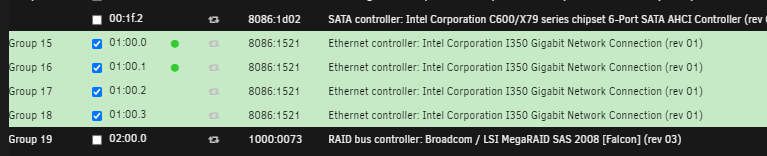
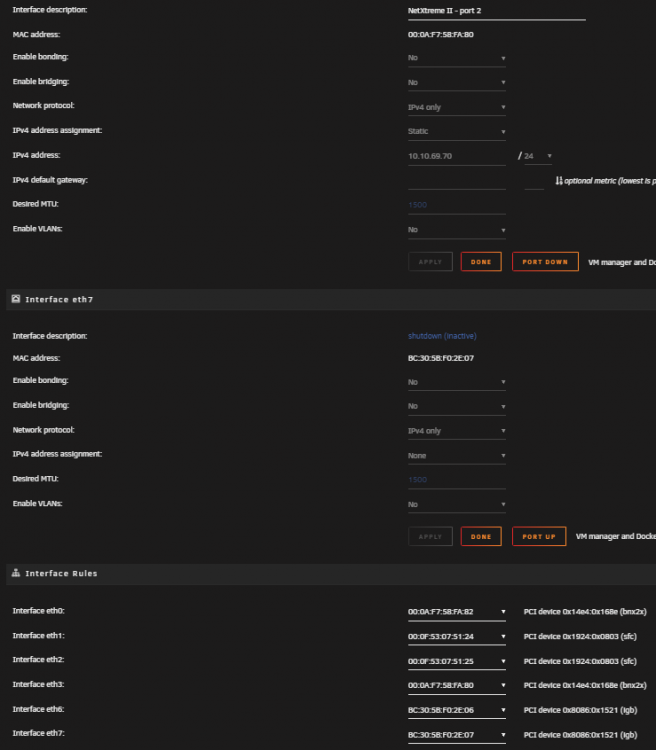
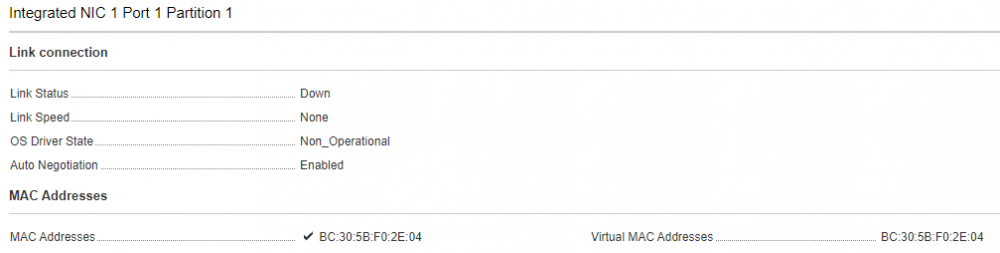
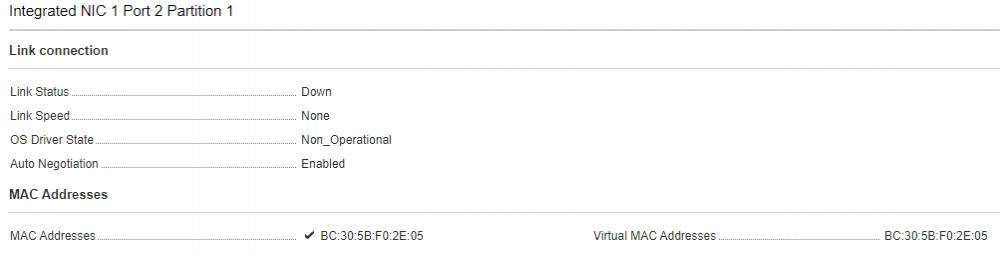
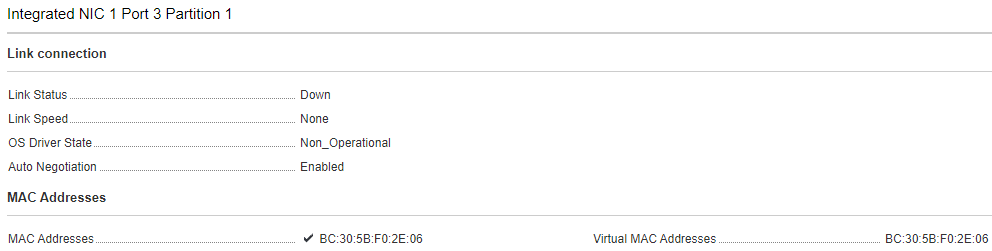
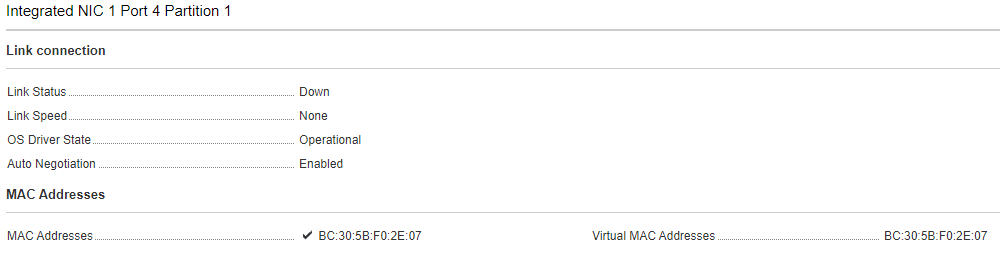
Hi! Nice. Still on unraid 6.8.1 right now, and I managed to passthrough a quadro card without stubbing with pci-stub.ids= like I used to, or using the VFIO-PCI Config plugin, it handled it gracefully with just pcie_acs_override=downstream and type1.allow_unsafe_interrupts=1. Though I'm facing an issue with onboard NIC and the VFIO-PCI Config plugin. Dell poweredge R720 here, using 2 other (better) network cards to actually connect the host around to network and back to back stuff, I would have liked to use all 4 'onboard' ports for some pf-sense-VM and routing tests. So I went on and used the VFIO-PCI Config plugin to stub all 4 ports (cause they each appear as their own subdevice) but as you can see on that screenshot, UNRAID for some reason keeps grabbing and using 2 of the 4 ports, for NO reason, since, atm, and at boot, no ethernet cables were even plugged in these, and they were all unconfigured and port-down interfaces. In network setting, showing in Mac address selection are eth6 and eth7, the two "derping" ports 01:00.0 and 01:00.1, but for some reason only one of the two is actually showing up at all as an available and configurable port (which it shouldn't at all, I don't want them grabbed by unraid) And check that sweet iDrac I can see how the onboard management sees the derping, please note they are in reverse order between IOMMU and unraid/idrac: port one, used to be eth4, good, not grabbed: port two, used to be eth5, good, not grabbed: port three, corresponding eth6, half a$$ grabbed, but no difference seen on idrac: port four, corresponding eth7, fully grabbed, and seen as functional I just don't get how it can fail, but since these devices are reset capable, it would be handy to know if there is a way to tell unraid "Bad! Bad hypervisor! Now sit!", and forcefully unload the devices without causing a kernel panic. If there is, that could be a life-saving option in the up-coming 6.9, to be able to tell unraid to just auto-unload some devices after booting, when they are known to hook themselves up for no reason. Please note, and I repeat, there are no cables plugged in these 4 ports, nothing configured to hook to them, and iDrac has its own dedicated port that isn't linked to the 'onboard' NIC (which in fact is on a mezzanine card.) If you could light my lantern there, I have no explanation of why Unraid is acting stubborn with this NIC, while handling GPU passthrough so blissfully on the other hand.
-
Hi, I know, not latest release, but it's a very very minor inconvenience (that still can be a hassle if stars align for apocalypse with other events or server load), and since I'm not feeling like updating an otherwise stable (and task running) server, I won't try now on 6.8.3 My parity check is on a monthly schedule, set for last day. So far, never had an issue. BUT, yesterday it did the parity check (even the it's not the last day on the month), and did it again today. I think it just "derped" and forgot that July counts 31days. If that's not a big issue to me, a parity check is a lot of array load and could cause inconvenience if the schedule derp in more critical setups, and if the scheduler derped with the parity check, I'm curious on about what else it could derp with. That's all for me, have a great day!
-
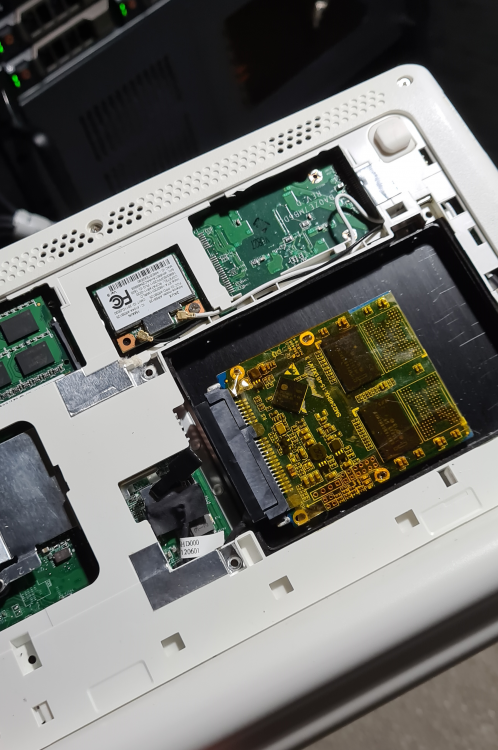
Eeeer, I was mostly seeing the Simpson reference, saying as it's yes effective but with an humorous twist, and I decided to ride that boat and show the next level of "refined jankiness", as in the daily use of electronic and PC parts wrapped in tape, but with the fanciness and luxurious taste in the choice of tape, presented with that naked-kaptonwrapped-SSD in that laptop I use as an IPMI dedicated console on a different VLAN than the rest.
-
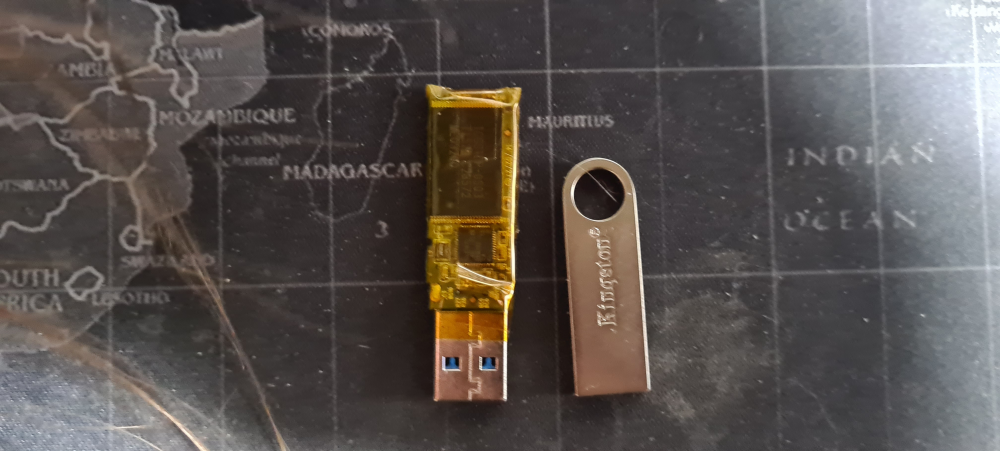
Well, the one of the left is basically what have ran my unraid server since 2017... I always broke plastic casings of USB keys (and this particular key also had a mobile workstation dropped on at some point before it became my server's boot device). Kapton type sounded to me like the less worst tape that would still be better than bare PCB (at least I was sure the adhesive wouldn't deteriorate). But you were warned! I said it was wrapped in kapton tape from the start, in the OG post! And you think kapton-wrapped USB is wrong? What about that!?
-
Upgrades people, upgrades
-
Well, from what we can assume it that pack of 3 seem to be a triplet twin situation. Probably that by-unit sold ones should still be unique. Damn 2€ saving wasn't worth it.




