





randomusername
Members
-
Joined
-
Last visited
Everything posted by randomusername
-
Brilliant, thanks.
-
In your appdata, delete the Unmanic settings.json file and then start the container Worked perfectly, thanks. I'm currently running a few tests on files to find a good workflow, is there a way to delete the 'file size metrics' data so that when I set unmanic on my main folder it's running from scratch? Also on one of Cpt Chaz's youtube videos he says that you can only use 5 plugins unless you subscribe on Patreon - I have 8 plugins which all appear to be working correctly, have I missed something? I haven't seen that statement written anywhere on the app.
-
Hi all, my unmanic docker isn't starting up correctly. Logs linked below, any help appreciated. https://pastebin.com/gXkGnB86
-
Bump - today's parity check showed 714 errors. Diagnostics attached once again, if anyone has any ideas I'd be very grateful. Also, this morning I noticed sabnzbd isn't allowing files to be added, and just transferring files to the unraid machine over the network also fails, saying some data can't be read or written. xeus-diagnostics-20210701-1812.zip
-
Well, I had a month and a half of peace, but after this month's parity check I got a message that disk8 had errors (no parity errors though). Then this morning I woke up to two emails: I have immediately taken diagnostics, hopefully I'm learning from my past mistakes here. I'm so desperate to get this sorted. xeus-diagnostics-20210612-0644.zip
-
Correct. None, but the array has been in maintenance mode for the last couple of days as I've been nervous about messing anything else up before seeking advice. Will do, no doubt it won't take long for the same thing to happen again. Thanks for your advice.
-
Extended SMART test complete, I'm not sure how to read it but it says "SMART overall health passed" so I don't know what to think. ST8000DM004-2CX188_WCT0JB5R-20210422-1413.txt
-
Running extended SMART test now. I noticed last night that some recent TV episodes on Plex disappeared and SabNZBD was having write issues, so I rebooted the server (perhaps naive, but I've been told that solution for desktops before). On reboot the log was full so I got the diagnostics, then did the xfs_repair. I haven't checked the lost+found share yet, would that give any hint as to the cause of the problem? From itimpi's previous comment I thought it just contained my files that I would need to go through and reorganise. The 200GB docker.img is because a few years ago something was filling the image with logs. I didn't know about this forum yet but a comment on Reddit said that making the docker.img a massive file solved their problem. It solved mine too, and since the cache drive is so large I haven't had a pressing need to get to the root of the problem, or decrease the img size.
-
Ahh, exactly the same thing has happened again. Disk8 xfs_repair shows many problems. Considering I've changed the cables this week, does this indicate a problem with the HDD itself, or am I doing something seriously wrong here? After getting the attached diagnostics I stopped the array, started in maintenance mode, checked xfs_repair with -nv then ran with -v. I checked all the disks because now I have a hammer everything is a nail, but only disk8 showed errors. xeus-diagnostics-20210420-0027.zip
-
Okay I'll change that for the future, thanks very much for your help.
-
Parity check just completed with no errors, so at least for the time being it looks like everything's sorted. Thank you all for helping me with this. Is a non correcting check the standard thing for a monthly parity check? I read somewhere to just always keep it correcting, so that's what I've been doing.
-
Between the two checks I ran "xfs_repair -v /dev/sdl" which I now know to be incorrect. After the second check I ran the correct xfs_repair command through the GUI. I am now running a further parity check, following itimpi's previous post. Edit: xfs_repair was on disk8, not on parity1, sorry if that was not clear.
-
Parity check shows 384 errors, diagnostics attached. Is there anything to suggest what the cause might be? Thanks for the lost+found tip, I'll make sure to use the correct procedure for xfs_repair in the future. xeus-diagnostics-20210417-1657.zip
-
Okay I can view files on the disk through the GUI, and in Krusader the /user directory now shows the folders that used to be there, now with a new "lost+found" folder that I assume I need to go through and place its contents in their correct folders. Would the correct thing now to be a parity check? And assuming no parity errors, consider this solved?
-
Running with -v gives the following output: Phase 1 - find and verify superblock... - block cache size set to 1473264 entries Phase 2 - using internal log - zero log... zero_log: head block 182074 tail block 182074 - scan filesystem freespace and inode maps... - found root inode chunk Phase 3 - for each AG... - scan and clear agi unlinked lists... - process known inodes and perform inode discovery... - agno = 0 - agno = 1 - agno = 2 - agno = 3 - agno = 4 - agno = 5 - agno = 6 - agno = 7 - process newly discovered inodes... Phase 4 - check for duplicate blocks... - setting up duplicate extent list... - check for inodes claiming duplicate blocks... - agno = 0 - agno = 3 - agno = 5 - agno = 7 - agno = 1 - agno = 6 - agno = 4 - agno = 2 Phase 5 - rebuild AG headers and trees... - agno = 0 - agno = 1 - agno = 2 - agno = 3 - agno = 4 - agno = 5 - agno = 6 - agno = 7 - reset superblock... Phase 6 - check inode connectivity... - resetting contents of realtime bitmap and summary inodes - traversing filesystem ... - agno = 0 - agno = 1 - agno = 2 - agno = 3 - agno = 4 - agno = 5 - agno = 6 - agno = 7 - traversal finished ... - moving disconnected inodes to lost+found ... Phase 7 - verify and correct link counts... XFS_REPAIR Summary Fri Apr 16 16:57:46 2021 Phase Start End Duration Phase 1: 04/16 16:57:45 04/16 16:57:45 Phase 2: 04/16 16:57:45 04/16 16:57:45 Phase 3: 04/16 16:57:45 04/16 16:57:45 Phase 4: 04/16 16:57:45 04/16 16:57:45 Phase 5: 04/16 16:57:45 04/16 16:57:46 1 second Phase 6: 04/16 16:57:46 04/16 16:57:46 Phase 7: 04/16 16:57:46 04/16 16:57:46 Total run time: 1 second done
-
Well now I feel foolish. Check completed in the GUI using parameters -nv got the following result: Phase 1 - find and verify superblock... - block cache size set to 1473264 entries Phase 2 - using internal log - zero log... zero_log: head block 182074 tail block 182074 - scan filesystem freespace and inode maps... - found root inode chunk Phase 3 - for each AG... - scan (but don't clear) agi unlinked lists... - process known inodes and perform inode discovery... - agno = 0 - agno = 1 - agno = 2 - agno = 3 - agno = 4 - agno = 5 - agno = 6 - agno = 7 - process newly discovered inodes... Phase 4 - check for duplicate blocks... - setting up duplicate extent list... - check for inodes claiming duplicate blocks... - agno = 0 - agno = 1 - agno = 5 - agno = 2 - agno = 4 - agno = 3 - agno = 6 - agno = 7 No modify flag set, skipping phase 5 Phase 6 - check inode connectivity... - traversing filesystem ... - agno = 0 - agno = 1 - agno = 2 - agno = 3 - agno = 4 - agno = 5 - agno = 6 - agno = 7 - traversal finished ... - moving disconnected inodes to lost+found ... Phase 7 - verify link counts... No modify flag set, skipping filesystem flush and exiting. XFS_REPAIR Summary Fri Apr 16 16:46:26 2021 Phase Start End Duration Phase 1: 04/16 16:46:24 04/16 16:46:24 Phase 2: 04/16 16:46:24 04/16 16:46:25 1 second Phase 3: 04/16 16:46:25 04/16 16:46:26 1 second Phase 4: 04/16 16:46:26 04/16 16:46:26 Phase 5: Skipped Phase 6: 04/16 16:46:26 04/16 16:46:26 Phase 7: 04/16 16:46:26 04/16 16:46:26 Total run time: 2 seconds
-
I set it to run and walked away from the laptop as I assumed it would take a while (like a parity check), though now you mention it I believe the first message on the screen was something about not being able to find a superblock.
-
Does this mean I should run it again using "xfs_repair -v /dev/sdl1"? Or not bother since it appears to have worked? When I ran the first xfs_repair, my laptop went to sleep and on waking the terminal window did not refresh. Since I didn't know how long the xfs_repair would take, I left the server for a few hours before rebooting it, checking the errors with xfs_repair -nv and then starting the parity check. So while I say it seems to have worked, this is based on the next xfs_repair -nv and not any message of success in the terminal after running "xfs_repair -v /dev/sdl"
-
xfs_repair -nv was from the GUI I then went into the terminal to run "xfs_repair -v /dev/sdl" - I wasn't sure if this was possible in the GUI. The parity check was correcting. Does that all sound correct?
-
xfs_repair -nv showed many errors. I ran xfs_repair -v I ran xfs_repair -nv again, did not appear to show any errors. I then did a parity check, which showed 961 errors (not sure if this is to be expected). Diagnostics attached. I think the correct thing to do would be another parity check and hope that there are zero errors - does that sound right or am I completely wrong? xeus-diagnostics-20210416-1400.zip
-
This is what I was using, until multiple people told me that they were not recommended. Maybe I misunderstood, but they seemed pretty certain about it. Either way, I replaced them with an LSI 9200-8i card so hopefully that's okay and not part of the problem I'm having.
-
Thanks, it took a while for cables to arrive but they have and I've replaced power and data cables for both the parity disk and disk8. Before I turned off the system to await new cables, the parity disk disconnected again, and the log filled up to 100%. A few of my docker containers went a bit funny when that happened, Plex didn't update and Krusader showed my /user directory as empty. I downloaded the diagnostics file and shut the server down (diagnostics file labelled "diagnostics before new cables". So today the new cables arrived, I replaced them and turned on the machine, reconnected the drive so it is currently doing a rebuild of the parity disk. I then got a warning that the log has filled up to 63% already. I stopped all the containers, got another diagnostics file (labelled 14 APR 2021) however since the rebuild has started I didn't think it would be a good idea to reboot the server (which is what the "fix common problems" plugin suggests). I'm really grateful for your help with this, I'm completely lost. xeus diagnostics before new cables.zip xeus-diagnostics-20210414-2121.zip
-
Thanks for your help, diagnostics attached. Since the first post the best advice I could find was to re-connect the drives one by one, so I did that. I am now running a parity check and one of the disks that disconnected (Disk 8 ) has 1710 errors. The parity check is also showing 849 sync errors. xeus-diagnostics-20210405-1843.zip
-
Bump - any ideas?
-
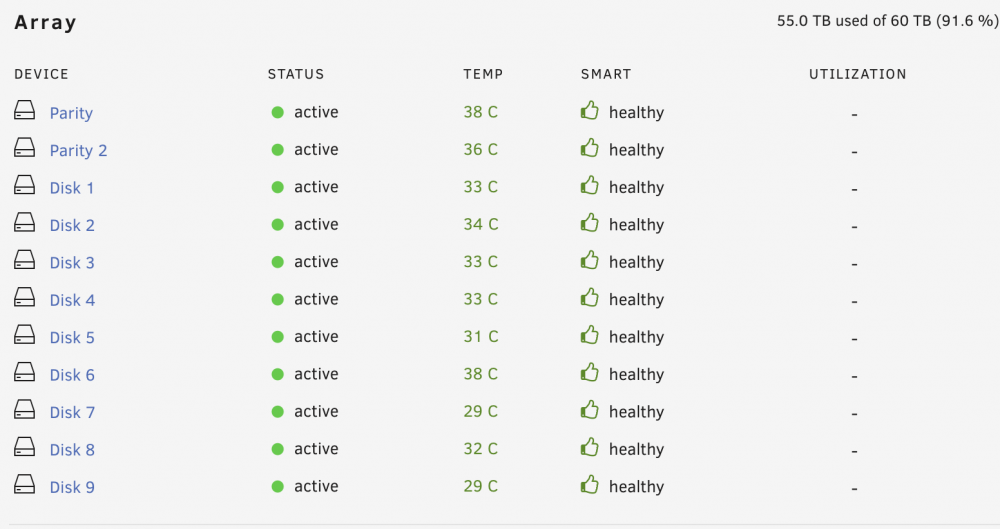
Hi all, In the last week or so I've had two discs become disabled (thankfully I have dual parity). Prior to this in the last year I had regular parity errors but being a covid healthcare worker things have been too busy to give it any energy. I put the parity errors down to PCIE SATA cards that had vibrated themselves out of their sockets (initially this caused trillions of read errors). Then I read that SATA cards are not recommended, so I got an LSI 9200-8i card, hoping this would fix things, replacing all SATA cables. But some errors continued. I recently moved the unRAID computer and then a disc became disabled, so I thought maybe the move had jiggled a cable free or something. I woke up this morning and a second disc was disabled, so I shut it down, took the computer apart and put it back together, reseating the RAM just in case. I'm not sure what to do from here, how I can see if the discs are still okay to use, and if so how I can re-connect them. And hopefully not get parity errors in the future. I guess I might just need to burn the server to the ground. Help much appreciated.

