





dh0llyw00d
Members
-
Joined
-
Last visited
-
I was using SATA power splitters, I replaced those with molex to sata power splitters (the psu had 8 native adapters, I needed another 2 for the remaining disks) and the problem is resolved, thanks for pointing me at the most likely culprit!
-
I have an issue with my server, twice now, a couple of disks have dropped off the array when its under heavy load, once during the initial big transfer from my cloud based files and recently during the first big parity sync. There seems to be quite a lot of messages like the below for multiple disks in the array: May 7 20:15:25 Tower kernel: ata7: SATA link down (SStatus 0 SControl 310) May 7 20:15:25 Tower kernel: ata7: hard resetting link May 7 20:15:31 Tower kernel: ata7: link is slow to respond, please be patient (ready=0) May 7 20:15:35 Tower kernel: ata7: COMRESET failed (errno=-16) May 7 20:15:35 Tower kernel: ata7: hard resetting link May 7 20:15:41 Tower kernel: ata7: link is slow to respond, please be patient (ready=0) May 7 20:15:45 Tower kernel: ata7: COMRESET failed (errno=-16) May 7 20:15:45 Tower kernel: ata7: hard resetting link May 7 20:15:48 Tower kernel: ata7: SATA link up 1.5 Gbps (SStatus 113 SControl 310) May 7 20:15:48 Tower kernel: ata7.00: configured for UDMA/133 May 7 20:15:48 Tower kernel: ata7.00: limiting speed to UDMA/100:PIO4 May 7 20:15:49 Tower kernel: ata7: SATA link up 1.5 Gbps (SStatus 113 SControl 310) May 7 20:15:49 Tower kernel: ata7.00: configured for UDMA/100 May 7 20:15:49 Tower kernel: ata7: EH complete May 7 20:15:49 Tower kernel: ata7.00: exception Emask 0x50 SAct 0x3c000000 SErr 0x4090800 action 0xe frozen May 7 20:15:49 Tower kernel: ata7.00: irq_stat 0x00400040, connection status changed May 7 20:15:49 Tower kernel: ata7: SError: { HostInt PHYRdyChg 10B8B DevExch } May 7 20:15:49 Tower kernel: ata7.00: failed command: READ FPDMA QUEUED May 7 20:15:49 Tower kernel: ata7.00: cmd 60/40:d0:58:4f:00/05:00:00:00:00/40 tag 26 ncq dma 688128 in May 7 20:15:49 Tower kernel: res 40/00:e8:18:5f:00/00:00:00:00:00/40 Emask 0x50 (ATA bus error) May 7 20:15:49 Tower kernel: ata7.00: status: { DRDY } The two disks that have dropped off were connected to an adaptec ASR-7805, but to rule that out, they are now connected to a PCI SATA expansion card (ASMedia ASM1166 Chipset), with no change in array behavior. Any ideas on next trouble shooting steps? Change SATA cables has been done, so change power cable? After that, what next? I appreciate any feedback, thanks. tower-diagnostics-20240508-1134.zip
-
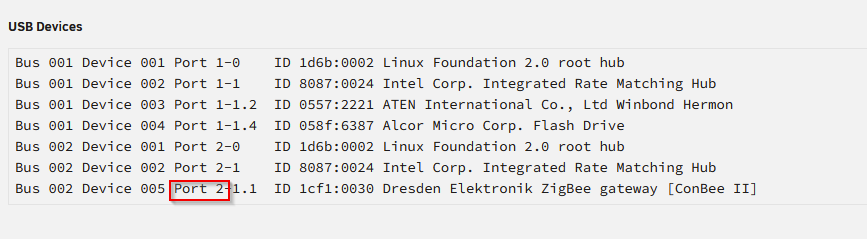
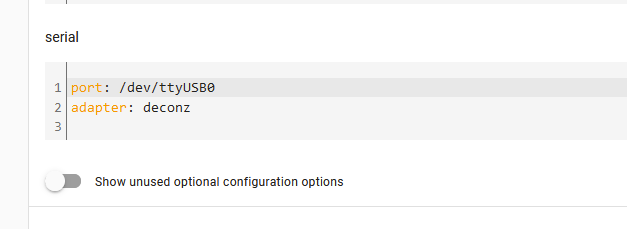
After struggling a little with getting this working, matching the target port on unraid did the trick: Unraid > Tools > System Devices: <serial type='dev'> <source path='/dev/serial/by-id/usb-dresden_elektronik_ingenieurtechnik_GmbH_ConBee_II_DEXXXXXXX-if00'/> <target type='usb-serial' port='2'> <model name='usb-serial'/> </target> <alias name='serial0'/> <address type='usb' bus='0' port='4'/> </serial> I then had to remap the z2m port in the Settings > Addons > Zigbee2MQTT > Configuration:
-
Edit the docker and set the timezone for the Key (mine is Key 20): Container Variable: PHP_TZ
