






GuildDarts
Members
-
Joined
-
Last visited
Everything posted by GuildDarts
-
This has not been reported yet, but i do know about it. When i was writing that part i tried to calculate it but got a bit annoyed so decided to just leave it at MiB Will add it to my todo list, so in the next few days should be fixed
-
Update This small update should hopefully fix the last issue, involving docker.folder not working at all. Sorry if anyone has lost their folders during all this Thanks @GooseGoose for helping find the issue
-
Update This update fixes a lot of things One being that if prefs file did not exist docker-tab/dashboard would not work. Dont know if this is cause of the issue with folders not loading or another one. If you're still having issues please post and i will try and figure it out thanks troyan for helping fix it
-
i understand the reason i wanted to do teamviewer instead of writing instructions, is that im unsure of what instructions to give or how to phrase them i understand your concern about giving me controle, i would be okay with doing it without controle whenever you want to do this just pm me
-
im unsure what you mean by "what are the points that I can control to advance" about the interface icon action not working, im unable to reproduce this so i cant really do anything. Thats why i asked to do teamviewer with you so that i can see why its happening for you
-
Hey sorry for the late reply if you have not uninstalled docker.folder and its still happening i would really like to do teamviewer with you. as you can see i have had a few reports of errors but i'm unable to reproduce it so im kinda lost looks like its failing to read folders.json but i have no idea why
-
@rraguokay so last night right after i posted that i got stop/start to not work, it started working again. Today i tried doing the exact same thing i did to break it yesterday and it is not breaking *sigh This i very confusing to me, i just reinstalled then tried to import the folders you sent previously and everything imported correctly would one of you two be willing to do teamviewer with me? (if we are not in same timezone i will stay up)
-
Yeah that's not supposed to happen. in the previous version i changed how the migration script works, and that might have caused the issue. will try and fix this asap sorry about your folders getting deleted incase anyone is reading this and i having same issue, before you uninstall there should be a folders.backup.json in /boot/config/plugins/docker.folder. You can import this once i fix the issue (again sorry) Edit: i have tried but cant seem to find the issue if you install docker.folder again is start/stop still broken? also if you remember were you on 2020.04.30 before you upgraded to 2020.05.03? Edit2: Just tried installing version 2020.04.24 then updating to latest and it broke. I cant start/stop, however my folders did not get removed like yours. Will try and fix this in the morning
-
Thanks for letting me know Just pushed an update. I was unable the get the error myself (on beta), but did fix what was causing the error (thanks for the logs ) hope this fixes it for you
-
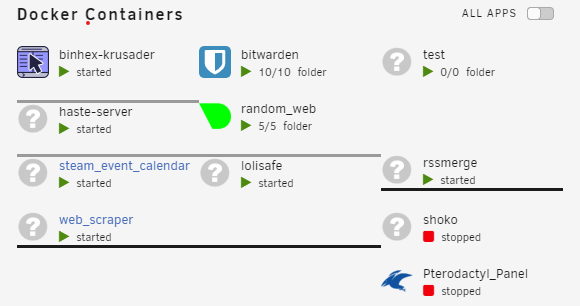
Update This update changes how folders are create. Before there was a hidden docker for each folder Also added a option to have a button for the dashboard expanded, as well as maybe fixing a bug with dashboard expanded. Expanding with the buttons can cause visual issues as in the posts above. Will try and fix this but might not be worth the hassle (sorry) @GooseGoose hope this fixes your issue with the lines, if not will try again
-
Will do also just the expand to break
-
will try and look into the lines not lining up (thought i had tested it *sigh) about getting it toggle-able, the original requester for the feature and i decided against it. tho i cloud add a option for a toggle button kinda like on the docker tab if you want
-
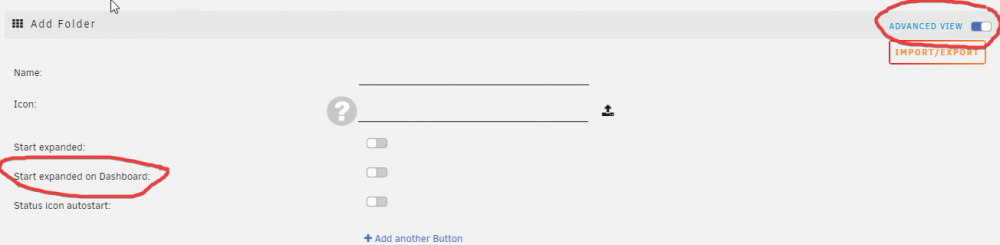
Thats awesome, glad that its fixed Its under "Advanced View" (really need to add some help info, like the blue ones unraid has)
-
yeah looks like we are in pretty opposite time zones I was unable to reproduce it even with your folders One thing you could try would be to export all your folders, uninstall plugin, "Reset sorting", install plugin and import folders. Then try sorting (not confident this will fix it but its worth a try)
-
Im unable to reproduce this . Would you be willing to let me teamviewer? If you are PM me (im usually online between 11-19 UTC) Edit two more things could you send your folders.json (goto "add folder" top right button import/export then "export all") also you said its the 2nd folder that has issues, does that mean all others still sort?
-
if you still need help getting started i would be happy to show how i got started
-
hmmm Thats very strang. Would you be able to make a short video/gif of you reordering and then it resetting, so i can get a better understand. sorry for the inconvenience
-
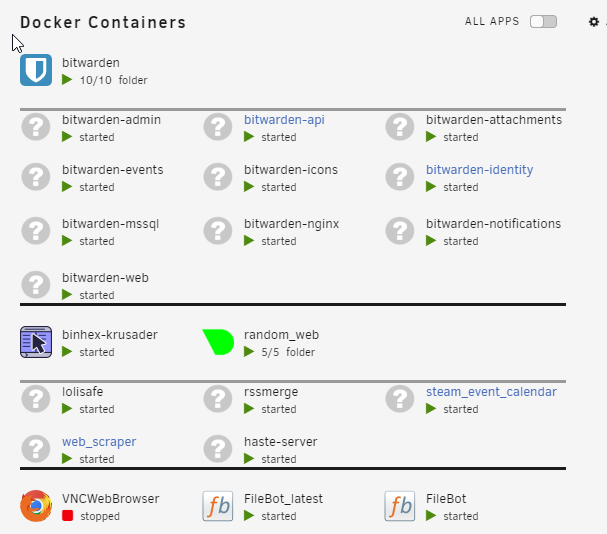
Update you can now have dockers expanded on dashboard ( @capt.asic hope its kinda what you imagined ) Added Unraid Docker WebUI construct Allow folder renaming Only restart started dockers Still wanna do this but might be a soon™
-
Holy cow thanks for all the suggestions really appreciate it ♥ Will look into adding this. But like you said i would have to parse the xml, which im not currently doing.
-
Will add both then, was just curious about the difference (if any)
-
1. Will do, cant believe i still have not done that 2. I can see why you would want the [IP] (great idea), but the [PORT] i just dont see what it would be for. Is there something different in unraid when doing "https://[IP]:[PORT:1234]" and https://[IP]:1234
-
Im fairly certain that this issue is the same one that @capt.asic report (like they suggested) are you on version '2020.04.22' thats the one with the fix
-
Okay i will try and figure out a way to do this. Also did you want a button to expand the folder or just have an option to start expanded? also fixed the Docker_Sub_Menu issue
-
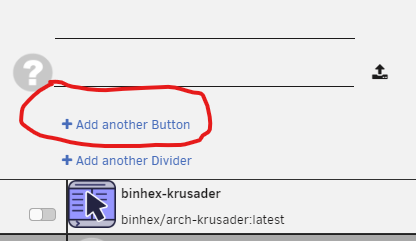
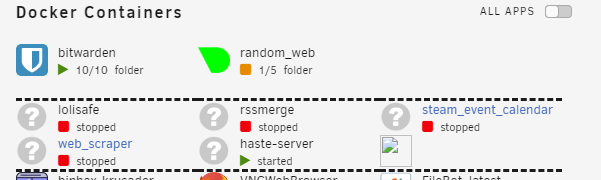
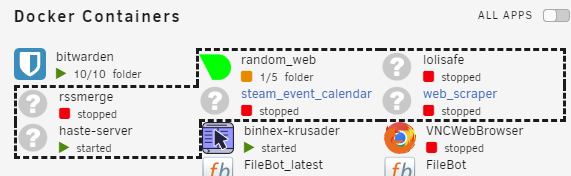
im guessing you're referring to multiple buttons. When you press "edit folder" there is a blue button called "Add another Button" press it and you should get a popup with options for buttons Thanks for doing the hard work of figuring out whats the cause. Will fix I could definitely add an option to show folders expanded on the dashboard. The only problem is making it not look really bad. Below are two ways i could think of doing it, i think both dont look very nice, but i cant think of a nicer way of doing it
-
@Nowjon this is now a thing, the option is under "advanced view" in edit folder thanks for another great suggestion





