





Decto
Members
-
Joined
-
Last visited
Everything posted by Decto
-
Seems like a case for a simple NAS with streaming. You can save some cash with an I3 - 10100 which is a 4c8t part, this will be plenty for NAS / streaming and the built in GPU does a good job of transcoding in Plex or other media streaming apps. if you want to transcode 4k so you can stream to non 4k devices the you need either the Intel iGPU or an add in GPU as it can be very hard on the cores. This chip will easily run a good number of dockers for gathering and streaming media and even a light weight VM or two if you need it. More cores would be for heavy VM usage, e.g. running gaming servers, or if you were using this as both a NAS and as your main desktop (via a VM). For motherboard, a B460 is a more budget choice with plenty of expansion, the main thing you lose is the option to split the main x16 PCI-E into a pair of X8 PCI-E for expansion. Look for a board with at least a x16 and x4 PCI-E slot, a couple of extra x1 are useful as well but don't get too carried away with premium boards unless you will use the 2.5Gb Network etc. Each x1 PCI-E can support 2 extra spinning drives at native speed while the x4 will give 8 extra drives. If you can get a deal on a B365 and similar CPU then that's a good option too. There is little difference other than Intel offered a little more of the money in the 10 series and added a 10 core part so discounted last gen would be fine. The areas you may want to spend a little extra are PSU and drives. That PSU has power plugs for around 8 drives and splitting power cables isn't recommended an extra one per string is OK, more than that can cause power issues. If you plan significantly more than 8 drives in the future then I'd recommend a PSU with more SATA power strings, or molex that can adapted to SATA. For drives, depending on how much storage you need, fewer larger drives are recommended. e.g 3x 8GB is prefered to 5x 4GB. You do waste a little more capacity using a larger drive as partity, however the expensive part of the whole system is usually the number of physical drives as each needs power, cooling, a slot in your case and a SATA port. So if you run out of capacity to add drives you may need a better PSU, a bigger case, , a more complex SATA add in card etc. or even a motherboard with more expansion slots. The cost of the extra 'wasted' space on the parity drive can soon become trivial in comparision. Also each drive is a potential point of failure. Good luck
-
Hi and welcome. Before anyone can help you need to post your requirements. Is this a simple NAS, media server, will it host VM's, if so what will these be for? What apps, dockers do you plan to run. How much storage do you plan to attach?
-
If you take a backup of your flash drive, you can always restore using the USB creation tool and the backup so changes can be undone easily.
-
Have a look here, poster seems to have the same board working, it may help with the USB. Integrated USB can be a challenge to pass through fully, often people fall back to an add in card. Edit Also seems to be an AMD bug with passthrough
-
I'm not sure why I read this as AMD earlier. Anyhow, I note you say that both GPU's and some PCI-E bus slots are in IOMMU group 1. Devices really need to be seperated into different IOMMU groups to pass through Eg. from my server, Have you tried PCIe ACS overide in Settings > VM Manager ? This may break the devices into more manageable groups although it is a bit of a hack which tells the OS to assume it can talk to devices independently when they aren't actually reporting that as possible so your milage may vary. You may need to check the BIOS for any other functions in addition to VT-d which support virtualisation as some BIOS need multiple settings to fully support VM's. 'IOAPIC 24-119 Entries' - 'Enable' may help as it uses an alternative to IRQ for multifunction devices... but that's a long shot, I suspect it is more linked to the cards sharing the same IOMMU.

-
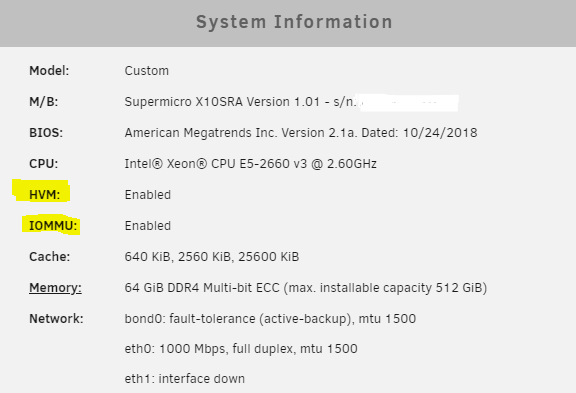
Do you have VT-D or the equivalent for AMD (AMD-V?) fully enabled in the BIOS In my experience it's often switched off to allow Ryzen master to run
-
To the best of my knowledge. If you want to install drivers for the mouse then you need to isolate and pass through a USB controller which you can then connect a mouse to and install device drivers. Same for the WIFI though that is likely to be difficult to isolate depending on your IOMMU groups. Unless the devices are isolated, linux drivers are in use so while the VM will translate the function, you cannot install a second layer of device drivers inside the VM.
-
For the 19xx Threadripper The CCX is the core building block, each of these has 4 CPU cores which share a block level 3 cache. (3cores on the 1920X as one is disabled) Two CCX form a die which also contains a dual channel memory controller and PCI-E interface etc. Two dies are mounted in the package, the physical chip you installed (there are actually 4 physical dies, however 2 of these are dummys) Each CCX comminicates with the other CCX's via infinity fabric, a high speed bus regardless of whether it is on the same die or a different die. This can cause latency when threads hop between cores accross the CCX's or data is in the cache on the wrong CCX. Additional latency comes when the CCX needs to access memory or devices on a different die which is what the video trys to avoid. Your image doesn't show the NUMA nodes as you have memory interleaving enabled (UMA) which increases the memory bandwidth at the expense of latency and hides the NUMA nodes from the OS. If you set memory interleaving to 'channel' in the BIOS and have the dimms in the correct configuration it should then switch to numa mode. There is no 'fix' for this, the latency is designed into the chip, which is optimised for production rather than gaming. However if you get the numa nodes correct you should see performance similar to a Ryzen 2600 with 6 cores allocated.
-
The 1920X contains mutiple chiplets and mutiple CCX's. The most cores you can have in a CCX is 4, however it is not clear if the 1920X has 4 x 3CCX or 3 x 4 CCX. You may be able to tell from Ryzen master in Windows. Once you start to move threads between the CCX's you introduce a lot of latency and take a signficant performance hit. As a first generation Ryzen SKU it is significantly eclipsed by second and third gen. The game mode on the 19XX series switched from UMA to NUMA mode and emulated a 8 core part to improve performance. If unraid is running it as the 12core part, latency will reduce performance etc. The main thing you can try is minimising detail rather than resolution, that may get a more playable frame rate, though as a simunlator, 30FPS should be sufficient.
-
Did you install 'tips and tweaks' and set the CPU governor to performance?
-
The new Sandisk Ultra Fit USB 3.1 do not have the GUID, The earlier Sandisk Ultra Fit USB 3.0 do have GUID, however the 32GB of this won't boot in 3 systems I tried while 16GB are fine, just discontinued. Sandisk Cruzer / Cruser Fit USB 2.0 seem fine as do the Kingston Data traveller USB 2 Also have issues with the Samsung Fit Plus 32GB as in the video. It will only boot using EFI on my supermicro X10 board, and not at all on a HP N40L or an older Gigabyte board. All boards will boot a cruzer 16GB or kingston 16GB without EFI fine.
-
I'm running 6.8.3 on an N40L with no issues, hardware is identical to N36L except CPU speed. Nothing reported makes me think it won't run fine on later versions, however I only upgrade to official releases on my backup server..... as it has my most current backup. N40L and N54L are common, always in Ebay in my region so worth seeking out. I use a 2 port ASM1061 card for 2 of the disks to avoid putting all 6 through the controller which is already bandwidth limited.
-
I'm having a similar experience with USB drives. My current server has been running happily on a 16GB USB 3.0 Sandisk Ultra Fit for around 3 years. I'm in the process of upgrading to a new server so I'm running a trial with the intent of converting this to a basic licence and to reuse an old HP N40L as parity protected cold storage. I like the small drives as they are difficult to break, though could use the internal USB port as discussed here. Anyhow, the 16GB USB 3.0 Sandisk Ultra Fit weren't available so then the fun started. 16GB Sandisk Ultra Fit USB 3.1 (all black) - No Guid 32GB Sandisk Ultra Fit USB 3.0 (old one with metal insert) - won't boot in any device, these look identical to the 16GB that works in any device. 32GB Samsung Fit Plus USB 3.1 - won't boot in the N40L at all, will only boot in SuperMicro X10 if I enable 'allow UEFI' in customise during creation. The 16GB Ultra Fit boots without. A 16GB USB 2.0 Cruzer Fit arrived today to I'll see if that still works, and maybe stock up on a few spares for the future as they are very cheap in this size. I think larger is better to a point as it helps the wear leveling even though the number of writes is small. I'll also take a look at the Kingston SE09, I have at least one genuine USB 2.0 of these, the other looks fake as there is only a logo on one side and I had a couple stop working in general use but these could have been fake. I also have a couple of later USB 3.0 versions. The triple pack could be useful if the GUID is common to all sticks and compatible with Unraid. Could these be a good backup option? If a stick went bad, you could just copy the latest backup to a replacement stick without needing to go through licence replacement which could be handy if you're running through PFSense or something on the server.
-
Hi, Several E5-2690 V3 on ebay in the EU for ~EUR 250. CPU's are quite robust and where you see someone is selling multiples it's very likely they are straight server pulls. I'd looked at these but then settled on an E5-2660 V3 for ~EUR 100 as it's more than adequate for my current needs. I'm currently testing with an X99 motherboard but plan to buy a Supermicro board in a couple of months, just some other jigsaw pieces to move. I'm a little caught in the loop of 1 or2 CPU, 4-8 dimm per CPU. if I go with 1 CPU or 2 CPU with 4 Dimms then I use my Antec P180 ATX case for now which will give 10 3.5 + 4 2.5 SATA. The dual CPU boards will also run with 1 CPU and as you say there is little difference in price so my current thoughts are to buy a dual board but run 1 CPU for now. My main concern with Dual CPU is idle power consuption, I'd be interested to know what you get when it's build. Good luck!
-
As you say, somewhat an overkill build. CPU's, if you want gaming then high frequency will be better. My real question is memory, performance will be significantly crippled with just 2 Dimms. The CPU's share memory badly as latency would be really high across a shared bus, Ideally you want each CPU to have it's own memory and 16GB shared between 12 to 24 cores is very stingy. Socket 2011 V3 is Quad channel so for best performance you need 4 Dimms per CPU, for tolerable performace you could live with 2, but 1 DIMM per CPU seems like a real performance killer. I recently bought 4 x 16GB RDIMM 2133 new, brown box in UK for ~ EUR50 per stick so your ram is also expensive. Most of the Xeons are capped at 2133 anyhow so 2400Mhz is mostly moot. Perhaps a single E5-2690 12C 24T 2.6Ghz / 3.5Ghz with 4 x 16GB would be a comprimise. Pass mark 19k hence why I don't see much point in dual CPU in consumer space. In a server farm with optimisation dual CPU makes more sense. For extra SATA use a cheap reflashed LSI SAS card, some random SATA card will only be trouble. What are you pluging you Samsung M.2 into? no slots on that board so will need a PCI-E adapter. Super fast and high IOPS makes little difference in the consumer space, mostly cache is just that, cache + log files etc. I'm using a standard mirrored pair of SATA SSD's and nothing I run including a few game servers causes them any stress. Drives - if you want to go big, I'd be buying 14TB+ Drives for parity and any new drives, add in the 8TB you have but if going big, why 8TB? Just have to look out for the Amazon etc deals and shuck the drives.


