





Rottonpeech
Members
-
Joined
-
Last visited
-
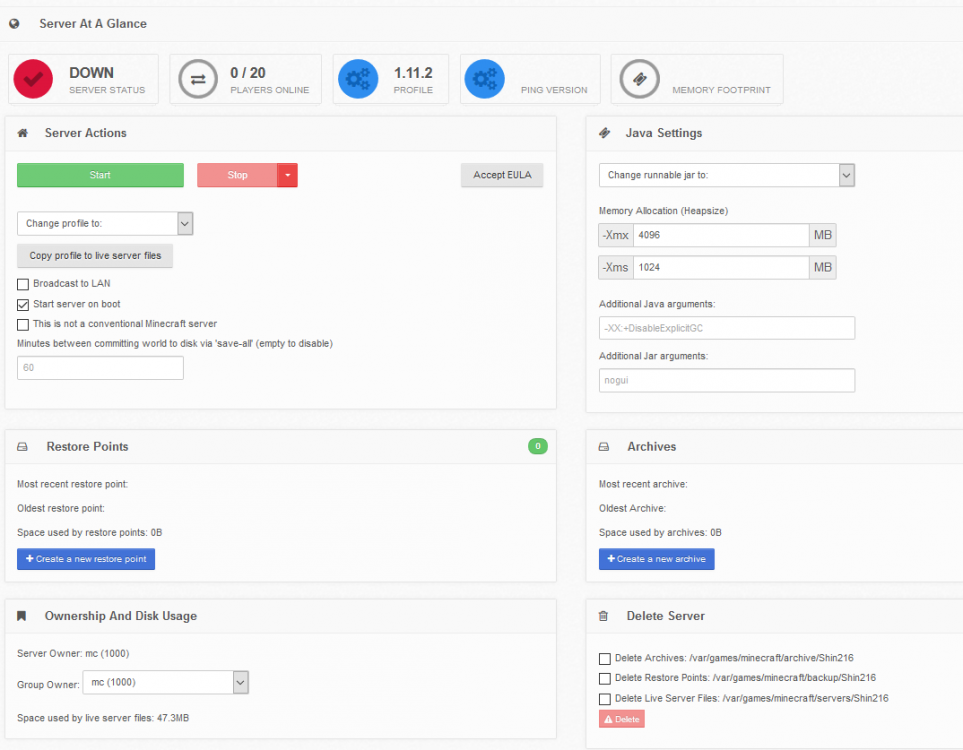
I must have grabbed the sent the configs while in-between different tests. I don't normally have that option checked, I was just trying random stuff. I removed the level name completely Same thing. attached screenshot also attached configs, and logs with the log directory zipped up (all that were accessible anyhow) server.config server.properties mineos.log mineos.auth.log log.zip
-
Just ran the update that was released, no change in my logs, no change in my ability to start a server. Is there any option to enable more verbose logging?
-
Rottonpeech changed their profile photo
-
/var/games/minecraft < -- > /mnt/user/appdata/minecraft/ /mnt/data < -- > /mnt/user/minecraft_data/ Attached are the other configs too supervisord.log eula.txt server.config server.properties
-
I'm trying to run your Mineos-Node docker, and I'm having an issue that i ant seem to figure out. The docker is installed just fine, and I have the WebUI running, i can create a server, but not matter which profile i choose, the server will not start. I never get a /var/log/mineos.log, and the only log I can find is from the docker and it just states the following: USER_NAME not provided; defaulting to "mc" Created user: mc (uid: 1000) Generating Self-Signed SSL... Generating a 1024 bit RSA private key ..............++++++ ......++++++ writing new private key to '.tmpkey.pem' ----- writing RSA key 2018-03-31 20:27:55,370 CRIT Supervisor running as root (no user in config file) 2018-03-31 20:27:55,370 WARN Included extra file "/etc/supervisor/conf.d/mineos.conf" during parsing 2018-03-31 20:27:55,387 INFO RPC interface 'supervisor' initialized 2018-03-31 20:27:55,387 CRIT Server 'unix_http_server' running without any HTTP authentication checking 2018-03-31 20:27:55,387 INFO supervisord started with pid 1 2018-03-31 20:27:56,389 INFO spawned: 'mineos' with pid 32 2018-03-31 20:27:57,403 INFO success: mineos entered RUNNING state, process has stayed up for > than 1 seconds (startsecs) 2018-03-31 20:29:14,930 CRIT reaped unknown pid 58) 2018-03-31 20:29:14,931 CRIT reaped unknown pid 59) 2018-03-31 20:30:16,101 CRIT reaped unknown pid 85) 2018-03-31 20:30:16,102 CRIT reaped unknown pid 86) 2018-03-31 20:33:25,428 CRIT reaped unknown pid 111) 2018-03-31 20:35:45,359 CRIT reaped unknown pid 146) 2018-03-31 20:35:45,359 CRIT reaped unknown pid 147) 2018-03-31 20:36:20,662 CRIT reaped unknown pid 172) 2018-03-31 20:36:20,662 CRIT reaped unknown pid 173) Every time I try to start the server, i get 2 - 3 more "CRIT reaped unknown pid" entries. Steps Ive taken thus far from reading other posts from everywhere I can find anything: adduser mc echo "mc:admin" | chpasswd chmod -R 777 /mnt/user/appdata/minecraft/ chown -R mc /mnt/user/appdata/minecraft/ chgrp -R 1000 /mnt/user/appdata/minecraft/ I have tried different profiles, from 1.7.10 to 1.12.2 vanilla, and even a few FTB options. It may be important to note that I have tried hexparrot's build too, and get the same issue. I'm flat out of ideas, do you have any? If it matters, I'm running Unraid 6.3.5 (cannot upgrade, later versions crash on my system) EDIT: found these logs, still not a lot of help here though. Says started, but its not. it immediately stops. mineos.auth.log mineos.log

