





Netbug
Members
-
Joined
-
Last visited
Everything posted by Netbug
-
Think I got it. Seems to be running 7.1.3 now. default menu.c32 menu title Lime Technology, Inc. prompt 0 timeout 50 label unRAID OS menu default kernel /bzimage append pci=realloc=off initrd=/bzroot label unRAID OS GUI Mode kernel /bzimage append pci=realloc=off initrd=/bzroot,/bzroot-gui label unRAID OS Safe Mode (no plugins, no GUI) kernel /bzimage append initrd=/bzroot unraidsafemode label unRAID OS GUI Safe Mode (no plugins) kernel /bzimage append initrd=/bzroot,/bzroot-gui unraidsafemode label Memtest86+ kernel /memtest
-
ok. So like the following: default menu.c32 menu title Lime Technology, Inc. prompt 0 timeout 50 label unRAID OS menu default kernel /bzimage append initrd=/bzroot append pci=realloc=off initrd=/bzroot label unRAID OS GUI Mode kernel /bzimage append initrd=/bzroot,/bzroot-gui append pci=realloc=off initrd=/bzroot label unRAID OS Safe Mode (no plugins, no GUI) kernel /bzimage append initrd=/bzroot unraidsafemode append pci=realloc=off initrd=/bzroot label unRAID OS GUI Safe Mode (no plugins) kernel /bzimage append initrd=/bzroot,/bzroot-gui unraidsafemode label Memtest86+ kernel /memtest
-
Ah. Found it. This is the current: default menu.c32 menu title Lime Technology, Inc. prompt 0 timeout 50 label unRAID OS menu default kernel /bzimage append initrd=/bzroot label unRAID OS GUI Mode kernel /bzimage append initrd=/bzroot,/bzroot-gui label unRAID OS Safe Mode (no plugins, no GUI) kernel /bzimage append initrd=/bzroot unraidsafemode label unRAID OS GUI Safe Mode (no plugins) kernel /bzimage append initrd=/bzroot,/bzroot-gui unraidsafemode label Memtest86+ kernel /memtest So I should add "append pci=realloc=off initrd=/bzroot" in this section like this? label unRAID OS menu default kernel /bzimage append pci=realloc=off append initrd=/bzroot
-
Can't seem to access it through my Windows shares. I'll pull the USB tomorrow morning and try it.
-
Thank you for looking. There is a lot of information on that thread. I assume, but "try this" you mean... added the following to my /boot/syslinux/syslinux.cfg: append pci=realloc=off initrd=/bzroot If that is the case, stupid question, but where is "boot" located? Would that be on the USB drive?
-
Sorry. Attached new ones. tower-diagnostics-20250606-1350.zip
-
Attached tower-diagnostics-20250606-1123.zip
-
Good morning. When attempting to upgrade from 6.12.14 to 7, my array seemed to become undetectable. I have downgraded back to 6.12.14, but, because I'm a little stupid, I didn't capture a screenshot of the system when it wasn't working. I believe it may be my SATA extender that is causing the problem. I was wondering if anyone would be willing to have a quick look and see if that is what's going on and if there's a way to fix it without replacing the hardware. Thanks so much. Components list follows. Current version: 6.12.14 Case: Lian-Li PC-A77F Motherboard: ASUSTeK COMPUTER INC. X99-A II , Version Rev 1.xx Processor: Intel Core i7-6850K CPU @ 3.60GHz RAM: 32GB DDR4 SATA Extender: Supermicro AOC-SASLP-MV8 SATA Extender Hot-swap Bays: SuperMicro CSE-M35T-1B (x 2) Power Supply: CORSAIR Enthusiast Series TX750M USB (unRAID): Lexar JD Firefly 8GB Hard Drives: Parity WDC_WD80EFAX-68KNBN0_VDHBX7VD - 8 TB (sdb) Disk 1 ST8000DM004-2U9188_ZR1520JK - 8 TB (sdf) Disk 2 ST8000DM004-2U9188_ZR1685VF - 8 TB (sdd) Disk 3 ST8000DM004-2U9188_ZR161J5L - 8 TB (sde) Disk 4 WDC_WD80EFAX-68KNBN0_VDH2MGVD - 8 TB (sdh) Disk 5 ST4000DM005-2DP166_WGY0E53A - 4 TB (sdj) Disk 6 ST3000DM001-1CH166_W1F23145 - 3 TB (sdm) Disk 7 WDC_WD30EZRX-00SPEB0_WD-WCC4E0NP7NLR - 3 TB (sdl) Disk 8 ST8000DM004-2CX188_ZR128XVM - 8 TB (sdk) Disk 9 ST8000DM004-2U9188_ZR15M67L - 8 TB (sdg) Disk 10 ST4000DM004-2CV104_ZFN0BNMN - 4 TB (sdi) Disk 11 ST8000DM004-2CX188_ZCT3VH40 - 8 TB (sdc) Cache INTEL_SSDPEKNW512G8_PHNH929303YD512A - 512 GB (nvme0n1) Flash JD_FireFly - 8 GB (sda)
-
Resolved with these instructions: https://wiki.servarr.com/radarr/faq#i-am-getting-an-error-database-disk-image-is-malformed
-
UnRAID Version 6.12.10 Radarr Docker Version: 5.15.1.9463 System Specs: Case: Lian Li PC-A77FB Motherboard: Asus X99-A II ATX LGA2011-3 Motherboard Processor: Intel® Core™ i7-6850K RAM: G.Skill Ripjaws V Series 32GB (4 x 8GB) DDR4-3200 Memory Drive Cage(s): 3x Supermicro CSE-M35T-1B Hot Swap Bay SATA Extender: Supermicro AOC-SASLP-MV8 SATA Extender Cache Drive: Intel® SSD 660p 512GB M.2 Boot Device: Flash JD_FireFly - 8 GB (sda) Parity WDC_WD80EFAX-68KNBN0_VDHBX7VD - 8 TB (sdb) Disk 1 ST8000DM004-2U9188_ZR1520JK - 8 TB (sdf) Disk 2 WDC_WD30EZRX-19D8PB0_WD-WMC4N0J7D8TT - 3 TB (sdd) Disk 3 WDC_WD20EARS-00MVWB0_WD-WCAZA9034298 - 2 TB (sde) Disk 4 WDC_WD80EFAX-68KNBN0_VDH2MGVD - 8 TB (sdh) Disk 5 ST4000DM005-2DP166_WGY0E53A - 4 TB (sdk) Disk 6 ST3000DM001-1CH166_W1F23145 - 3 TB (sdm) Disk 7 WDC_WD30EZRX-00SPEB0_WD-WCC4E0NP7NLR - 3 TB (sdl) Disk 8 ST8000DM004-2CX188_ZR128XVM - 8 TB (sdk) Disk 9 ST8000DM004-2U9188_ZR15M67L - 8 TB (sdg) Disk 10 ST4000DM004-2CV104_ZFN0BNMN - 4 TB (sdi) Disk 11 ST4000DM004-2CV104_ZFN1TJV6 - 4 TB (sdc) Good afternoon, I noticed this morning that downloads from Radarr were not being imported into Emby. After some digging, I noticed the following error in Radarr's log: [v5.14.0.9383] code = Corrupt (11), message = System.Data.SQLite.SQLiteException (0x800007EF): database disk image is malformed database disk image is malformed at System.Data.SQLite.SQLite3.Reset(SQLiteStatement stmt) at System.Data.SQLite.SQLite3.Step(SQLiteStatement stmt) at System.Data.SQLite.SQLiteDataReader.NextResult() at System.Data.SQLite.SQLiteDataReader..ctor(SQLiteCommand cmd, CommandBehavior behave) at System.Data.SQLite.SQLiteCommand.ExecuteReader(CommandBehavior behavior) at Dapper.SqlMapper.ExecuteReaderWithFlagsFallback(IDbCommand cmd, Boolean wasClosed, CommandBehavior behavior) in /_/Dapper/SqlMapper.cs:line 1142 at Dapper.SqlMapper.QueryMultipleImpl(IDbConnection cnn, CommandDefinition& command) in /_/Dapper/SqlMapper.cs:line 1125 at NzbDrone.Core.Datastore.BasicRepository`1.Insert(IDbConnection connection, IDbTransaction transaction, TModel model) in ./Radarr.Core/Datastore/BasicRepository.cs:line 188 at NzbDrone.Core.Datastore.BasicRepository`1.Insert(TModel model) in ./Radarr.Core/Datastore/BasicRepository.cs:line 151 at NzbDrone.Core.Messaging.Commands.CommandQueueManager.Push[TCommand](TCommand command, CommandPriority priority, CommandTrigger trigger) in ./Radarr.Core/Messaging/Commands/CommandQueueManager.cs:line 138 at NzbDrone.Core.Messaging.Commands.CommandQueueManager.Push(String commandName, Nullable`1 lastExecutionTime, Nullable`1 lastStartTime, CommandPriority priority, CommandTrigger trigger) in ./Radarr.Core/Messaging/Commands/CommandQueueManager.cs:line 142 at NzbDrone.Core.Jobs.Scheduler.ExecuteCommands() in ./Radarr.Core/Jobs/Scheduler.cs:line 42 at System.Threading.ExecutionContext.RunFromThreadPoolDispatchLoop(Thread threadPoolThread, ExecutionContext executionContext, ContextCallback callback, Object state) --- End of stack trace from previous location --- at System.Threading.Tasks.Task.ExecuteWithThreadLocal(Task& currentTaskSlot, Thread threadPoolThread) The above error (or some version) is repeated dozens of times in the Radarr log. After some searching the forums, this seems to be related to database corruption, but I'm not sure how to proceed to repair it. Would anyone be able to point me in the right direction? Thanks. tower-diagnostics-20241210-1309.zip
-
Oh FFS. I figured it out. I set up a constant ping to the unraid system and had it running in a window. Then when I went to mess around with the cables, I happened to glance up and see that I was still getting no packet loss. Long story short, somehow the DHCP reserved range on my router was wiped so two devices (unraid and a chromecast) had the same IP address. Fixed the reserved range and it seems to be working (fingers crossed).
-
Ordered a new USB drive. Hopefully arriving today. Will update once transferred.
-
Safe mode did not help. Issue persists. How does one create an unRAID stock flash drive?
-
I've successfully updated to 6.11.5. If booting into safe mode works, what would be the next step? Also, do you have a link to instructions on how to create an unRAID stock flash drive? Thanks.
-
Update: I have replaced the ethernet cable and switch. No change.
-
Sorry. I didn't realize that was separate from the system log. Attached. tower-diagnostics-20230409-1332.zip
-
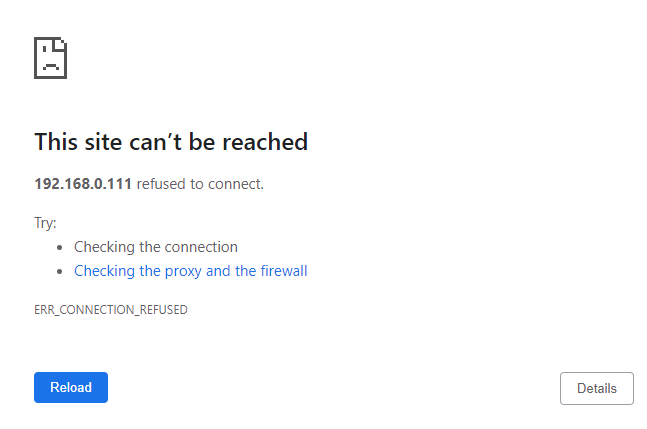
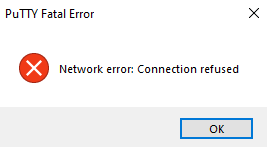
UnRAID Version: 6.11.2 Plugins: Unassigned Devices, CA Auto Update Applications, CA Backup/Restore Appdata, CA Cleanup Appdata, Community Applications, Dynamix S3 Sleep, Dynamix System Information, Fix Common Problems, Nerd Tools, Open Files, User Scripts Dockers: binhex-Radarr, binhex-sabnzbd, mylar3, radarr, binhex-sonarr, EmbyServer Hardware: Case: Lian-Li PC-A77F Motherboard: SuperMicro X9SCM-F Processor: Intel Core i3-2120 Sandy Bridge Dual-Core 3.3 GHz LGA 1155 RAM: Kingston 8GB SATA Extender: Supermicro AOC-SASLP-MV8 SATA Extender Hot-swap Bays: SuperMicro CSE-M35T-1B (x 2) Power Supply: CORSAIR Enthusiast Series TX750M USB (unRAID): Lexar JD Firefly 8GB Hard Drives: Parity WDC_WD80EFAX-68KNBN0_VDHBX7VD - 8 TB (sdb) Disk 1 WDC_WD20EADS-00R6B0_WD-WCAVY5374796 - 2 TB (sdf) Disk 2 WDC_WD30EZRX-19D8PB0_WD-WMC4N0J7D8TT - 3 TB (sdd) Disk 3 WDC_WD20EARS-00MVWB0_WD-WCAZA9034298 - 2 TB (sde) Disk 4 WDC_WD80EFAX-68KNBN0_VDH2MGVD - 8 TB (sdh) Disk 5 ST4000DM005-2DP166_WGY0E53A - 4 TB (sdj) Disk 6 ST3000DM001-1CH166_W1F23145 - 3 TB (sdm) Disk 7 WDC_WD30EZRX-00SPEB0_WD-WCC4E0NP7NLR - 3 TB (sdl) Disk 8 ST8000DM004-2CX188_ZR128XVM - 8 TB (sdk) Disk 9 ST4000DM005-2DP166_WDH2S61F - 4 TB (sdg) Disk 10 ST4000DM004-2CV104_ZFN0BNMN - 4 TB (sdi) Disk 11 ST8000DM004-2CX188_ZCT3VH40 - 8 TB (sdc) Cache INTEL_SSDPEKNW512G8_PHNH929303YD512A - 512 GB (nvme0n1) Flash JD_FireFly - 8 GB (sda) Issue: Last night, my internet became very flaky; dropping out every 5 minutes or so. So for the evening, I unplugged my router and just worked off of my cellular hotspot (just Netflix, not unRAID). Before I went to bed, I plugged the router back in. Overnight, the issue with the internet connection was resolved, however, when I tried to access unRAID through the GUI, I was getting "This site can't be reached". I would leave it for a few minutes, and unRAID would then load properly, then it would lock up again with "This site can't be reached". This is also happening with all dockers and when I try to SSH into the server; intermittent responses. So I set the system up to ping the server for a few minutes. There was only one packet lost in that time, however, during that time, I was continuing to experience the intermittent error of being unable to reach it. I did a clean shutdown and restart from the tower itself (shutdown -r now). It boots properly, but the problem persists. What is the next thing I can look at to try to figure out what is going on? Thanks. tower-syslog-20230409-1359.zip tower-diagnostics-20230409-1332.zip

-
Thanks. How do I identify to which drive that cable is feeding?
-
Thank you for the reply. I have fixed A (switched to IPv4 only) and B (corrected email configuration). For C, forgive my ignorance, but how do I identify which disk has the problematic cable (or possibly drive failure)? I do not see any identifying information in the section of the log that you pasted.
-
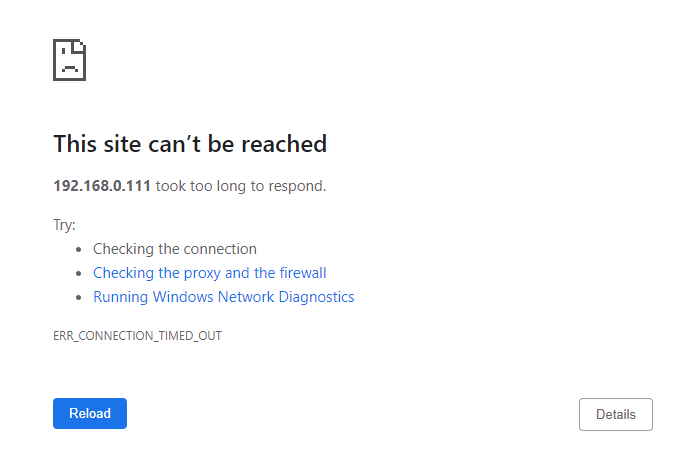
UnRAID Version: 6.10.3 Case: Lian Li PC-A77FB Motherboard: Asus X99-A II ATX LGA2011-3 Motherboard Processor: Intel® Core™ i7-6850K RAM: G.Skill Ripjaws V Series 32GB (4 x 8GB) DDR4-3200 Memory Drive Cage(s): 3x Supermicro CSE-M35T-1B Hot Swap Bay SATA Extender: Supermicro AOC-SASLP-MV8 SATA Extender Cache Drive: Intel® SSD 660p 512GB M.2 Boot Device: Flash JD_FireFly - 8 GB (sda) Hard Drives: Parity WDC_WD80EFAX-68KNBN0_VDHBX7VD - 8 TB (sdb) Disk 1 WDC_WD20EADS-00R6B0_WD-WCAVY5374796 - 2 TB (sdf) Disk 2 WDC_WD30EZRX-19D8PB0_WD-WMC4N0J7D8TT - 3 TB (sdd) Disk 3 WDC_WD20EARS-00MVWB0_WD-WCAZA9034298 - 2 TB (sde) Disk 4 WDC_WD80EFAX-68KNBN0_VDH2MGVD - 8 TB (sdh) Disk 5 ST4000DM005-2DP166_WGY0E53A - 4 TB (sdk) Disk 6 ST3000DM001-1CH166_W1F23145 - 3 TB (sdm) Disk 7 WDC_WD30EZRX-00SPEB0_WD-WCC4E0NP7NLR - 3 TB (sdl) Disk 8 ST3000DM001-1ER166_Z5029NBR - 3 TB (sdj) Disk 9 ST4000DM005-2DP166_WDH2S61F - 4 TB (sdg) Disk 10 ST4000DM004-2CV104_ZFN0BNMN - 4 TB (sdi) Disk 11 ST4000DM004-2CV104_ZFN1TJV6 - 4 TB (sdc) So last night I was watching some content from my Emby docker when the content froze. I walked over to my desktop to access the GUI, and I was getting a timeout for the dashboard and all other docker GUIs. After some troubleshooting, it was recommended by a friend who was helping to change the GPU. I completed this and thought everything was good. The solution seemed to work for about 12 hours, but has now started again. Content is unwatchable as it freezes every minute or so for 2-3 minutes. What will happen is I will get a timeout on the GUI through my web browser. After 2-3 minutes, it will reload and continue working properly, then lock up again. When I check the unRAID system directly through the command line (monitor, keyboard connected to the tower), there is no loss of response and no slowdowns. When I do a ping test on the local network to the system, there are no timeouts at all. I'm at a loss for where next to start troubleshooting. Please advise. tower-diagnostics-20221010-1851.zip
-
Issue seems to have been resolved by disabling DLNA in the Emby settings.
-
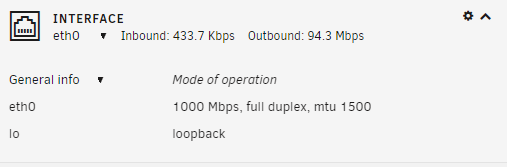
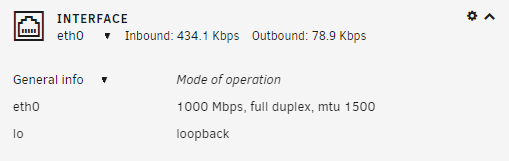
Thanks so much for the reply. That's what I've been trying to figure out. The "scheduled tasks" area of the Emby settings is not very helpful, unfortunately. What's really odd is that it seems to be completely outbound traffic according to what I'm seeing on the unRAID dashboard. I'm also attaching the emby logs here. Not sure if anybody knows how to interpret them. Here's what it shows when the emby docker is running: And here it is with the docker stopped: embyserver.txt hardware_detection-63785207120.txt
-
So I reinstalled the docker last weekend and the issue went away. All of a sudden when I got home today, it had started again. This leads me to believe there is some automated process that is running that is causing the issue. Any suggestions as to how to look for it? Updated log attached. tower-diagnostics-20220410-1700.zip
-
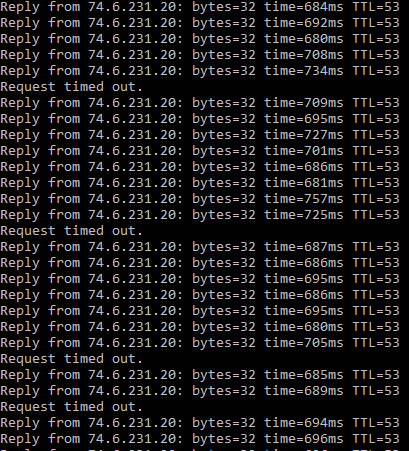
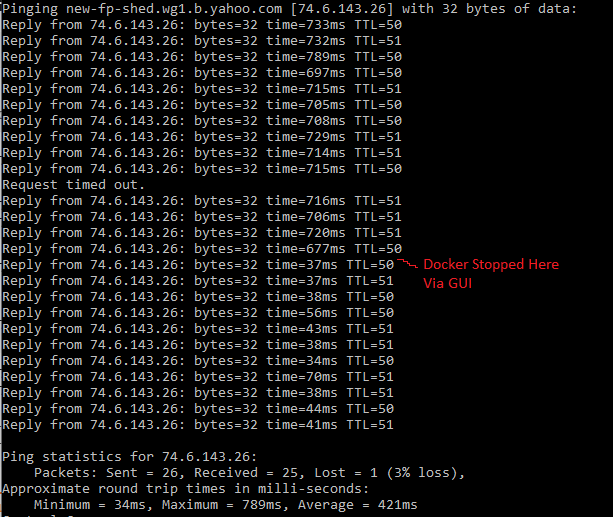
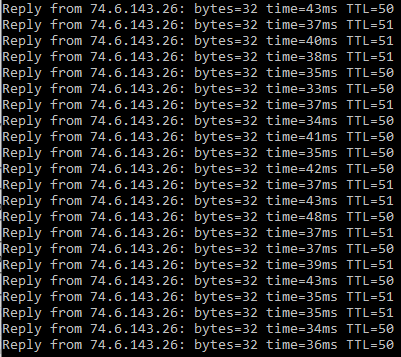
UnRAID 6.9.2 Issue: Starting earlier today, all of a sudden my unRAID system has been causing extreme latency and packet loss on my network. After a little trial and error, I've determined that this is being caused by the EmbyServer docker. When I stop this docker, my network traffic returns to normal. I've never had an issue like this before. I use Emby daily and it is quite important to me. I'm not quite sure how to go about troubleshooting this. As soon as I start the docker, the network goes bananas. I've attached some screenshots. Any ideas where I can start troubleshooting this? If I need to troubleshoot with Emby support, I can try that. Please advise. Dockers: binhex-radarr4k binhex-sabnzbd mylar3 radarr binhex-sonarr EmbyServer Plugins: CA Auto Update Applications CA BAckup / Restore Appdata CA Cleanup Appdata Community Applications Dynamix S3 Sleep Dynamix SSD Trim Synamix System Information Fix Common Problems Nerd Tools Open Files Unassigned Devices Unraid Nvidia User Scripts Hardware: Case: Lian-Li PC-A77F Motherboard: SuperMicro X9SCM-F Processor: Intel Core i3-2120 Sandy Bridge Dual-Core 3.3 GHz LGA 1155 RAM: Kingston 8GB SATA Extender: Supermicro AOC-SASLP-MV8 SATA Extender Hot-swap Bays: SuperMicro CSE-M35T-1B (x 2) Power Supply: CORSAIR Enthusiast Series TX750M USB (unRAID): Lexar JD Firefly 8GB Drives: Parity WDC_WD80EFAX-68KNBN0_VDHBX7VD - 8 TB (sdb) Disk 1 WDC_WD20EADS-00R6B0_WD-WCAVY5374796 - 2 TB (sdf) Disk 2 WDC_WD30EZRX-19D8PB0_WD-WMC4N0J7D8TT - 3 TB (sdd) Disk 3 WDC_WD20EARS-00MVWB0_WD-WCAZA9034298 - 2 TB (sde) Disk 4 WDC_WD80EFAX-68KNBN0_VDH2MGVD - 8 TB (sdh) Disk 5 ST4000DM005-2DP166_WGY0E53A - 4 TB (sdj) Disk 6 ST3000DM001-1CH166_W1F23145 - 3 TB (sdm) Disk 7 WDC_WD30EZRX-00SPEB0_WD-WCC4E0NP7NLR - 3 TB (sdl) Disk 8 ST8000DM004-2CX188_ZR128XVM - 8 TB (sdk) Disk 9 ST4000DM005-2DP166_WDH2S61F - 4 TB (sdg) Disk 10 ST4000DM004-2CV104_ZFN0BNMN - 4 TB (sdi) Disk 11 ST8000DM004-2CX188_ZCT3VH40 - 8 TB (sdc) Cache INTEL_SSDPEKNW512G8_PHNH929303YD512A - 512 GB (nvme0n1) Flash JD_FireFly - 8 GB (sda) tower-diagnostics-20220405-2056.zip
-
I don't, or I have them filtered due to spam. Is there a wiki article on configuring them? (I know, I'm bad at this)
