





Wody
Members
-
Joined
-
Last visited
-
No idea, the case is sold by a brand, but its not their design, they just buy the cases from China and market them as their own, without any modifications. It's a dumb backplane, so it only has power-connections and the SFF-8087 connector. Since I found out where it came from, I looked around and got a case out of China directly, also from a reseller but much more modern, that does have a brand-name on the backplane, which is OTT. The one I have comes with 8643 connectors for 12gbit, but they make a backplane with U2 as well now.
-
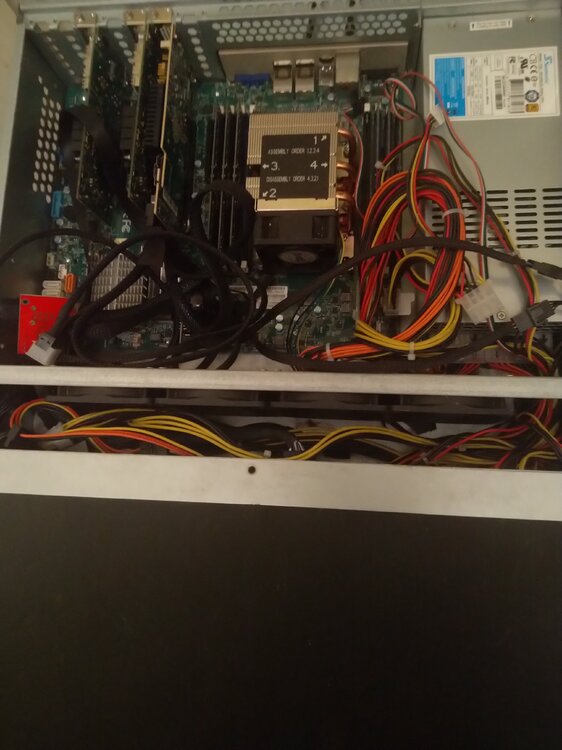
This picture isn't very clear because of all the cables, this is an X11SPL-F motherboard with 192GB RAM, 2xConnectX-4 Lx and my 9600-24i. There's also a USB with unraid and a TPM module installed. For cables, it's this ( from HBA to adapter without the baffle and then this to the backplane. Together it's all less than 1m/3 feet so it stays within SATA standards. This is a 2u case with 12 hotswap drives, so there's 2x3 cables and 3 adapters. I also use the same 8654 to 8643 in my other server which has a 8643 backplane. For price comparison, with a 9400 you can get away with these. But, I didn't use these because together with the 8654 cable it was longer than the SATA standard allows. Chenyang now also makes a 6843 to 6843 coupler which is cheaper, but I can't find shorter cables than 0.5m which means together it's already 1m so outside of SATA standards. If you only use SAS drives, you can go to 3m (10 feet) so then it is less of an issue.
-
Got the cables today, and unfortunately the results are as expected. So 6854-8i to 6843 or to 6843+6843-8087 adapter+8087-8087 cable works. I use that with a dumb backplane, and on one computer it detects my array and on the test-computer it detects the two drives I inserted, a 6TB WD drive, and a Samsung 870 SSD. These cable, so 8654-8i to 8087 do not work and detect no drives. Since it says compatible with SAS 4, even though I knew the outcome in advance, I tested with both my 9500-16i (SAS 3.5) and the 9600-24i (SAS 4), connectors identical, result identical. With a multimeter you can test cables, you connect it to one pin on one end, and to one pin on the other end, and if the pins are connected it shows 0, and if the pins aren't connected it shows 1. I've used this to verify that power-connectors were wired the same, and I should be able to do the same with these cables to figure out what is different about them, and I think I'll end up doing that eventually, but for now, the cables may support all kinds of things, but as tests show, they don't support Broadcom cards in the configuration we need at least.
-
Consumer-processors usually have about 20 lanes or so, the latest about 24. Take away 16 for a GPU, one or two for the chipset, and there is almost none left, so you'll always have to share, either from slots, or because it has to go through the chipset-connection. You'll need server processors and boards to avoid most of those bottlenecks. Plus they are designed to run 24/7 and last longer, as in a decade minimum instead of 2-3 years.
-
What slot are you using? Only the E4 slot is usable (near the edge of the board) since that's x4 (which should run the card, but I haven't tested that model on x4), the others (E2 and E3) are x1 and most likely won't work. (Also assuming E1 is in use for the graphics card). If you have an SSD in the slot next to it, it'll only run at x2 which also may not be compatible.
-
Depends on the motherboard. Normally you want one port for the internet connection, and the other for your local connection. So if the motherboard has separate PCI-IDs you can pass through one of them for your internet and use the other for your local connection. During the VM creation you'd then select the network source as unraid, and pass through the port, and with pfsense you'd select the port as internet and the other connection as your lan.
-
Some manufacturers publish cooling lists, like Noctua, but I think in this case they are not reliable since they claim 14.5cm coolers work, but 2U is only about 9cm, so as long as you have a cooler that's 7cm in height or less it should work. You'd need to measure with the motherboard and processor installed to make sure There's coolers that have the fan on top of the heatsink instead of to the side and usually those are smaller but still have a big heatsink At least there's plenty of models available that fit the hight-limits. A lot will also depend on how you use the system. You'll have a lot more issues if you stick it full with drives so the air that comes to the cooler is already warm, but if there's less drives and it's just serving files it'll be fine.
-
From pictures it looks like there's a 2x4 for CPU-power (which can be combined into 1x8). But you can ask the seller to be sure, they also sell that board separately. As for 2U, in some ways it is a lot easier since there is less height so things are closer, on the other cable management is more important, and also you these use LP or 'low profile' for cards, which means you can only use half height cards, so they don't stick out (so most GPUs won't fit). For cards that do fit, they need to come with a LP-baffle, which is the metal part on the back of the card that you can remove and replace when needed. They are very different, for the full height the screw-hole is on the right, for the low profile one it is on the left, so it isn't a case of cutting a part off to make it fit. For many cards you can buy them separately, and you can 3D-print them yourself too. That is something to look out for though, when you install a card it is easy to get the wrong screw-hole in the chassis if you're not used to 2u.
-
If you're picking a card to use with existing drives, something to keep in mind is also that the 9300 and newer no longer supports SATA 1 (1.5gbit) drives, and SAS 4 (so the 9600 and newer) no longer supports SATA 2 (3gbit) drives. The 9600 also has to work a lot harder, so it uses about 17 watt for the 16i. I haven't watched the videos, so I don't know if they measured temperatures but if not, most of the cards I have can get up to 60-65 celsius during startup, but usually they keep at 50-60 celsius during use. Exceptions are the 9211-8i, 9400-16i and 9500-16i which stay at about 40-45 celsius at most. This is all in a server with airflow, but all measured in the same condition (same slot etc). So keeping in mind power, heat and functionality, at this time the 9400-16i wins.
-
There are various manuals on the Broadcom site but not included in the previous link is the sas2flash manual which is here. -o is required for advanced commands, -e is erase, and level 6 erases everything except the manufacturing area which keeps the sas address, and -f tells it to flash firmware. You might be able to erase just the bios with -o -e 5, but I always do -e 6 and reflash so I'm sure about the integrity of the firmware.
-
You can try a different USB port first, preferably USB 2, then if it happens again, you know you'll have to replace the USB drive, otherwise it can be the port. That said, I'd also get a new USB, just in case. And try to make sure you have a backup, or at least copy the folders (especially the config folder).
-
The cards normal have thermal epoxy which is not easy to remove, see here.
-
If Unraid detects the card, you can do it there, otherwise you need to use UEFI shell. From the broadcom site here you'll want to get the BIOS and UEFI files (in case you want them in the future), or the Installer P20 for UEFI or Linux and the P20 package under Firmware. You'll want to unpack the sas2flash and the 2118it.bin file, and then first erase the card and re-program it with sas2flash -o -e 6 sas2flash -o -f 2118it.bin Make sure your BIOS is also updated to the latest version. Don't remember if you need -o for the last one but it shouldn't hurt. As an alternative, setting the PCIe slot to Gen 2 in the BIOS also should work.
-
The normal unraid way would be to put all HDD's as array with (one of) the biggest ones as parity for protection. Since that is 14TB, you'd have the leftover drives which is 14TB+3x2TB=20TB as storage. You could set up the media as a folder, or as a share, and the photos as well. Of course if you want to change, you'll need to empty one of the 14TB drives and convert the other because you can't/shouldn't use ZFS as a file-system in the array, so you'd need to find space for the files.
-
My understanding is that some of the pins are different between NVMe and SAS/SATA so it shouldn't work. But it is a good find, and now I want to know as well so I'll purchase some of them in a week or so and once I have them I'll let you know.
