





Bosshappy
Members
-
Joined
-
Last visited
-
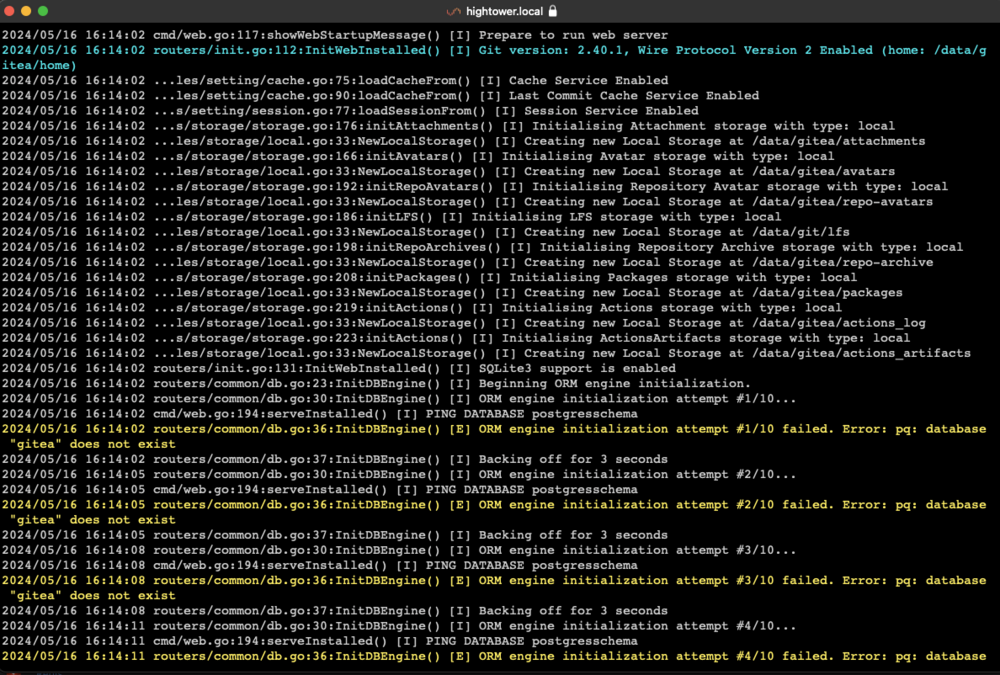
Hi, I'm new to using Gitea. I installed the app on my Unraid server but the keeps crashing. It seems to be trying to connect to a Postgres database. I didn't find any additional steps for setting this up. Can some one point me in the right direction?
-
Thanks
-
Yeah, that's what I deduced. As far as I can tell, when I upgraded to V2 of the CA backup, either I forgot to update the settings or the upgrade did not copy the settings. Either way, a lesson has been learned. I'm embarrassed to admit it but I fully don't understand how the cache drive works. I assume I am to configure the V2 CA backup against /mnt/cache/appdata? Originally, I think it was against /mnt/user/appdata. Should I be configuring the docker apps to store in /mnt/cache/appdata? I had them configured to /mnt/user/appdata. Overall, my assumption was the cache drive would move data in and out as needed, thus I shouldn't set configurations directly against it.
-
Yeah, that's the problem. There is no app data to restore.
-
New diagnostics attached. Thanks. hightower-diagnostics-20230212-1012.zip
-
My SSD drive crashed which was my cache drive. I restored apps via "Previous Apps" but none of the configurations are restored. The Appdata is gone. Any help is appreciated. Attached is the diagnostic file. hightower-diagnostics-20230211-0832.zip
-
I'm not sure what changed, but I stripped everything out and restarted and sure enough it's working. Thanks for your help!
-
Thanks for responding. What is the path to the files you copied from FoundryVTT?
-
Hi, I'm having some difficulty. I'd appreciate any help. I've bought a license and downloaded the Linux files. I've put everything in "/mnt/user/appdata/FoundryVTT/fvtt". My data file configuration is: "/mnt/user/appdata/FoundryVTT/data" My config file config is: "/mnt/user/appdata/FoundryVTT/config" When I try to run the executable: "foundryvtt", I get the following error: "foundryvtt: error while loading shared libraries: libnss3.so: cannot open shared object file: No such file or directory" I added "/usr/lib64/firefox" to my $PATH, which contains "libnss3.so", but I still get the same error. Any ideas:
