





JPetovello
Members
-
Joined
-
Last visited
-
Reserved for current support information This post is reserved for current known issues, important upgrade notes, common fixes, and other support information that may change over time. Current upgrade note Existing installations upgraded from older versions that ran the container as root may have root-owned application data. If the container fails to start with: sqlite3.OperationalError: attempt to write a readonly database stop the container and, when using the default appdata path, run: chown -R 99:100 /mnt/user/appdata/x-onu-dashboard Then start the container again. This changes ownership only and does not delete or reset the dashboard database or historical data.
-
X-ONU-SFPP DashboardThis is the official unRAID support thread for X-ONU-SFPP Dashboard. X-ONU-SFPP Dashboard is a lightweight monitoring dashboard for the EXEN X-ONU-SFPP and compatible ONTs running 8311 community firmware. It provides live and historical XGS-PON telemetry, configurable server-side alerting, alert history, notification support, and optional advanced monitoring over SSH. FeaturesCore monitoring does not require SSH and includes: RX and TX optical power TX bias current Module voltage Optical temperature CPU temperatures PLOAM state ONT reachability Historical optical and temperature charts Configurable telemetry and alert-history retention Optional SSH-based advanced monitoring adds: Live download and upload rates Downloaded and uploaded byte counters FEC status and counters BIP errors HEC counters PLOAM MIC errors Active ONT alarms GEM key-error counters ONT uptime Memory and load information Ethernet GEM / Allocation information Optical module information Historical traffic charts SSH monitoring is completely optional. If SSH is disabled or unavailable, normal core monitoring continues to operate. Alerts & NotificationsThe dashboard includes server-side alert monitoring, so the dashboard does not need to remain open in a browser for alerts and notifications to function. Alerts can monitor conditions including: RX and TX optical power Optical and CPU temperatures PLOAM state ONT reachability Active ONT alarms GEM key errors BIP, FEC, and HEC counters PLOAM MIC errors Supported notification providers include: Discord ntfy Gotify Pushover Generic Webhook Alert thresholds, severities, debounce settings, counter thresholds, cooldowns, notification providers, and data-retention settings can all be configured from the dashboard. RequirementsYou need an ONT running compatible 8311 community firmware with its metrics endpoint reachable from the unRAID server. The default metrics endpoint is: https://192.168.11.1/cgi-bin/luci/8311/metrics For optional advanced telemetry, the unRAID server must also be able to reach the ONT over SSH. The dashboard does not create or manage the network path between unRAID and the ONT management interface. That connectivity must already exist. UniFi Cloud Gateway FiberThe project also includes optional reference scripts and documentation for maintaining persistent ONT management access when using a UniFi Cloud Gateway Fiber (UCG Fiber). These scripts are not required by the dashboard and modify a WAN-side interface, so they should be reviewed and adapted to your network before use. The documentation and reference scripts are available in the GitHub repository. InstallationX-ONU-SFPP Dashboard is available through Community Applications on unRAID. Search Community Applications for: X-ONU-SFPP Dashboard Docker image: ghcr.io/jpetovello/x-onu-sfpp-dashboard:latest SupportPlease use this thread for: Installation help Configuration questions Upgrade problems ONT connectivity issues Dashboard behavior Alert and notification configuration General troubleshooting Feature questions When reporting a problem, please include as much of the following as possible: unRAID version X-ONU-SFPP Dashboard version Relevant Docker/container logs Whether core telemetry is working Whether optional SSH monitoring is enabled Any relevant error messages Please remove passwords, SSH credentials, notification tokens, webhook URLs, and other sensitive information before posting logs or screenshots. Confirmed software bugs can also be reported through GitHub Issues. Development NoteX-ONU-SFPP Dashboard has been developed with substantial AI-assisted software development. AI tools are used to assist with implementation, review, testing, documentation, and security analysis. Project direction, requirements, real-world testing, validation, release decisions, and ongoing support are handled by the project maintainer. The complete source code and development history are publicly available on GitHub. Project LinksGitHub: https://github.com/JPetovello/x-onu-sfpp-dashboard Documentation / README: https://github.com/JPetovello/x-onu-sfpp-dashboard#readme GitHub Issues: https://github.com/JPetovello/x-onu-sfpp-dashboard/issues I maintain X-ONU-SFPP Dashboard and will use this thread for ongoing unRAID support and project-related questions.
-
Stale <Overview> metadata retained in local my-*.xml templates for installed CA apps Hi Unraid Devs, I maintain two applications in Community Applications and noticed that after updating their <Overview> fields in the upstream repository, the updated descriptions appeared correctly in CA, but existing installations continued showing the old descriptions in the Unraid Docker UI. I traced this to the installed my-*.xml files under /boot/config/plugins/dockerMan/templates-user/, which retain the <Overview> content from when the application was originally installed. Reproduction: Installed two separate applications (PassForge and X-ONU-SFPP-Dashboard). Updated the upstream CA template <Overview> field. Verified that the local my-*.xml files still contained the old <Overview> text. Replaced only the <Overview> blocks in the local my-*.xml files with the current upstream values. The Unraid Docker UI immediately displayed the current descriptions without recreating or modifying either container. Question / Feature Request: I completely understand why user-defined container configuration (ports, paths, variables, etc.) in my-*.xml must never be overwritten by upstream template updates. However, is it intentional that informational metadata such as <Overview> also remains permanently pinned to the version that was present when the application was installed? This can leave existing users with outdated information even after a maintainer corrects or updates the CA template. In my case, one of the stale descriptions documented an older privacy architecture, making this an accuracy issue rather than simply a cosmetic one. Would it make sense for <Overview> to be refreshed from the current CA repository template independently of the user's saved container configuration? Thanks for all your work on the platform!
-
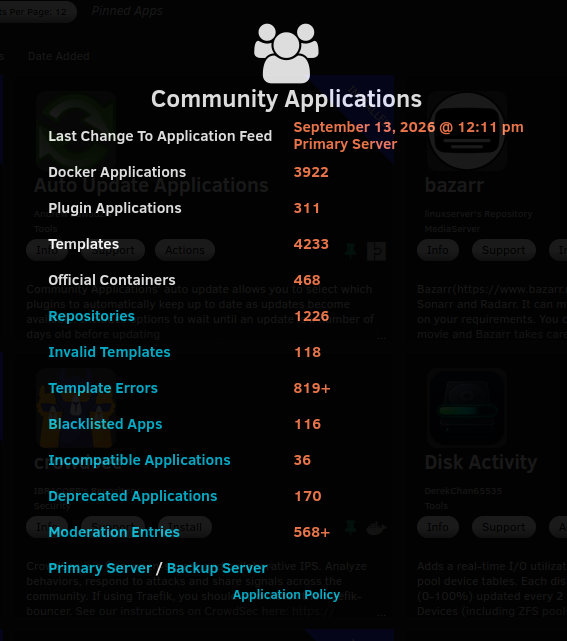
I think the central Community Applications application feed may be stalled. The CA UI currently reports: Last Change To Application Feed: September 13, 2026 @ 12:11 pm Server: Primary Server As of September 15, the feed still appears to contain repository metadata from that point in time. I noticed this because I maintain JPetovello/unraid-templates and changes made to two templates have not appeared in CA. One example is templates/passforge.xml. The current GitHub template contains: Have I Been Pwned (HIBP) breach database but CA is still displaying an older typo: Have I Been Pwned Pwned Passwords database A second example is templates/x-onu-sfpp-dashboard.xml. The current repository contains a v3.5.0 changelog entry, but the CA feed still stops at v3.4.0. I checked both central feed timestamp endpoints directly: https://ca.unraid.net/assets/feed/applicationFeed-lastUpdated.json https://ca.unraid.net/cdn/feed/applicationFeed-lastUpdated.json Both currently return: {"last_updated_timestamp":1789315913} I also downloaded both full feeds: https://ca.unraid.net/assets/feed/applicationFeed.json https://ca.unraid.net/cdn/feed/applicationFeed.json Both contain the old PassForge text and neither contains the new X-ONU v3.5.0 changelog entry. My local CA cache was refreshed on September 15, so this does not appear to be only a local browser/plugin cache issue. The newly downloaded local feed matches the stale central feed. Current local observations: templates_new.json mtime: 2026-09-15 20:48 UTC PassForge old typo count: 1 PassForge corrected wording count: 0 X-ONU v3.5.0 changelog count: 0 The Primary and CDN feeds return the same stale content. This looks like the central application-feed generation/ingestion process may not have regenerated since September 13. I’ve also attached a screenshot showing the CA status panel reporting the September 13 feed timestamp. Happy to provide any additional diagnostics if useful.
-
Title: GHCR download statistics in Community Applications Quick question about how Community Applications handles download statistics for containers hosted on GHCR. I recently published X-ONU-SFPP Dashboard in Community Applications. The container is hosted exclusively on GHCR: ghcr.io/JPetovello/x-onu-sfpp-dashboard:latest I noticed that my application doesn't currently display a download count in the CA AppFeed, so I did some digging to understand where that metric comes from. From what I can tell, the CA download count appears to be based on Docker Hub repository pull counts rather than tracking actual installations made through Community Applications. A couple of interesting examples I noticed: MeTube currently uses ghcr.io/alexta69/metube:latest in CA, but still shows a CA download count. There is a corresponding alexta69/metube repository on Docker Hub with a pull count in the same general range. absulli uses ghcr.io/operationeth/absulli:latest, but also displays a download count. It similarly has a corresponding operationeth/absulli repository on Docker Hub. My repository, jpetovello/x-onu-sfpp-dashboard, doesn't exist on Docker Hub, and the CA feed shows no download value for the app. I'd prefer not to publish or duplicate the project on Docker Hub just to populate this statistic, so I plan to keep it GHCR-only. Would it be possible for CA/AppFeed to fetch pull or download statistics directly for GHCR-hosted containers? If GitHub simply doesn't expose a usable public GHCR pull counter, that completely answers my question. I'm mostly just curious if GHCR statistics could eventually be supported within the existing AppFeed system.
-
Is there a setting that will allow me to hide these buttons? GyazoGyazo
-
Hello. I was wondering if there is some way that an update can be pushed for FTB Presents Direwolf20 1.21, as they updated to version 1.18.1. Thanks!
-
There is a plugin that was developed by the maintainer of the unRAID Tailscale plugin. Its posted on the unRAID Reddit.
-
When are we going to see this dealt with? It's been months since they first published these vulnerabilities.

