





Ronhj
Members
-
Joined
-
Last visited
-
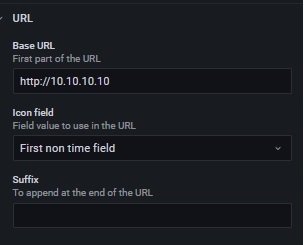
I had to Edit the Dockers (Running) and Dockers (Stopped) changed base url to http://10.10.10.10 (My server ip adress)
-
Its on host. 192.168.80.154 is unraid server 32400 is plex internal port 50000 is external (same as set inside plex settings - remote access, 32400 by deffault) Sent fra min SM-G965F via Tapatalk
-
Example. Sent fra min SM-G965F via Tapatalk
-
For me i use the unraid ip and port 32400 in router settings Need to port it to the internal 32400 aswell, You can try change external port on plex to somthing else personaly i changed to 50000 on mine. Since i had problems connecting to my plex when i had it on 32400
-
Atm openvpn is bad with pia. Had to change server once a day.. changing to a docker with built in wiregard solves the problem for now anyway. There is one made by dyonr. And can be found on CA Sent fra min SM-G965F via Tapatalk
-
Shoud be a docker version of it on apps with built in wireguard. Shoud work with pia i beleve if im not mistaken Sent fra min SM-G965F via Tapatalk
-
clearing browser cache normaly fixes it for me or open handbrake in incognito mode on my browser Sent fra min SM-G965F via Tapatalk
-
pia: Sweden server is down i could enter deluge but no trafic Switzerland works for now atleast
