buellmule
Members
-
Joined
-
Last visited
Everything posted by buellmule
-
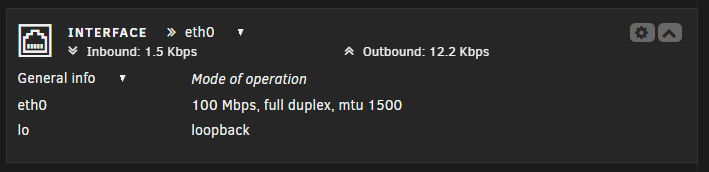
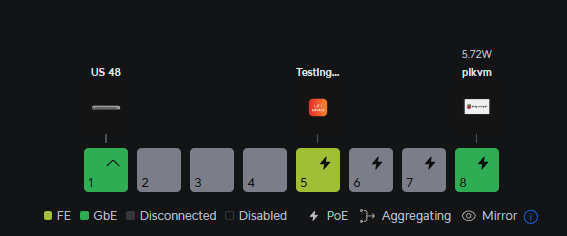
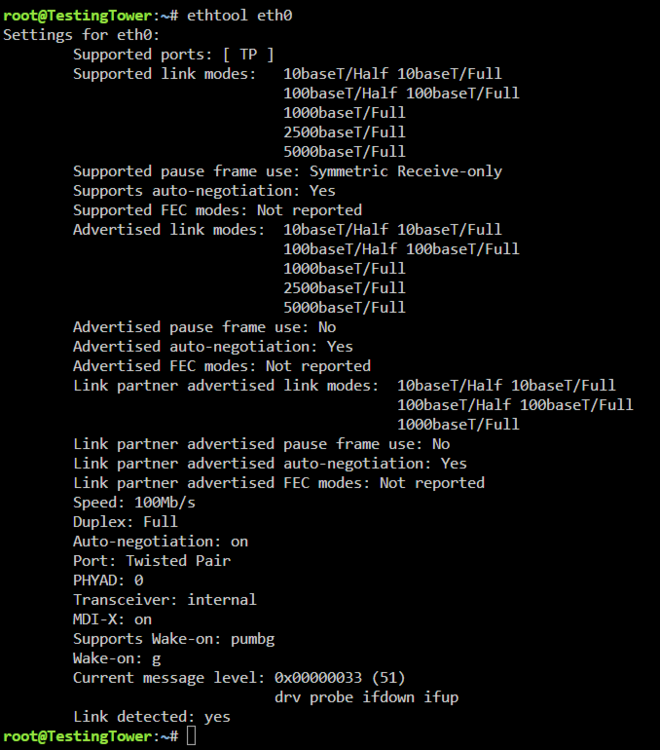
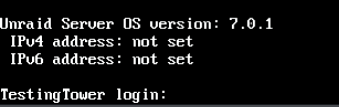
Built a new server for unraid this week, and any help with this, would be much appreciated. The motherboard I chose is an MSI mag x870e tomahawk, which has a RTL8126 5gb ethernet. I am testing this new server with a fresh install V7.0.1 trial key to make sure there weren't any hardware issues. Of course there isn't native drivers in Linux kernel 6.6.78, so I installed the RTL 8126 plugin. It recognizes the card, but unfortunately will ONLY negotiate to 100MB plugged in to my Ubiquiti US-8-60W gigabit switch. I have switched ports and switched cables. All cables being Cat6a. I also have my PIKVM connected to the same switch and connects at gigabit speeds. And the switch connects to my US48 Ubiquiti switch at gigabit speeds. So i doubt it's my switch or cabling. ethtool says the port is CAPABLE of everything up to 5GB. Curious thing when booting up, is it shows the IPV4 address isn't set, yet I CAN get to the Unraid gui. I've attached the diagnostics file. Thank You. testingtower-diagnostics-20250327-2220.zip

-
DOOOH! Thank you!!!! I thought since I changed the port to 8018, I needed to in the conf file. ALl fixed and working in less than 30 min. THANK YOU!
-
I've been pulling my hair out trying to figure out what I am doing wrong getting piwigo to work with letsencrypt. I used spaceinvader's guid to get them up and running, and have several other subdomains working, Jellyfin, radarr, sonarr, lidarr, etc... So letencrypt is working, and I am getting no errors there. I have my subdomains/ddns setup through freedns.afraid.org I setup piwigo this morning, changed the port 80 to port 8018, and it works locally. But trying to go to it via piwgo.mydomain.com gives me a 502 Bad Gateway error. Here is the piwigo.subdomain.conf file I am using. # make sure that your dns has a cname set for piwigo server { listen 443 ssl; listen [::]:443 ssl; server_name piwigo.*; include /config/nginx/ssl.conf; client_max_body_size 0; # enable for ldap auth, fill in ldap details in ldap.conf #include /config/nginx/ldap.conf; # enable for Authelia #include /config/nginx/authelia-server.conf; location / { # enable the next two lines for http auth #auth_basic "Restricted"; #auth_basic_user_file /config/nginx/.htpasswd; # enable the next two lines for ldap auth #auth_request /auth; #error_page 401 =200 /ldaplogin; # enable for Authelia #include /config/nginx/authelia-location.conf; include /config/nginx/proxy.conf; resolver 127.0.0.11 valid=30s; set $upstream_app piwigo; set $upstream_port 8018; set $upstream_proto http; proxy_pass $upstream_proto://$upstream_app:$upstream_port; } } Looking at my ngnix error.log, I just noticed it's giving me this: *1 connect() failed (111: Connection refused) while connecting to upstream, client: 192.168.0.1, server: piwigo.*, request: "GET / HTTP/2.0", upstream: "http://172.18.0.8:8018/", host: "piwigo.mydomain.com" 2020/07/19 15:33:28 [error] 432#432: *1 connect() failed (111: Connection refused) while connecting to upstream, client: 192.168.0.1, server: piwigo.*, request: "GET /favicon.ico HTTP/2.0", upstream: "http://172.18.0.8:8018/favicon.ico", host: "piwigo.mydomain.com", referrer: "https://piwigo.mydomain.com/" Obviously, my actual domain was replaced by mydomain.com in the above errors, and .conf file. So what am I doing wrong?
-
THANK YOU!!!! It must change that when passing through anything.
-
1st of all. AWESOME job on the docker. Makes it MUCH easier to install OSX. Thank you. I'm having a problem passing ANYTHING to the VM. Just passing a USB memory stick to the VM results in the graphics becoming all wonky over VNC. Any ideas? <?xml version='1.0' encoding='UTF-8'?> <domain type='kvm' id='4' xmlns:qemu='http://libvirt.org/schemas/domain/qemu/1.0'> <name>MacinaboxCatalina</name> <uuid>485331e3-ee0d-4122-8c3d-d0654a6bc476</uuid> <description>MacOS Catalina</description> <metadata> <vmtemplate xmlns="unraid" name="Windows 10" icon="catalina.png" os="Catalina"/> </metadata> <memory unit='KiB'>4194304</memory> <currentMemory unit='KiB'>4194304</currentMemory> <memoryBacking> <nosharepages/> </memoryBacking> <vcpu placement='static'>2</vcpu> <cputune> <vcpupin vcpu='0' cpuset='0'/> <vcpupin vcpu='1' cpuset='1'/> </cputune> <resource> <partition>/machine</partition> </resource> <os> <type arch='x86_64' machine='pc-q35-3.1'>hvm</type> <loader readonly='yes' type='pflash'>/usr/share/qemu/ovmf-x64/OVMF_CODE-pure-efi.fd</loader> <nvram>/etc/libvirt/qemu/nvram/485331e3-ee0d-4122-8c3d-d0654a6bc476_VARS-pure-efi.fd</nvram> </os> <features> <acpi/> <apic/> </features> <cpu mode='host-passthrough' check='none'> <topology sockets='1' cores='1' threads='2'/> </cpu> <clock offset='utc'> <timer name='rtc' tickpolicy='catchup'/> <timer name='pit' tickpolicy='delay'/> <timer name='hpet' present='no'/> </clock> <on_poweroff>destroy</on_poweroff> <on_reboot>restart</on_reboot> <on_crash>restart</on_crash> <devices> <emulator>/usr/local/sbin/qemu</emulator> <disk type='file' device='disk'> <driver name='qemu' type='qcow2' cache='writeback'/> <source file='/mnt/user/domains/MacinaboxCatalina/Clover.qcow2'/> <backingStore/> <target dev='hdc' bus='sata'/> <boot order='1'/> <alias name='sata0-0-2'/> <address type='drive' controller='0' bus='0' target='0' unit='2'/> </disk> <disk type='file' device='disk'> <driver name='qemu' type='raw' cache='writeback'/> <source file='/mnt/user/domains/MacinaboxCatalina/Catalina-install.img'/> <backingStore/> <target dev='hdd' bus='sata'/> <alias name='sata0-0-3'/> <address type='drive' controller='0' bus='0' target='0' unit='3'/> </disk> <disk type='file' device='disk'> <driver name='qemu' type='raw' cache='writeback'/> <source file='/mnt/user/domains/MacinaboxCatalina/macos_disk.img'/> <backingStore/> <target dev='hde' bus='sata'/> <alias name='sata0-0-4'/> <address type='drive' controller='0' bus='0' target='0' unit='4'/> </disk> <controller type='sata' index='0'> <alias name='ide'/> <address type='pci' domain='0x0000' bus='0x00' slot='0x1f' function='0x2'/> </controller> <controller type='pci' index='0' model='pcie-root'> <alias name='pcie.0'/> </controller> <controller type='pci' index='1' model='pcie-root-port'> <model name='pcie-root-port'/> <target chassis='1' port='0x10'/> <alias name='pci.1'/> <address type='pci' domain='0x0000' bus='0x00' slot='0x02' function='0x0' multifunction='on'/> </controller> <controller type='pci' index='2' model='pcie-root-port'> <model name='pcie-root-port'/> <target chassis='2' port='0x11'/> <alias name='pci.2'/> <address type='pci' domain='0x0000' bus='0x00' slot='0x02' function='0x1'/> </controller> <controller type='pci' index='3' model='pcie-root-port'> <model name='pcie-root-port'/> <target chassis='3' port='0x12'/> <alias name='pci.3'/> <address type='pci' domain='0x0000' bus='0x00' slot='0x02' function='0x2'/> </controller> <controller type='pci' index='4' model='pcie-root-port'> <model name='pcie-root-port'/> <target chassis='4' port='0x13'/> <alias name='pci.4'/> <address type='pci' domain='0x0000' bus='0x00' slot='0x02' function='0x3'/> </controller> <controller type='virtio-serial' index='0'> <alias name='virtio-serial0'/> <address type='pci' domain='0x0000' bus='0x02' slot='0x00' function='0x0'/> </controller> <controller type='usb' index='0' model='ich9-ehci1'> <alias name='usb'/> <address type='pci' domain='0x0000' bus='0x00' slot='0x07' function='0x7'/> </controller> <controller type='usb' index='0' model='ich9-uhci1'> <alias name='usb'/> <master startport='0'/> <address type='pci' domain='0x0000' bus='0x00' slot='0x07' function='0x0' multifunction='on'/> </controller> <controller type='usb' index='0' model='ich9-uhci2'> <alias name='usb'/> <master startport='2'/> <address type='pci' domain='0x0000' bus='0x00' slot='0x07' function='0x1'/> </controller> <controller type='usb' index='0' model='ich9-uhci3'> <alias name='usb'/> <master startport='4'/> <address type='pci' domain='0x0000' bus='0x00' slot='0x07' function='0x2'/> </controller> <interface type='bridge'> <mac address='52:54:00:2f:ca:8a'/> <source bridge='br0'/> <target dev='vnet0'/> <model type='virtio'/> <alias name='net0'/> <address type='pci' domain='0x0000' bus='0x01' slot='0x00' function='0x0'/> </interface> <serial type='pty'> <source path='/dev/pts/0'/> <target type='isa-serial' port='0'> <model name='isa-serial'/> </target> <alias name='serial0'/> </serial> <console type='pty' tty='/dev/pts/0'> <source path='/dev/pts/0'/> <target type='serial' port='0'/> <alias name='serial0'/> </console> <channel type='unix'> <source mode='bind' path='/var/lib/libvirt/qemu/channel/target/domain-4-MacinaboxCatalina/org.qemu.guest_agent.0'/> <target type='virtio' name='org.qemu.guest_agent.0' state='connected'/> <alias name='channel0'/> <address type='virtio-serial' controller='0' bus='0' port='1'/> </channel> <input type='tablet' bus='usb'> <alias name='input0'/> <address type='usb' bus='0' port='1'/> </input> <input type='mouse' bus='ps2'> <alias name='input1'/> </input> <input type='keyboard' bus='ps2'> <alias name='input2'/> </input> <graphics type='vnc' port='5900' autoport='yes' websocket='5700' listen='0.0.0.0' keymap='en-us'> <listen type='address' address='0.0.0.0'/> </graphics> <video> <model type='qxl' ram='65536' vram='65536' vgamem='16384' heads='1' primary='yes'/> <alias name='video0'/> <address type='pci' domain='0x0000' bus='0x00' slot='0x01' function='0x0'/> </video> <hostdev mode='subsystem' type='usb' managed='no'> <source> <vendor id='0x0781'/> <product id='0x5599'/> <address bus='5' device='2'/> </source> <alias name='hostdev0'/> <address type='usb' bus='0' port='2'/> </hostdev> <memballoon model='virtio'> <alias name='balloon0'/> <address type='pci' domain='0x0000' bus='0x03' slot='0x00' function='0x0'/> </memballoon> </devices> <seclabel type='dynamic' model='dac' relabel='yes'> <label>+0:+100</label> <imagelabel>+0:+100</imagelabel> </seclabel> <qemu:commandline> <qemu:arg value='-usb'/> <qemu:arg value='-device'/> <qemu:arg value='usb-kbd,bus=usb-bus.0'/> <qemu:arg value='-device'/> REMOVED <qemu:arg value='-smbios'/> <qemu:arg value='type=2'/> <qemu:arg value='-cpu'/> <qemu:arg value='Penryn,kvm=on,vendor=GenuineIntel,+invtsc,vmware-cpuid-freq=on,+pcid,+ssse3,+sse4.2,+popcnt,+avx,+aes,+xsave,+xsaveopt,check'/> </qemu:commandline> </domain>

-
Here they are. orthros-diagnostics-20191114-0405.zip
-
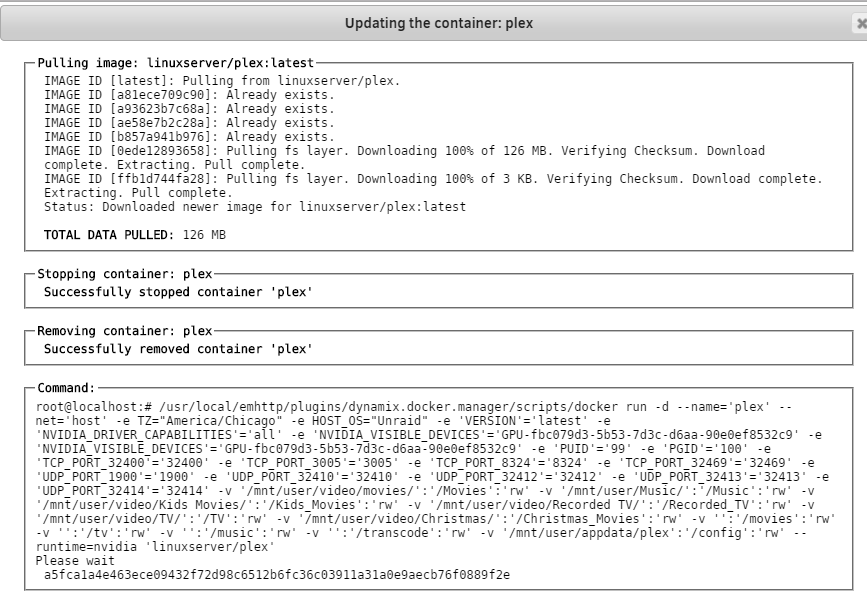
Went to update my Plex docker to the latest, and it's been sitting here for about 2 hours. What SHOULD I do?