





jwiese997
Members
-
Joined
-
Last visited
-
Duh. That fixed it. I had it set as top level only. Thanks for clarifying my moment of stupidity.
-
Like the title says, mover keeps trying to move to a full disk. I tried removing the disk from the share by excluding the disk as well as not including it. I've tried setting it to high-water and as well as most-free with a min free space of 1gb, yet every time I run mover it immediately starts trying to move to disk 1 which is the full disk. I've tried updating Unraid all the way up to 7.0 beta 2 yet nothing is affecting it.
-
This actually was sort of the issue. There was nothing wrong with the flash drive, but after several years, there was something bad in the unraid files. I just did a stock install of unraid on it and transferred my config folder and that fixed it. I was finally able to boot up without enabling csm and using just the onboard graphics. Thanks for the help.
-
I already did. The EFI folder does not have the trailing- and it just keeps rebooting back to bios unless I have csm enabled.
-
I'm trying to upgrade my system but the secure boot is messing up everything. I'm wanting to use the onboard graphics but from what I'm discovering, that's not possible. I disable secure boot and all that goes with it, but it will not boot unraid. It keeps taking me back to the bios and it just keeps looping back to the bios with every restart. The only way I've gotten it to boot up to unraid is by enabling csm and the only way to do that is to use a GPU. I have made sure the EFI folder does not have the trailing -, so I'm not sure what I'm missing. I'm using an Asus primez790-v wifi with an i9-12900k. I've also tried it with a gigabyte b760 Gaming X AX and it's the same for both. Why can't I boot to unraid without enabling csm? I can boot to a windows setup, but not unraid.
-
So no ideas? It's still happening.
-
I’ve run a check with no errors. It’s a left over folder from lan cache. Yes I can stop the array without issue. I will say that I get errors when I try and update any plugin or update unraid. Once I do a reboot that gives me an unclean shutdown, it’ll let me update again.
-
I've had a recurring issue for a little while. I keep getting unclean shutdowns recently even though it appears everything is still running and stopping correctly. I don't have the vm manager running at all so I know it's not that. I've tried the recent updates to 6.12.5 and still no change. I also have a folder on my cache drive that will not delete. I've tried the dynamix file manager and try and delete it but nothing happens when I do. I've also tried mc but it says resource is busy. It's empty, the docker that used that folder is deleted, there's nothing using it but I can't get rid of it no matter what I do. I've attached my diagnostic logs if any one can help because I have no clue what I'm looking for in all that information. tower-diagnostics-20231129-1239.zip
-
Can someone help me with what the heck is happening? I keep seeing this error in the log and it keeps giving me a "starting services" constantly. I also noticed on my windows pc that the network link for my unraid keeps disappearing and reappearing. tower-diagnostics-20230708-1419.zip
-
I'm not sure what happened overnight, but I woke up this morning to "Failed to load Radarr. Version 4.5.2.7388". I've tried restarting the docker, restarting the server, uninstalling and reinstalling the docker, and nothing seems to help. I've attached the docker log as well as the radarr logs. radarr log.txt radarr.0.txt
-
Upgraded to 6.11.5 and lost almost all my shares and docker service wouldn't start as well. Downgraded back to 6.11.4 and everything returned to normal. tower-diagnostics-20221121-0803.zip
-
Are you using rclone? Look at the answer to my problem just a couple above.
-
Thank you! Thank you! Thank you! That finally fixed it! I'm sorry I didn't mention rclone but I didn't know that was important. You were the first one to ever ask questions to help. I literally was just told that it's working for everyone else so it's a problem on my end. No one ever actually helped me find the root cause by asking questions so I could actually give useful info. I'm not in IT, I'm just a hobbyist and am struggling to find my way through. I'm great with Google, but that only takes you so far. Thanks again!
-
Yes it is still doing it on the stable branch as well as the release candidates. Everything past the 6.10.1 rc1 fails to import. It's the exact same with sonarr
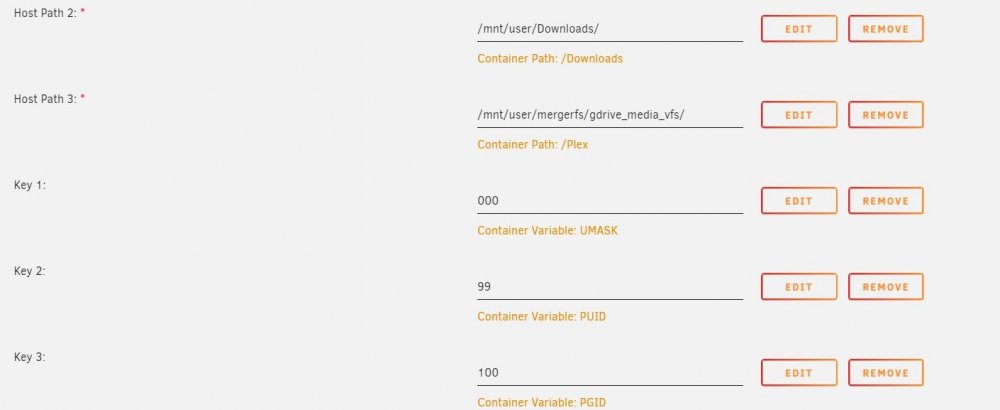
-
It is ridiculous that this problem has been going on for months and months and I’ve tried to get help and there’s absolutely none to be found. I guess I’m stuck on rc1 until I find a better os that actually comes with some support instead of snide comments from other users that says “there’s thousands of other users who aren’t having problems so it must be something on your end”. No kidding, but that’s why I’m trying to get help.
