Keint
Members
-
Joined
-
Last visited
Everything posted by Keint
-
thanks but what is mean? After 1h the transfert start to be faster like 150/200 MB/S super weird ...
-
Thanks a lot ! but I change all the SATA SAS cables and same same ... I m rebuilding at 6/ 10MB/S I can t understand where is the probleme ... tower-diagnostics-20260323-2151.zip
-
Thanks a lot ! For my info, how do ou know it s a disk 6 who has a problem? To avoid to bother you next time :) Thanks!!!
-
Hello I just switch my 8TO HDD by a 10TB HDD. When I m rebuilding, it s extremely slow ... 10 MB/S average ... But everything seems ok from my NOOB side, I don t understand why it s so slow ... I tried to stop all the docker service, and same .... Any idea? Thanks in advance !!!! Attached my diag ... tower-diagnostics-20260323-1340.zip
-
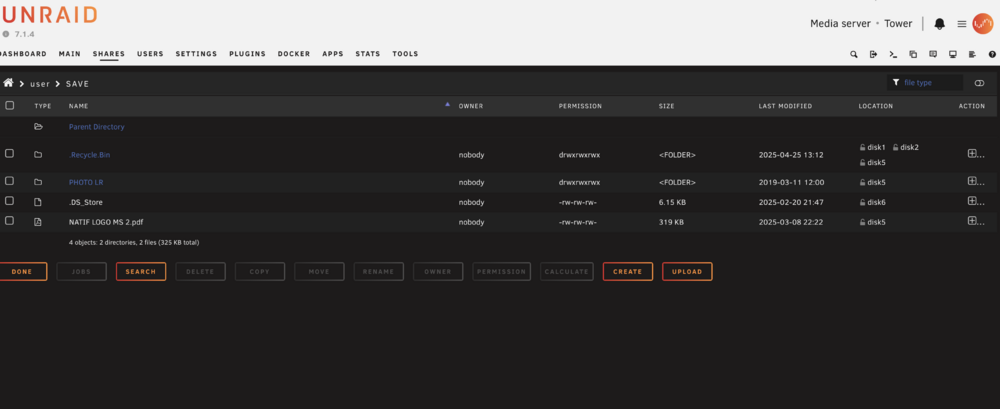
That weird I can t find any file ... I found it in the USB KEY tower-diagnostics-20250702-2023.zip syslog.txt
-
here ? There is another log do download? tower-diagnostics-20250702-2023.zip
-
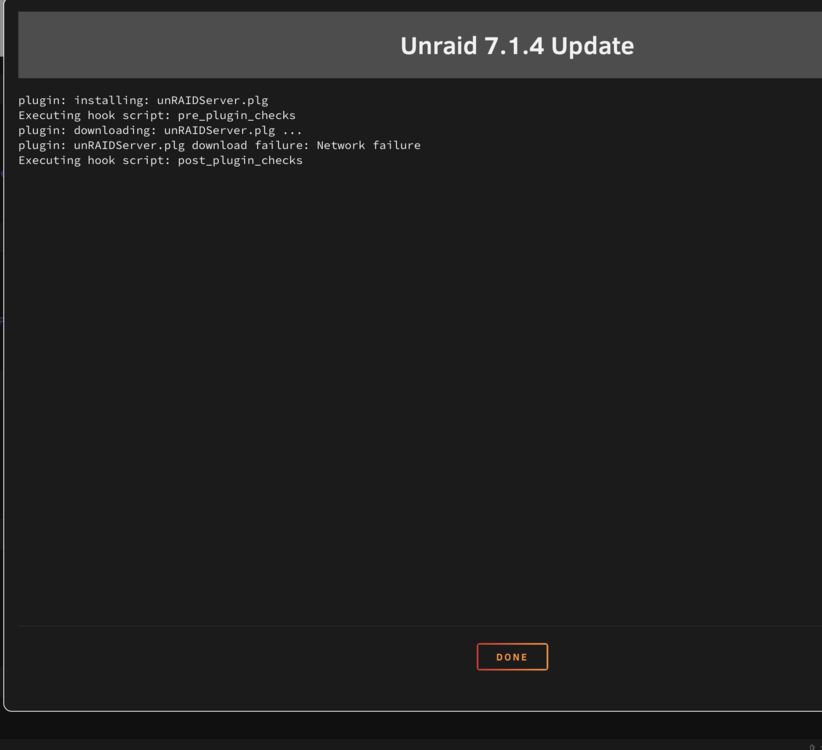
I can t even update the system
-
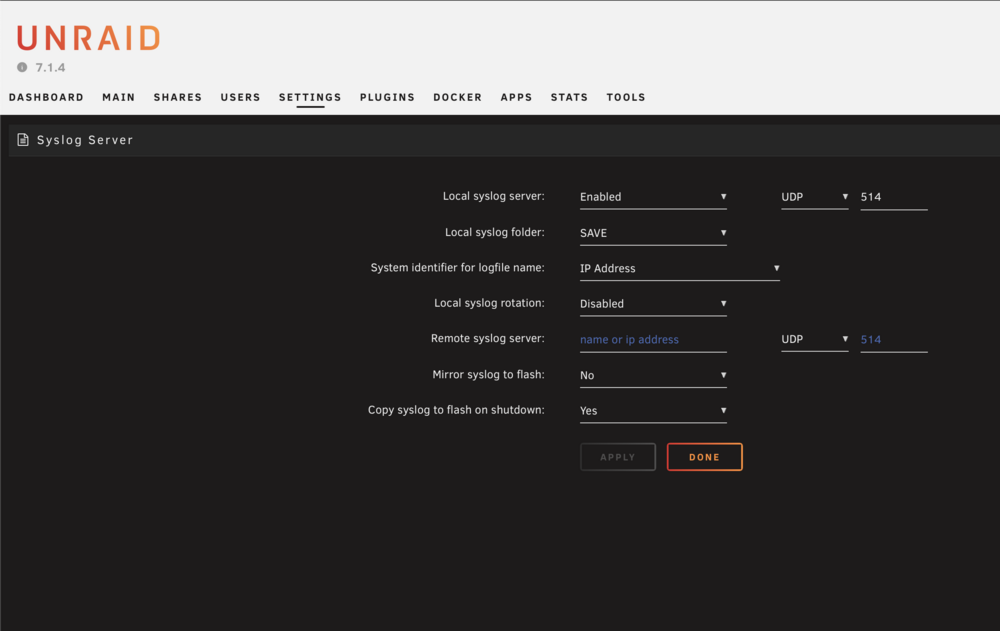
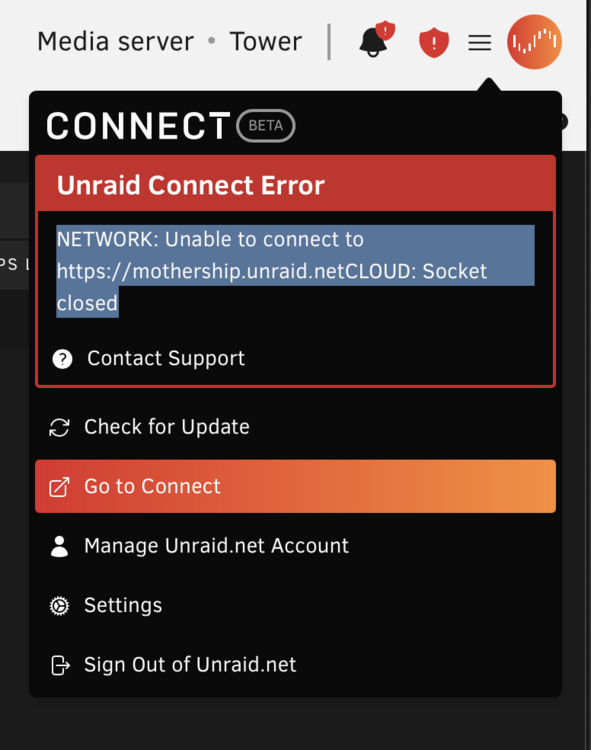
Here we go ! I lost again the connection ... I can t find the problem. I activated the syslog server last time. I can t connect to plex. But now I can access remotely to unraid with TUNEL VPN If anyone could help me ! Thanks ! tower-diagnostics-20250702-2023.zip I figure out that I have no access to anymore to UNRAID CONNECT
-
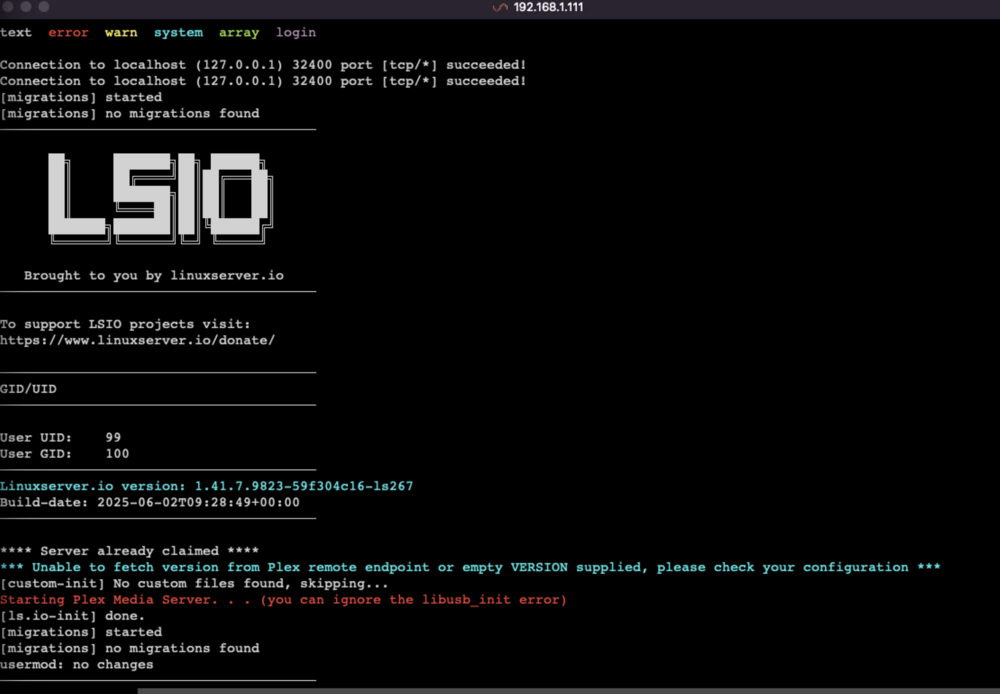
Hello, I just figure out few hours earlier that I lost the connection with my unraid. I can t connect anymore to plex. The serveur is on I can have a look to the SUPERMICRO MENU and see that all look ok. I restart the server and same, I can t connect to plex anymore... I did t change nothing . tower-diagnostics-20250702-2023.zip If anyone has an idea? ! I try to change the DNS to 8.8.8.8 and 8.8.4.4 ... I tried to restart the routeur and internet ... same same Plex is not online, even in local I can t connect to 34000
-
thanks! I did it, waiting the next crash !
-
Hello, I've been having an issue for the past few months. Roughly every three weeks, I lose access to my Unraid server. When I check the network, the server seems to disappear—I can't see its IP address anymore. It's like it's no longer on the network, even though the server itself is still powered on. I have diagnostics, but only after a reboot, since I can't access the server while it's off the network. I'm using a dual 10 Gbps RJ45 network card. If anyone has any ideas or suggestions, I'd really appreciate it. Thanks in advance! tower-diagnostics-20250424-1027.zip
-
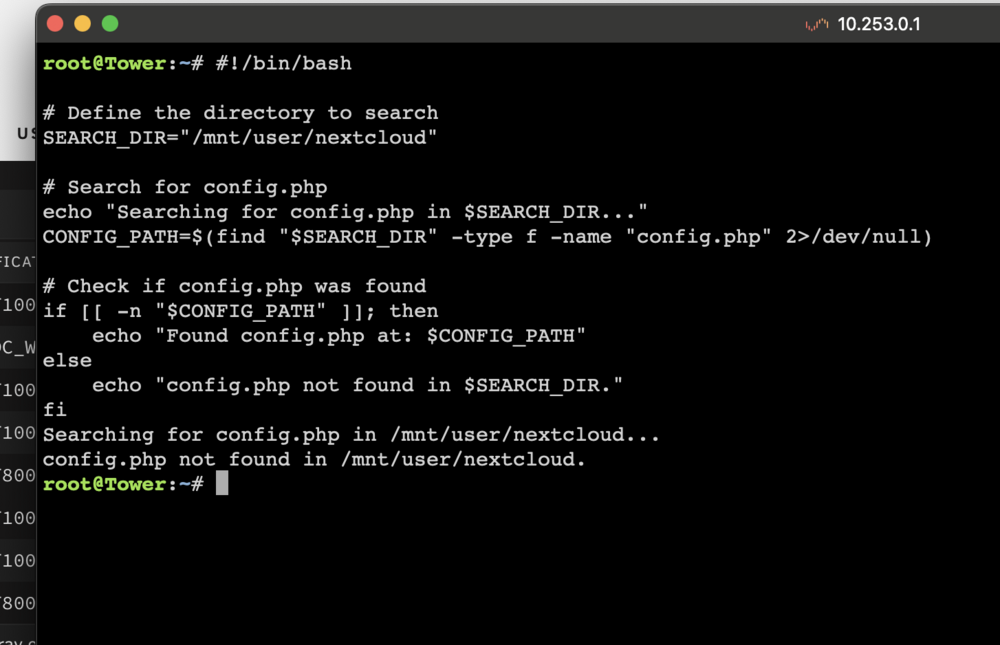
Thanks for your help and answer, I ll ask to Nextcloud Forum I already tried the script to wrote me, but it can t find the file config.php which is very weird to me !
-
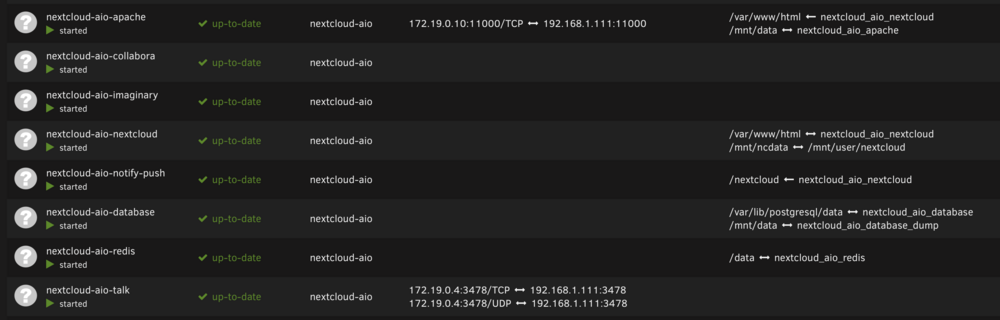
Hello, I just installed nextcloud AIO, I finally after many attempt ... It s now working well ! But ... I would like to copy from my unraid my files I want to share to the nextcloud folder. I figure out that I can t see the files I copied. I understood that I have to do a Scan file to update nexcloud with the file I just copied. I found that I can modify the config.php file to scan automatically when I add new files. My problem is I can t find the config.php file. there is nothing in my app data folder, not even Nextcloud. I m using Krusader as files explorer. If someone could help me ... 😁 I m looking for the path of config.php 😅 or other any solution to let me scan the nextcloud folder to see my files on nextcloud... Many thanks ! Cheers
-
Thanks for the fast answers !! I ll check the cable when I m back home. I ll let you know ! Thanks
-
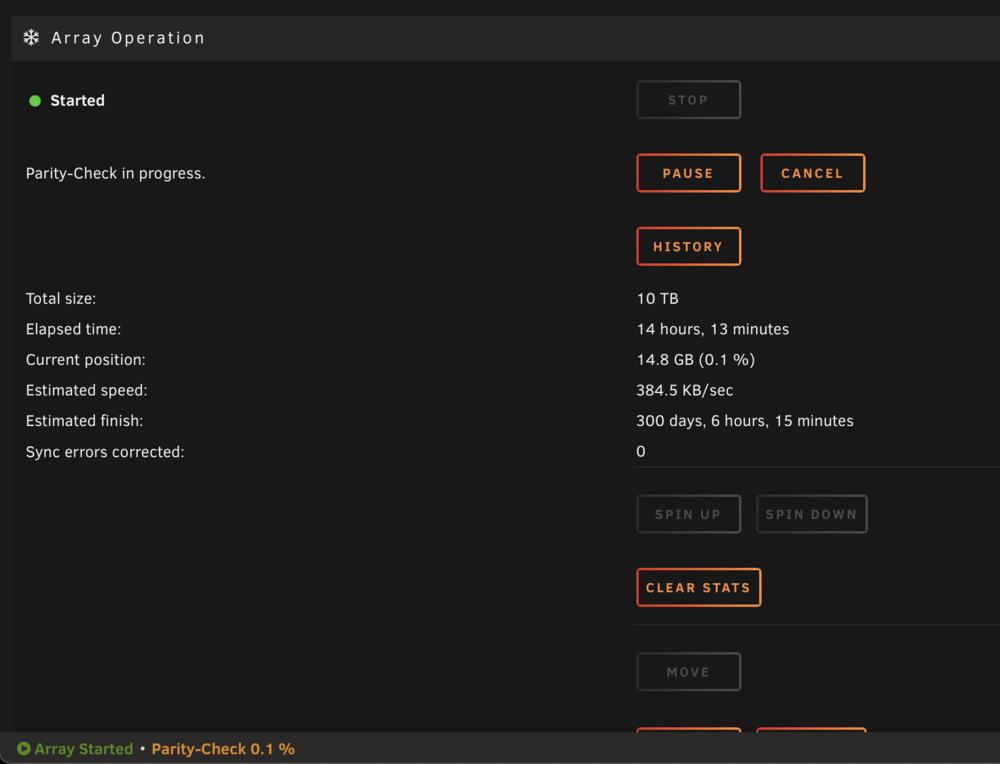
Hello, I have a parity check every month. the last one was one week ago but it didn't work properly, it was very slow so I stopped and reboot the server. Yesterday I tried again to do a parity check, but same problem, it s very slow, it s copy the files a 200 Kbps... If someone has any idea ... ? Thanks in advance !! tower-diagnostics-20241114-1213.zip
-
Yes I click on File System Check, same kind of error when I previously did XFS repair -n / -L Then I click Run with correct flag and I get this report. Nothing change 😅run with correct flag.pdfrun with correct flag.pdrun with correct flag.pdf run with correct flag.pdf
-
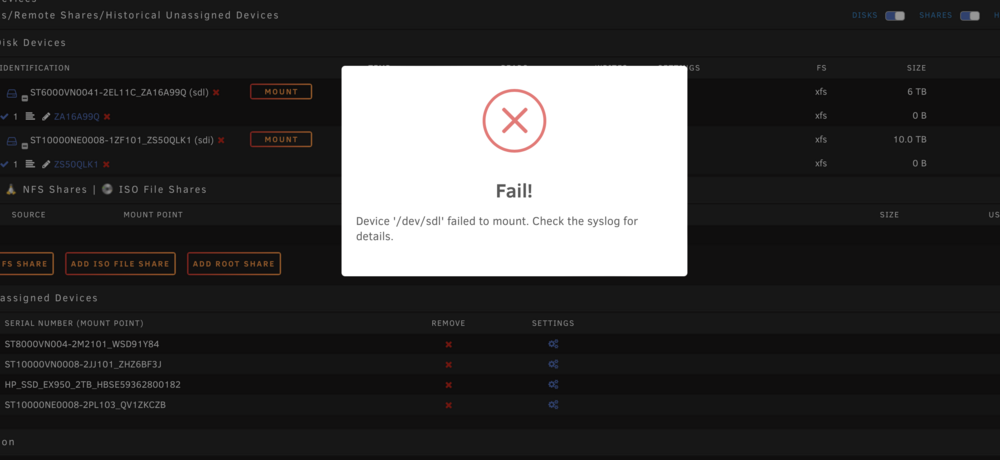
Thanks again for your help , I tried again -n -L its not working at allxfs.pdf Attached the log I change the disk, did a data rebuilt, but I lost the files I had the disk5, and now I can t mount the disk 5 outside the array I lost 4 TB, there is any way to access to those data ? Or it s totally dead? Thanks !
-
Thanks again ! I tried the check filesystem .... I m in maintenance array mode. DISK5: -nv: Phase 1 - find and verify superblock... bad primary superblock - bad CRC in superblock !!! attempting to find secondary superblock... .found candidate secondary superblock... verified secondary superblock... writing modified primary superblock sb root inode value 18446744073709551615 (NULLFSINO) inconsistent with calculated value 128 resetting superblock root inode pointer to 128 sb realtime bitmap inode value 18446744073709551615 (NULLFSINO) inconsistent with calculated value 129 resetting superblock realtime bitmap inode pointer to 129 sb realtime summary inode value 18446744073709551615 (NULLFSINO) inconsistent with calculated value 130 resetting superblock realtime summary inode pointer to 130 Phase 2 - using internal log - zero log... - scan filesystem freespace and inode maps... Metadata CRC error detected at 0x469f20, xfs_agi block 0x2/0x200 agi has bad CRC for ag 0 clearing needsrepair flag and regenerating metadata Metadata CRC error detected at 0x469f20, xfs_agi block 0x1ffffffe2/0x200 agi has bad CRC for ag 4 agi_freecount 231, counted 18 in ag 4 agi_freecount 231, counted 18 in ag 4 finobt sb_icount 0, counted 5088 sb_ifree 0, counted 280 sb_fdblocks 1464608869, counted 348270052 - found root inode chunk Phase 3 - for each AG... - scan and clear agi unlinked lists... - process known inodes and perform inode discovery... - agno = 0 bad CRC for inode 128 bad CRC for inode 135 bad CRC for inode 157 bad CRC for inode 128, will rewrite Bad mtime nsec 1953336569 on inode 128, resetting to zero Bad ctime nsec 2309488277 on inode 128, resetting to zero cleared root inode 128 bad CRC for inode 135, will rewrite cleared inode 135 bad CRC for inode 157, will rewrite Bad ctime nsec 3498608549 on inode 157, resetting to zero cleared inode 157 - agno = 1 - agno = 2 - agno = 3 - agno = 4 bad CRC for inode 8589934720 fixing bad v3_pad. bad CRC for inode 8589934721 fixing bad v3_pad. bad CRC for inode 8589934722 fixing bad v3_pad. bad CRC for inode 8589934723 fixing bad v3_pad. bad CRC for inode 8589934724 fixing bad v3_pad. bad CRC for inode 8589934725 fixing bad v3_pad. bad CRC for inode 8589934726 fixing bad v3_pad. bad CRC for inode 8589934727 fixing bad v3_pad. bad CRC for inode 8589934728 fixing bad v3_pad. bad CRC for inode 8589934729 fixing bad v3_pad. bad CRC for inode 8589934730 fixing bad v3_pad. bad CRC for inode 8589934731 fixing bad v3_pad. bad CRC for inode 8589934732 fixing bad v3_pad. bad CRC for inode 8589934733 fixing bad v3_pad. bad CRC for inode 8589934734 fixing bad v3_pad. bad CRC for inode 8589934735 fixing bad v3_pad. bad CRC for inode 8589934736 fixing bad v3_pad. bad CRC for inode 8589934737 fixing bad v3_pad. bad CRC for inode 8589934738 fixing bad v3_pad. bad CRC for inode 8589934739 fixing bad v3_pad. bad CRC for inode 8589934740 fixing bad v3_pad. bad CRC for inode 8589934741 fixing bad v3_pad. bad CRC for inode 8589934742 fixing bad v3_pad. bad CRC for inode 8589934743 fixing bad v3_pad. bad CRC for inode 8589934744 fixing bad v3_pad. bad CRC for inode 8589934745 fixing bad v3_pad. bad CRC for inode 8589934746 fixing bad v3_pad. bad CRC for inode 8589934747 fixing bad v3_pad. bad CRC for inode 8589934748 fixing bad v3_pad. bad CRC for inode 8589934749 fixing bad v3_pad. bad CRC for inode 8589934750 fixing bad v3_pad. bad CRC for inode 8589934751 fixing bad v3_pad. bad CRC for inode 8589934752 fixing bad v3_pad. bad CRC for inode 8589934753 fixing bad v3_pad. bad CRC for inode 8589934754 fixing bad v3_pad. bad CRC for inode 8589934755 fixing bad v3_pad. bad CRC for inode 8589934756 fixing bad v3_pad. bad CRC for inode 8589934757 fixing bad v3_pad. bad CRC for inode 8589934758 fixing bad v3_pad. bad CRC for inode 8589934759 fixing bad v3_pad. bad CRC for inode 8589934760 fixing bad v3_pad. bad CRC for inode 8589934761 fixing bad v3_pad. bad CRC for inode 8589934762 fixing bad v3_pad. bad CRC for inode 8589934763 fixing bad v3_pad. bad CRC for inode 8589934764 fixing bad v3_pad. bad CRC for inode 8589934765 fixing bad v3_pad. bad CRC for inode 8589934766 fixing bad v3_pad. bad CRC for inode 8589934767 fixing bad v3_pad. bad CRC for inode 8589934768 fixing bad v3_pad. bad CRC for inode 8589934769 fixing bad v3_pad. bad CRC for inode 8589934770 fixing bad v3_pad. bad CRC for inode 8589934771 fixing bad v3_pad. bad CRC for inode 8589934772 fixing bad v3_pad. bad CRC for inode 8589934773 fixing bad v3_pad. bad CRC for inode 8589934774 fixing bad v3_pad. bad CRC for inode 8589934775 fixing bad v3_pad. bad CRC for inode 8589934776 fixing bad v3_pad. bad CRC for inode 8589934777 fixing bad v3_pad. bad CRC for inode 8589934778 fixing bad v3_pad. bad CRC for inode 8589934779 fixing bad v3_pad. bad CRC for inode 8589934780 fixing bad v3_pad. bad CRC for inode 8589934781 fixing bad v3_pad. bad CRC for inode 8589934782 fixing bad v3_pad. bad CRC for inode 8589934783 fixing bad v3_pad. - agno = 5 - process newly discovered inodes... 150896697680: Badness in key lookup (length) bp=(bno 0x200000060, len 16384 bytes) key=(bno 0x200000060, len 4096 bytes) fixing bad v3_pad. fixing bad v3_pad. fixing bad v3_pad. fixing bad v3_pad. fixing bad v3_pad. fixing bad v3_pad. fixing bad v3_pad. fixing bad v3_pad. fixing bad v3_pad. fixing bad v3_pad. fixing bad v3_pad. fixing bad v3_pad. fixing bad v3_pad. fixing bad v3_pad. fixing bad v3_pad. fixing bad v3_pad. fixing bad v3_pad. fixing bad v3_pad. fixing bad v3_pad. fixing bad v3_pad. fixing bad v3_pad. fixing bad v3_pad. fixing bad v3_pad. fixing bad v3_pad. fixing bad v3_pad. fixing bad v3_pad. fixing bad v3_pad. fixing bad v3_pad. fixing bad v3_pad. fixing bad v3_pad. fixing bad v3_pad. fixing bad v3_pad. 150896697680: Badness in key lookup (length) bp=(bno 0x200000080, len 16384 bytes) key=(bno 0x200000080, len 4096 bytes) fixing bad v3_pad. fixing bad v3_pad. fixing bad v3_pad. fixing bad v3_pad. fixing bad v3_pad. fixing bad v3_pad. fixing bad v3_pad. fixing bad v3_pad. fixing bad v3_pad. fixing bad v3_pad. fixing bad v3_pad. fixing bad v3_pad. fixing bad v3_pad. fixing bad v3_pad. fixing bad v3_pad. fixing bad v3_pad. fixing bad v3_pad. fixing bad v3_pad. fixing bad v3_pad. fixing bad v3_pad. fixing bad v3_pad. fixing bad v3_pad. fixing bad v3_pad. fixing bad v3_pad. fixing bad v3_pad. fixing bad v3_pad. fixing bad v3_pad. fixing bad v3_pad. fixing bad v3_pad. fixing bad v3_pad. fixing bad v3_pad. fixing bad v3_pad. 150896697680: Badness in key lookup (length) bp=(bno 0x200000060, len 4096 bytes) key=(bno 0x200000060, len 16384 bytes) 150896697680: Badness in key lookup (length) bp=(bno 0x200000080, len 4096 bytes) key=(bno 0x200000080, len 16384 bytes) correcting imap correcting imap correcting imap correcting imap correcting imap Metadata CRC error detected at 0x45fb48, xfs_dir3_block block 0x200000058/0x1000 entry "Malcolm.In.The.Middle.S03e18.Poker.2.La.Revanche.Multi.1080P.Amzn.Web-Dl.Aac2.0.x265-ICantBreathe-18.mkv" at block 0 offset 2072 in directory inode 8589934725 references invalid inode 154619562612 clearing inode number in entry at offset 2072... entry at block 0 offset 2072 in directory inode 8589934725 has illegal name "/alcolm.In.The.Middle.S03e18.Poker.2.La.Revanche.Multi.1080P.Amzn.Web-Dl.Aac2.0.x265-ICantBreathe-18.mkv": correcting imap correcting imap correcting imap correcting imap correcting imap correcting imap correcting imap correcting imap correcting imap correcting imap correcting imap correcting imap correcting imap correcting imap correcting imap correcting imap correcting imap correcting imap correcting imap correcting imap correcting imap correcting imap correcting imap correcting imap correcting imap correcting imap correcting imap correcting imap correcting imap correcting imap correcting imap correcting imap correcting imap correcting imap correcting imap correcting imap correcting imap correcting imap correcting imap correcting imap correcting imap correcting imap correcting imap correcting imap correcting imap correcting imap correcting imap correcting imap correcting imap correcting imap correcting imap correcting imap correcting imap correcting imap correcting imap correcting imap correcting imap correcting imap found inodes not in the inode allocation tree Phase 4 - check for duplicate blocks... - setting up duplicate extent list... - check for inodes claiming duplicate blocks... - agno = 0 - agno = 2 - agno = 3 - agno = 4 15089769f680: Badness in key lookup (length) bp=(bno 0x200000060, len 4096 bytes) key=(bno 0x200000060, len 16384 bytes) 15089769f680: Badness in key lookup (length) bp=(bno 0x200000080, len 4096 bytes) key=(bno 0x200000080, len 16384 bytes) - agno = 5 - agno = 1 Phase 5 - rebuild AG headers and trees... - reset superblock... Phase 6 - check inode connectivity... reinitializing root directory - resetting contents of realtime bitmap and summary inodes - traversing filesystem ... 150894687680: Badness in key lookup (length) bp=(bno 0x200000060, len 4096 bytes) key=(bno 0x200000060, len 16384 bytes) 150894687680: Badness in key lookup (length) bp=(bno 0x200000080, len 4096 bytes) key=(bno 0x200000080, len 16384 bytes) 15089d374600: Badness in key lookup (length) bp=(bno 0x200000060, len 4096 bytes) key=(bno 0x200000060, len 16384 bytes) Metadata corruption detected at 0x46f860, inode 0x200000080 dinode fatal error -- couldn't map inode 8589934720, err = 117 -L Phase 4 - check for duplicate blocks... - setting up duplicate extent list... - check for inodes claiming duplicate blocks... - agno = 0 - agno = 2 - agno = 1 - agno = 5 - agno = 4 - agno = 3 1538c1bce680: Badness in key lookup (length) bp=(bno 0x200000060, len 4096 bytes) key=(bno 0x200000060, len 16384 bytes) 1538c1bce680: Badness in key lookup (length) bp=(bno 0x200000080, len 4096 bytes) key=(bno 0x200000080, len 16384 bytes) Phase 5 - rebuild AG headers and trees... - reset superblock... Phase 6 - check inode connectivity... reinitializing root directory - resetting contents of realtime bitmap and summary inodes - traversing filesystem ... 1538ba3f1680: Badness in key lookup (length) bp=(bno 0x200000060, len 4096 bytes) key=(bno 0x200000060, len 16384 bytes) 1538ba3f1680: Badness in key lookup (length) bp=(bno 0x200000080, len 4096 bytes) key=(bno 0x200000080, len 16384 bytes) 1538c74a1600: Badness in key lookup (length) bp=(bno 0x200000060, len 4096 bytes) key=(bno 0x200000060, len 16384 bytes) Metadata corruption detected at 0x46f860, inode 0x200000080 dinode fatal error -- couldn't map inode 8589934720, err = 117 DISK6 I do: -nv Phase 1 - find and verify superblock... bad primary superblock - bad CRC in superblock !!! attempting to find secondary superblock... .found candidate secondary superblock... verified secondary superblock... would write modified primary superblock Primary superblock would have been modified. Cannot proceed further in no_modify mode. Exiting now. -L Disk6 Ok now I can see it tower-diagnostics-20240710-1551.zip
-
Thanks I change the splitter and check all the power cable, all looks good and clean. My pc power supply is a bit old, do you think it can come from that ? Last Diag attached I can see that they all are back to SATA 6gb/s Disk to pass from ATA Security is: Disabled, NOT FROZEN [SEC1] to ATA Security is: Disabled, frozen [SEC2] What is mean ? Thanks tower-diagnostics-20240710-1416.zip
-
Ok, thanks should I wait the data rebuild is finish ? Or I cancel and check the power cable ? yes I have one splitter on the 2 disks that has the trouble … thanks
-
What do you suggest ? I have to idea about what to do 😅 Before the disks start to crash, I increase the speed of the CPU Fan for FULL SPEED, maybe there is a link with the power consumption ? I put back normal speed REBUILDING DATA is now working, I still have 18H to go, should I wait and see? Thanks
-
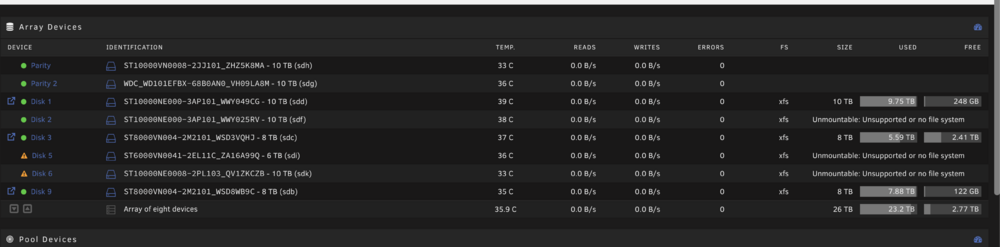
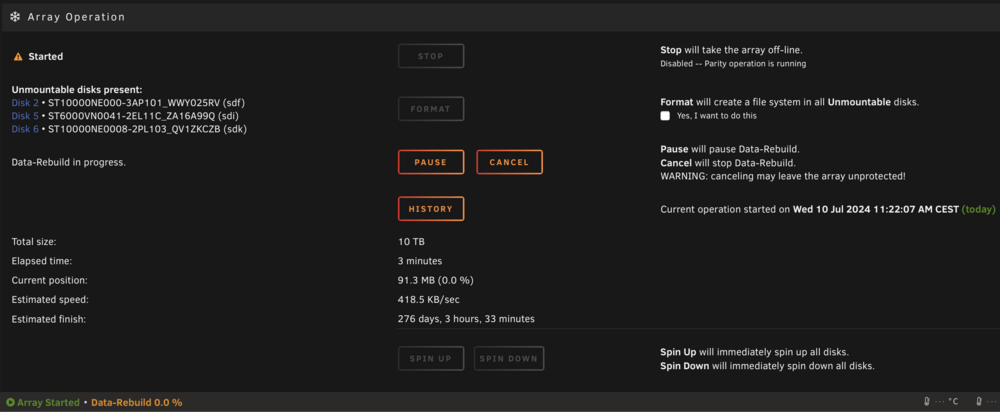
Hello Jorge ! Thanks for you answer I just changed all the mini SAS cable. 3 brands new. The 3 disk are still unmountable. Array is DATA REBLUIDING now but is stuck to 0.0% What do you thing about that? Thanks ! tower-diagnostics-20240710-1123.zip
-
Hello I have an issue that I can t fix for the moment, I m stuck ! At the beginning I had the disk 5 disable. I stop the array reboot then Disk 2 wasn't able to mount: Unmountable: Unsupported or no file system I tried to fix disk 2 with xfs_repair using -L After finish the repair it s was ok disk 2 mounted. but disk 6 start to have trouble, and was able to mount also ... Now I have 3 disks who show me: Unsupported or no file system and two of the 3 disks are now disable .... I saw on the diag something weird 2 disks are on data 1.5 gb instead of 3 or 6 gb Maybe a sata cable problem? I don t know what to do now, if someone can help me, it ll be very kind! I DL the dial after each step Many thanks !! DISK 6 XFS REAPAIR -N Phase 1 - find and verify superblock... Phase 2 - using internal log - zero log... - scan filesystem freespace and inode maps... Metadata CRC error detected at 0x469f20, xfs_agi block 0x1ffffffe2/0x200 agi has bad CRC for ag 4 xfs_repair: read failed: Input/output error xfs_repair: read failed: Input/output error btree block 2/17907192 is suspect, error -117 bad magic # 0 in btbno block 2/17907192 btree block 4/521735 is suspect, error -117 bad magic # 0 in btcnt block 4/521735 agf_freeblks 1867929, counted 0 in ag 4 agf_longest 750596, counted 0 in ag 4 agf_btreeblks 4, counted 2 in ag 4 agi_freecount 232, counted 28 in ag 4 agi_freecount 232, counted 28 in ag 4 finobt xfs_repair: read failed: Input/output error btree block 8/4707457 is suspect, error -117 bad magic # 0 in btcnt block 8/4707457 agf_freeblks 219593351, counted 1594 in ag 8 agf_longest 218958418, counted 8 in ag 8 agf_btreeblks 6, counted 5 in ag 8 xfs_repair: read failed: Input/output error xfs_repair: read failed: Input/output error btree block 0/9049369 is suspect, error -117 bad magic # 0 in btcnt block 0/9049369 btree block 1/2752396 is suspect, error -117 bad magic # 0 in btcnt block 1/2752396 agf_btreeblks 7, counted 6 in ag 2 agf_freeblks 26766153, counted 26758435 in ag 1 agf_btreeblks 9, counted 8 in ag 1 agf_freeblks 2314749, counted 2314379 in ag 0 agf_btreeblks 12, counted 11 in ag 0 sb_fdblocks 609809859, counted 405369844 - found root inode chunk Phase 3 - for each AG... - scan (but don't clear) agi unlinked lists... - process known inodes and perform inode discovery... - agno = 0 xfs_repair: read failed: Input/output error xfs_repair: read failed: Input/output error xfs_repair: read failed: Input/output error can't read block 0 for directory inode 884451 no . entry for directory 884451 no .. entry for directory 884451 problem with directory contents in inode 884451 would have cleared inode 884451 xfs_repair: read failed: Input/output error cannot read inode 908928, disk block 908928, cnt 32 tower-diagnostics-20240710-0432.zip tower-diagnostics-20240710-0439.zip tower-diagnostics-20240710-0504.zip
-
Thanks again ! Another question 😬 ... I have with this motherboard a Dual 10GB X722 + X557 network card, but I only see a 1000baeT/Full Unraid doesn't support the X722 + X557 ?? On my previous motherboard I had a X540-T2 Intel X540 Chipset and it was working well, unraid recognize de 10gb . Thanks !!!! Settings for eth0: Supported ports: [ TP ] Supported link modes: 1000baseT/Full Supported pause frame use: Symmetric Receive-only Supports auto-negotiation: Yes Supported FEC modes: Not reported Advertised link modes: 1000baseT/Full Advertised pause frame use: No Advertised auto-negotiation: Yes Advertised FEC modes: Not reported Speed: 1000Mb/s Duplex: Full Auto-negotiation: on Port: Twisted Pair PHYAD: 0 Transceiver: internal MDI-X: Unknown Supports Wake-on: g Wake-on: g Current message level: 0x00000007 (7) drv probe link Link detected: yes driver: i40e version: 6.1.64-Unraid firmware-version: 3.31 0x80000c92 1.1747.0 expansion-rom-version: bus-info: 0000:60:00.0 supports-statistics: yes supports-test: yes supports-eeprom-access: yes supports-register-dump: yes supports-priv-flags: yes -------------------------------- Settings for eth1: Supported ports: [ ] Supported link modes: 1000baseT/Full Supported pause frame use: Symmetric Receive-only Supports auto-negotiation: Yes Supported FEC modes: Not reported Advertised link modes: 1000baseT/Full Advertised pause frame use: No Advertised auto-negotiation: Yes Advertised FEC modes: Not reported Speed: Unknown! Duplex: Unknown! (255) Auto-negotiation: off Port: Other PHYAD: 0 Transceiver: internal Supports Wake-on: g Wake-on: g Current message level: 0x00000007 (7) drv probe link Link detected: no driver: i40e version: 6.1.64-Unraid firmware-version: 3.31 0x80000c92 1.1747.0 expansion-rom-version: bus-info: 0000:60:00.1 supports-statistics: yes supports-test: yes supports-eeprom-access: yes supports-register-dump: yes supports-priv-flags: yes --------------------------------
-
Thanks for your answer :)) Do you know why Unraid shows only one one the main page of the webgui ? Is the GTX 1080 TI is detected? I can't find it 😅 Thanks