FlamongOle
Community Developer
-
Joined
-
Last visited
Everything posted by FlamongOle
-
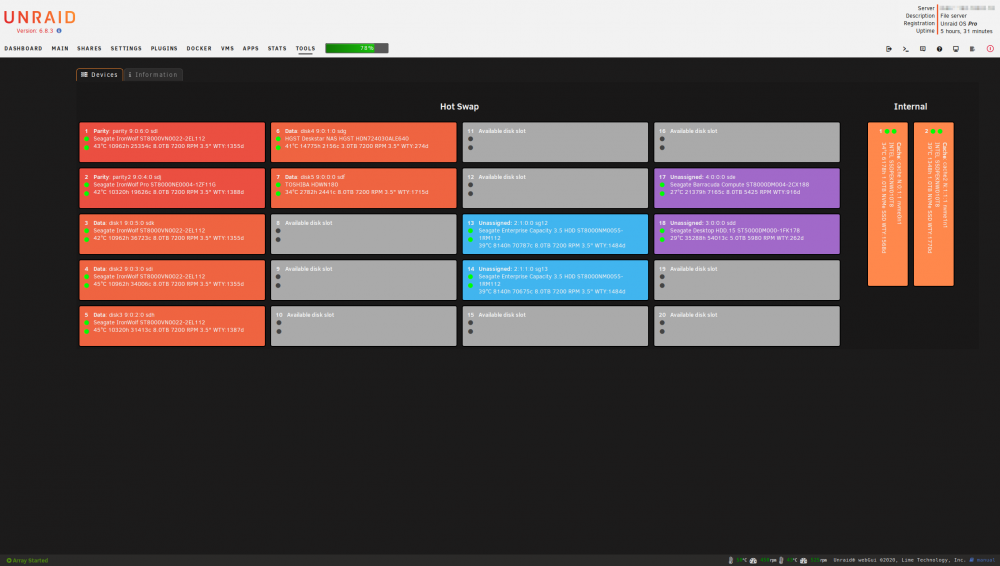
Disk Location is a different disk tray layout plugin which uses the hard disk path to locate the drives. It supports only drives found by the SCSI Generic drivers, which is usually SATA and NVMe including devices attached to hardware storage/raid cards. This also include a handy "Locate" function which help you allocate the tray from where the disk is installed in, if you have hotswap trays with their own HD-activity LED (or made your own custom ones). This might not work on SSD's or maybe even some other types of hard drives. You can change the direction of the trays horizontal and vertical as well as the numbering direction of the trays, make some override to add more storage "not included in the hotswap tray area", change the background colors of the different type of storage (unraid, unassigned and empty), and more. Doing changes will not delete or clear any configuration and values are mainly stored based upon serial number and model name of the hard disk. For more information and help, use the inline Help function from Unraid (this will solve most of the questions asked): The plugin is primarily developed for the current stable Unraid branch and might lag a bit behind for new releases with new functions. Disk Location is 100% AI and vibe coding FREE! (AI might be a better coder than me, but it's more important that I know my own code!) Disk Location will be installed under "Tools". Install the plugin via "Community Applications" plugin, search for "Disk Location" under "Apps" For manual installation or you wish to use the development build, check below under "Available Builds" VALUABLE POSTS Overhaul '25 release notes with screenshots https://forums.unraid.net/topic/77302-plugin-disk-location/page/47/#comment-1525784 Fetching lost manually typed device dates from the old database after database migration https://forums.unraid.net/topic/77302-plugin-disk-location/page/48/#comment-1526163 Disk Location Recovery tool https://forums.unraid.net/topic/77302-plugin-disk-location/page/50/#comment-1526726 TROUBLESHOOTING First thing you should try is simply clicking "Force SMART+DB" button under "System" tab. This solves a lot of problems and have been repeated over the forum thread. Make sure the plugin is updated to the latest version, having an up to date Unraid isn't too bad either. The plugin might work from 6.9 and onwards, but for sure guaranteed from 6.12. Re-installation of the plugin might be required if it continues to be stuck on version 2025.02.08. Re-installations/removal will NOT remove any configuration. Press the help symbol as pointed out above, it will display a lot of information related to configuration and whatnot. RTFM. Your answer might be found in the thread, but as it's getting quite large and difficult to find the information you might need, please read at least a few last pages as it might point out your issue. You can always use the search function, but you might end up with some old deprecated answers. Read the Change Log, it might give a hint about some changes. DEPRECATION INFO This plugin support now only Unraid 6.9 and onwards! Development build might be installed otherwise, but is not recommended or supported! AVAILABLE BUILDS Stable (recommended and supported): https://raw.githubusercontent.com/olehj/disklocation/master/disklocation-master.plg Development (unsupported and not recommended - but you know, brave ppl's!): https://raw.githubusercontent.com/olehj/disklocation/devel/disklocation-devel.plg Install the legacy 2024 edition of the plugin using this URL in Unraid (unsupported) URL LINK HAS CHANGED: https://raw.githubusercontent.com/olehj/disklocation/2024-edition/disklocation-legacy.plg To swap between stable and development builds, please delete existing plugin from the plugin manager before you install the other one. Be aware that database changes are not always backwards compatible, but the old databases are backed up. New backup system will have the option to perform backups by user intervention. Other info might be available via me on this forum, usually for debugging purposes. Do not update development builds automatically unless instructed to do so, unless you like risk. After testing and debugging and the new stable release containing the fixes is launched, I advice you to remove the development build and install the stable one instead! BUG REPORTS & FEATURE REQUESTS Please report bugs and feature requests at github: https://github.com/olehj/disklocation SUPPORT MY HOURS PUT INTO MAKING DISK LOCATION Rough estimate is likely over 1500 hours of making the plugin, and I expect it will be even more! Troubleshooting issues from you is a lot of help and happens often in this forum thread but also on GitHub. Thanks for all your support! If you like it and find it helpful and want to donate, please use this link: https://www.paypal.me/olehj ALTERNATIVES GitHubGitHub - joshmans/unraid-baywatch: Bay Watch (formerly Di...Bay Watch (formerly Disk Location Next): a lifeguard for your drive bays - tray/bay map and SMART history for Unraid 7.2+, via unraid-api's GraphQL. Independent of the Disk Location plugin. - j... SOCIAL MEDIA These might be a bit outdated, but can still be helpful for you. Big thanks for the guys making these videos ❤️ Know some more? Tell me about it!

-
Any updates on this? I experience the same thing with my unassigned device share and I am heavily dependent on the system accepting the user/group permissions - right now everybody get access to r/w and completely ignoring the file permissions. I know I can specify them myself in the exports file, but it get overwritten every time I do an update with any NFS share in unraid GUI, which is quite annoying. Any simple solution to either keep very specific rules to apply, or making it care about the permissions? It magically worked anyway, dunno what happened.