





FlamongOle
Community Developer
-
Joined
-
Last visited
Everything posted by FlamongOle
-
Can you try this file from development branch, I just added some delays to the javascript execution: do in terminal: # Download: wget https://raw.githubusercontent.com/olehj/disklocation/devel/disklocation/pages/config.php # Move and overwrite current config script: mv config.php /usr/local/emhttp/plugins/disklocation/pages/config.php You can also try to tweak the "sleep" timers at the bottom of the script, check if larger number than 200 is working better/worse.
-
Did you try the new update? I have done some mods to it. For me it works the same in Win and Linux now It does run killall before start, to be sure its not running already. It is intended. A page refresh will also kill the script.
-
Update 2019.01.31 - Commit #29 - BUG: Locate button acting weirdly, especially under Windows(?). Added escape and encode. Also modified the bash script. - Commit #28 - Minor issue: break-variable missing from the Unraid LEDs. - Commit #27 - BUG: added variables for new users so they don't see an empty page.
-
Aha, so it is completely empty? Wait for the next version then, and delete the plugin for now. I have fixed the issue, but it won't be available just yet. Expect it later today/tomorrow.
-
I'm mainly a hardcore linux user. I tried the function in Windows now, and it seems to have a bit more problems there. I did however succeed a few times, but it is way more unstable.
-
Ah, seems to have forgotten to define a variable there after the last database change. It should disappear when you save the config.
-
It looks like this is a Windows specific problem, can you try to check if you see activity happening on 1:0:1:0 using this URL: http://<your address>/plugins/disklocation/pages/locate.php?disklocation=1%3A0%3A1%3A0&cmd=start Kill it running this: http://<your address>/plugins/disklocation/pages/locate.php?cmd=killall
-
If you go directly to the source file, does it give you a blank page (expected result) or does it say "File not found"? Try to go to: http(s)://<your address here>/plugins/disklocation/pages/locate.php The "plugins" folder is expected to be at the root of the hostname/address, and not within another folder - at least for Unraid 6.6. I'm not sure if they changed that in later versions.
-
What web browser are you using? The call happens from javascript and has mainly been tested with newer Vivaldi, Chrome (both blink engines) and Firefox. Be sure you haven't disabled javascript, or have any plugins/extensions disabling it. Edit: And does the "Locate" button change to black background and does it say "Stop" after clicking it?
-
With the new update 2019.01.30b, you can try to deselect "Disk Operation LED" and check if the response will be faster. This runs an additional smart query for drives not in Unraid array. Then you can enable it when the creation of the array is done. A smart query is likely to run slower if the system is very busy, and also slower if it is an unassigned drive because it can't get cached unraid data.
-
Sudden UPDATE! ###2019.01.30(b) - Commit #21 - FEATURE: Added options to select what to show at Devices page - Commit #20 - FEATURE: Added temperature unit selection, C/F/K - Commit #19 - BUG: Fixed HDD reported as SSD if rotation was 0 - FEATURE: You can now choose between Unraid version (select months: 12/24/36...) or Manual ISO dates (YYYY-MM-DD) in the warranty section, a config switch is required before this is accessible. - Updated Help for new features. - Database will be backed up during install because it will be upgraded.
-
Currently no ways of selecting what to display, it might be added in the future. I also had some issues adding a 5th tab - but I guess I have another idea of implementing this. It's hard to say what's normal or not, it really depends on how fast it scan's trough all of your drives with smartctl -x. I have 15 drives as well, and it takes ~5 seconds. It might be that your drives needs to be spun up from a standby state and wakes up drives one by one, so the question is: does it happen even after a page refresh, or only after "a while"?
-
Alright, I will probably add this in a future update. Feel free to add a feature request at github, nice for a reminder
-
No timeline for that yet - it's likely that this will be included if I have to do any other adjustments to the existing database. As for now I try to limit that, and consider rather either changing the purchase date so it fits your warranty. I expected warranty to be valid from the purchase date (at least it is here in this country), and not when the factory sets it.
-
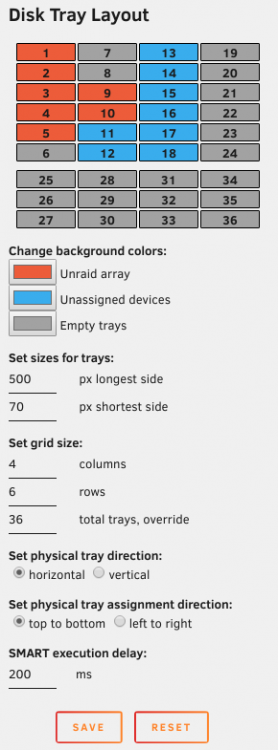
2019.01.28 released: Added slightly better support for 36 tray servers and in general override tray optimization. For 36 tray servers, set trays to ex: Grid: 4 columns * 6 rows Override: 36 This will make 2 sections, one for 24 trays and the last for the remaining 12: 4*6 + 4*3
-
Should support 36 (and more) just fine, just define your rows and columns and eventually overrides. As for now the tray layout would require a total redesign and the configuration would be to excessive if it should be configured for every possible server layouts, so I believe it won't happen any time soon. Rather try to work around it like setting it up to 24 in front eg. 4*6 (or whatever it looks like) with 36 set to override to get your extra 12 on the side.
-
If the disks are recognized in your system as internal single SCSI drives, you should be good to go. Else we have only this one option for override, so yes, 2*8 trays is what you'd be looking at then. As a side note, you can also invert the override, by setting it to like 3 trays (row or columns) and override to 8 (but it might be displayed different). Play around The plugin installs it via installpkg and are completely managed via Unraid itself, my plugin just list it as a thing to be installed. So yes, it will only install if the installed version is older than the one already installed.
-
You can add 1 row of 5, then you set override to 8. Then you will have 5+3 as a tray layout. smartmontools is easily written into it and seems to cause no trouble, and it will only update as long as it is newer than existing package. It will be removed when Unraid updates the system to use it native, I don't think there's any point for a special request for it now, as it is probably around the corner anyway edit: smartmontools 7 is already a part of the 6.7 branch.
-
Hello and thank you! The Locate function is very vague and only calls smartctl -x /dev/bsg/PATH every half second. You can test manually by using that command, just replace PATH with the path number available (you can see it from the list, or by ls /dev/bsg). Everytime you run the command, the LED on the HD might light up. If the smart data does not work, goes too fast, then the locate button won't work either. Sometimes I also discovered I might need to click "Locate" maybe more than one time, or just go to another device before clicking the other one. Consider this function neat if it works, else, don't really expect it. I just discovered that smartctl activated the LED's for the mechanical drives here, so I thought it would be a fun and useful addition to the plugin. But give the above command a go, and check the light when you press enter. It uses -x because it typically takes longer time than other.
-
If the VM got passthrough or any recognizable harddisk device under unraid, it should work. I dunno if you already tried the plugin and checked the contents in the "Config" page? Eventually, how does the drives identify under /dev/ ? and can you do a smartctl on these?
-
No, but it should pick up everything based upon PATH (3:0:0:0 etc), then you can select the drives you wanna include.
-
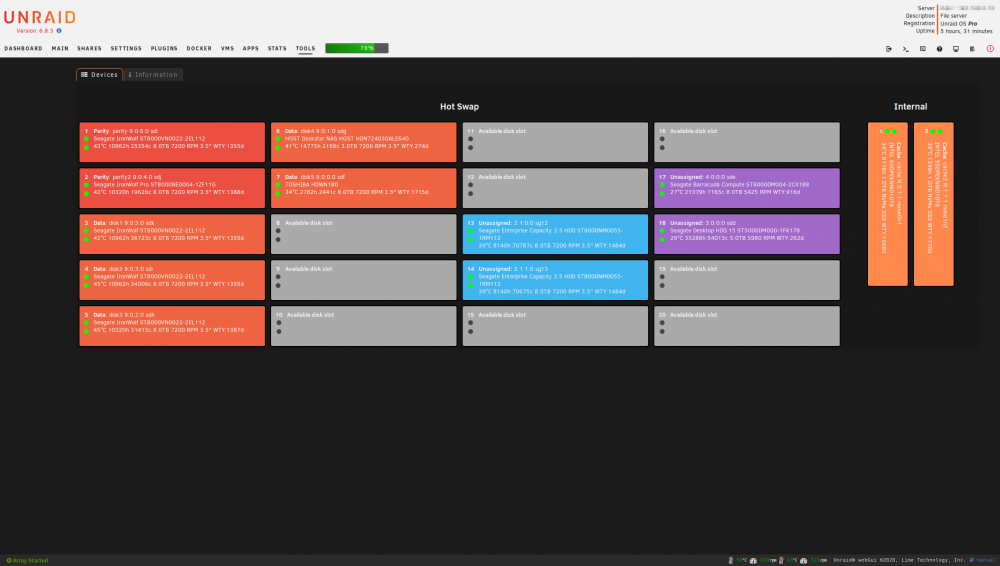
Disk Location is a different disk tray layout plugin which uses the hard disk path to locate the drives. It supports only drives found by the SCSI Generic drivers, which is usually SATA and NVMe including devices attached to hardware storage/raid cards. This also include a handy "Locate" function which help you allocate the tray from where the disk is installed in, if you have hotswap trays with their own HD-activity LED (or made your own custom ones). This might not work on SSD's or maybe even some other types of hard drives. You can change the direction of the trays horizontal and vertical as well as the numbering direction of the trays, make some override to add more storage "not included in the hotswap tray area", change the background colors of the different type of storage (unraid, unassigned and empty), and more. Doing changes will not delete or clear any configuration and values are mainly stored based upon serial number and model name of the hard disk. For more information and help, use the inline Help function from Unraid (this will solve most of the questions asked): The plugin is primarily developed for the current stable Unraid branch and might lag a bit behind for new releases with new functions. Disk Location is 100% AI and vibe coding FREE! (AI might be a better coder than me, but it's more important that I know my own code!) Disk Location will be installed under "Tools". Install the plugin via "Community Applications" plugin, search for "Disk Location" under "Apps" For manual installation or you wish to use the development build, check below under "Available Builds" VALUABLE POSTS Overhaul '25 release notes with screenshots https://forums.unraid.net/topic/77302-plugin-disk-location/page/47/#comment-1525784 Fetching lost manually typed device dates from the old database after database migration https://forums.unraid.net/topic/77302-plugin-disk-location/page/48/#comment-1526163 Disk Location Recovery tool https://forums.unraid.net/topic/77302-plugin-disk-location/page/50/#comment-1526726 TROUBLESHOOTING First thing you should try is simply clicking "Force SMART+DB" button under "System" tab. This solves a lot of problems and have been repeated over the forum thread. Make sure the plugin is updated to the latest version, having an up to date Unraid isn't too bad either. The plugin might work from 6.9 and onwards, but for sure guaranteed from 6.12. Re-installation of the plugin might be required if it continues to be stuck on version 2025.02.08. Re-installations/removal will NOT remove any configuration. Press the help symbol as pointed out above, it will display a lot of information related to configuration and whatnot. RTFM. Your answer might be found in the thread, but as it's getting quite large and difficult to find the information you might need, please read at least a few last pages as it might point out your issue. You can always use the search function, but you might end up with some old deprecated answers. Read the Change Log, it might give a hint about some changes. DEPRECATION INFO This plugin support now only Unraid 6.9 and onwards! Development build might be installed otherwise, but is not recommended or supported! AVAILABLE BUILDS Stable (recommended and supported): https://raw.githubusercontent.com/olehj/disklocation/master/disklocation-master.plg Development (unsupported and not recommended - but you know, brave ppl's!): https://raw.githubusercontent.com/olehj/disklocation/devel/disklocation-devel.plg Install the legacy 2024 edition of the plugin using this URL in Unraid (unsupported) URL LINK HAS CHANGED: https://raw.githubusercontent.com/olehj/disklocation/2024-edition/disklocation-legacy.plg To swap between stable and development builds, please delete existing plugin from the plugin manager before you install the other one. Be aware that database changes are not always backwards compatible, but the old databases are backed up. New backup system will have the option to perform backups by user intervention. Other info might be available via me on this forum, usually for debugging purposes. Do not update development builds automatically unless instructed to do so, unless you like risk. After testing and debugging and the new stable release containing the fixes is launched, I advice you to remove the development build and install the stable one instead! BUG REPORTS & FEATURE REQUESTS Please report bugs and feature requests at github: https://github.com/olehj/disklocation SUPPORT MY HOURS PUT INTO MAKING DISK LOCATION Rough estimate is likely over 1500 hours of making the plugin, and I expect it will be even more! Troubleshooting issues from you is a lot of help and happens often in this forum thread but also on GitHub. Thanks for all your support! If you like it and find it helpful and want to donate, please use this link: https://www.paypal.me/olehj SOCIAL MEDIA These might be a bit outdated, but can still be helpful for you. Big thanks for the guys making these videos ❤️ Know some more? Tell me about it!

-
Any updates on this? I experience the same thing with my unassigned device share and I am heavily dependent on the system accepting the user/group permissions - right now everybody get access to r/w and completely ignoring the file permissions. I know I can specify them myself in the exports file, but it get overwritten every time I do an update with any NFS share in unraid GUI, which is quite annoying. Any simple solution to either keep very specific rules to apply, or making it care about the permissions? It magically worked anyway, dunno what happened.



