FlamongOle
Community Developer
-
Joined
-
Last visited
Everything posted by FlamongOle
-
Update 2026.11.26 Commit #547 - MINOR: Logical disk flashes red with “SMART: Failed” when SMART is unavailable. Devices without SMART data will now report N/A instead of FAILED. Commit #546 - MINOR: NVMe drive disappears from Disk Location when lsscsi returns another drive’s partition. Added -k flag to lsscsi to enable kernel names instead of device node names. 26th is not here yet, but some places in the world, it is!
-
Update 2026.11.25 Commit #544 - MINOR: Help text out of boxes. Added a style for containing the text inside the inline help boxes. Removed the .php extension of disk.css file as it does not contain any PHP variables anymore. Commit #543 - ENHANCEMENT: Included Unraid version number and last log of SMART+DB run into debug(). Some rearrangement in how they appear in the debug file. Added lsscsi temporary file into plugin reset function.
-
Update 2026.11.24 Commit #542 - MINOR: Broadcom 9500 Tri-Mode HBA virtual enclosure (BROADCOM VirtualSES) detected as a drive, causes mpt3sas log messages every 5 minutes: Modified #538 to skip devices not marked as "disk" type in lsscsi. Also made the lsscsi output to be stored as a temporary file to reduce loading time of the plugin. Hopefully this won't break any configurations out there when only devices marked as "disk" will be included. I'm not sure if e.g. "enclosu" and "storage" has any useful SMART data. CD/DVD drives will also be ignored, if that has for some reason worked before (it was never intended).
-
Update 2026.11.23 Commit #538 - BUG: Unraid 7.3.6 uses the same kernel as 7.4.1 and caused the same issues as earlier reported. Included 7.3.6+ in the lsscsi_parser function. @kiekar please test this release. The instructions from 2026.11.21 for 7.4.1 is valid for 7.3.6 as well: This update must be installed, and an earlier backup must be restored before running Force SMART+DB again for those who "lost" the devices.
-
I think I see what's going on. Unraid maintain different subversions, while that is all good and well, they have also changed the kernel to be the same as 7.4.1 in 7.3.6. I didn't expect 7.3-series to not change that much on a kernel level, but it looks like they went the lazy route by including the one from 7.4.1. This is annoying and very unpredictable for me to maintain my own code. Anyway, I will see if I can fix that issue soon. Otherwise, you must rollback to 7.3.5 or earlier or upgrade to 7.4.0 or later.
-
Can't really see what's wrong other than it can't fetch the smart data. What does this output give: smartctl -x /dev/nvme0n1and have you entered any configuration specific to that drive, like adding "nvme" as a drive/smart controller?
-
Then I need the debugfile
-
First I would do a Force SMART+DB, then check if the drives are added either under "Unassigned" or "History" under "Tray Allocations" page. If they're listed, you can try to assign them again. If the drives are found and are listed under "History", they should normally reappear under "Unassigned".
-
Update 2026.11.21 - IMPORTANT UPDATE FOR UNRAID 7.4.1 Commit #538 - BUG: Unraid 7.4.1 causes empty NVME devices. Unraid 7.4.1 includes more drivers built into the kernel and there's some changes with the output of lsscsi that had to be addressed. Function lsscsi_parser regexp was adjusted. This update must be installed, and an earlier backup must be restored before running Force SMART+DB again for those who "lost" the devices. After this update, there's possible to add NVME devices to physical slots as well. However, it has not been tested if this actually works.
-
Update 2026.11.16 Commit #536 - BUG: Cold storage could blink due to missing SMART info. Added checks for cold storage to override missing data. @getgray you can try this update. I might add an automatic detection of the drives once it's connected in the future, but for now, the cold storage option is a manual toggle only. This update should technically just work, no need to update anything unless you changed something.
-
Update 2026.11.15 Commit #531 - MINOR: Avoid console noise at boot: nvme id-ctrl deprecation and zpool 'no pools available'. Thanks to thecode@github.
-
I found the issue, it was a certificate problem. Restoring the previous one fixed it. nginx -t revealed it, thanks!
-
After upgrading the server today, the WebGUI refuses to load. It looks like it fails with the GraphQL-thingy. I don't use that myself, but had it enabled with a plugin I tried out but later disabled it. I don't know exactly what went wrong, but it's not sure it's related to the Unraid upgrade.
-
Upgraded to 7.3.4 from 7.3.3, server starts but I can't access webgui anymore, and logs are filled up with: Oct 26 17:05:53 Odin webgui: curl error: Failed to connect to localhost:80 over unix:///var/run/nginx.socket after 0 ms: Could not connect to server endpoint: diagnostics Oct 26 17:05:53 Odin publish: curl to diagnostics failed
-
Update 2026.10.12 Commit #528 - MINOR: zfs_disk() substring match: sda matched to ZFS member sdaa1. Thanks to kapsaicin@github for the fix.
-
Set the LED signals to "Static"
-
I will check the comment fields later. Thanks for reporting.
-
Use -4 instead of 4, negative numbers allowed
-
Update 2026.10.02 Commit #524 - FEATURE: Added cold storage option to save information of a drive not attached or online. Commit #519 - MINOR: Make the tray map usable on mobile viewports (Thanks to joshmans@github). Commit #518 - ENHANCEMENT: Fix pkill quoting, add JSON export, add PHP lint CI, harden shell_exec() calls (Thanks to joshmans@github). @getgray you can try this update, I have not been able to test this myself other than that it won't destroy anything and that it does store the set values. To use cold storage: attach the drives to your hardware do a force smart+db update go to Tray Allocations assign the drives how you want them check "cold" for those that's gonna remain as cold storage save pull the drives marked as "cold" from the hardware test by either force smart+db or reboot.
-
Important information! There's a new plugin emerging from a fork of Disk Location, it's apparently vibe coded from what I can see and it's called "Disk Location Next" I am not affiliated with that plugin what so ever, and I will request that user to rename the plugin so it won't look like it's affiliated to my work. You, users, are free to choose whichever direction you want, maybe the new plugin will be better, or even replace this one in the future. I am very happy that someone will provide with an alternative, choices are good. I will still maintain and continue to build this plugin the way I want for now, without the help of an AI. Call me old fashioned, but I am not vibe coding my plugin for several reasons, the most important is: personal lack of control and that it is very bad for our planet. Update 2026-10-18 (ISO date): "Disk Location Next" has been renamed to "Bay Watch", and will likely show up in the Apps soon. Check out the project at: https://github.com/joshmans/unraid-baywatch
-
Hello getgray, Drives will be automatically removed/moved to history when it's not detected by the system anymore. This happens during boot of the system or during Force SMART+DB. Things might have worked differently in the past, and was most likely a bug that shouldn't work that way. For you it was a feature =D Adding a possibility to add a cold storage is a good idea, and I will list it up as a feature request. I will have no ETA on when this will be implemented. However, this will require the drive to be added and scanned, then marked as cold storage before it will be removed. If it's already in the history tab, the location of the drive is of course removed as well. It should however be relatively easy to implement (but other things might break .. :p). Technically is all about adding a status letter, but it has to be acknowledged by rest of the plugin.
-
I get these errors as well: Stack overflow in unmanaged: IP: 0x14dfe318590a, fault addr: 0x555a4ed4699b But I have since start and I'm been using it for over a year. Despite the message, the server starts anyway. I never really cared about it and dunno if it matters I'm running two servers from two separate docker containers.
-
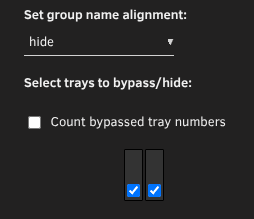
Set group name alignment: hide
-
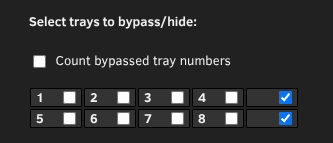
You can add bypassed/hidden drives: so 2*5 instead of 2*4 in layout, then hide the empty slots at the right side (checkmark): You can also just create a hidden layout you put between each section. 1*2, hide both drives and the name:
-
Can be if the drive was disconnected or so during a reboot. Disk Location moves not found drives as "lost", if it's detected again, it can be assigned.