FlamongOle
Community Developer
-
Joined
-
Last visited
Everything posted by FlamongOle
-
Just in case: The new plugin is split up in two main sections, one for Configuration (located under "Settings") and one for the Information itself (located under "Tools").
-
It is now updated to work with 6.7.2 and onward, new update is released!
-
Update 2019.06.28 - Design v2.0 Commit #45 - REQUEST: Different tray count (from @FrackinFrog) Commit #22 - REQUEST: Multiple cases (from tarchive). Add a bunch of cases made available including a bunch of other configuration possibilities. Removed a bunch of bugs, rewrote a lot of code, and has in general made "Design v2.0". Too much to document, most forgotten anyway! But a lot of work has gone into this release. NB! Due to weird Unraid releases and versioning, this plugin will only work from 6.7.2 and onward! 6.7.1 is broken (missing SQLite support). And I can't bothered keeping an eye with older versions as well. Development version is required else (but it will not work with 6.7.1).
-
It's a teaser for next update
-
Yes, wait for the next update.
-
-
Ok, next release will start from the next SQLite activated release making all previous versions incompatible. It is easier this way, rather than skipping some version in between. Working on something major changesright nowYes I know, but I don't want to mess up too much with the Dashboard page. The way I have implemented it now is rather a "hack" to make it look like the new dashboard, and not the old style. So far not so much I can do without making some other problems. SorryAlright, thanks for clearing things up a bit, I am relatively new to Unraid and what has been going around here in the forums. So for future reference, better not care too much about the versioning and how its done. SQLite is what I define as the opposite of overkill, utilizing a full blown database like MariaDB, PostreSQL etc. would have been. Before I made this plugin, I did check my possibilities, and any SQL database will make the life easier. SQLite - which is the simplest and has less support for most SQL commands, will anyway fit perfect for its task. I am rather surprised no more people uses it, it makes the life a hell lot easier than dealing with text files. And SQLite is rather just a glorified text file in this sense without any real extra bloat. Anyway, I hope this is just temporary (as it seems for now) and I can continue with this plugin the way I started it 6 months ago. I just use the tools which is available, where I can. Tell the users to switch to Emby, better than Plex anyway Anyway, I hope you figure out the problem, and I'll keep a watch on what's happening from release to release. PS! I didn't intend to beat anyone Have a nice day!Yeah, maybe. Still find it a bit strange that this isn't done in beta and rc releases, but at a stable level.As @Squid said, you can't use the plugin if the array is stopped. It stops Docker and VM's when you stop the array, so yeah didn't think about that. Looks like they either have to enable SQLite in PHP again, or this plugin is likely dead.Yes, I would even prefer it over SQLite for the database sake, but for simplicity SQLite is a winner as we don't need to access other databases and setup the connection before we can start using the plugin. But this will rather likely be the future path if SQLite will be permanently disabled. That is your own MariaDB docker + this plugin.Update 2019.06.23 PFFT¤#"!%" - Currently need to stop support at Unraid 6.7.0 because lack of SQLite support in PHP from and including Unraid 6.7.1. Follow the forums for more information of the future.I wrote some information about current standing with this plugin and Unraid, it is not optimistic... yet. https://forums.unraid.net/topic/81169-unraid-os-version-671-available/?tab=comments#comment-753703 Please continue writing here on this thread, not at the release thread.Hi I just received information about this and that they have disabled sqlite from php in 6.7.1. Disk Location will be incompatible until I find another way of implementing another database because I am not dealing with ini/conf files for this. It is seriously annoying, even if it (might) create problems for other users with Unraid, it makes making plugin for Unraid quite annoying. The lack of general documentation and information, and then they suddenly remove support for some major things will destroy the motivation on continuing on the plugin itself. Removing SQLite is one thing, but not adding another SQL database where I can access own created plugin database makes this a very annoying task. So for now, I am sad to say, that the plugin is dead from and including 6.7.1 until SQLite (or any other SQL database) will be accessible for plugins. I am not messing with "text files", it's highly ineffective. Sorry. Anyway, if you have any ideas on how to go on with this, please continue this particular thread in the Disk Location plugin thread at https://forums.unraid.net/topic/77302-plugin-disk-location/Geez, so I now have to rely on idiotic config/ini files for this? @limetech wtf?Hot-swapping might be the issue here, I have also "hot-swappable" trays and motherboard/controllers supposedly supporting it. But in the end, it does -work- but the data is often recognized as the first disk which was installed in that specific port. A reboot might solve the issue, then do a force scan all. My two cents though.Good luck The numbers are there rather for maybe future problem if it would block something else. But I haven't found anything useful than 0 or 2+ (1 "crashes" with NUT dashboard here). So yes, these two are sadly the only positions I found possible to use as well. At least until it might be some documentation of it, my approach is anyway not the official either as that is the old looking dashboard but will occupy entire width (which does not look nice with this plugin). I ended up with using 10, enabled. And then "minimize" the plugin, so it is flat and gives the most important info.Update 2019.06.21 Commit #84 - IMPROVEMENT: Help page has been removed and replaced by the standard Unraid inline help function. Commit #54 - FEATURE: Added a Dashboard widget.First, be sure to have 2019.06.20 version as it fixed some weird issues. Second, click on "Force SMART reload", it should then remove all non-existing drives into the correct table. Please report back to me if it worked or not. The reason why this is probably happening is because of the new way of handling SMART data, it runs in the background every hour and checks all spinning drives (active/idle) for data. Non-spinning drives (standby/sleep/off) will not be queried because we don't want to wake up drives from standby mode. And that's why this plugin can't go through with removing non-installed disks anymore automagically, but it will do so by running the "Force SMART reload" button - this will also wake up all drives one by one! The benefit of the new system is that the plugin page will be very fast to load, second is that we now can have a dashboard widget. I might rename the button in the future to something more appropriate and understandable.Dashboard widget upcoming next release! (Oh geez I wish Unraid would have a proper plugin wiki or something, reverse engineering takes way too much time.)
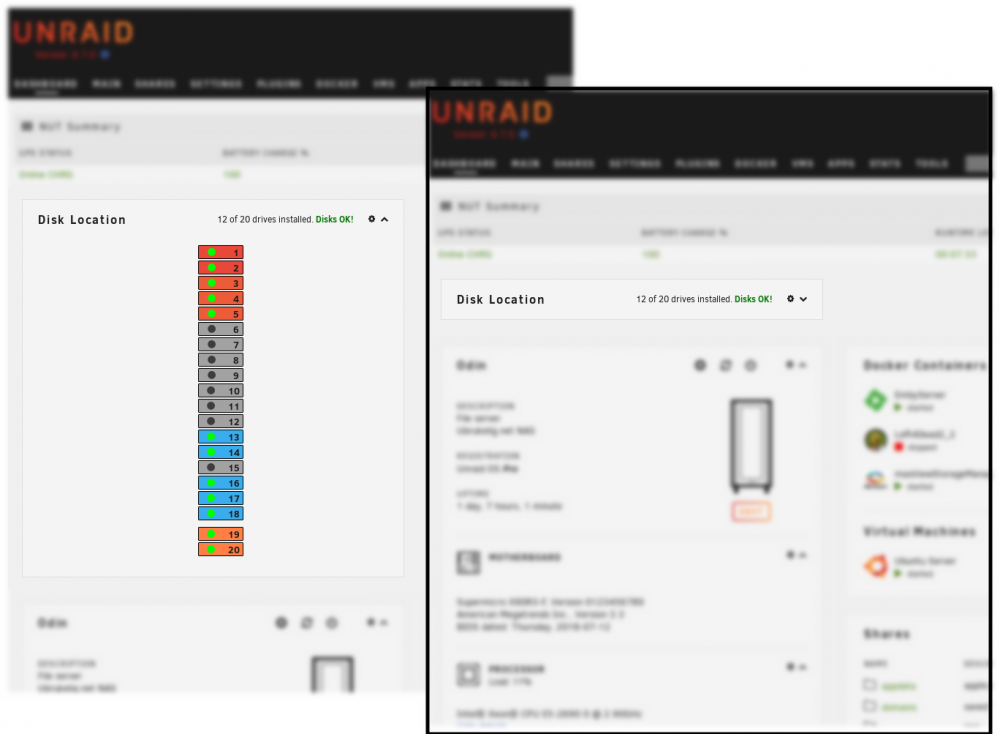 Update 2019.06.20 Commit #82 - IMPROVEMENT: Installer and cron script now checks for running instances before executing them. Commit #81 - BUG: Forgot to add standby flag to smartctl. Disks should now be able to go back to standby/sleep/off mode again. Also made sure to not accidentally move drives to "lost" when they where just standby. git requirement removed!Update 2019.06.19 Commit #78 - IMPROVEMENT: Major change on how this plugin behaves has been implemented. The drives will now be inserted in the database at install time, and updated hourly via cronjob for the active drives. Force SMART scan button is also available at "Configuration". The temperature unit is now configured globally from Unraid itself (Display Settings). NB!!! Plugin does NOT install git automatically anymore, this is still required and must be installed manually or via "Nerd Pack" plugin (this does not apply to Unraid 6.6.x, the support from 6.6 series might end soon). If you encounter slow drives/loading times, you can run the script manually which will give you an indication about time usage per drive. Type in the terminal after installation (you will also see this executed during install/update): php -f /usr/local/emhttp/plugins/disklocation/pages/system.php cronjobWhen mounting the array, this is displayed at the bottom panel: Warning: Use of undefined constant luksKeyfile - assumed 'luksKeyfile' (this will throw an Error in a future version of PHP) in /usr/local/emhttp/plugins/unassigned.devices/include/lib.php on line 584 Nothing serious, but should probably be updated soon Unraid 6.7.0 with current Unassigned plugin.