





FlamongOle
Community Developer
-
Joined
-
Last visited
Everything posted by FlamongOle
-
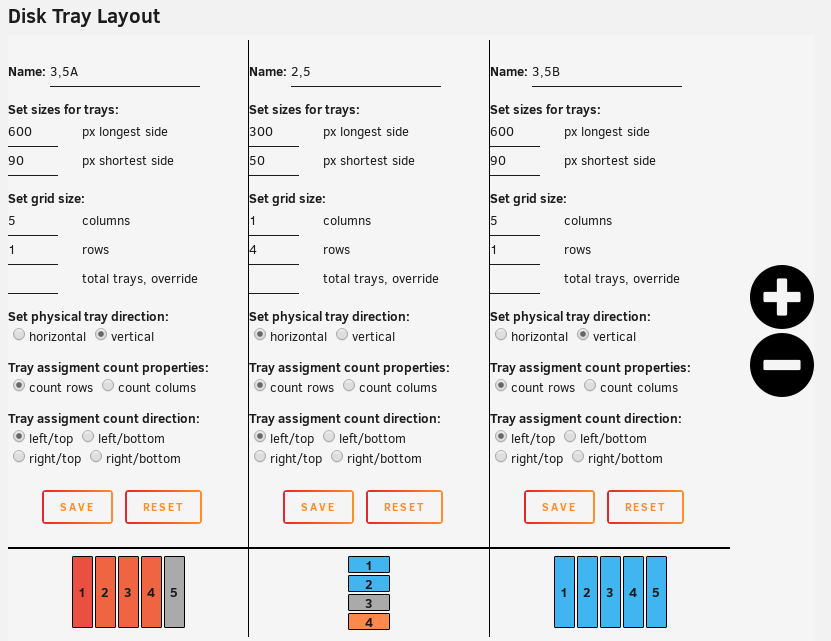
First of all, get Unraid 6.7.2 or above and update the plugin to the newest version. Then you add three groups, 5+4+5 slots, first and last vertical, the middle horizontal with standard count 1->5 on all. Then you can adjust pixel sizes to make a difference for 3,5 and 2,5 manually. Something like this:
-
First of all I see that two has the same path (20:0:0:0), this might cause some issues. So I suggest you run a "Force Scan All" under Configuration->Tray Allocation, this will rescan all drives and also wake them up from standby to get all SMART data. It will also purge invalid configs which might happen when replacing drives or controllers, or maybe other configurations. Else it might be that these drives simply don't trigger the HDD light when SMART data is requested, like most/all of the SSD's out there. No fix for that in this case.
-
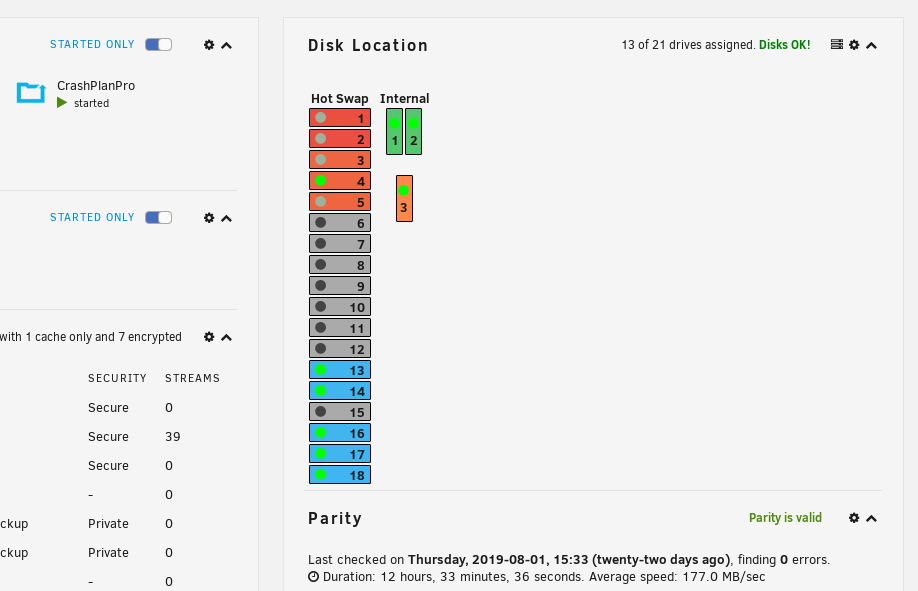
Update 2019.08.23 Commit #102 - IMPROVEMENT: Hints provided by @Squid to improve the dashboard integration. Further changes made to customize it and position it to your own liking. Check the configuration page to adjust the widget. It can be positioned under "Hardware Information" tab, or the "Disk array" tab, or simply turned off. When the tab has been selected, you can move the widget up and down to your liking.
-
Notice: use the help button, it might show info about how, what and why
-
It is intended for easy setup, you add the drives after the numbers shown in allocation and not the end result/chosen layout.
-
If you see the disk then there's no real problem else - the plugin will mainly work for its main purpose: showing the disk locations. SMART is mainly for information only, so in worst case you will not see "power on hours", smart failures etc.
-
I'm not sure what you mean when the drive is in read/write, but no, I have no issues with this. I use LSI HBA (IBM 1015 in IT mode without BIOS), onboard SATA and SCU and Adaptec 6805 raid controller. None of them behaves like that.
-
Hi, thanks! What happens during a cronjob is that it looks for SMART activity. The way it works is that it request which state the drive is in before it pulls out the rest of the SMART data. If the drive(s) reports a typical spinning state (ACTIVE/IDLE), then it will request all SMART data from that drive. If this for some reason fails, or the HBA expander always says the drive is ACTIVE/IDLE regardless the real state of the HD, it looks like it will then wake up the drive to get the SMART data. But I'm not sure about this and I'm not sure how to really test this further. Maybe there's some special SMART override configurations for the HBA controller if it has a BIOS to prevent it from waking up when SMART is requested? Or maybe SMART is getting disabled, overridden or ignored? You can check if you trigger the messages from dmesg via these commands: Check SMART activity, will (should) only post results if the drive is either ACTIVE or IDLE: smartctl -n standby /dev/<device> Output should be something like "Device is in IDLE_B mode". If this line is missing, it is detected as standby or sleep (non-spinning). If the drive is detected as ACTIVE or IDLE, then the cronjob will go on and get the rest of the SMART data with this command (except it will get them via --json in the script): smartctl -n standby -x /dev/<device> One or both of these command is probably what causes your messages to happen, and be sure to check if the SMART data seems to be correct and not something the controller "makes"
-
Yes, this happens now because LUN is ignored when scanning through drives. Earlier it was used to detect if the drive was an actual drive, but some drives doesn't even have LUN's so it had to be removed. At least you can choose to show it or not 😛
-
Update 2019.07.12 Commit #100 - MINOR ISSUE: Fixed a non-numeric value warning message. Fixed padding for empty trays.
-
Yes, it is per group basis.
-
Delete it under "System Files"
-
Probably just an undefined variable, nothing to care about. The configuration is now located under Unraid "Settings" tab, while the plugin view is under "Tools"
-
Good to hear!
-
Under "System Files" you can delete the database - you have to set up everything again, but it might help.
-
Then I suggest deleting the database and redo it, if that doesn't help, then I don't know what causes this. It should simply not be possible unless custom colors has been saved.
-
The drives you assign has to be recognized as "Data" drives by Unraid and connected to the device node. There's nothing which can interfere with the main colors, sure you haven't stored some custom colors for disk 11 and 14? Do you use a different card for these drives, than the other drives - like raid card or something. Maybe lsscsi doesn't pick up the device nodes and then won't find the function it is assigned for. For Unraid/main colors, it uses only device node and not the scsi generic device node. I have no documentation about what Unraid stores if it does not get the device node name.
-
Update 2019.07.10 Commit #98 - IMPROVEMENT: Added color list for color selection under the "Configuration" tab.
-
Did you make sure that: - You changed the "Data" color under the "Configuration" tab and not the "Custom color" under "Tray Allocations" - Does not try to use the same color for "Custom color" as for those pre-defined under "Configuration"? Custom colors works as an override and can not be the same as "Parity" "Cache" "Data" "Empty" or "Unassigned" pre-defined colors. Try to change 11 and 14 to f.eks. #FF0000 to see if it saves and uses those values, to reset to colors, you can use the predefined colors and it will automatically ignore it and use the pre-defined instead.
-
Update 2019.07.07 Commit #94 - MINOR ISSUE: Some disks fail because of missing LUN. Skipping LUN during device validation, add LUN from SMART instead. @shaunmccloud I am just way too nice 🥴 Do a "Force Scan All" to get all disks updated, the installer/updater only care about spinning disks (non-standby)! New devices may appear (like USB drives and SATA/RAID controllers) as they might provide SMART information... do whatever you want with them or just ignore them. Devices without SMART "serial number" and "model name" will be skipped, and they play a vital role in the database system - this will not be changed.
-
Because of the output above, I assume it can't detect the disk to assign the color to. It will fail hitting the device nodes as the output is outside the specifications of what the plugin can handle at the moment. I might ditch the entire LUN in the future as I mainly don't use that anymore if I remember correctly.
-
[4:0:0:0] disk ATA SPCC Solid State Disk _ /dev/sdc /dev/sg3 There's the problem, for some odd reason, this "disk" does not get a LUN like the others, and falls back to "ATA SPCC Solid State Disk _" for whatever reason. I'm sorry I can't help you further here. I dunno why it hasn't received any LUN's though. Has it been inserted with the server on, like hot swap? I dunno if that might be a problem or the SATA SSD controller itself. If a reboot doesn't help, then I dunno how to fix this. I never had that issue with any of the disks I had
-
what's the output of "lsscsi -u -g" ?
-
Update 2019.07.06b Commit #92 - MINOR ISSUE: defined a variable as array(), caused a count() warning message.
-
Update 2019.07.06 Commit #90 - IMPROVEMENT: Adding a console window for "Force Scan" button, making it easier to see what's going on in the background. Commit #89 - BUG: Cache drive get unassigned color if it is an nvme drive. Use SCSI generic device node name instead if device node name is null.

