





FlamongOle
Community Developer
-
Joined
-
Last visited
Everything posted by FlamongOle
-
Check if any of the drives have a "FAIL" SMART status. The "Information" tab should point it to the related drive as well.
-
Update 2020.03.30 Commit #145 - BUG: Wrong checksum for disklocation.sh cronjob script.
-
I can't seem to find anything wrong here. Can you verify that the "/boot/config/plugins/disklocation/disklocation.sqlite" exists at all after installation? And that for some reason this is not mounted as read-only for whatever reason. You can try the new version which fixes another issue as described in the next post:
-
Try to delete the entire plugin and reinstall it, looks like something went wrong during download. Maybe you have to delete the database also under /boot/config/plugins/disklocation/disklocation.sqlite if the "Settings -> Disk Location -> System" does not exists or shows any database
-
Update 2020.03.18 Not really anything new, but now licensed under GNU GPL version 3.
-
Hi The screenshots are outdated, and the information was given in the forum at some point. Though I will update the first post later. The plugin is divided into two sections: Tools -> Disk Location: This is the visible and configured section of your system Settings -> Disk Location: This is where you configure your system. "Force Scan All" button under "Tray Allocations" will help solve most of the problems.
-
Update 2020.03.06 Commit #142 - IMPROVEMENT: Differ between SATA SSD, NVMe, and rotational devices. Commit #141 - MINOR ISSUE: Checking for SSD only if rotation rate is not reported, some drives should show rotation rates again (ex. Toshiba drives). "Force Scan All" might be needed to update all the devices. @S80_UK fixed.. probably.
-
Update 2020.03.04 Commit #139 - FEATURE: Added the ability to turn off scanning of device during a plugin update. If it's disabled it will rely on manual updates (Force Scan All) and S.M.A.R.T update schedules. (This will make updates and reboots faster though) Commit #138 - FEATURE: Added possibility to adjust the size of the preview/dashboard layout. @CorneliousJD something for you 😛
-
I might add an adjustable factor in the future, I'll list it on github meanwhile.
-
They are directly related by a factor of 10x the size. The idea is that you should adjust the size of the "Devices" page, and not the "Layout" display.
-
Update 2020.03.03 (probably 3rd somewhere in the world already) Commit #136 - IMPROVEMENT: Added help text for the "System" tab (also renamed the tab from "System Files"). Commit #135 - FEATURE: Added an "Undelete" button under "System" tab for undeleting manually deleted devices. @mistah ..or you can use this new function when you update the plugin 😛 The buttons under "System" are only available when it's possible to use them, otherwise hidden if there's nothing to do.
-
If you are sure you have flagged it for deletion earlier, then yes it is possible. But you should rather know some SQL basics. Make sure you have ran the "Force Scan All" button first, I don't remember if that will re-add it if it is found or if it's completely ignored because of the flag. SQL: First, backup the entire database: cp /boot/config/plugins/disklocation/disklocation.sqlite /boot/config/plugins/disklocation/disklocation.bak To check for the deletion flag (if nothing is listed the flag does not exist and there's nothing more you can do here): sqlite3 /boot/config/plugins/disklocation/disklocation.sqlite "select device,devicenode,model_family,model_name,status,hash from disks where status='d';" To undelete a specific device, type this and copypaste the HASH from the list to be undeleted (do not include < >), this will put the device under "Devices not found or removed" under the "Drives" tab, where you can add or delete it manually from the list: sqlite3 /boot/config/plugins/disklocation/disklocation.sqlite "update disks set status='r' where hash='<INSERT HASH HERE>';" Option 2) To undelete all devices (I might add this to a function later) Button added under "System" Finally you wanna run "Force Scan All" to make sure it detects the devices.
-
Update 2020.03.02 Commit #133 - IMPROVEMENT: Removed the "Reset" buttons as they make people confused about its function. They only resetted the changed input in forms, pure html reset.
-
Guess you reached pulling the new update
-
Update 2020.02.28 Commit #131 - BUG: A php comment section was accidentally pasted into an SQL creation variable, causing an update to fail (affected version: 2020.02.23). Commit #127 - MAJOR ISSUE: Disk Location uses a cronjob for storing data in a database file located at the flash device, and an hourly cronjob might have exhausted some flash devices. A new setting is available where the default is now set as "Disabled", however, "Daily" (and longer periods) should still be quite safe to use. It's stored on the flash device because the database contain information about old devices as well, which is neat in case of a major device failure and you just wanna know how long it lasted. Everybody is strongly encourage to upgrade ASAP! Also: please use the inline Help function for more information - it works! People with Unraid earlier than 6.7.1 should upgrade using the development branch (or simply update your Unraid altogether). I hope it's none.
-
Looks like a php comment section was accidentally pasted into a SQL creation variable. Will fix asap.
-
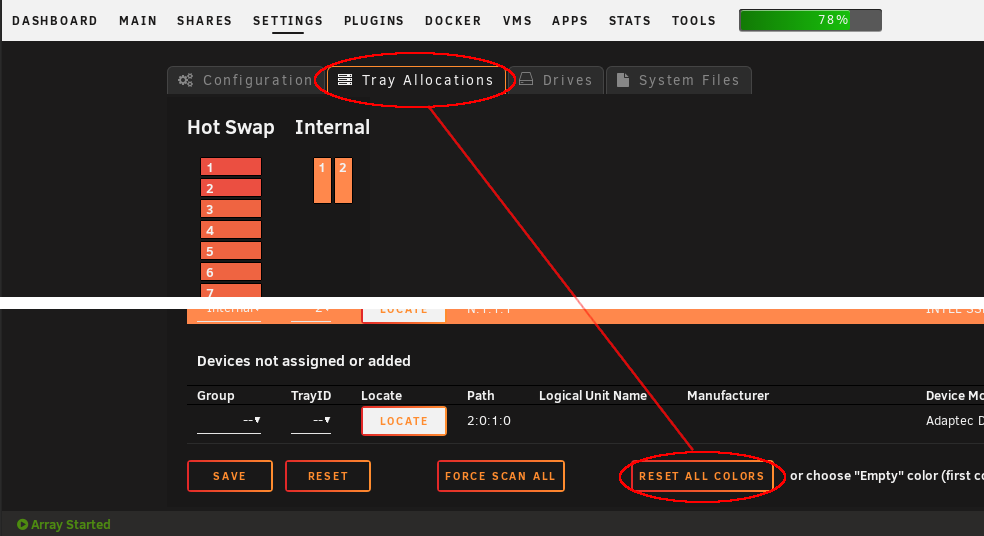
-This- reset button?
-
Update 2020.02.23 Commit #127 - MAJOR ISSUE: Disk Location uses a cronjob for storing data in a database file located at the flash device, and an hourly cronjob might have exhausted some flash devices. A new setting is available where the default is now set as "Disabled", however, "Daily" (and longer periods) should still be quite safe to use. It's stored on the flash device because the database contain information about old devices as well, which is neat in case of a major device failure and you just wanna know how long it lasted. Everybody is strongly encourage to upgrade ASAP! Also: please use the inline Help function for more information - it works! People with Unraid earlier than 6.7.1 should upgrade using the development branch (or simply update your Unraid altogether). I hope it's none.
-
I for sure won't do the RAM approach, but the other options I gave should eliminate the problem. I have myself ran this without issue since the cronjob was added, I run on a Kingston USB 3.0 DataTraveler 50 32GB. I expect you might have a device with less storage? For curiosity only, I will still fix the problem one way or the other.
-
Alright, I'll make two additional features for the future: 1) Adjustable cron times, will probably keep it at disabled, 1 hour, 24 hours, weekly, and monthly. 2) Movable database to another device Or I might consider digging through Unraids lack of documentation to implement their own SMART data into the plugin, meaning less writes to the database (maybe even none during normal operation). Never thought about how much it can actually write, really. Temporary workaround to disable it: rm /etc/cron.hourly/disklocation.sh NB! This WILL leave SMART data for the plugin static/old and all changes for the system must be run by "Force scan all"
-
It updates the SMART data so you'll get the feedback if it reports a SMART error, and also simply updates the "power on hours" etc. The writes are so minor that I wouldn't worry about the flash device. Earlier it was only accessed when you entered the plugin, but that made it quite slow to load and would've been a pain for the dashboard plugin as well. I can of course consider make an option to disable update writes, but then features will be lost, or simply add a custom update time.
-
Where? Under "Configuration" you should, under "Tray Allocation" you shouldn't. The point is that it shouldn't mix up Unraid assigned devices with unassigned, but you can still manually force a custom color. Unless you choose the default colors specified under "Configuration". If you choose any color specified under "Configuration" in "custom color" it will reset like choosing "Gray/Empty" color.
-
Update 2020.02.19 Commit #124 - MINOR ISSUE/IMPROVEMENT: Added a "Reset All Color" button with following informative text to clarify the coloring of devices.
-
You have the same colour for unassigned and data drives. The colour picker always list the chosen colours first and in this row from the left: parity, data, cache, unassigned, empty. The extra two added ones are the default colours for data and cache (which is replaced by your custom colour). The behavior is expected
-
Update 2020.01.27 Commit #122 - IMPROVEMENT: "Force scan all" should check all drives in the database except manually deleted (hidden) ones. Earlier scanned just assigned devices, leaving some removed devices in the assignment list instead of "not found" list. Commit #121 - IMPROVEMENT: Better use of FontAwesome, PNG icon files removed.

