





Drunken_Walnuts
Members
-
Joined
-
Last visited
-
Drunken_Walnuts changed their profile photo
-
Thank you for looking into this. I also am not worried about it. Some of my trackers do not permit multiple IPs for seeding and have never complained or gave errors for it. I did explicitly block for 44203 on my firewall and got a kernel panic within 10 mins. Never had one before, could be a coincidence but the timing tho. I was not at home so I had the wife hard reset.
-
I will try to get the logs when I am off work. But for the IP it is the one assigned to my VPN. It is actually a static Torguard.net VPN IP with 44203 port forwarded. I did remotely just run a packet capture for that port on my pfsense box and it is trying to send an receive packets from that port number on my static vpn ip
-
All ports are unchanged, privoxy set to no and not used anyway, vpn is custom on openvpn, strict port forward set to no and vpn input/output ports left blank. Nameservers are default to container install. Container is not use by any other for connection, only radarr and sonarr to download torrents with it.
-
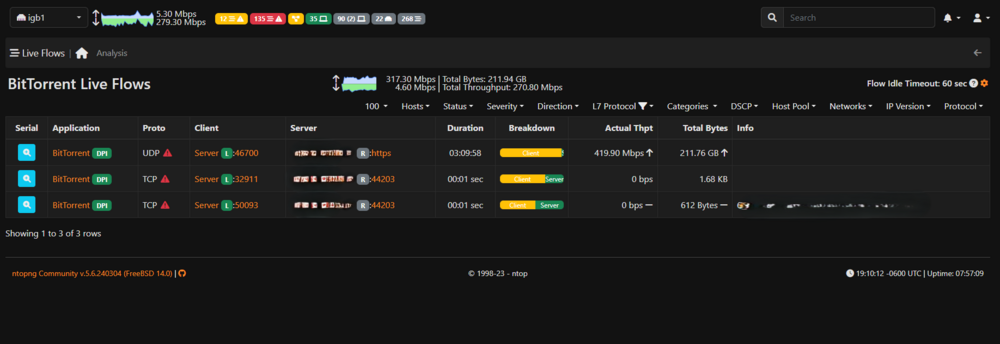
Do I need to be concerned about this? I was reviewing my network activity and noticed my qbittorrentvpn docker (labelled as BitTorrent application) correctly showed the port used for incoming connections in Qbittorent (44203). As you can see it was only for 1 second and then switched to port 443 through the vpn configuration. Docker log (VPN IP xxx) -A INPUT -s 172.17.0.0/16 -d 172.17.0.0/16 -j ACCEPT -A INPUT -s xxx.xxx.xxx.xx/32 -i eth0 -j ACCEPT -A INPUT -i eth0 -p tcp -m tcp --dport 8091 -j ACCEPT -A INPUT -i eth0 -p udp -m udp --dport 8091 -j ACCEPT -A INPUT -p icmp -m icmp --icmp-type 0 -j ACCEPT -A INPUT -i lo -j ACCEPT -A INPUT -i tun0 -j ACCEPT -A OUTPUT -d xxx.xxx.xxx.xx/32 -o eth0 -j ACCEPT -A OUTPUT -s 172.17.0.0/16 -d 172.17.0.0/16 -j ACCEPT -A OUTPUT -d xxx.xxx.xxx.xx/32 -o eth0 -j ACCEPT -A OUTPUT -o eth0 -p tcp -m tcp --sport 8091 -j ACCEPT -A OUTPUT -o eth0 -p udp -m udp --sport 8091 -j ACCEPT -A OUTPUT -p icmp -m icmp --icmp-type 8 -j ACCEPT -A OUTPUT -o lo -j ACCEPT -A OUTPUT -o tun0 -j ACCEPT 2024-06-10 16:00:05,544 DEBG 'start-script' stdout output: -------------------- 2024-06-10 16:00:05,545 DEBG 'start-script' stdout output: [info] Starting OpenVPN (non daemonised)... 2024-06-10 16:00:05,565 DEBG 'start-script' stdout output: 2024-06-10 16:00:05 DEPRECATED OPTION: --cipher set to 'AES-128-CBC' but missing in --data-ciphers (AES-256-GCM:AES-128-GCM:CHACHA20-POLY1305). OpenVPN ignores --cipher for cipher negotiations. 2024-06-10 16:00:05,566 DEBG 'start-script' stdout output: 2024-06-10 16:00:05 WARNING: file 'credentials.conf' is group or others accessible 2024-06-10 16:00:05 OpenVPN 2.6.10 [git:makepkg/ba0f62fb950c56a0+] x86_64-pc-linux-gnu [SSL (OpenSSL)] [LZO] [LZ4] [EPOLL] [PKCS11] [MH/PKTINFO] [AEAD] [DCO] built on Mar 20 2024 2024-06-10 16:00:05 library versions: OpenSSL 3.3.0 9 Apr 2024, LZO 2.10 2024-06-10 16:00:05,566 DEBG 'start-script' stdout output: 2024-06-10 16:00:05 DCO version: N/A 2024-06-10 16:00:05,567 DEBG 'start-script' stdout output: 2024-06-10 16:00:05 NOTE: the current --script-security setting may allow this configuration to call user-defined scripts 2024-06-10 16:00:05,567 DEBG 'start-script' stdout output: 2024-06-10 16:00:05 TCP/UDP: Preserving recently used remote address: [AF_INET]xxx.xxx.xxx.xx:443 2024-06-10 16:00:05,567 DEBG 'start-script' stdout output: 2024-06-10 16:00:05 UDPv4 link local: (not bound) 2024-06-10 16:00:05 UDPv4 link remote: [AF_INET]xxx.xxx.xxx.xx:443 2024-06-10 16:00:05,743 DEBG 'start-script' stdout output: 2024-06-10 16:00:05 [server] Peer Connection Initiated with [AF_INET]xxx.xxx.xxx.xx:443 2024-06-10 16:00:06,936 DEBG 'start-script' stdout output: 2024-06-10 16:00:06 TUN/TAP device tun0 opened 2024-06-10 16:00:06 net_iface_mtu_set: mtu 1500 for tun0 2024-06-10 16:00:06 net_iface_up: set tun0 up 2024-06-10 16:00:06,937 DEBG 'start-script' stdout output: 2024-06-10 16:00:06 net_addr_ptp_v4_add: 10.9.0.89 peer 10.9.0.90 dev tun0 2024-06-10 16:00:06 /root/openvpnup.sh tun0 1500 0 10.9.0.89 10.9.0.90 init 2024-06-10 16:00:06,938 DEBG 'start-script' stdout output: 2024-06-10 16:00:06 Initialization Sequence Completed 2024-06-10 16:00:23,119 DEBG 'start-script' stdout output: [info] Attempting to get external IP using 'http://checkip.amazonaws.com'... 2024-06-10 16:00:41,231 DEBG 'start-script' stdout output: [info] Failed on last attempt, attempting to get external IP using 'http://whatismyip.akamai.com'... 2024-06-10 16:00:41,691 DEBG 'start-script' stdout output: [info] Successfully retrieved external IP address xxx.xxx.xxx.xx 2024-06-10 16:00:41,692 DEBG 'start-script' stdout output: [info] VPN provider 'custom' not supported for automatic port forwarding, skipping incoming port assignment 2024-06-10 16:00:41,720 DEBG 'watchdog-script' stdout output: [info] qBittorrent listening interface IP 0.0.0.0 and VPN provider IP 10.9.0.89 different, marking for reconfigure 2024-06-10 16:00:41,723 DEBG 'watchdog-script' stdout output: [info] qBittorrent not running 2024-06-10 16:00:41,724 DEBG 'watchdog-script' stdout output: [info] qBittorrent config file already exists, skipping copy [info] Removing session lock file (if it exists)... 2024-06-10 16:00:41,736 DEBG 'watchdog-script' stdout output: [info] Attempting to start qBittorrent... 2024-06-10 16:00:41,739 DEBG 'watchdog-script' stdout output: [info] qBittorrent process started [info] Waiting for qBittorrent process to start listening on port 8091... 2024-06-10 16:00:42,058 DEBG 'watchdog-script' stdout output: [info] qBittorrent process listening on port 8091
-
Dont mind me, I am an idiot. Fixed it. Reading through the docker hub link I realized I need to use port 6080 to connect via vnc, but need to add the /vnc.html?resize=remote&host=<host ip>&port=<host port>&&autoconnect=1 after it. Now I just have 6080 mapped in openvpn just like before.
-
I just tried switching to this container from the other Nicotine docker. I had network set to none and the --net=container:OpenVPN-Client parameter set. In the OpenVPN-Client docker I added the port 6080 and 5900 so I can access the UI via VNC and it wont connect. I can access port 6080 but it is not the VNC interface. Container worked fine before I routed the network through OpenVPN. Not sure if I am missing something or misconfigured something. Edited to 6080
-
Ah thanks. Makes sense. I will play it safe and do one at a time. Just trying to be impatient.
-
I just ordered 2 new larger drives to upgrade my parity drives. I was hoping to swap both out at the same time after stress testing the new drives, but in the unlikely event one of the array drives fail during rebuilding the 2 parity drives, would I simply be able to swap one of the old parity drives back into parity and recover, or once I start to rebuild the new parity drives there is no going back?
-
Just to update for anyone else who may have problems. The online port checker utilities do not show this port as open, but it is if you forward it correctly in your router. I suspect some services block or ignore port checkers? Either way, my problem was for some reason the template was pulled down wrong, and the 8211 port was pointing internally to the server on the rcon port, and visa versa. So: 172.17.0.12:8211/TCP192.168.1.10:25575 172.17.0.12:25575/UDP192.168.1.10:8211 And since I had rcon disabled the 8211 was going nowhere, and 25575 was not forwarded in my router. I deleted the docker image and pulled it again, works fine now.
-
Glad I am not the only one. Was driving me nuts trying to get this to work. I have had Plex successfully port forwarded for years and shows open port. Literally copied the format from those pfsense firewall rules to open Palword ports and it still does not work. Oddly tho my Wireguard tunnel port also shows closed, but it allows me to connect...
-
I just made a bunch of hardware and system changes to my unraid server, happened to look at the logs and noticed I am getting this error every 30 seconds. Jul 15 07:39:07 Tower nginx: 2023/07/15 07:39:07 [error] 7731#7731: *534722 open() "/usr/local/emhttp/upnpdevicedesc.xml" failed (2: No such file or directory), client: 127.0.0.1, server: , request: "GET /upnpdevicedesc.xml HTTP/1.1", host: "0.0.0.0" I think it might be a docker, but I am not sure where to go from here as to how to fix this. Google was no help /.


