






Mr.N3rd
Members
-
Joined
-
Last visited
-
Mr.N3rd changed their profile photo
-
Really having some issues trying to get Glances to show GPU information / Stats. I have followed the guides on This Guide, But It seems that I still have no GPU stats. I have also Tried adding ```--runtime=nvidia``` --runtime=nvidia (in Extra Parameters: field) and I added this as seperate variables: NVIDIA_VISIBLE_DEVICES = all (and specific GPU-UUID) NVIDIA_DRIVER_CAPABILITIES = All Still I cannot get GPU to show up. I have changed the Repo to nicolargo/glances:latest-full But again, still no GPU. I have been working on this for two days now and I still cant get it to show. I have read many post on github and other sites that state that I need NVIDIA-Container-Toolkit and/or py3nvml Library installed. I have installed py3nvml via ssh term and it shows to be working and the output of $nvidia-smi is this: root@Pelican:~# nvidia-smi Tue Jan 2 15:08:46 2024 +---------------------------------------------------------------------------------------+ | NVIDIA-SMI 545.29.06 Driver Version: 545.29.06 CUDA Version: 12.3 | |-----------------------------------------+----------------------+----------------------+ | GPU Name Persistence-M | Bus-Id Disp.A | Volatile Uncorr. ECC | | Fan Temp Perf Pwr:Usage/Cap | Memory-Usage | GPU-Util Compute M. | | | | MIG M. | |=========================================+======================+======================| | 0 NVIDIA GeForce GTX 1080 Ti Off | 00000000:42:00.0 Off | N/A | | 0% 38C P8 19W / 275W | 2MiB / 11264MiB | 0% Default | | | | N/A | +-----------------------------------------+----------------------+----------------------+ +---------------------------------------------------------------------------------------+ | Processes: | | GPU GI CI PID Type Process name GPU Memory | | ID ID Usage | |=======================================================================================| | No running processes found | +---------------------------------------------------------------------------------------+ I do have Nvidia drivers installed and working with Plex, Emby, and JellyFin
-
So I fixed the other issue, Apparently the new motherboard/CPU did not like the Mellonox-XConnect-2 10g NIC. I took it out and got the performance I was looking for. I figured it was a network issue of some kind.
-
So I changed over to Brave and its still doing the same thing, the Docker pulls are taking between much longer, than it used to. What factors could lead to the slower speed installs?
-
Here is the Diagnostic file.. gifserver-diagnostics-20221206-0834.zip
-
Okay so the mover finished and all docker containers are stopped. I am finally getting parity speeds >100MB/s but it fluctuates from 140MB/s - 101MB/s. I have never really payed attention to the parity check before but it seems to be normal. But I'm still worried about the latency in the UI and with the other issue I mentioned.
-
Sorry @JorgeB I didn't realize you replied. I did not free up space. In fact I just let it format and had to redo all the docker containers I had, luckily I didn't have any VM's on this server yet. and Yes I was on 6.11.4 at the time, Now its on 6.11.5 and a host of new issues...
-
I also forgot to mention that I am having horrible performance with docker installs from community applications and when editing containers. Redeploys are usually instant, now they are taking 5-8 minutes. all while the UI is unusable on a different tab in the same browser. I waited for 20 minutes while the server was "Downloading" and installing "Disk Speed" container. I have 1 Gb/s Fiber - Down and Up so Its not because of internet speeds
-
So I upgraded from 7700K (having heat issues, it was de-lided), to a Thread-ripper 2950x. I'm using an Adaptec ASR-71605 in HBA Mode, 126 G of ram and a 1080ti. 36TB array spanned on 10 SAS HHD's (one for Parity). NOTE: The only thing I changed from build to build is the Motherboard and the CPU, All other specs are the same. I went from 102.5 MB/s down to 4MB/s. Something that finished in 10 hours now is estimating 10 days... I have disabled Docker entirely to make sure that its not taking a hit because of containers, I'm currently waiting for the Mover to finish to restart and see if that made a difference. The other issue I have is when I do a restart and go in to the UI, Start the array and Firefox shows the "reload content" and if I hit resend, it asks to reboot the server, I think its because of "unclean shutdown" but I shutdown from the UI so im not sure what happened to make this occur. If I let it reboot, it come back up and does the same thing so It would be in a rebooting loop if i let it. The only way to keep it from happening is to hit cancel instead of reload. I need help fixing this system, Otherwise Im going to have to look at other OS options, but I really do not want to move away from UnRaid
-
So the system Rebooted and the cache pool is unavailable and requiring format, to be expected from the change from Raid0 to single
-
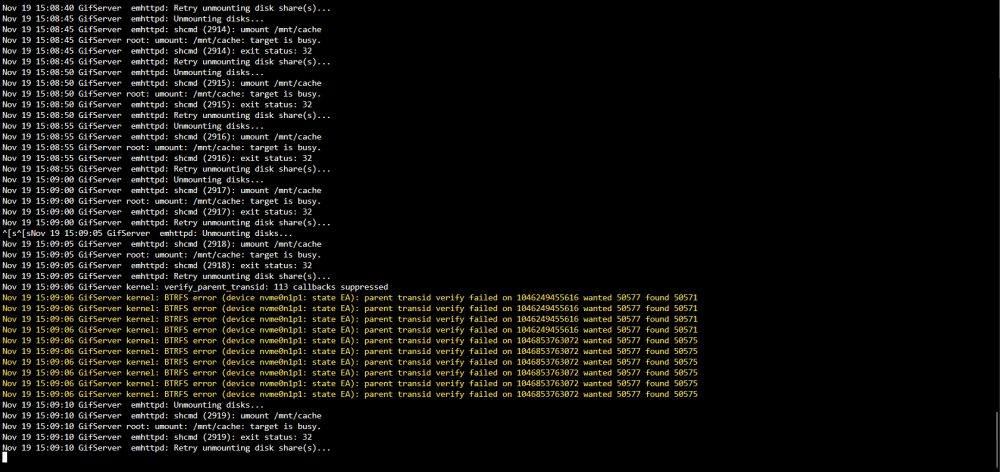
Thanks for chiming in! So I "converted to Single Mode" ( I put it in quotations because it didn't seem to do anything, watching the log just showed a command that ran with no result - I assume to be expected) Nov 20 10:46:59 GifServer ool www[15476]: /usr/local/emhttp/plugins/dynamix/scripts/btrfs_balance 'start' '/mnt/cache' '-dconvert=single,soft -mconvert=raid1,soft' I have since rebooted successfully. Will post outcome shortly.. From what I can see it was set in the Docker Settings to ipvlan not macvlanThe Main issue is the BTFS Error. I can't invoke the mover because of the errors and I/O Errors. the System as it sits is unusable. It even Killed my Docker Containers and the service as a whole. I tried to stop the array and its just giving off the "emhttpd:shcmd 2925 and 2926 error" I'm really at a loss. The spinning drives were originally from my other build that has had 4-5 years run time so I know its almost time to replace but the NVME is Brand new Samsung 970 Evo 1TB. So it having errors is baffling to me. This was a Fresh config and install of UnRaid on a Brand new USB drive. I have attached the current log, the errors under the Docker Tab and the current Diagnostic. The system is still running as we speak trying to stop the array. Still cant do it after 30 or so minutes. the other issue is Unclean shutdowns, I know its been discussed alot but I have tried to shut down multiple times, the first time I let it go for 2 days without realizing it was still not powered off. Its headless so Not sure what the log said I just held down the Power button to kill it. Hoping it was in a safe state and restart it later on. I cannot get it to actually have a clean shutdown... Specs: Asus x270-E Intel 7700K Corsair Vengenex LPX 64G (Brand New) Adaptec ASR-71605 SAS HBA Samsung NVME cache Two Off brand Sata 3 Cache drives (Old and planning to retire after fixing this issue) All the Spinning drives are SAS and Either Hitatchi or HSGT (Which is the same company) and with in a couple of models apart. and all 4TB drives Please help me revive my weekend project before I loose my mind! UnRaid-diagnostics-20221119-1704.zip

 This is the position it stalls at this position in the photo attached: https://i.postimg.cc/bYM0pH0K/3-DD31167-CC0-B-4-C7-A-83-C4-1-A4-D9-F59860-A.jpg The current build is: Gigabyte GA-7TESM 144G DDR3 ECC 2x Xeon x5670 Here is the thing, I have noticed that it keeps changing values of installed RAM. It never shows the 144 anymore, currently it is showing 124G, sometimes it shows 96G. I have turned off ECC and ram MemTest 86+ for two days. During that time it was only showing 124G. Originally I thought it was related to unRaid but I am more so thinking that its now hardware. I just don't know what the position in boot is point to a MOBO failure, RAM failure, or CPU failure. I'm kind of at a loss at the moment. The Server is down and will not come back up like it is. I assume its related to the CPU0 because it stalls on the Spectre vulnerability check on CPU0. I have reinstalled on three USB's trying to see if it was a USB failure. Any help would be appreciated 3DD31167-CC0B-4C7A-83C4-1A4D9F59860A.heic


